Thursday, 22 October 2026 · 11 Jumada I 1448 AH Sun – Thu · 9:00 – 18:00
+971 56 914 9477 العربية
WhatsApp

Marvel RDM Remote Device Management

Marvel RDM Remote Device Management Platform for Outdoor LCD Terminals

WhatsApp
Priceon request
QuotationWithin 1 working day
DeliveryConfirmed with your quote, based on stock
PDFDownload datasheet (OMC User Manual-v1.5.pdf)
Overview

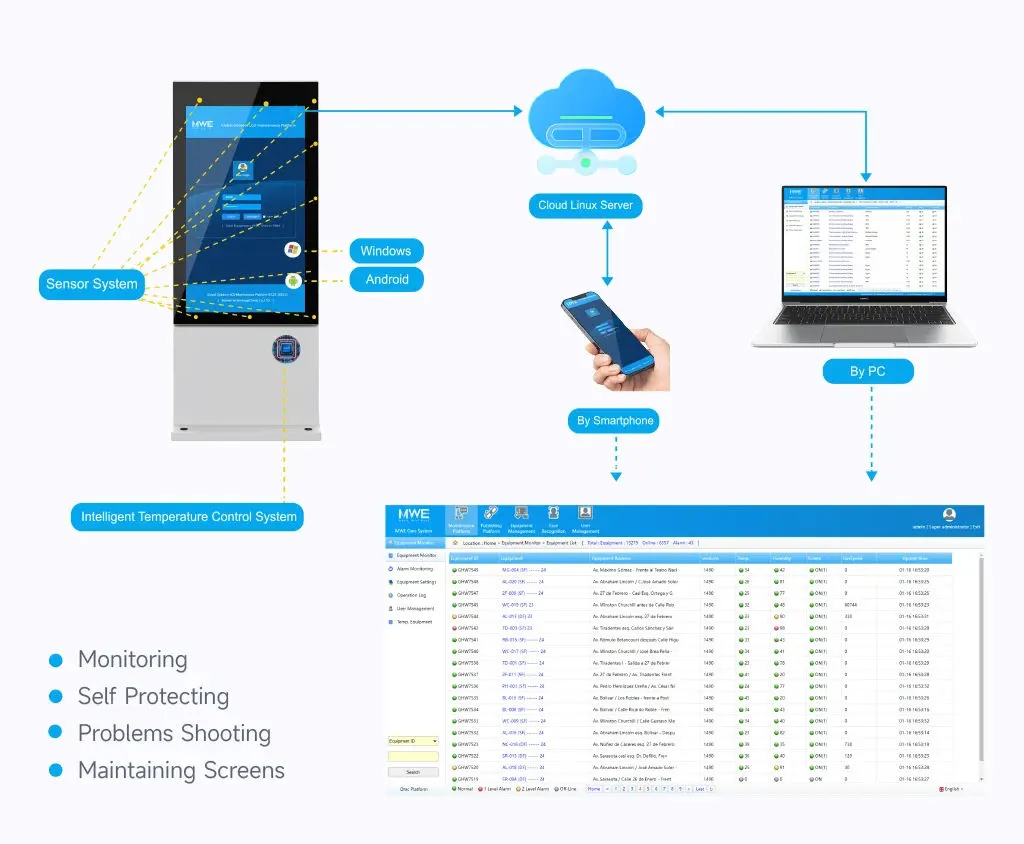
The Marvel RDM is a cloud-based remote device management platform for outdoor LCD terminals. It tracks more than 12 parameters per terminal, including temperature, humidity, smoke, tilt and door access, and lets operators power screens on or off, adjust fan speeds and trigger heaters from one dashboard. Alerts reach operators by email as well as on site. It suits facilities teams in Qatar running fleets of outdoor screens, such as bus stops, malls and public information points.

A single dashboard for an outdoor screen fleet

The Marvel RDM is a remote device management platform built for outdoor LCD terminals. Rather than sending a technician to each site to check a screen, operators see every registered terminal on one dashboard, with its status shown as online, offline or in alert. The platform is also designed for other connected devices, including bus stops, so it suits organisations that run networks of screens rather than a single display.

Monitoring that flags problems before screens fail

The platform tracks more than 12 parameters through embedded sensors, including temperature, humidity, smoke, tilt and door access. Status lights show green for normal, yellow for warning and red for critical, so a fault can be spotted at a glance. Sensor history is logged by date, which helps diagnose events such as a temperature spike during the night.

  • Temperature, humidity, smoke, tilt and door access tracked per terminal
  • Colour-coded status for normal, warning and critical conditions
  • Sensor history logged by date for diagnostics

Remote control and temperature rules

Operators can power screens on or off remotely, adjust fan speeds through PWM control and toggle heaters. Batch control applies the same action to several devices at once, such as rebooting a group of terminals after a network outage. Five-tier temperature thresholds, for example from -10°C to 65°C, can each trigger an action such as heater activation or screen shutdown, and an automatic shutdown at 65°C acts as a fail-safe.

Where it fits in Qatar

A facilities team managing wayfinding screens across a Doha business district can review every unit from one office in the morning, instead of inspecting each site during the afternoon heat. A shopping centre in Lusail with outdoor-facing displays can set temperature rules so heaters or shutdown respond automatically as conditions change. A transport operator with screens at bus stops across several municipalities can schedule overnight reboots and receive email alerts about faults, cutting the number of site visits.

What to plan before you request a quote

List the terminal models and their mainboards, because the platform is compatible with various mainboards, such as ZK-R322, and with TTL and RS232 serial protocols. Confirm which sensors each terminal carries and which optional sensors you need, such as PM2.5 or motion detection. Decide which staff need access and which roles they should hold: Super Admin, Operator and Display Manager roles restrict access to system and device functions. Terminals are registered by IMEI number, so gather those identifiers before installation. Audit logs keep three months of operational records, including manual changes and automated reports.

SmartRooms Qatar offers a free site survey to review terminal locations and sensor requirements before quotation. To plan a monitored fleet, request a quote from SmartRooms Qatar, and our team will confirm configuration, quantities and delivery to your location, with a quotation usually issued within one working day.

Highlights

  • Tracks more than 12 parameters per terminal through embedded sensors
  • Remote power on/off, PWM fan speed control and heater toggling
  • Five-tier temperature thresholds that trigger automatic actions
  • Email alerts with adjustable frequencies and severity filtering
  • Role-based access for Super Admin, Operator and Display Manager
  • Audit logs retaining three months of operational records

Estimated timeline

Quotation within 1 working day · delivery timing depends on stock availability, and we confirm it with your quotation.

Specifications

8 specifications · Source: manufacturer · checked Oct 2026
Key Attributes8
Model Number
Marvel
Brand Name
Marvel
Certification
CE FCC ROHS ISO IP65
Place of Origin
Shenzhen, China
Application
Outdoor/Indoor
Input Voltage
AC100~240V 50 /60 HZ
Packaging
-
Delivery Detail
-

Downloads

3 files from the manufacturer

Questions about Marvel RDM Remote Device Management

What is the Marvel RDM Remote Device Management platform?
It is a management platform for outdoor LCD terminals. Operators use it to monitor each terminal's status, respond to alerts and carry out remote control tasks such as powering screens on or off, adjusting fan speeds and rebooting devices in batches. It suits facilities and IT teams in Qatar who look after several outdoor screens and want fewer on-site visits to diagnose problems.
Which sensors and parameters does it track?
The platform tracks more than 12 parameters through embedded sensors, including temperature, humidity, smoke, tilt and door access. It also supports PM2.5, motion detection, GPS, IPTV and ambient light sensors for expanded use. Sensors can be enabled or disabled per device, so each terminal only reports what its site requires.
How does the platform handle heat during Doha's summer?
Temperature rules are central to the platform. Five-tier thresholds, such as -10°C to 65°C, can trigger heater activation or screen shutdown, and an automatic shutdown at 65°C acts as a fail-safe. Where screens sit in sun-exposed positions in Doha, where summer temperatures exceed 45°C, confirm the terminal's own operating range with the SmartRooms Qatar team before installation.
Can we schedule screens to switch off or mute at night?
Yes. Operators can power screens on or off remotely and run scheduled reboots, which reduces downtime. Time-based rules can set volume levels from 0 to 15 or set power schedules, for example muting a terminal at night. Batch control applies the same action to several devices at once, so a group of outdoor screens can be updated together.
Can it manage bus stop screens spread across several municipalities?
Yes. The platform is designed to scale across diverse IoT devices, including digital signage and bus stops. Terminals are bound by IMEI number and assigned to users or groups, so teams responsible for stops in different areas can work with their own devices while a central administrator oversees the full network.
How would a shopping centre in Lusail use temperature rules?
A centre with outdoor-facing displays can set five-tier temperature thresholds so that heaters activate or screens shut down automatically when conditions change. Staff receive alerts without checking each screen manually, and sensor history logged by date helps them review events such as temperature spikes afterwards.
How do alerts reach staff who are away from the site?
Alerts work on two layers, onsite and by email, and can be filtered by severity or source. Email frequency can be adjusted, so a facilities manager in Doha is not flooded with messages during a temperature spike. Status lights on each terminal also show yellow for warning and red for critical, so site staff see problems immediately.
How are terminals added to the platform?
Each terminal is registered by binding its IMEI number, then assigned to a user or group. Collect the IMEI for every screen before installation so registration is quick. The device overview lists all terminals with live online, offline or alert status, making it easy to see which units need attention first.
Which mainboards and serial protocols are supported?
The platform is compatible with various mainboards, with ZK-R322 given as an example, and with TTL and RS232 serial protocols. Because compatibility depends on the terminal hardware, confirm your screen model and mainboard with the SmartRooms Qatar team before requesting a quote, so the configuration matches your existing installed units.
Who can access the system and change settings?
Hierarchical permissions use roles including Super Admin, Operator and Display Manager, which restrict access to system functions and individual devices. Password policies enforce terminal login credentials and server authentication, keeping access controlled across a multi-site estate in Qatar.
How long are operational records kept?
Audit logs store three months of operational records, including manual changes and automated reports. Sensor history is also logged by date. If your organisation needs a longer retention period for internal audits or procurement reviews, raise the requirement when requesting a quote so it can be checked against the platform's stated retention.
What should we prepare before requesting a quote for a fleet?
Prepare the number of terminals, their locations, mainboard models and the sensors each unit needs. SmartRooms Qatar offers a free site survey to review locations before quotation, and quotations are usually issued within one working day. Government and corporate buyers can order against a purchase order or LPO, and the manufacturer's warranty applies to products supplied.

Similar models

Dahua LDH55-WAI200L Dahua LDH55-WAI200L 55-inch Digital Signage Display
55″ 1080 (H) × 1920 (V) 3000 cd/m² (typ.)
Dahua LDH32-WAI200L Dahua LDH32-WAI200L 32-inch Android Digital Signage Display
32″ 1080 (H) × 1920 (V) 2500 cd/m² (typ.)
Dahua LDH43-EAO400L Dahua LDH43-EAO400L 43-inch Outdoor Wall-mounted Digital Signage Display
43″ 3840 (H) × 2160 (V) 2500 cd/m² (typ.)
Dahua LDH43-WAI200L Dahua LDH43-WAI200L 43-inch LCD Digital Signage
43″ 1080 (H) × 1920 (V) 3000 cd/m² (typ.)
Dahua LDH55-EAO400L Dahua LDH55-EAO400L 55-inch Outdoor Wall-mounted Digital Signage
55″ 3840 (H) × 2160 (V) 2500 cd/m² (typ.)
Email Call