





Thursday, 22 October 2026 · 11 Jumada I 1448 AH Sun – Thu · 9:00 – 18:00
+971 56 914 9477 العربية
WhatsApp

IZ65A

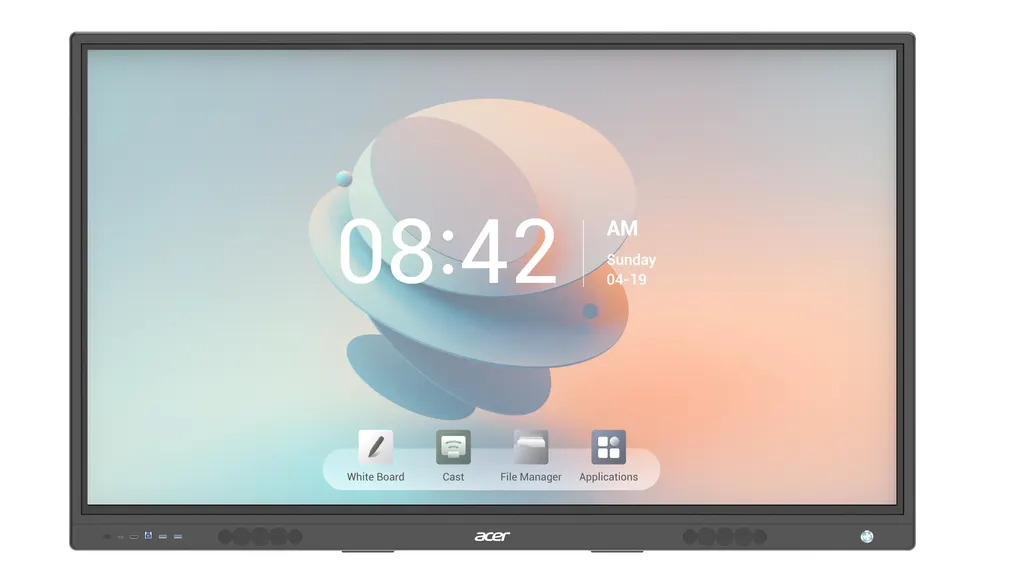
Acer IZ65A 65-inch 4K Interactive Touch Display with OPS Slot

Resolution
3840(H) ×2160 (V) (IPS)
Touch
20 points (Drawing
Memory
4 GB DDR4
Storage
32 GB EMMC5
WhatsApp
Priceon request
QuotationWithin 1 working day
DeliveryConfirmed with your quote, based on stock
PDFDownload datasheet (ACER_INTERACTIVE_TOUCH_SERIES_65_for_R.pdf)
Overview

The Acer IZ65A is a 65-inch 4K UHD interactive touch display with a 3840 x 2160 IPS panel, 400 cd/m2 brightness and 20-point infrared touch. It runs Android 13 with 32GB internal storage, has an OPS slot for a PC module, and supports WiFi 6, with two 20W speakers and VESA wall mounting. Suited to classrooms, meeting rooms and boardrooms across Qatar. Request a quote.

What the Acer IZ65A is and how it works in a room

The Acer IZ65A is a 65-inch interactive display built on a 3840 x 2160 IPS panel. Its infrared touch layer recognises up to 20 points at once, so several people can write, drag and annotate on the same surface during a single session. That makes it a practical choice for rooms where discussion and hands-on work matter more than a single presenter.

The specifications that matter for buyers

The listed brightness is 400 cd/m2, with a 1200:1 contrast ratio and 1.07 billion displayable colours. Horizontal and vertical viewing angles are both listed at 178 degrees. The cover glass is anti-glare, which helps where ceiling lights or windows would otherwise reflect on the screen. Touch accuracy is listed at 1 mm, and the touch response time at less than 5 to 6 ms.

Inside the display, Android 13 runs on a quad-core A55 processor at 1.55 GHz, with 4 GB DDR4 RAM and 32 GB eMMC storage. The OPS slot takes an Intel Core i5 PC module. The source lists one configuration with 8 GB memory and a 512 GB SSD, supplied with no operating system and a USB keyboard and mouse.

Connectivity and audio for teaching and meetings

  • Two HDMI inputs, one HDMI output and one DP 1.2 port
  • VGA input, microphone input and a line out
  • Two RJ-45 network ports (one in, one out), RS232, WiFi 6 and Bluetooth 5.2
  • Six USB ports, including four USB 3.0
  • Two 20W speakers

Where it fits in Qatar

A private school in Al Wakrah fitting out a classroom can use the 65-inch panel for lesson slides, with students coming to the screen to write or annotate using a pen or a finger. An engineering office in West Bay can place one in a meeting room to review drawings, then connect with colleagues abroad through a separate conferencing system. A training centre in Education City could install one in a small group room for workshop sessions.

What to plan before ordering

Start with the wall. The VESA mounting pattern is 500 x 400 mm, and the package weighs 54 kg gross, so the wall and fixings should be checked before installation. Choose an air-conditioned room away from direct sun: the listed operating range is 0°C to 40°C, and summer temperatures in Doha can pass 45°C. Mark the power and network positions early. Input is listed at 100 to 240 V, 50/60 Hz, with power consumption of up to 230 W for this size.

SmartRooms Qatar provides a free site survey and professional installation, with delivery to all eight municipalities of Qatar. Send us the room size, wall type and number of units, and we will prepare a quotation, usually within one working day. Request a quote for the Acer IZ65A today.

Highlights

  • 65-inch 4K UHD IPS panel at 3840 x 2160 resolution
  • 20-point infrared touch with 1 mm touch accuracy
  • Android 13 with 4GB RAM and 32GB internal storage
  • OPS slot for an Intel Core i5 PC module
  • WiFi 6 and Bluetooth 5.2 connectivity with two 20W speakers
  • Manufacturer warranty listed as 3 years

Classroom fit

At 65″ the farthest student should sit within about 4.9 m (6× the screen height).

Estimated timeline

Quotation within 1 working day · delivery timing depends on stock availability, and we confirm it with your quotation.

Specifications

45 specifications · Source: manufacturer · checked Oct 2026
General9
Type
65”" Interactive Touch Screen
Wall mount
VESA Standard (Wall mount)
Input voltage
AC:100~240V 60/50HZ
Power rate
≤230W (65”)
Standby
≤0.5W
Operating Temperature
0℃~ 40℃
Package Dimension(L*H*W) mm
1665*1045*230 (65”)
G.W (kg)
54Kgs for 65”
VESA Mount
500 x 400mm (65”)
Panel features7
Brand
MODEL NAME: ACER IZ65A (IPS)
Resolution
3840(H) ×2160 (V) (IPS)
Display Color
1.07Billon Colors
Brightness
400cd/m2*
LCD (with LED backlit)
LED Backlit
View Angle
R/L 178 (Min.), U/D 178 (Min.)
Contrast Ratio
1200:1
Sound/speaker feature1
Speaker output
20W × 2*
Inputs & Outputs12
HDMI Input
2
HDMI Output
1
Multi-Media USB
USB2.0: * 2 and 4* USB 3.0 (Total 6 USB ports)
RS232
1
RJ-45
2 (1* In and 1*out)
Touch input
2
Bluetooth
BT 5.2
WIFI
WIFI 6
VGA in
1
Line Out
1
MIC
1
DP 1.2
1
Touch screen9
Cover Glass
Cover Glass Anti-glare, Mohs 7 Hardness 9
Touch Resolution
32768x32768
Touch Accuracy
1mm
Annotation Over Any Source
Yes
Palm Detection
Yes
Pen and Touch Differentiation
Yes
Pens Included
2 Stylus with Magnetic fixtures
Compatibility
Windows 11/ Linux/Android /Chrome
Light Sensor
Optional
Android5
OS Version
ANDROID 13
Processor
A55 Quadcore 1.55Ghz
Flash
32 GB EMMC5
RAM
4 GB DDR4
Touch
20 points (Drawing, Annotation, Painting, Eraser, Highlighter, PDF Viewer, PPT Viewer, Browser, Movies & Image Viewer, External Source annotation)
OPS PC (Optional)1
OPS
Optional only (Intel Core i5) with 8GB Memory and 1TB / 512GB SATA SSD
Accessories1
Included
User manual, remote control, power cable, touch cables, HDMI cable, touch pens (2 stylus, 1 extendable),


Downloads

2 files from the manufacturer

Questions about IZ65A

Who is the Acer IZ65A designed for?
The Acer IZ65A suits rooms where a small group works from one screen, such as classrooms, huddle rooms and meeting rooms. Its 65-inch 4K panel and 20-point touch let several people annotate, browse and present at the same time. For a large lecture hall or a boardroom with many seats, a bigger size may suit better, so our team can confirm the right model for your room before you order.
How well does the screen handle a room with windows or bright lights?
The panel is rated at 400 cd/m2 brightness with a 1200:1 contrast ratio, and the cover glass is anti-glare to reduce reflections. In a classroom or meeting room with daylight, position the screen so windows do not sit directly behind it, and check the lighting during the site survey. Strong direct sun can still wash out the image.
How many touch points does it support, and can it tell a pen from a finger?
The display supports 20 touch points using infrared technology, with a listed touch accuracy of 1 mm. It includes palm detection and can differentiate pen input from touch, so a teacher can write with a stylus while a student uses a finger. The package includes touch pens with magnetic fixtures, along with a remote control and cables.
Can it run apps without a computer connected?
Yes. Android 13 is built in, powered by a quad-core A55 processor at 1.55GHz with 4GB DDR4 RAM and 32GB eMMC storage. Its tools include annotation over any connected source, a PDF viewer, a PPT viewer, a browser and a media viewer, so lesson files and presentations can be opened directly on the screen.
What is the OPS slot for, and what PC module is listed?
The OPS slot accepts a plug-in computer module, so the display can run a full PC environment without a separate tower under the desk. The source lists an Intel Core i5-10300H module with 8GB memory and a 512GB SSD, supplied with no operating system and a USB keyboard and mouse. Confirm with the SmartRooms Qatar team whether the module is part of your quotation and which operating system licence you need.
Which ports will we need for laptops, cameras and network connections?
The display has two HDMI inputs, one HDMI output, one DP 1.2 port, one VGA input, two touch inputs, a microphone input, a line out and one RS232 port. Two RJ-45 ports (one in, one out) support wired networking, and six USB ports (two USB 2.0, four USB 3.0) handle media and peripherals. Plan which laptop and room system connects to which port during the survey.
Can it be used for video calls with colleagues abroad?
It works well as the display in a meeting room that connects Doha with teams abroad. It provides a screen, two 20W speakers, a microphone input and a line out. A camera and video conferencing codec are separate products and are not included with this model, so request a quote for a complete room setup that matches your platform.
How is the display mounted, and does the wall need checking?
The display uses a VESA standard wall mount with a 500 x 400 mm pattern. The package weighs 54 kg gross, so the wall type, load capacity and fixings must be checked before installation. SmartRooms Qatar offers a free site survey that covers wall construction, height, cable routes and the position of power and network outlets.
Is it suitable for installation in a hot area in Doha?
The listed operating temperature is 0°C to 40°C, and summer temperatures in Doha can exceed 45°C. Install the display in an air-conditioned room, away from direct sun, windows and air vents, and avoid outdoor, veranda or unconditioned lobby spaces. If the room may be hot, ask our team to review the location during the survey.
What power does it need and how much does it draw?
The listed input range is 100 to 240 V at 50/60 Hz, with rated power consumption of up to 230 W for the 65-inch model and standby consumption of 0.5 W or less. Qatar mains run at 240 V and 50 Hz, but the plug and socket should still be confirmed. Ask our team to check that the included power cable suits BS 1363 sockets and to position the outlet during the survey.
What warranty applies, and how can a government entity order it?
The manufacturer lists a 3-year warranty for this model. SmartRooms Qatar supplies the display with delivery to all eight municipalities of Qatar and accepts purchase orders (LPOs), government tenders including Monaqasat, and payment by bank transfer, cheque or purchase order. Send the tender or LPO requirements with your request and we will quote, usually within one working day.
Would a private school fitting out several classrooms benefit from ordering together?
Yes. A private school in Al Wakrah equipping several classrooms can order multiple 65-inch units under one purchase order, which keeps screen sizes and setups consistent across rooms. Each classroom needs its own survey for wall position, power and network outlets, and our team can cover all rooms in one quotation with a single installation plan.

Similar models

BenQ CM7505 BenQ Board CM7505 75-inch Interactive Display
75″ UHD 3840 × 2160 pixels Ultra Precision IR
SMART SBID-6286S-V3 SMART Board 6086S-V3 86-inch Interactive Display with iQ
86″ 4K UHD (3840 × 2160) HyPr Touch with InGlass
SMART SBID-6286S-V3-P SMART Board 6086S-V3 Pro 86-inch Interactive Display with iQ
86″ 4K UHD (3840 × 2160) HyPr Touch with InGlass
Clevertouch Clevertouch Edge 65" Clevertouch Edge 65" 4K Interactive Display with Camera and Speakers
65″ 4K UHD (3840x2160 @60Hz) Android 15
Clevertouch Clevertouch Edge 86" Clevertouch Edge 86" 4K Interactive Flat Panel
86″ 4K UHD (3840x2160 @60Hz) Android 15
Email Call


