Thursday, 22 October 2026 · 11 Jumada I 1448 AH Sun – Thu · 9:00 – 18:00
+971 56 914 9477 العربية
WhatsApp

PSMPC100_8256W

Prestigio PSMPC100_8256W Digital Media Player Mini PC

System
Windows 11 Pro Trial
WhatsApp
Priceon request
QuotationWithin 1 working day
DeliveryConfirmed with your quote, based on stock
PDFDownload datasheet (Datasheet PSMPC100_8256W (EN) - psmpc100_datasheet_project_4.pdf)
Overview

The Prestigio PSMPC100_8256W is a compact mini PC for digital signage and meeting rooms. It runs an Intel N150 processor with 8GB RAM and a 256GB SSD, plus Wi-Fi 6, Gigabit Ethernet and Bluetooth 5.2. Two HDMI and two USB-C ports handle displays, and the manufacturer states it supports up to three 4K screens. It suits retail counters and conference hubs in Doha and Lusail. Request a quote.

What the PSMPC100 is and how it is built

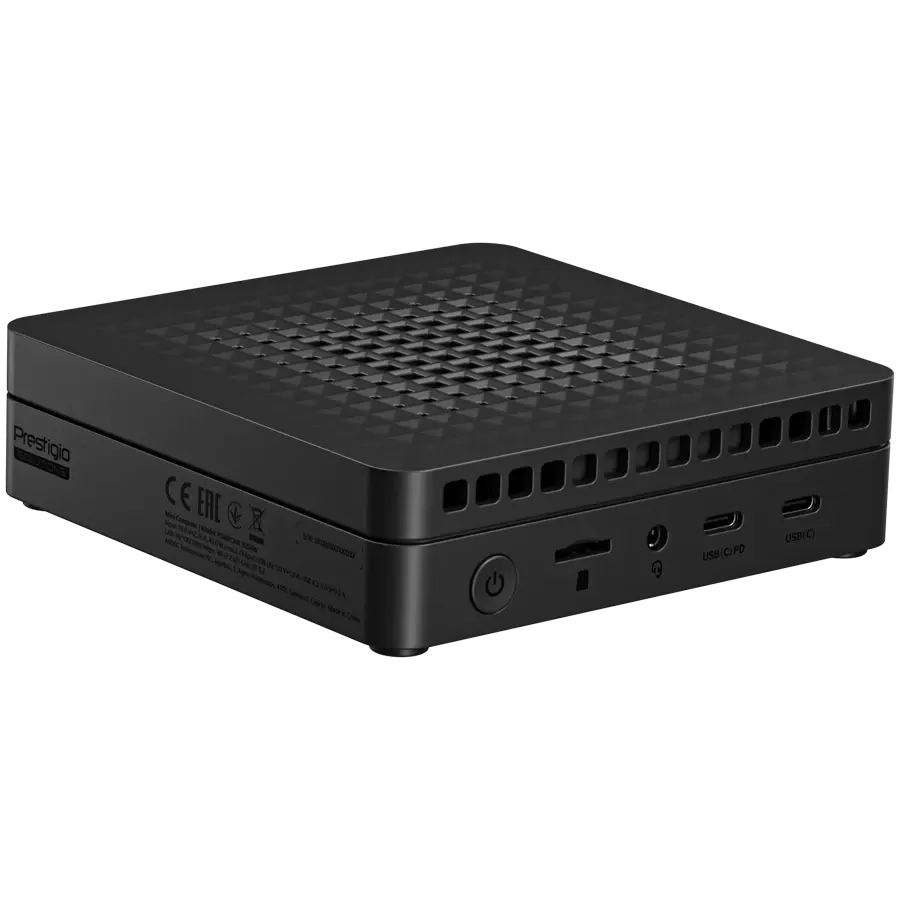
The Prestigio PSMPC100_8256W is a small desktop computer that can run as a Digital Media Player for screens or as a general-purpose office PC. Its body measures 116 mm wide, 116 mm deep and 32.3 mm high, and weighs 0.275 kg, so it can sit behind a monitor, under a counter or on a shelf without taking up much room. The unit is black and uses an external power adapter.

Inside is an Intel N150 processor with four cores, four threads and 6 MB of cache. The data also lists the N100 as an alternative chip in the same family. Memory is 8 GB of DDR4 RAM running at 3200 MHz, and storage is a 256 GB M.2 SSD (22x80mm form factor) connected over PCIe 3.0. Graphics come from integrated Intel UHD Graphics, which share system memory.

Ports and connectivity for screens, meetings and peripherals

The port set includes two HDMI (Type A) ports, two USB-C ports, five USB 3.2 Gen 1 Type-A ports rated up to 5 Gbps, one Gigabit Ethernet RJ-45 port, a 3.5 mm audio jack and a microSD card reader. Wireless networking is Wi-Fi 6 (IEEE 802.11ax) with Bluetooth 5.2. The manufacturer states the unit supports up to three 4K displays, which is useful where one player feeds several screens.

Where it fits in Qatar

In a cafe or retail outlet in West Bay, the PSMPC100 can loop menus, offers and information on a wall-mounted screen while the box stays out of sight behind the counter. Its small footprint suits busy checkout areas where space is tight.

In a company meeting room in Msheireb or Lusail, the unit works as a conference hub. The five USB 3.2 ports can take a camera, a microphone and other peripherals at the same time, while Gigabit Ethernet gives a wired link for video calls when the wireless network is busy. It is aimed at presentations, collaboration and online meetings rather than demanding editing work.

A school in Al Wakrah or Education City fitting out digital classrooms can use the same model for online learning and administrative tasks, as the manufacturer describes. Schools ordering several units can issue a purchase order.

What to plan before ordering

  • Display count: confirm how many screens you will drive and their resolution, since the unit is rated for up to three 4K displays.
  • Operating environment: the source data does not list an operating temperature range, so confirm the mounting location and ventilation with the SmartRooms Qatar team before placing it in a warm or enclosed space.
  • Operating system: the unit is supplied with a Windows 11 Pro trial, so plan activation and licensing with your IT team.
  • Storage: 256 GB is the base capacity, and the data notes an optional extension up to 512 GB.
  • Power and cabling: the adapter is external, so allow for a socket and cable route, and check the adapter rating against Qatar's 240 V, 50 Hz supply before ordering.

Ordering from SmartRooms Qatar

SmartRooms Qatar supplies the PSMPC100 across all eight municipalities of Qatar, with professional installation and free site surveys. We accept purchase orders and government tenders, and quotations are usually issued within one working day. Send us your screen count, room layout and intended software, and request a quote for supply and installation.

Highlights

  • Intel N150 processor with four cores and four threads
  • 8GB DDR4 RAM running at 3200 MHz
  • 256GB M.2 SSD with optional extension up to 512GB
  • Wi-Fi 6, Gigabit Ethernet and Bluetooth 5.2 connectivity
  • Two HDMI, two USB-C and five USB 3.2 Gen 1 ports
  • Supports up to three 4K displays; 36-month warranty

Estimated timeline

Quotation within 1 working day · delivery timing depends on stock availability, and we confirm it with your quotation.

Specifications

43 specifications · Source: manufacturer · checked Oct 2026
Software1
Operating System
Windows 11 Pro Trial
System1
Built-in Devices
Card Reader (Micro SD)
Processor5
CPU
Intel Mobile Processor N100/N150
CPU Core Quantity
4
Threads Quantity
4
CPU Socket Standard
Socket 1264
CPU Cache Size
6 MB
Memory1
RAM Capacity
8 GB
Video Output3
Video Chipset
Intel UHD Graphics
Video Controller Form Factor
Integrated
Video Memory Type
Shared Video Memory
Networking Specifications3
Wi-Fi
IEEE 802.11ax Wi-Fi 6
Bluetooth
ВТ 5.2
Networking Form Factor
Integrated
Interface Provided5
HDMI
2 (HDMI (Type A))
LAN
1 (RJ-45)
USB
2 (USB (C))
USB 3.2 Gen 1
5 (USB 3.2 (type A))
Audio Interface
1 (3.5-mm mini jack)
Dimensions & Weight Device4
Height (mm)
32.3 mm
Depth (mm)
116 mm
Width (mm)
116 mm
Nominal Weight
0.275 kg
Warranty1
Warranty Term (month)
36 month(s)
Power2
Power Device Type
Power Adapter
Power Device Location
External
Miscellaneous1
External Color
Black
Storage1
SSD
256 GB, M.2 22x80mm Form Factor
Logistic15
Pack Length (mm)
214 mm
Pack Width (mm)
175 mm
Pack Height (mm)
106 mm
Pack Weight Brutto (kg)
1.21 kg
Pack Weight Netto (kg)
0.275 kg
Pieces in pack
1
Box Length (mm)
445 mm
Box Width (mm)
340 mm
Box Height (mm)
200 mm
Box Weight Brutto (kg)
7.85 kg
Retail Packaging Net Weight Carton
0.1 kg
Retail Packaging Net Weight Plastic
0.05 kg
Packs in Box
6
Package Type
Retail
EAN Code
8595248161450

Downloads

17 files from the manufacturer
PDF Datasheets Datasheet PSMPC100_8256W (EN) - psmpc100_datasheet_project_4.pdf 11.9 MB Prestigio PSMPC100_8256W datasheets (PDF, 11.9 MB) PDF Manuals & guides Quick Start Guide (multilingual) - psmpc100_8256_mini_computer_qsg_multi_19hx16_v103_13062025_1.pdf 3.0 MB Prestigio PSMPC100_8256W manuals & guides (PDF, 3.0 MB) PDF Manuals & guides User Manual (AR) - psmpc100_8256_mini_computer_um_ar_v101_062025.pdf 1.7 MB Prestigio PSMPC100_8256W manuals & guides (PDF, 1.7 MB) URL Manuals & guides · Opens on manufacturer site User Guide (LT) Prestigio PSMPC100_8256W manuals & guides (URL) URL Manuals & guides · Opens on manufacturer site User Guide (LV) Prestigio PSMPC100_8256W manuals & guides (URL) URL Manuals & guides · Opens on manufacturer site User Guide (PL) Prestigio PSMPC100_8256W manuals & guides (URL) URL Manuals & guides · Opens on manufacturer site User Guide (RO) Prestigio PSMPC100_8256W manuals & guides (URL) URL Manuals & guides · Opens on manufacturer site User Guide (SK) Prestigio PSMPC100_8256W manuals & guides (URL) URL Manuals & guides · Opens on manufacturer site User Guide (SR) Prestigio PSMPC100_8256W manuals & guides (URL) URL Manuals & guides · Opens on manufacturer site User Guide (UA) Prestigio PSMPC100_8256W manuals & guides (URL) URL Manuals & guides · Opens on manufacturer site User Manual (BG) Prestigio PSMPC100_8256W manuals & guides (URL) URL Manuals & guides · Opens on manufacturer site User Manual (CS) Prestigio PSMPC100_8256W manuals & guides (URL) URL Manuals & guides · Opens on manufacturer site User Manual (EL) Prestigio PSMPC100_8256W manuals & guides (URL) URL Manuals & guides · Opens on manufacturer site User Manual (ET) Prestigio PSMPC100_8256W manuals & guides (URL) URL Manuals & guides · Opens on manufacturer site User Manual (KK) Prestigio PSMPC100_8256W manuals & guides (URL) PDF Certificates & compliance PSMPC100 CE ROHS - psmpc100_psmpc100_8256l_psmpc100_8256w_ce_rohs_declar_signed.pdf 406 KB Prestigio PSMPC100_8256W certificates & compliance (PDF, 406 KB) 01 Software & firmware · Opens on manufacturer site PSMPC100 drivers upgrade package For Windows 11 OS 1.01 Prestigio PSMPC100_8256W software & firmware (01)

Questions about PSMPC100_8256W

What is the Prestigio PSMPC100_8256W designed for?
The PSMPC100_8256W is a compact mini PC that can run as a digital media player for screens or as a general office computer. It suits retail outlets that need menus or promotions on a display, conference rooms that need a meeting hub, and front desks that need a light-duty PC. Its 116 mm by 116 mm body fits behind a screen or on a shelf. Request a quote to confirm it suits your use.
How many screens can one unit drive?
The manufacturer states that the PSMPC100 supports up to three 4K displays. The unit has two HDMI (Type A) ports and two USB-C ports, so the number of screens you can run depends on the port used for each display and the content you play. Before ordering, tell the SmartRooms Qatar team how many screens you plan to use and their resolution, so we can quote the right configuration.
Can a shop or cafe in West Bay use it for digital signage?
Yes, the manufacturer positions it for digital signage in retail stores and restaurants. A cafe in West Bay can use it to loop menus and offers on a wall-mounted screen while the unit stays hidden behind the counter. Its small footprint and external power adapter make it easy to place in a back room. A free site survey helps plan cable routes and screen positions before installation.
How does it work in a meeting room in Lusail?
Five USB 3.2 Gen 1 Type-A ports let you connect a camera, a microphone and other peripherals together, while the HDMI and USB-C ports handle the display. Gigabit Ethernet provides a wired link when the wireless network is congested during video calls. The unit is built for presentations, collaboration and video conferencing. Quotations are usually issued within one working day once we confirm your room layout.
Would it suit a classroom in a school in Al Wakrah?
Yes, the product data describes it for digital classrooms, online learning and administrative tasks. A school in Al Wakrah could fit one unit to each classroom alongside a large display, connecting through HDMI and the USB ports for peripherals. For an order covering several classrooms, a purchase order (LPO) can be issued. SmartRooms Qatar offers professional installation and free site surveys before work begins.
Is it suitable for a clinic waiting area in Al Rayyan?
A clinic waiting area can use the PSMPC100 to show health information, queue updates or video content on a wall screen. The Gigabit Ethernet port and Wi-Fi 6 help it run steadily on a fixed network. The source data does not give an operating temperature range, so confirm the installation space with the SmartRooms Qatar team, especially if the unit would sit near a window or in a hot back room.
Which processor does it use, and how fast is it?
It uses the Intel 12th Gen Alder Lake-N150 processor, which the data lists at up to 3.6 GHz, with an N100 option running up to 3.4 GHz. The chip has four cores, four threads and 6 MB of cache. Graphics come from integrated Intel UHD Graphics. This is well matched to documents, spreadsheets, presentations and web browsing.
How much memory and storage does it include?
The unit has 8 GB of DDR4 RAM running at 3200 MHz and a 256 GB M.2 SSD on PCIe 3.0. The data states that storage can be extended optionally up to 512 GB. Memory and storage affect how many applications run at once, so if you plan several screens or multiple meeting tools, ask us to confirm the configuration before ordering.
What connectivity options does it offer?
It includes Gigabit Ethernet (RJ-45), Wi-Fi 6 (IEEE 802.11ax) and Bluetooth 5.2, so it can connect by cable or wirelessly. For displays and peripherals it has two HDMI (Type A) ports, two USB-C ports, five USB 3.2 Gen 1 Type-A ports, a microSD card reader and a 3.5 mm audio jack. Check your network and display cabling before ordering.
Has it been tested with DISPL software?
The manufacturer states that the PSMPC100 has been tested with and approved by DISPL, a digital signage software platform. If you already use DISPL or plan to, this is a relevant point. The source data does not describe the software setup beyond that approval, so confirm your signage software and licence requirements with the SmartRooms Qatar team before buying.
Which operating system is installed?
The data lists Windows 11 Pro Trial as the installed operating system. A trial edition is not a permanent licence, so plan activation and licensing with your IT team before the unit enters service. Your IT team should also confirm that any signage or conferencing applications you use are compatible with Windows 11 Pro.
What are its dimensions and weight, and can it be wall-mounted?
The unit measures 116 mm wide, 116 mm deep and 32.3 mm high, and weighs 0.275 kg, so it is light enough to fix behind a display or on a shelf. The source data does not list a VESA mounting pattern or mounting kit, so confirm the fixing method with the SmartRooms Qatar team. A free site survey can establish power points and cable routes first.

Similar models

Dahua DS04-AI400 Dahua DS04-AI400 Media Player Box for Digital Signage
Android 8.1 –10 °C to +55 °C (+14 °F to…
Dahua DS04-AI400N Dahua DS04-AI400N 4K Media Player Box for Digital Signage
Android 14 –10 °C to +55 °C (+14 °F to…
Elo Backpack 4 for Android Elo Backpack 4 for Android Media Player and Compute Module
Standard Model: Android 10 with Google Play…
Elo Backpack 5 with Android Elo Backpack 5 with Android 14 Compute Device
USB-C*: 1920 x 1080 @60fps Android 14 with Google Play…
Elo Backpack for Linux Elo Backpack for Linux E143585 Compact Linux PC
USB-C: 3840 x 2160 @60fps Linux Debian 10
Email Call