Thursday, 22 October 2026 · 11 Jumada I 1448 AH Sun – Thu · 9:00 – 18:00
+971 56 914 9477 العربية
WhatsApp

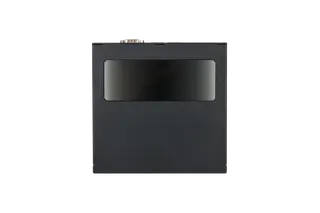
MPi4 Box Gen2

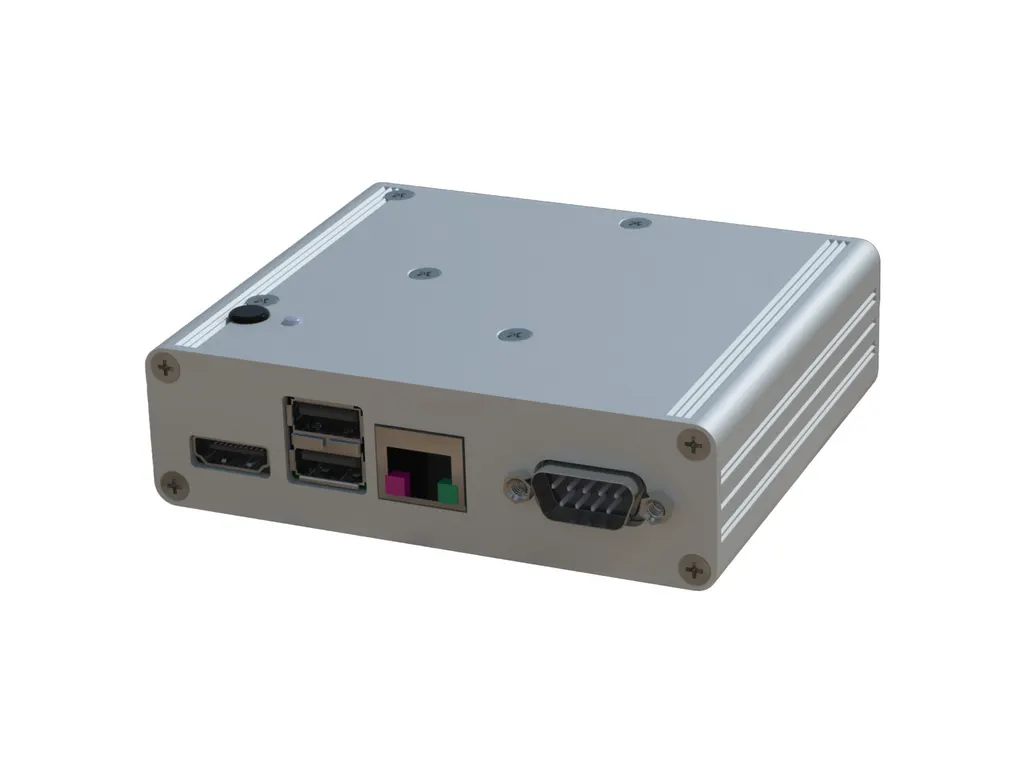
Sharp MPi4 Box Gen2 Raspberry Pi Digital Signage Media Player

System
custom
WhatsApp
Priceon request
QuotationWithin 1 working day
DeliveryConfirmed with your quote, based on stock
PDFDownload datasheet (SNDS_Datasheet_100016242_MPi4-Box-Gen2_en.pdf)
Overview

The Sharp MPi4 Box Gen2 is an external media player based on the Raspberry Pi Compute Module 4, with 4GB RAM and 32GB eMMC storage. It decodes 4K H.265 video and attaches to any display that supports 10W USB. An open platform lets it run third-party content management software, suiting retail signage, menu boards and passenger information. Request a quote for a compatible display setup.

What the Sharp MPi4 Box Gen2 adds to a display

The Sharp MPi4 Box Gen2 is an external computing unit that gives a compatible screen its own signage player. Instead of feeding content from a laptop or a separate PC, the screen receives its playlists from this box, which is built around the Raspberry Pi Compute Module 4. Because the platform is open, the unit can run third-party content management software and a range of operating systems that are compatible with Raspberry Pi, so an integrator can choose the software that matches the client's workflow.

Specifications that shape the buying decision

  • Processor: quad-core 64-bit ARM processor at 1.5 GHz with a VideoCore IV GPU.
  • Memory and storage: 4GB LPDDR4-3200 SDRAM and 32GB eMMC.
  • Video: hardware H.265 (HEVC) decoding up to 4Kp60, H.264 decoding up to 1080p60 and encoding up to 1080p30, plus OpenGL ES 3.0 graphics.
  • Ports: two USB 2.0 ports, one RJ45 10/100/1000 Mbps network port, one microHDMI port, one RS232C serial port and one USB Type C port for power delivery.
  • Operating system: custom, with the open platform designed to run other systems compatible with Raspberry Pi.

The 4K decode capability matters most when the screen is the main visual element in a space, because it allows 4K content to play at up to 60 frames per second. The 4GB of memory and 32GB of eMMC storage leave room for the operating system and the player software. The RS232C port lets a control system or technician remotely control the display and run provisioning or preventive maintenance tools, which helps facilities teams manage several screens without visiting each one.

Where it fits in Qatar

In a shopping mall in West Bay or Msheireb, a retail team can run promotional loops on a store screen and update them through a third-party content management system chosen by the operator.

A quick service restaurant in Al Sadd or Al Rayyan can drive a menu board from one box, keeping item changes on a single playlist that the team manages from the office.

At a transport hub near the Hamad International Airport area, a passenger information screen can show schedules and announcements, with the RS232C port available for remote control by the operator.

Planning the installation

  • Confirm that your display supports USB with 10W. The manufacturer lists the PN-M322 as a compatible display, so check your screen against that before ordering.
  • Plan cable routes for the HDMI, network and USB Type C connections, and leave access to the box for servicing.
  • The source data gives no operating temperature range, so confirm the installation location with the SmartRooms Qatar team, especially in areas that can exceed 45°C in summer.
  • The source data does not list a power adapter rating, so confirm the power arrangement for your site before ordering.
  • For larger or public installations, book a free site survey to check mounting, cable runs and network access.

SmartRooms Qatar delivers to all eight municipalities of Qatar and provides professional installation. Schools, government offices and companies ordering several units can work with purchase orders (LPOs) and government tenders, including those published on Monaqasat.

Request a quote

To check compatibility, configuration and delivery for your site, request a quote from SmartRooms Qatar. Our team usually responds within one working day.

Highlights

  • Raspberry Pi Compute Module 4 processing platform
  • Quad-core 1.5 GHz processor with 4GB LPDDR4 RAM
  • 32GB eMMC storage on board
  • Hardware H.265 decoding up to 4Kp60
  • RJ45 10/100/1000 Mbps, microHDMI, USB 2.0 and RS232C ports
  • Attaches to any display supporting 10W USB

Estimated timeline

Quotation within 1 working day · delivery timing depends on stock availability, and we confirm it with your quotation.

Specifications

6 specifications · Source: manufacturer · checked Oct 2026
Specifications6
CPU
Quad Core 64-bit ARM Cortex 72 (ARM v8) @ 1.5GHz, VideoCore IV GPU
Graphics (board)
Hardware video encode / decode H.265 (HEVC) (up to 4Kp60 decode), H.264 (up to 1080p60 decode, 1080p30 encode), OpenGL ES 3.0 graphics
Memory
32GB eMMC
RAM
4GB LPDDR4-3200 SDRAM
Operating System
custom
Interfaces
2x USB 2.0 1x RJ45 10 / 100 / 1000 Mbps 1x microHDMI 1x RS232C 1x USB Type C for power delivery
Downloads

5 files from the manufacturer

Questions about MPi4 Box Gen2

What is the Sharp MPi4 Box Gen2 used for?
The Sharp MPi4 Box Gen2 is an external computing unit that turns a compatible display into a digital signage player. It is built around the Raspberry Pi Compute Module 4 and runs content through an open software platform, so the screen does not need a separate PC for playback. Typical uses include retail signage, quick service menu boards and passenger information displays across Qatar.
Which displays work with the MPi4 Box Gen2?
The manufacturer lists the PN-M322 as a compatible display, and the box can be attached to any display that supports USB with 10W. Before ordering, confirm that your screen's USB port meets the 10W requirement and that its model is on the compatibility list. If you are unsure, send the display model with your quote request and the SmartRooms Qatar team will confirm compatibility.
What processor, memory and storage does it have?
The unit uses a quad-core 64-bit ARM processor running at 1.5 GHz with a VideoCore IV GPU. It has 4GB of LPDDR4-3200 SDRAM and 32GB of eMMC storage. These resources run the custom operating system and the player software you choose on the open platform.
Can it play 4K video for a store or lobby screen?
Yes, for decoding. The box decodes H.265 (HEVC) video up to 4Kp60 in hardware, and H.264 up to 1080p60. A promotional loop in a shopping mall in West Bay or Msheireb can therefore run in 4K if the file format and frame rate fall within those limits. The box encodes H.264 up to 1080p30, so plan any on-site recording around that limit.
Does it support third-party content management systems?
Yes. The open platform can run third-party content management software and digital signage applications compatible with Raspberry Pi. A retail group in Doha that already works with a preferred CMS can keep that workflow rather than adopting a vendor-specific player. Confirm that your software supports the box's operating system before you buy, and raise it when you request a quote.
What network and cable connections does it need?
The box has one RJ45 port supporting 10/100/1000 Mbps, two USB 2.0 ports, one microHDMI port, one RS232C port and one USB Type C port for power delivery. The data does not list wireless connectivity, so plan a wired network point at the mounting location. For a menu board in an Al Sadd restaurant, ask your IT team to confirm the cable route before installation day.
Can the screen be controlled remotely?
Yes. The RS232C port lets you remotely control the connected display and run provisioning or preventive maintenance tools. A facilities team looking after screens across a multi-building campus in Education City can use this to check and adjust displays without visiting each one. Confirm with your software provider which control commands your system supports.
How is the box powered?
It is powered through its USB Type C port for power delivery. The source data does not list the power adapter rating or mains specification, so do not assume compatibility with a particular supply. When you request a quote, ask SmartRooms Qatar to confirm the power arrangement for your site, including how the display's 10W USB supply is used.
Is it suitable for hot or dusty locations in Qatar?
The source data does not give an operating temperature range or an outdoor rating, so do not assume it suits outdoor, window-facing or unventilated locations. Summer temperatures in Qatar can exceed 45°C and dust storms are common, so for lobby or entrance installations, confirm the environment with the SmartRooms Qatar team before mounting.
Which operating systems can it run?
The unit ships with a custom operating system, and the open platform is designed to run other operating systems compatible with Raspberry Pi. If your digital signage software requires a specific operating system, confirm that it runs on the box before buying. This matters for integrators in Doha who manage several sites with one software stack and want to avoid changing hardware.
How does it suit a passenger information display near the airport?
A transport operator with a passenger information screen in the Hamad International Airport area can drive the display from a single unit, with the RS232C port available for remote control. Because mounting and cable planning affect the installation, SmartRooms Qatar offers a free site survey, and delivery covers all eight municipalities of Qatar.
Can a school or ministry buy it through an LPO or tender?
Yes. SmartRooms Qatar accepts purchase orders (LPOs) and government tenders, including those published on Monaqasat, and accepts payment by bank transfer, cheque or purchase order. A school fitting out several information screens in Al Wakrah can request one quotation covering all units, and the team will confirm lead times with the quote, since they depend on stock.

Similar models

Dahua DS04-AI400 Dahua DS04-AI400 Media Player Box for Digital Signage
Android 8.1 –10 °C to +55 °C (+14 °F to…
Dahua DS04-AI400N Dahua DS04-AI400N 4K Media Player Box for Digital Signage
Android 14 –10 °C to +55 °C (+14 °F to…
Elo Backpack 4 for Android Elo Backpack 4 for Android Media Player and Compute Module
Standard Model: Android 10 with Google Play…
Elo Backpack 5 with Android Elo Backpack 5 with Android 14 Compute Device
USB-C*: 1920 x 1080 @60fps Android 14 with Google Play…
Elo Backpack for Linux Elo Backpack for Linux E143585 Compact Linux PC
USB-C: 3840 x 2160 @60fps Linux Debian 10
Email Call