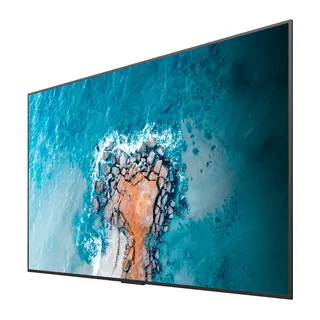
ND65CMD
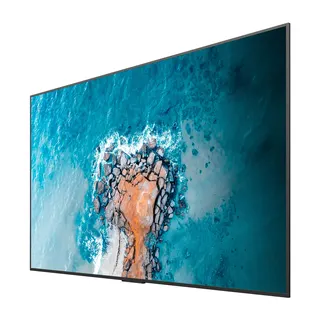
MAXHUB CMD Series ND65CMD 65-inch Meeting Room Display
- Screen size
- 65"
- Resolution
- 3840(H) × 2160(V)
- Brightness
- 300 cd/m2
- Operation
- 7 × 16H
The MAXHUB ND65CMD is a 65-inch 4K meeting room display with a VA panel, 300 cd/m2 typical brightness and a 178° viewing angle. It runs Android 11 with 4GB RAM and 32GB storage and includes a Type-C port that delivers 65W to a connected laptop. Wi-Fi 6 and Bluetooth 5.2 are built in. It suits small and mid-sized meeting rooms across Qatar that need one screen for video calls and presentations.
What the ND65CMD is built for
The MAXHUB ND65CMD is a 65-inch display from the CMD Series, designed for meeting rooms where one screen carries video calls, presentations and shared documents. It uses a 3840 × 2160 VA panel with a 16:9 aspect ratio and a display area of 1428.48 mm by 803.52 mm. With a 0.372 mm pixel pitch, small text in shared spreadsheets and slides stays readable across the table.
Picture, sound and lifetime figures to check
- Brightness and contrast: 300 cd/m2 typical brightness and 6,000:1 typical contrast, with a 178° viewing angle for people seated off-centre.
- Colour and motion: 1.07 billion colours (8-bit with FRC), NTSC 72% typical colour gamut, a 60Hz refresh rate and a 6.5 ms response time.
- Audio: 2.0 channel speakers rated 2 × 10W, placed along the bottom edge of the frame.
- Service life: 50,000 hours or more, based on 7 days a week at 16 hours a day.
Connecting laptops and controlling the room
The connections include two HDMI 2.0 inputs, one USB 2.0 port, audio input and output, an RS232 port and an RJ45 network port. The front panel adds two USB 3.0 ports and a USB Type-C port that carries video, audio, touch and network data while supplying up to 65W of power. A presenter can connect a laptop with one cable and keep its battery charged during the meeting.
For control, the display supports RS232 and IP protocol, HDMI CEC, a one-key black screen function and channel memory. A built-in media player and a device management system are also included. Screen sharing works over the Type-C cable or through MAXHUB Share software, which supports Windows, macOS, iOS and Android. Wireless connectivity uses Wi-Fi 6 with 2.4GHz and 5GHz bands, supporting 802.11ac/b/g/n/a/ax, and Bluetooth 5.2.
Where it fits in Qatar
- A consultancy office in Msheireb or West Bay: a mid-sized meeting room where staff present from their own laptops while joining calls with colleagues at overseas offices.
- A private school in Al Wakrah or Al Rayyan: a staff room or teacher training room where Arabic and English presentations share one display, and the built-in media player can run content without a separate computer.
- A serviced apartment or hotel meeting room in Lusail: a presentation screen for guests in an air-conditioned room that stays in use throughout the working week.
Planning the mounting and power
The panel weighs 17 kg net and 27 kg in packaging, so the wall and fixings should be checked before delivery. It uses a 400 × 200 mm VESA pattern and M6 × 30 mm wall-hanging screws. Overall dimensions are 1445.7 × 841.3 × 84.9 mm, and wall-mounted thickness with the WIB6540B bracket listed in the manufacturer data is 116 mm. Typical power draw is 153W and maximum is 257W, with standby at 0.5W or less. The power supply is rated 100–240V, 50/60Hz.
The operating range is 0°C to 40°C with 10% to 90% humidity, which is well below outdoor summer temperatures in Qatar that regularly pass 45°C. Install the display in an indoor, air-conditioned room away from direct sunlight and glazing, and confirm the room conditions with the SmartRooms Qatar team before fixing. SmartRooms Qatar supplies the ND65CMD with professional installation across all eight municipalities, and a free site survey can confirm the wall, bracket and cable route before the unit arrives. Quotations are usually issued within one working day, and purchase orders and government tenders are accepted. Request a quote with your room size and wall type to get started.
Highlights
- 65-inch 4K VA panel with 300 cd/m2 typical brightness
- Android 11 with 4GB RAM and 32GB storage
- Front USB Type-C port with 65W power delivery and touch
- Wi-Fi 6 (802.11ax) on 2.4GHz and 5GHz, plus Bluetooth 5.2
- RS232, IP control, HDMI CEC and one-key black screen
- Energy Star certified with a 3-year display warranty
Estimated timeline
Quotation within 1 working day · delivery timing depends on stock availability, and we confirm it with your quotation.
Specifications
ND65CMD59
- Display · Screen Size
- 65"
- Display · Panel Type
- VA
- Display · Backlight
- DLED
- Display · Display Area
- 1428.48(H) × 803.52(V)mm
- Display · Pixel Pitch
- 0.372 × 0.372mm
- Display · Resolution
- 3840(H) × 2160(V)
- Display · Contrast Ratio (Typ.)
- 6000:1
- Display · Aspect Ratio
- 16 : 9
- Display · Refresh Rate
- 60Hz
- Display · Brightness (Typ.)
- 300 cd/m2
- Display · Operation Hours (Day × Hours)
- 7 × 16H
- Display · Life Time
- ≥ 50000 Hours
- Display · Display Color
- 1.07B (8bit+FRC)
- Display · Color Gamut (Typ.)
- NTSC 72%
- Display · Viewing Angle (H × V)
- 178°
- Display · Response Time
- 6.5ms
- System · System
- Android 11.0
- System · CPU
- A73 × 4 + A53 × 4
- System · GPU
- Mali G52MP8
- System · RAM
- 4G
- System · ROM
- 32G
- Speaker · Channel
- 2.0
- Speaker · Power
- 2 × 10W
- Power · Power Supply
- 100-240V~50/60Hz
- Power · Standby Power Consumption
- ≤ 0.5W
- Power · Power Consumption (Typ.)
- 153W
- Power · Power Consumption (Max.)
- 257W
- Features · HDMI CEC
- Yes
- Features · RS232/IP Protocol to control
- Yes
- Features · Built-In Media Player
- Yes
- Features · Device Management System
- Yes
- Features · Screen Share
- Yes
- Features · Channel memory
- Yes
- Features · One-key black screen
- Yes
- Connectivity · HDMI IN (2.0)
- 2
- Connectivity · USB 2.0
- 1
- Connectivity · USB 3.0
- 2 ( Front Panel )
- Connectivity · USB Type-C
- 1 ( PD 65W, Front Panel )
- Connectivity · Touch 2.0
- 1
- Connectivity · AUDIO IN
- 1
- Connectivity · AUDIO OUT
- 1
- Connectivity · RS232
- 1
- Connectivity · RJ45 IN
- 1
- Connectivity · Wi-Fi
- AP + STA Wi-Fi 6 Support 2.4GHz & 5GHz 802.11ac/b/g/n/a/ax
- Connectivity · Bluetooth
- 5.2
- Mechanical Specification · Product Dimension (L×H×D)
- 1445.7 × 841.3 × 84.9mm
- Mechanical Specification · Package Dimension (L×W×H)
- 1610 × 185 × 972mm
- Mechanical Specification · Thickness of machine and wall mount
- 116 mm (WIB6540B)
- Mechanical Specification · Net Weight
- 17kg
- Mechanical Specification · Gross Weight
- 27kg
- Mechanical Specification · VESA
- 400 × 200mm
- Mechanical Specification · Wall-hanging Screw Spec
- M6 × 30mm
- Environmental Conditions · Operation Temperature
- 0°C - 40°C
- Environmental Conditions · Operation Humidity
- 10% - 90%RH
- Environmental Conditions · Storage Temperature
- -20°C - 60°C
- Environmental Conditions · Storage Humidity
- 10% - 90%RH
- Environmental Conditions · Altitude
- Below 5000 meters
- Certification · Certification
- Energy Star
- Warranty · Display
- 3 years warranty