Thursday, 22 October 2026 · 11 Jumada I 1448 AH Sun – Thu · 9:00 – 18:00
+971 56 914 9477 العربية
WhatsApp

DS-MBZA

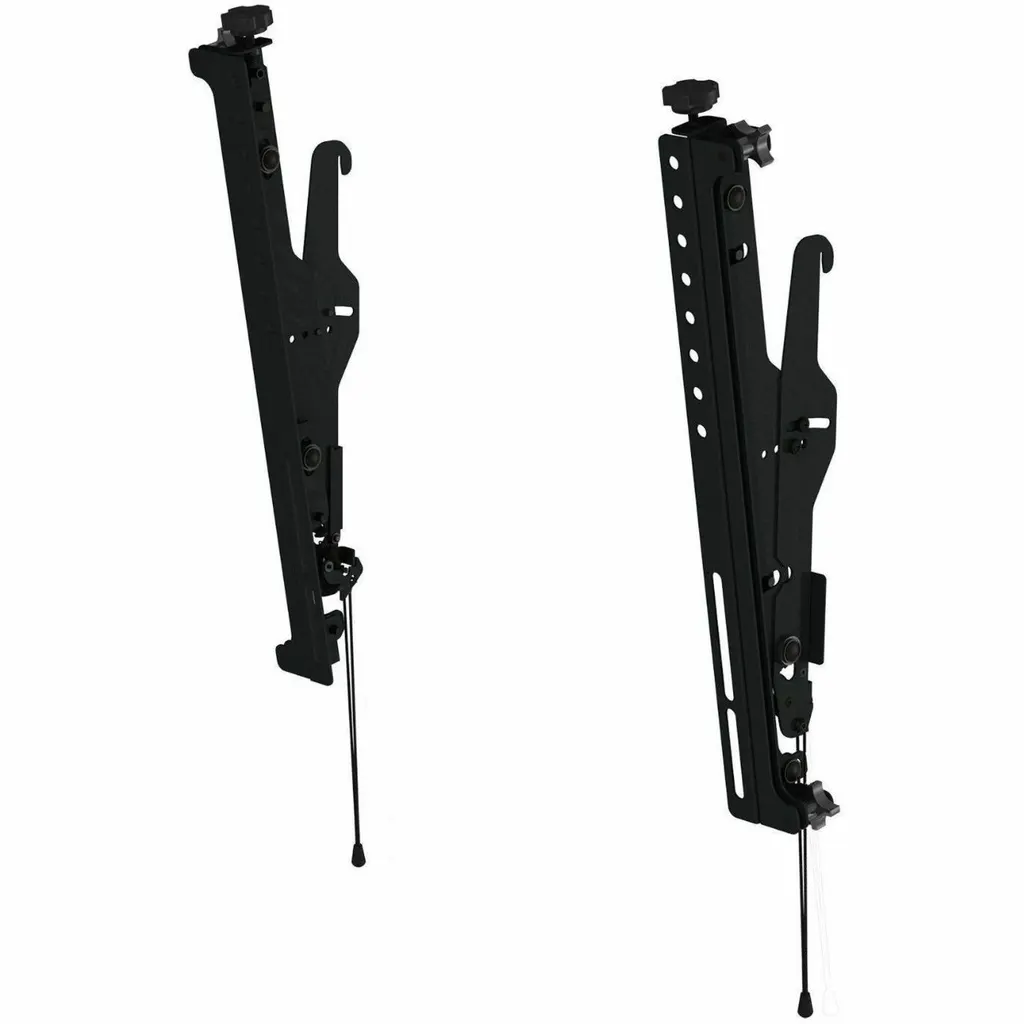
Peerless-AV DS-MBZA Adaptor Set for DS-MBZ Menu Board Mounts

Screen size
40" (101.60 cm)
WhatsApp
Priceon request
QuotationWithin 1 working day
DeliveryConfirmed with your quote, based on stock
PDFDownload datasheet (DS-MBZA_Product-Datasheet.pdf)
Overview

The Peerless-AV DS-MBZA is a two-adaptor set that adds a 40 to 48-inch display to an existing DS-MBZ menu board mount. It includes mounting hardware, carries up to 45.36 kg and tilts from 0 to 15 degrees so screens in a row align. Built for quick-service restaurant menu boards across Qatar, request a quote for your site.

What the DS-MBZA adds to an existing menu wall

The Peerless-AV DS-MBZA is an accessory set for the DS-MBZ menu board mount system. It supplies two DS-MBZ adaptors and the mounting hardware needed to attach a display of 40 to 48 inches to that system. It is not a standalone mount: it extends a menu wall that already uses DS-MBZ mounts, which is why the first step is confirming your existing hardware before you order.

Specifications that matter when you plan the order

  • Display range: 40 inches (101.60 cm) to 48 inches (121.92 cm)
  • Maximum load: 45.36 kg
  • Tilt range: 0° to 15°
  • Mounting pattern: 400 x 400 VESA
  • Dimensions: 49.45 cm high, 6.83 cm wide, 7.52 cm deep
  • Approximate weight: 2.27 kg
  • Finish: powder-coated black
  • Use: indoor; assembly required
  • Compliance and warranty: TAA compliant, RoHS, 5-year limited warranty

The load figure is the one to check first. Add the weight of the display and anything fixed to it, then compare the total with 45.36 kg. The set's own weight of about 2.27 kg also needs to be carried by the wall structure.

Alignment and adjustment after installation

Menu boards are judged as a set, so small differences in height or angle show up quickly. The DS-MBZA gives you tool-less height adjustment, four-corner depth adjustment and an 8-point micro adjustment that moves the display along the x, y and z axes once it is hung. The tilt range of 0° to 15° lets every panel in a row be set to the same angle. The kickstand holds the bottom edge away from the wall while cables are connected, so a technician does not have to hold the screen the whole time.

Where it fits across Qatar

The clearest use is a quick-service restaurant adding one more screen to an existing menu wall, for example a branch in West Bay or The Pearl that is extending its menu boards. Food-service groups opening outlets in Lusail, Al Sadd or the Hamad International Airport area can use the same set on each site, provided the existing mount is a DS-MBZ. A shopping centre food court in Doha is another realistic setting where a row of matching menu screens has to stay level over time.

Because the set is rated for indoor use, the location is a planning point rather than a product limit. Walls next to kitchen exhaust, glazing that receives strong afternoon sun and any position exposed to dust should be reviewed with the SmartRooms Qatar team before the order is placed. The data does not list an operating temperature range for this set, so we do not state one here.

Planning the installation

Start with three checks: the model of the existing mount, the display size and weight, and the wall condition. SmartRooms Qatar provides free site surveys, which is a practical way to confirm that the adaptors match what is on the wall before purchase orders are raised. Assembly is required, so allow the installer time to fit the adaptors ahead of the display. Multi-site operators can consolidate sets under one purchase order (LPO), and payment can be made by bank transfer, cheque or purchase order.

Request a quote from SmartRooms Qatar with your display model, the number of outlets and your existing mount details, and the team will confirm compatibility and supply.

Highlights

  • Adds a 40 to 48-inch display to DS-MBZ menu board mounts
  • Maximum load capacity of 45.36 kg
  • Tilt range from 0° to 15°
  • Tool-less height adjustment and 8-point micro adjustment
  • 400 x 400 VESA mounting pattern
  • Indoor use, TAA compliant, 5-year limited warranty

Estimated timeline

Quotation within 1 working day · delivery timing depends on stock availability, and we confirm it with your quotation.

Specifications

39 specifications · Source: manufacturer · checked Oct 2026
General Information9
Manufacturer
Peerless Industries, Inc
Manufacturer Part Number
DS-MBZA
Manufacturer Website Address
http://www.peerless-av.eu.com
Brand Name
Peerless-AV®
Product Series
DS-MBZA
Product Model
DS-MBZA
Product Name
DS-MBZ Adaptor Set Compatible with DS-MBZ Menu Board Mounts
Packaged Quantity
2
Product Type
Mounting Adapter
Product Information10
Device Supported
Display; Menu Board
Maximum Load Capacity
45.36 kg
Minimum Screen Size Supported
40" (101.60 cm)
Maximum Screen Size Supported
48" (121.92 cm)
Features
3-axis; Adjustable Depth; Increlock; Kickstand; Quick Connect; Tool-less Micro-Adjustment
Height Adjustable
Yes
Minimum Tilt Angle
0°
Maximum Tilt Angle
15°
Mount Function
Tilt
Mount Surface
Ceiling
Physical Characteristics10
Color Family
Black
Product Color
Black
Finishing
Powder Coated
VESA Mount Compatible
Yes
Mounting Pattern
400 x 400
Form Factor
Ceiling Mountable
Height
49.45 cm (19.47")
Width
6.83 cm (2.69")
Depth
7.52 cm (2.96")
Weight (Approximate)
2.27 kg
Miscellaneous9
Package Contents
DS-MBZ Adaptor Set Compatible with DS-MBZ Menu Board Mounts; Mounting Hardware
Application/Usage
Quick Serve Restaurant (QSR)
Indoor/Outdoor
Indoor
Compatibility
Peerless-AV DS-MBZ Menu Board Mount
Certifications & Standards
TAA
Manufacturer Product Class
Menu Board Accessory
Assembly Required
Yes
TAA Compliant
Yes
Environmental Compliance
Restriction of Hazardous Substances (RoHS)
Warranty1
Limited Warranty
5 Year

Downloads

2 files from the manufacturer

Questions about DS-MBZA

What is the Peerless-AV DS-MBZA used for?
The DS-MBZA is an adaptor set that lets you add a display to an existing Peerless-AV DS-MBZ menu board mount. It supplies two DS-MBZ adaptors plus mounting hardware, and it is built for quick-service restaurant menu boards where several screens sit side by side on one wall. If you already have DS-MBZ mounts in place and need one more panel in the row, this set is the part to quote.
Which screen sizes does it support?
The DS-MBZA supports displays from 40 inches (101.60 cm) to 48 inches (121.92 cm). Screens outside that range are not covered by the source specification, so check your panel size before ordering. If you are planning a row of matching menu screens, measure the diagonal of each panel and confirm it falls within the range with the SmartRooms Qatar team when you request a quote.
Will it work with my existing menu board mount?
The DS-MBZA is listed as compatible with Peerless-AV DS-MBZ Menu Board Mounts, and it is not designed for other mount families. Before you order, identify your current mount model and confirm it is a DS-MBZ. The SmartRooms Qatar team can check the model number from your site records or photos as part of the quotation, so you avoid buying hardware that does not fit the wall plates you already have.
What is the maximum load capacity?
The maximum load capacity is 45.36 kg. Check the weight of your display, plus any player or accessory fixed to it, against this figure before ordering. The DS-MBZA weighs approximately 2.27 kg itself, so plan the wall for its own weight as well as the screen. Send the display model to the SmartRooms Qatar team and the team will confirm it fits.
How much tilt adjustment does it offer?
The tilt range runs from 0° to 15°. Setting every display in a row to the same angle keeps the wall looking consistent, which is why tilt matters on a multi-panel menu board. The set is designed so that all displays in a row can be tilted at one angle, which helps avoid visible misalignment across several outlets.
What adjustment is possible after the display is hung?
The DS-MBZA offers tool-less height adjustment, four-corner depth adjustment and an 8-point micro adjustment that moves the display along the x, y and z axes after installation. These controls help correct a slightly uneven wall or a panel that sits out of line with its neighbours. Adjustments are made once the display is on the mount, so the installer can fine-tune alignment without starting again.
What is the kickstand for?
The kickstand holds the bottom of the display away from the wall while you connect cables, so your installer does not need to support the screen by hand. The source describes this as a way to reduce installation time. For a bank of menu displays, that step can save considerable time during a single site visit.
Can I install it outdoors or in a hot kitchen area?
The DS-MBZA is classified for indoor use only. The source data does not give an operating temperature range for the set, so this page does not state one. Kitchen-side walls, areas near glazing and any location exposed to Qatar's summer heat or dust should be checked with the SmartRooms Qatar team before you order. Do not plan an outdoor installation for this set.
What comes in the box?
The package holds two DS-MBZ adaptors and the mounting hardware needed to attach them. Assembly is required, so allow time for the installer to fit the parts before the display is hung. The display and the DS-MBZ mount itself are separate items and are not part of this set's listed package contents.
We run a quick-service restaurant in West Bay. Can we add one panel to our existing menu wall?
Yes, if your existing wall uses the Peerless-AV DS-MBZ menu board mount system. Adding one panel to a menu wall in West Bay is the situation this set is built for. Measure the new screen, confirm it is between 40 and 48 inches, then request a quote. SmartRooms Qatar offers a free site survey, so the team can check the wall and existing mount before the adaptors are ordered.
We are a fast-food chain with outlets in Lusail and The Pearl. Can we order sets for several sites?
Yes. Each outlet's menu wall should be checked on site, because wall condition and the existing DS-MBZ mount may differ between locations. A multi-outlet operator can send one purchase order (LPO) covering all sets, and SmartRooms Qatar delivers across all 8 municipalities of Qatar. Ask for a single quotation that lists the number of sets for each location.
What warranty and certifications apply to the DS-MBZA?
The DS-MBZA carries a 5-year limited warranty from the manufacturer. The source lists it as TAA compliant and as meeting RoHS restrictions on hazardous substances. Its finish is powder-coated black. If your procurement team needs the full warranty wording, ask the SmartRooms Qatar team for it when you request a quote.

Similar models

Dahua LD-AI-W Dahua LD-AI-W USB Wi-Fi Dongle for Display Terminals
0 ℃ to +40 °C (+32 °F to +104 °F)
Dahua LDH22-SAI200L Dahua LDH22-SAI200L 21.5-inch Wall-mounted LCD Digital Signage
22″ 1920 (H) × 1080 (V) 250 cd/m² (typ.)
Dahua LDH32-SAI200L Dahua LDH32-SAI200L 32-inch Wall-mounted Digital Signage Display
32″ 1920 (H) × 1080 (V) 320 cd/m² (typ.)
Dahua LDH43-HAI400L Dahua LDH43-HAI400L 43-inch Wall-mounted LCD Digital Signage
43″ 3840 (H) × 2160 (V) 700 cd/m² (typ.)
Dahua LDH43-LAI400L Dahua LDH43-LAI400L 43-inch 4K Android LCD Digital Signage
43″ 3840 (H) × 2160 (V) 500 cd/m² (typ.)
Email Call