Thursday, 22 October 2026 · 11 Jumada I 1448 AH Sun – Thu · 9:00 – 18:00
+971 56 914 9477 العربية
WhatsApp

PH55F-P

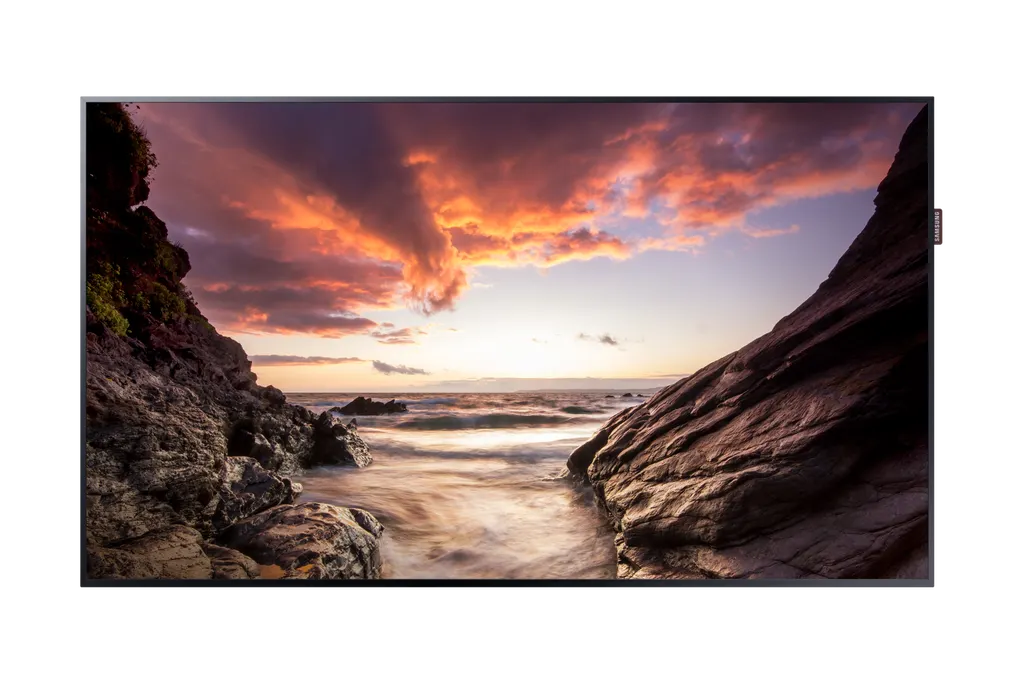
Samsung PH55F-P 55-inch Digital Signage Display

Screen size
‎55"‎
Resolution
1,920 x 1,080
Brightness
700 nit
Contrast
4,000:1
WhatsApp
Priceon request
QuotationWithin 1 working day
DeliveryConfirmed with your quote, based on stock
XLSXDownload datasheet (PH55F-P_Specifications_levant.xlsx)
Overview

The Samsung PH55F-P is a 55-inch standalone signage display with MagicInfo Player S4 built in, so content can run without a separate media PC. It offers a 1920 x 1080 non-glare panel, IP5x dust protection and a 29.9 mm depth. Its 6.9 mm top and side bezels suit lobby screens and video walls in Doha, Lusail and Al Wakrah. Request a quote from SmartRooms Qatar.

What the Samsung PH55F-P is built to do

The Samsung PH55F-P is a 55-inch standalone display for digital signage, part of the PHF-P series. Its main job is to run looping content, menus, wayfinding and information without a separate media computer, because MagicInfo Player S4 runs inside the unit on the Tizen-based SSSP 4.0 platform. Content can be scheduled locally or from a central MagicInfo server, which suits organisations that manage several screens from one office.

The panel and build facts that matter

  • Resolution: 1920 x 1080 pixels with a 0.63 x 0.63 mm pixel pitch, suited to text and information read at normal viewing distance.
  • Non-glare front: a 25% glass haze rating reduces reflections from ceiling lights and daylight in lobbies and corridors.
  • Typical brightness of 700, a contrast ratio of 4,000:1 and 178/178 degree viewing angles.
  • Slim build: 29.9 mm depth, 6.9 mm top and side bezels and an 8.9 mm bottom bezel for a tidy wall-mounted look.
  • Dust resistance: IP5x certified, with an operating range of 0 to 40°C and 10 to 80% humidity, non-condensing.

Connectivity and built-in playback

The unit provides two HDMI inputs, one DisplayPort input and one DVI input, so laptops and media devices can be connected directly. RS232 input and output allow serial control, while an RJ45 network port and built-in Wi-Fi support network management. Two USB ports, one audio output and a stereo mini-jack audio input complete the set. The unit has no Bluetooth and no HDBaseT input, so plan cabling accordingly.

Where it fits across Qatar

  • Government reception in Msheireb: service queue and wayfinding information beside the front desk, managed from one office.
  • Private school in Al Wakrah: a corridor or staff room screen showing timetables and event announcements from scheduled playlists.
  • Hotel lift lobby in The Pearl: event and dining information kept within air-conditioned areas, matching the 0 to 40°C operating range.
  • Office video wall in Lusail: MagicInfo supports daisy-chained video walls, so several units can show one image across a wall.

Planning the installation

The set weighs 16.4 kg and the packed unit weighs 22.2 kg, so a two-person team is sensible for wall work. It uses a 400 x 400 mm VESA mounting pattern. Samsung lists the WMN4270SD wall mount and the STN-L4655E stand as optional accessories; confirm their fit against your wall and layout before ordering. Power draw is 187 W in on-mode and 0.5 W in sleep mode, the energy rating is B, and the power input is rated for 100 to 240 V at 50/60 Hz, which covers Qatar's 240 V, 50 Hz supply. We offer free site surveys, which we recommend before fixing any unit to a lobby or corridor wall. Quotations are usually issued within one working day, and we accept purchase orders (LPOs), government tenders including Monaqasat, and payment by bank transfer, cheque or purchase order.

If you are planning a single lobby screen or a multi-unit video wall, request a quote from SmartRooms Qatar and include the room size, wall type and number of units so we can prepare a complete proposal.

Highlights

  • 55-inch 1920 x 1080 panel with non-glare front
  • Embedded MagicInfo Player S4 on SSSP 4.0 platform
  • IP5x dust protection and 0 to 40°C operating range
  • 29.9 mm depth with 6.9 mm top and side bezels
  • Two HDMI, DisplayPort, DVI and RS232 in and out
  • MagicInfo daisy-chain video wall support and 400 x 400 mm VESA

Estimated timeline

Quotation within 1 working day · delivery timing depends on stock availability, and we confirm it with your quotation.

Specifications

52 specifications · Source: manufacturer · checked Oct 2026
Display14
Diagonal Size
‎55"‎
Panel Type
Edge slim
Resolution
1,920 x 1,080
Pixel Pitch (HxV, mm)
0.63(H) x 0.63(V)
Brightness (Typical)
700
Contrast Ratio
4,000:1
Viewing Angle (H/V)
178/178
Response Time
8ms
Color Gamut
72%
Glass Haze
25%
H-Scanning Frequency
30 ~ 81kHZ
Maximum Pixel Frequency
148.5MHz
V-Scanning Frequency
48 ~ 75HZ
Contrast Ratio (Dynamic)
MECA DCR
Connectivity20
HDMI In
2
DP In
Yes
DVI In
1
Tuner In
No
USB
2
Component In
No
Composite In
No
RGB In
DVI-I Common
IR In
No
HDBaseT In
No
Audio In
Stereo Mini Jack, RGB/DVI/HDMI
Audio Out
1
Video Out
Yes
Power Out
No
RS232 In
Yes
RS232 Out
Yes
RJ45 In
Yes
RJ45 Out
In
WiFi
Yes
Bluetooth
No
Power3
Power Supply
AC100 - 240 V~ (+/- 10%), 50/60Hz
Power Consumption (On Mode, W)
‎187‎
Power Consumption (Sleep Mode, W)
‎0.5‎
Dimension2
Set Dimension (WxHxD, mm)
‎1228.4 x 701.2 x 29.9‎
Package Dimension (WxHxD)
‎1335 x 182 x 812‎
Weight2
Set Weight
‎16.4‎
Package Weight
‎22.20‎
Operation Conditions2
Temperature
0℃~ 40℃
Humidity
10% ~ 80%, non-condensing
Mechanical Specification3
VESA Mount (mm)
‎400 x 400‎
Bezel Width (mm)
‎6.9(Top/Side), 8.9(Bottom)‎
Frame Material
Non-Glossy
Optional Feature2
Mount
WMN4270SD
Stand
STN-L4655E
Internal Player (MagicInfo)1
MagicInfo Daisychain Videowall Support
Yes
Eco1
Energy Efficiency
B
Certification and Compliance2
EMC
Class A
Safety
60950

Downloads

1 file from the manufacturer

Questions about PH55F-P

What is the Samsung PH55F-P used for?
The PH55F-P is a 55-inch display built for digital signage, such as menus, wayfinding, queue information, timetables and promotional loops. Its MagicInfo Player S4 runs inside the unit, so a separate media PC is not needed for simple playback. It suits reception areas, corridors and lobbies in ministries, schools, clinics and malls where one screen must run for long hours. Its 29.9 mm depth keeps wall-mounted installations low-profile.
Does it need a separate media player or PC?
Not for standard playback. The display includes MagicInfo Player S4 on the Tizen-based SSSP 4.0 platform, so playlists and schedules can run locally. A MagicInfo server can manage multiple units from a central location, which helps facilities teams in Doha run several screens without visiting each site. Confirm your content workflow with the SmartRooms Qatar team during the quotation stage.
Is the PH55F-P suitable for outdoor or sunlit areas in Qatar?
The PH55F-P has an operating temperature range of 0 to 40°C and 10 to 80% humidity, non-condensing. IP5x certification protects against dust, but it is not an outdoor rating. Qatar summers regularly exceed 45°C, so place it indoors in air-conditioned areas. The non-glare panel helps near windows, but confirm the exact location, airflow and direct sun exposure with SmartRooms Qatar before mounting.
What does the IP5x rating mean for dusty sites?
IP5x means the enclosure is protected against dust ingress to a level that limits harmful deposits inside the unit. This matters for sites affected by fine sand, such as logistics offices or operations rooms near the Industrial Area or Mesaieed. The display must still sit in a suitable indoor environment within its 0 to 40°C range. Ask SmartRooms Qatar for the full datasheet to check the exact certification scope.
Can several PH55F-P units form a video wall?
Yes. The source specification lists MagicInfo daisy-chain video wall support, so units can be linked to show one image across a wall. The bezels measure 6.9 mm at the top and sides and 8.9 mm at the bottom, which reduces visible seams. The number of panels, layout and cabling depend on the wall design, so send your target size and room layout to SmartRooms Qatar for a configured quotation.
Will it run on Qatar's 240 V power supply?
Yes. The power input is specified at AC 100 to 240 V, plus or minus 10%, at 50 or 60 Hz, which covers Qatar's 240 V, 50 Hz mains. Typical draw is 187 W in on-mode and 0.5 W in sleep mode. Plan a socket within reach of the mounting point, and confirm the supplied power lead and plug arrangement with SmartRooms Qatar, as the data does not list a plug type.
How heavy is it, and can it go on a standard wall?
The set weighs 16.4 kg and the packed unit weighs 22.2 kg, with a 400 x 400 mm VESA mounting pattern. Before mounting, we recommend a free site survey to check wall construction, fixings and mounting height. Load capacity of plasterboard, cladding or partition walls is a structural question, so confirm it on site rather than assuming it will carry the unit.
Which optional mount and stand are listed for this model?
Samsung lists the WMN4270SD as the optional wall mount and the STN-L4655E as the optional stand for this model. Both should be checked against the 400 x 400 mm VESA pattern and the 16.4 kg set weight before ordering. A stand suits a reception desk or exhibition space, while a wall mount suits corridors and lobbies. Send the room type with your request so the right accessory is quoted with the display.
How does it compare with the 43-inch and 49-inch models?
The source notes that the PHF series is offered in 43, 49 and 55-inch sizes, and this page covers the 55-inch PH55F-P. The 55-inch model suits larger reception areas, classrooms or meeting spaces where viewers stand several metres away. Choose the size by viewing distance and available wall space, and ask SmartRooms Qatar to compare the smaller versions if the room is compact.
How do we order several units for a school or ministry?
Schools and government offices can order through a purchase order or LPO, and public-sector buyers can use Monaqasat tenders. SmartRooms Qatar supplies the units, delivers to all eight municipalities of Qatar and offers professional installation. Quotations are usually issued within one working day, with payment by bank transfer, cheque or purchase order. Send the quantity, site list and mounting plan with your request.
Which connections should we plan for a laptop and a media device?
Plan an HDMI cable from a laptop or media device to one of the two HDMI inputs, or a DisplayPort cable to the DisplayPort input. A DVI input is also available. Network connection uses the RJ45 port, and Wi-Fi is built in, but Bluetooth is not. RS232 input and output allow serial control from a control system. Confirm your source devices and cable lengths before ordering.

Similar models

Sony FW-43BZ30L Sony FW-43BZ30L 43-inch 4K HDR Professional Display
43″ 3840 x 2160 440 nit
Elo Stylus Tray Elo Stylus Tray E574912 Stylus Holder for Elo Displays
Signage displays
Hikvision DS-D6122TH-D/C Hikvision DS-D6122TH-D/C 22-inch Electronic Class Board
22″ 1920 × 1080 600 cd/m²
Hisense 100DM66E Hisense 100DM66E 100-inch 4K UHD Digital Signage Display
100″ 3840 x 2160 500 nits
Hisense 100DM66GE Hisense 100DM66GE 100-inch 4K UHD Digital Signage Display
100″ 3,840 x 2,160 500 nits
Email Call