What does the Sony CAB-VGAHDMI1 do?
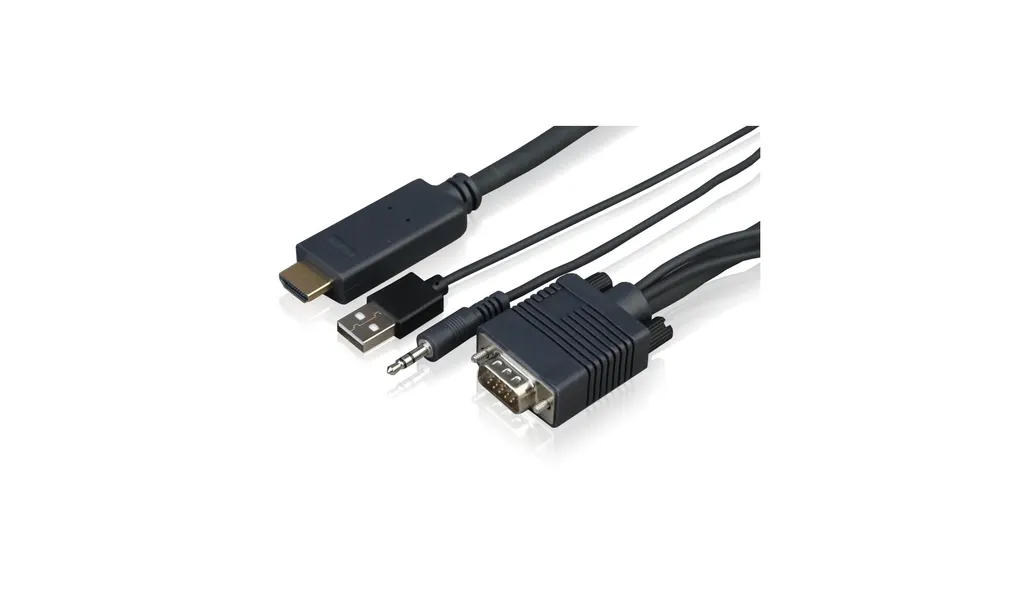
The CAB-VGAHDMI1 takes a VGA video signal with its audio and delivers them to an HDMI input. It is for connecting a source that only has a VGA output, such as an older laptop or PC, to a display that accepts HDMI. The source data describes it as a VGA plus audio to HDMI cable of 1 metre, so it is a simple link between two existing devices rather than a standalone device with its own features.
Who in Qatar needs this cable?
It suits IT and facilities teams in schools, universities, government offices and companies that are upgrading displays but still rely on VGA-equipped computers. A typical case is a meeting room in West Bay or a classroom in Al Rayyan where the presentation PC has a VGA port and the screen has HDMI. Procurement teams often buy a few units as spares, so the cable can be used to connect legacy sources while new equipment is phased in.
How long is the cable, and does that limit where I can use it?
The cable is 1 metre long. That means the source device must sit very close to the display, such as on a desk beside a screen or in a cabinet directly below a wall-mounted panel. It will not reach across a room or to a distant rack. If your layout needs a longer run, you should request a quote for a different cable length, and the SmartRooms Qatar team can help you check the options before you order.
Does the cable carry audio as well as video?
Yes. The product name describes it as a VGA plus audio to HDMI cable, which means the audio signal is carried through to the HDMI side along with the video. VGA on its own does not carry sound, so this cable is useful when a presenter needs both picture and sound on a display with an HDMI input. For the exact audio formats supported, the manufacturer data does not provide details, so confirm them with the team when you request a quote.
Can I use it with a display that only has a VGA input?
No. The cable's output is HDMI, so the display must have an HDMI input to receive the signal. If your screen only has VGA, this cable will not solve the problem, and you would need a different adapter or cable that matches the display's input. Check the rear or side ports of the display before ordering. The SmartRooms Qatar team can review the ports on both your source and display and confirm whether this cable is the correct choice for your setup.
What resolution can it handle?
The manufacturer data for this model does not list a maximum resolution or refresh rate, so this page does not state one. The resolution you can achieve depends on what the source PC outputs and what the HDMI display accepts. Before buying several units for a school or office, confirm the source resolution and the display's supported input with the SmartRooms Qatar team, so you are not surprised by a blank or distorted image on the day of installation.
Is it suitable for a classroom with an older teacher PC?
Yes, this is one of the most common uses. A teacher PC from an older refurbishment cycle may have a VGA port but no HDMI, while the classroom display or interactive panel uses HDMI. Place the PC close to the screen, connect the cable, and the teacher can present with both picture and audio. Because the cable is 1 m long, set the PC position first, then measure the distance so the cable reaches without strain.
Can it be used outdoors or in a hot, dusty location?
The manufacturer data for this model does not give an operating temperature range or an outdoor rating, so it should not be presented for outdoor use. Qatar summers exceed 45°C and dust storms are common, so for any location near windows, loading areas or open-air venues, check the environment with the SmartRooms Qatar team before ordering. For most installations this is an indoor, air-conditioned classroom or meeting room cable.
What should I check before ordering several units for a school or ministry?
Start by listing each source and display pair and measuring the distance between them, since the cable is a fixed 1 m. Confirm the VGA output on each source and the HDMI input on each display. Then send the list to SmartRooms Qatar and request a quote. Quotations are usually provided within one working day, and public bodies can issue a purchase order (LPO) or tender reference for the order.
How do I confirm my laptop or PC has the right output?
Look at the back or side of the laptop or PC for a 15-pin VGA port, which is a wide trapezoid-shaped connector. Then check the display for an HDMI port. If both are present, this cable is designed for that combination. If your device has only USB-C, a different adapter will be needed. The SmartRooms Qatar team can help you identify the correct cable once you send the model names of your source devices and displays.
Do you deliver and install this cable in Qatar?
SmartRooms Qatar supplies this cable and delivers it to all 8 municipalities of Qatar. Professional installation is available, and free site surveys can be arranged for larger projects, such as a classroom refit or a boardroom upgrade, to check cable routes and distances before the work begins. Installation details and timing are confirmed with your quotation, so request a quote and the team will advise on the right service for your site.
Is the cable covered by a warranty?
The product is covered by the manufacturer's warranty. The manufacturer data for this model does not state the warranty duration or its terms, so this page does not give those details. When you request a quote from SmartRooms Qatar, ask the team to confirm the warranty terms that apply to the cable you are buying, especially if you are ordering multiple units for a tender or a purchase order.