Thursday, 22 October 2026 · 11 Jumada I 1448 AH Sun – Thu · 9:00 – 18:00
+971 56 914 9477 العربية
WhatsApp

CDE5530

ViewSonic CDE5530 55-inch 4K Presentation Display

Screen size
55"
Resolution
3840 x 2160
Brightness
450 nits (typ.)
Contrast
1200:1 (typ.)
WhatsApp
Priceon request
QuotationWithin 1 working day
DeliveryConfirmed with your quote, based on stock
PDFDownload datasheet (CDE5530_Datasheet.pdf)
Overview

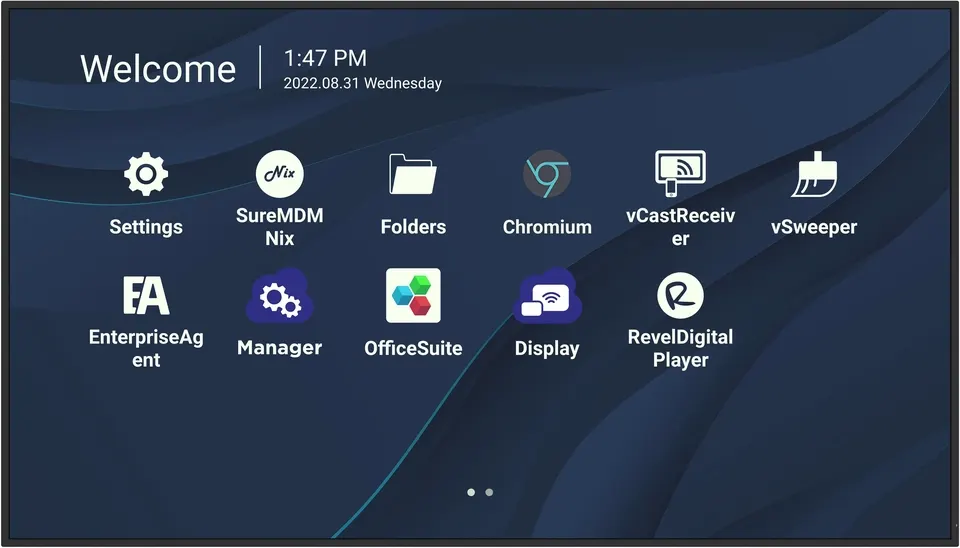
The ViewSonic CDE5530 is a 55-inch 4K presentation display from the CDE30 Series, built for continuous 24/7 use. It offers 450 nits typical brightness, a 3840 x 2160 panel, landscape and portrait orientation, and a single USB-C cable carrying video and 65W power. Its built-in Android 11 platform plays signage without a media player, making it suited to meeting rooms and reception areas across Doha.

What the ViewSonic CDE5530 is built to do

The ViewSonic CDE5530 is a 55-inch presentation display with a 3840 x 2160 native panel, part of the CDE30 Series that spans six sizes from 43 inches to 98 inches. The 55-inch model suits a meeting room, training room or school classroom where a 43-inch screen feels small but a much larger panel would overwhelm the space. It is designed for continuous operation, so the same unit can show a meeting agenda in the morning and looping announcements through the afternoon.

Picture quality and brightness that matter on a wall

The VA panel uses a DLED backlight and reaches 450 nits typical brightness. Typical contrast is 1200:1, rising to 5000:1 when dynamic contrast is enabled. A 6.5 ms response time and 178-degree horizontal and vertical viewing angles keep content readable from the side of a room, not only from the front row. The anti-glare surface, rated 3H hardness with 25 percent haze, reduces reflections from daylight and ceiling lights. The panel shows 1.07 billion colours (8-bit with FRC), and the backlight is rated for 50,000 hours.

Connectivity: one cable, wireless sharing and remote management

The USB-C port carries DisplayPort 1.2 video and provides 65 W power delivery, 100M Ethernet and USB 2.0, so a compatible laptop can connect with a single cable. The rest of the connections include:

  • Two HDMI 2.1 inputs supporting 3840 x 2160 at 60 Hz, with ARC on HDMI 1
  • One HDMI 2.0 output at 3840 x 2160 at 60 Hz for video tiling across screens
  • RS-232, RJ45 LAN, SPDIF, one USB 2.0 and one USB 3.0 port
  • A WiFi slot and speakers rated at 10 W x 2

Wireless sharing comes through myViewBoard Display, which mirrors a screen from a browser without a cable or download, and vCast, which offers split, extended and grouped screen layouts. AirPlay and Chromecast are also supported. Central management uses myViewBoard Manager, a web-based tool for broadcasting messages, pushing software updates and providing remote desktop support. Device usage tracking requires myViewBoard Manager Advanced. The display is listed for ProAV compatibility with Crestron, Extron and AMX systems.

One point to check when comparing models: the Windows slot-in PC option is listed for the CDE6530, CDE7530, CDE8630 and CDE9830, not the CDE5530. This unit runs on its own Quad-core ARM Cortex A55 processor with embedded Android 11, 4GB RAM and 32GB storage.

Where it fits in Qatar

In Doha offices, a 55-inch unit at the entrance of a floor in Msheireb or West Bay can show visitor information and room bookings around the clock. Mount it on an interior wall, away from sunlight coming through a glass facade, so the anti-glare surface works as intended.

A private school in Al Wakrah fitting out a staff room or classroom can use the display for timetables, announcements and lesson content. Portrait mode suits corridor notices and student work boards.

A shopping destination in Lusail or a hotel lobby in The Pearl can run promotional loops or wayfinding in portrait orientation. Because the display is rated for indoor operation between 0 and 40 degrees Celsius, it belongs in air-conditioned retail or hospitality space, not in an open atrium without reliable cooling.

Planning the installation

The unit weighs 13.4 kg net and 19.5 kg in its packaging, and measures 1233 x 703.5 x 71.5 mm. It uses a 600 x 400 mm VESA wall mount, and four wall mount screws are included. Plan for two people when lifting it onto a bracket, and check the wall structure before mounting.

Power input is 100 to 240 VAC plus or minus 10 percent, which covers Qatar's 240 V supply. Typical consumption is 82 W, and it draws below 0.5 W when off. Before ordering, confirm that the supplied power cables suit the sockets at your site, and plan the cable route for HDMI or USB-C connections. SmartRooms Qatar offers a free site survey before wall-mounting, along with professional installation and delivery to all eight municipalities. Request a quote for the CDE5530, and we will confirm lead times with the quotation based on stock.

Highlights

  • 55-inch 4K Ultra HD panel at 3840 x 2160 resolution
  • 450 nits typical brightness with anti-glare surface
  • Landscape and portrait orientation for flexible mounting
  • Single USB-C cable for video, 65W power and Ethernet
  • Quad-core processor, Android 11, 4GB RAM, 32GB storage
  • 7/24 operating hours with 50,000-hour backlight life rating

Estimated timeline

Quotation within 1 working day · delivery timing depends on stock availability, and we confirm it with your quotation.

Specifications

38 specifications · Source: manufacturer · checked Oct 2026
Display14
Panel Size
55"
Type/ Tech
TFT LCD Module. VA type, DLED backlight
Display Area (mm)
1209.6 (H) × 680.4 (V) (54.64” diagonal)
Native Resolution
3840 x 2160
Aspect Ratio
16:9
Colors
1.07G (8bits + FRC-)
Brightness
450 nits (typ.)
Contrast Ratio
1200:1 (typ.), 5000:1 (DCR enabled)
Response Time
6.5ms
Viewing Angles
H = 178, V = 178 typ.
Backlight Life
50,000 hours
Surface Treatment
Anti-Glaire, 3H hardness, Haze 25%
Bezel
9.9/9.9/9.9/9.9 mm (L/R/T/B)
Orientation
Landscape & Portrait
Platform3
Processor
Quad-core ARM Cortex A55
RAM
4GB
Storage
32GB
INPUT3
HDMI
2.1x2 ( 3840x2160 @60Hz, HDMI 1 supports ARC)
RS-232
x 1
WiFi Slot
x 1
OUTPUT2
HDMI
2.0 x1 ( 3840x2160 @60Hz )
SPDIF
x 1
LAN1
RJ45
x 1
USB2
Type A
2.0 x 1, 3.0 x 1
Type C
x1 ( (DP1.2, PD 65W, USB2.0, 100M ethernet)
SPEAKERS1
Value
10W x2
Embedded OS1
Value
Android 11
POWER2
Voltage
100-240 VAC +/- 10%
Consumption
82 W(typ.) < 0.5W(off)
OPERATING CONDITIONS2
Temperature (º C)
0 to 40℃
Humidity
10%-90% RH
Operating Hours1
Value
7/24
DIMENSIONS (W x H x D)2
Physical (inch / mm)
48.54 x 27.70 x 2.81in/ 1233 x 703.5 x 71.5mm
Packaging (inch / mm)
52.44 x 32.24 x 6.14 in./1332 x 819 x 156 mm
WEIGHT2
Net (lb / kg)
29.54 lbs/13.4 kg
Gross (lb / kg)
42.99 lbs/19.5 kg
REGULATIONS1
Value
cTUVus, FCC/ICES003, Energy star 8.0, EPEAT, Mexico NOM , Mexico Energy, EMC/CE , CB, EAC, UkrSEPRO, RCM, LBL, Flicker free, Green BOM, RoHS , ErP, REACH, SCIP, WEEE , Annex I, Annex II, TPCH , Packing waste, CA65
PACKAGE CONTENTS1
Value
1. Remote Control with batteries 2. Quick Start Guide 3. Power Cables 4. HDMI cable 5. USB-C cable 6. Wall Mount Screw x 4 7. RS232 adapter 8. Compliance statement
Downloads

17 files from the manufacturer
PDF Datasheets CDE5530_Datasheet.pdf 419 KB ViewSonic CDE5530 datasheets (PDF, 419 KB) PDF Manuals & guides CDE30_QSG.pdf 832 KB ViewSonic CDE5530 manuals & guides (PDF, 832 KB) PDF Manuals & guides CDE30_UG_ENG.pdf 13.4 MB ViewSonic CDE5530 manuals & guides (PDF, 13.4 MB) URL Manuals & guides · Opens on manufacturer site CDE5530 User Guide (Online View) ViewSonic CDE5530 manuals & guides (URL) PDF Drawings & CAD CDE5530_2D_drawing.pdf 706 KB ViewSonic CDE5530 drawings & cad (PDF, 706 KB) URL Drawings & CAD · Opens on manufacturer site CDE5530 3D drawing(stp) ViewSonic CDE5530 drawings & cad (URL) RFA Drawings & CAD · Opens on manufacturer site ViewSonic_Commercial Display_CDE5530.rfa ViewSonic CDE5530 drawings & cad (RFA) PDF Certificates & compliance CDE5530_PCF.pdf 946 KB ViewSonic CDE5530 certificates & compliance (PDF, 946 KB) PDF Certificates & compliance VS19113_BSMI_RoHS.pdf 123 KB ViewSonic CDE5530 certificates & compliance (PDF, 123 KB) PDF Software & firmware ViewBoard_Network_Requirements_ENG.pdf 2.9 MB ViewSonic CDE5530 software & firmware (PDF, 2.9 MB) URL Software & firmware · Opens on manufacturer site CDE5530_BE2_Firmware_Pack_20260310 ViewSonic CDE5530 software & firmware (URL) URL Software & firmware · Opens on manufacturer site CDE5530_Firmware_Pack_20260310 ViewSonic CDE5530 software & firmware (URL) URL Software & firmware · Opens on manufacturer site EAirplay ViewSonic CDE5530 software & firmware (URL) URL Software & firmware · Opens on manufacturer site vCast ViewSonic CDE5530 software & firmware (URL) URL Software & firmware · Opens on manufacturer site vCastSender for Linux ViewSonic CDE5530 software & firmware (URL) URL Software & firmware · Opens on manufacturer site vCastSender for Mac ViewSonic CDE5530 software & firmware (URL) URL Software & firmware · Opens on manufacturer site vCastSender for Windows ViewSonic CDE5530 software & firmware (URL)

Questions about CDE5530

What is the ViewSonic CDE5530 used for?
The CDE5530 is a 55-inch display built for presentations, corporate communication and digital signage that runs for long hours. Its 3840 x 2160 panel and 450 nits typical brightness keep text readable in meeting rooms, training rooms, reception areas and campus corridors. It suits organisations that want one screen to handle both meeting content and looped announcements throughout the working day.
Is it suitable for a 24-hour loop in a shopping mall in Lusail?
It is rated for 7/24 operating hours, and its backlight has a 50,000-hour life rating. The operating range is 0 to 40 degrees Celsius with 10 to 90 percent relative humidity, so it should sit in an air-conditioned unit rather than an open mall atrium. Confirm the exact spot with the SmartRooms Qatar team before the display is mounted.
Can we place it near a window in a Doha office during summer?
Only with careful planning. The rated operating temperature is 0 to 40 degrees Celsius, while outdoor temperatures in Qatar's summer regularly exceed 45 degrees. Keep the display indoors, away from direct sunlight through glazing and out of sheltered outdoor areas. A free site survey can check the position before installation.
Does it work with Qatar's 240 V mains supply?
Yes. The power input is listed as 100 to 240 VAC plus or minus 10 percent, which covers Qatar's 240 V supply. Typical consumption is 82 W, and standby draw is below 0.5 W when the unit is off. Before ordering, confirm with the SmartRooms Qatar team that the supplied power cables suit the sockets at your site.
How do I connect a laptop in a West Bay meeting room with one cable?
Use the USB-C port. It carries DisplayPort 1.2 video, delivers up to 65 W of power to a compatible laptop and provides 100M Ethernet, all over one cable. A USB-C cable is included in the box. This setup lets presenters charge their device and share the screen without managing separate video, power and network leads.
What wireless options does it offer for sharing screens?
myViewBoard Display mirrors a screen from a browser without a cable or download, which suits guests and short presentations. vCast provides split, extended and grouped screen layouts from any device. The display also supports AirPlay and Chromecast, so staff using different laptops and phones can share content without adapters.
Can IT teams manage several units remotely?
Yes. myViewBoard Manager is a web-based tool that lets administrators broadcast messages, including emergency notices, to multiple displays, push software updates and use Remote Desktop for support. Tracking device usage and generating insight reports requires myViewBoard Manager Advanced, so check which edition your IT team needs before ordering several units.
Does it have a built-in Windows PC?
No. The Windows slot-in PC option described for the series applies only to the CDE6530, CDE7530, CDE8630 and CDE9830. The CDE5530 runs on its own Quad-core ARM Cortex A55 processor with embedded Android 11, 4GB RAM and 32GB storage. If your staff need Windows applications on the screen, ask the team about a model that supports the slot-in PC.
Can a hotel lobby in The Pearl use it for portrait wayfinding?
Yes. The CDE5530 supports both landscape and portrait orientation, so a 55-inch screen turned vertically can show directional signs, dining menus and event listings. Portrait mode suits narrow lobby walls and corridors. Because the lobby must be air-conditioned to stay within the 0 to 40 degrees Celsius operating range, confirm the environment during the site survey.
How is it mounted and how heavy is it?
It uses a 600 x 400 mm VESA wall mount, and four wall mount screws are included. The net weight is 13.4 kg and the physical size is 1233 x 703.5 x 71.5 mm. The packaged unit weighs 19.5 kg, so plan for two people when lifting it onto a bracket. A free site survey can check the wall and cable routing beforehand.
Can it be integrated with a Crestron, Extron or AMX control system in a boardroom?
The display is listed for ProAV compatibility with Crestron, Extron and AMX systems, and it has an RS-232 port with an adapter included in the box. For a boardroom in Msheireb with an existing control processor, the SmartRooms Qatar team can confirm the integration details with your AV contractor before you place an order.
Can a school in Al Wakrah order several units under a purchase order?
Yes. SmartRooms Qatar supplies this display against purchase orders (LPOs) and government tenders, including Monaqasat, and delivers to all eight municipalities of Qatar. A school ordering units for several classrooms can request one quotation covering all of them, usually issued within one working day. Payment can be made by bank transfer, cheque or purchase order.

Similar models

Sony FW-43BZ30L Sony FW-43BZ30L 43-inch 4K HDR Professional Display
43″ 3840 x 2160 440 nit
Elo Stylus Tray Elo Stylus Tray E574912 Stylus Holder for Elo Displays
Signage displays
Hikvision DS-D6122TH-D/C Hikvision DS-D6122TH-D/C 22-inch Electronic Class Board
22″ 1920 × 1080 600 cd/m²
Hisense 100DM66E Hisense 100DM66E 100-inch 4K UHD Digital Signage Display
100″ 3840 x 2160 500 nits
Hisense 100DM66GE Hisense 100DM66GE 100-inch 4K UHD Digital Signage Display
100″ 3,840 x 2,160 500 nits
Email Call