





Thursday, 22 October 2026 · 11 Jumada I 1448 AH Sun – Thu · 9:00 – 18:00
+971 56 914 9477 العربية
WhatsApp

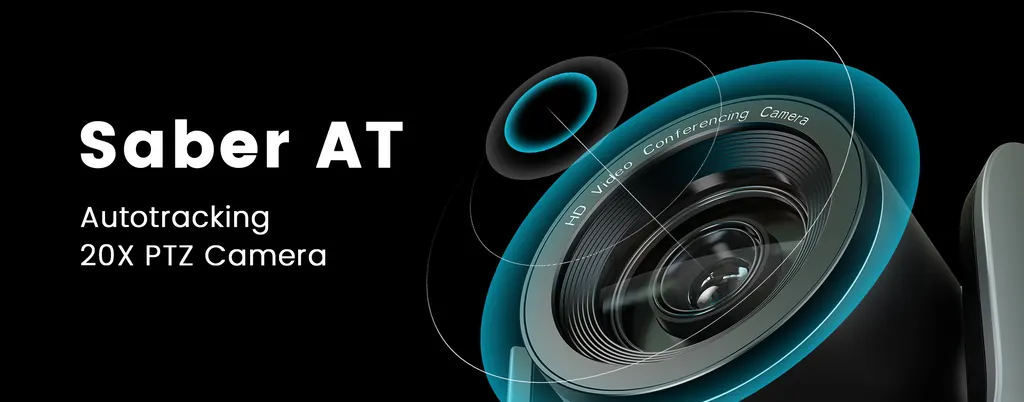
Saber AT

Angekis Saber AT 20x Optical Zoom PTZ Camera with Autotracking

Zoom
20x Optical
WhatsApp
Priceon request
QuotationWithin 1 working day
DeliveryConfirmed with your quote, based on stock
PDFDownload datasheet (Saber AT Data Sheet.pdf)
Overview

The Angekis Saber AT is a PTZ camera for video conferencing with onboard autotracking, a 20x optical zoom and a 1/2.8-inch 2.4MP sensor. It outputs 1080p at up to 60 frames per second over HDMI, 3G-SDI, IP and USB-C, and accepts line-in audio through a 3.5mm jack. It suits lecture halls, boardrooms and event spaces in Qatar that need hands-free camera framing.

What the Angekis Saber AT does

The Angekis Saber AT is a PTZ camera built for rooms where one person speaks, moves and needs to stay in frame. It carries the design of the Saber series and adds autotracking that runs inside the camera itself. Shape and motion analysis lets it follow a subject without a separate tracking computer, so a presenter can walk across a stage while the image stays framed.

Imaging, zoom and frame rates that matter

The camera uses a 1/2.8-inch 2.4MP CMOS sensor and a 20x optical zoom. Its horizontal view runs from 60 degrees at the wide end to 3.2 degrees at telephoto, so one unit can cover a small meeting table and a distant speaker in a large hall. The 1080p output runs at up to 60 frames per second over HDMI and 3G-SDI, which keeps motion smooth for live broadcasts and recorded lectures.

  • Minimum illumination is rated at 0.01 lux.
  • 2D and 3D noise reduction are included.
  • White balance, exposure, focus and iris can be set to auto or manual.

Connectivity and control

Video leaves the camera through HDMI, 3G-SDI, IP over LAN and USB Type-C, which runs at USB 2.0. Line-in audio arrives through a 3.5mm jack. PoE+ support and a 1000M network port mean that, where the switch supports it, one network cable can carry power and IP video to the camera. Control is possible over RS232 or RS485 serial and over IP, with 10 presets on the remote controller and 128 presets over serial.

Where it fits in Qatar

In a lecture hall at a university in Education City, the 20x zoom can frame a lecturer at the front of the room while the feed goes to students studying off campus. In a government ministry boardroom in West Bay, automatic tracking lets a presenter be followed during a meeting with a team abroad without a camera operator. In a hotel conference room in The Pearl, the low-light rating and HDMI or USB-C outputs support recording or streaming of evening events. In a private school in Al Wakrah fitting out an assembly hall, the camera suits a teacher who moves between the stage and the floor.

What to plan before you order

The source data does not list the camera's dimensions, weight or operating temperature range, so confirm the installation environment and mounting position with the SmartRooms Qatar team before ordering. Qatar summers exceed 45 degrees Celsius, so confirm conditions for any unit near windows or outdoors. A free site survey checks sightlines to the presenter area, lighting at the camera position and cable routes. If you use a PoE+ switch, confirm its power budget covers every device connected to it.

Purchase orders and LPOs are accepted, which suits schools and government bodies buying more than one camera. Request a quote for the Angekis Saber AT, and our team will reply with a quotation, usually within one working day.

Highlights

  • Onboard autotracking that analyses shape and motion
  • 20x optical zoom with 60 to 3.2 degree horizontal view
  • 1080p at up to 60 fps over HDMI and 3G-SDI
  • Outputs include HDMI, 3G-SDI, IP, USB Type-C and 3.5mm line-in
  • PoE+ support with a 1000M network port
  • Pan -170 to +170 and tilt -30 to +90 degrees

Room fit

Tell us the room size and platform (Teams, Zoom or BYOD) and we confirm the right combination with your quotation.

Estimated timeline

Quotation within 1 working day · delivery timing depends on stock availability, and we confirm it with your quotation.

Specifications

25 specifications · Source: manufacturer · checked Oct 2026
Specifications25
Sensor
1/2.8 inch 2.4MP CMOS Sensor
Video Format
HDMI: 1920*1080P60/50/30/25/59.94/29.97/24/23.98; 1920*1080160/50/59.94; 1280*720P60/50/30/25/59.94/29.97 IP: Main Stream: 1920*1080@15~60;1280*720@15~60;1024*576@15~60 Sub Stream: 640*360@15~30 3G-SDI: 1920*1080P60/50/30/25/59.94/29.97/24/23.98; 1920*1080160/50/59.94; 1280*720P60/50/30/25/59.94/29.97 USB Type-C: NV12 :1920*1080p5;1280*720pl5;1024*576P25;800*448P30; YUY2:1920*1080p5;1280*720pl0;1024*576P15;800*448P30; MJPG:1920*1080P30; 1280*720P30; 1024*576P30; 800*448P30 H.264/HEVC: 1920*1080P30; 1280*720P30; 1024*576P30; 800*448P30
Zoom
20x Optical
Horizontal View Angle
60°(Wide) ~3.2°(Tele)
Preset
Remote controller: 10; Serial port: 128; Accuracy:0.1°
Pan Rotation Angle
-170° ~+170°
Tilt Rotation Angle
-30° ~+90°
Pan Rotation Speed
0.1°~120°/s
Tilt Rotation Speed
0.1°~80°/s
Control Port
RS232(RS485), IP
Video Port
LAN, HDMI, 3G-SDI, USB Type-C
Audio Port
3.5mm Line In
Network Port Speed
1000M
Noise Reduction
2D & 3D
Minimum lux
0.01 lux
White Balance
Auto/Manual/Auto tracking/Push/Indoor/Outdoor/Color Temperature
Exposure
Auto/Manual/Shutter Priority/Iris Priority/Brightness Priority
Anti-Flicker
OFF, 50Hz, 60Hz
Image Flip
Supported
Mirroring
Supported
Focus
Auto/Manual
Iris
Auto/Manual
Electronic Shutter
Auto/Manual
Gamma
Supported
Backlight Compensation
Supported

Downloads

2 files from the manufacturer

Questions about Saber AT

What is the Angekis Saber AT used for?
The Saber AT is a PTZ camera for meetings, lectures and events where a speaker must stay in frame without a camera operator. Its onboard autotracking follows a subject by analysing shape and motion, and its 20x optical zoom reaches a presenter at the far end of a large room. It suits organisations running hybrid meetings that need a steady, hands-free picture. Request a quote to confirm the fit for your room.
Does the autotracking need a separate computer or tracking device?
The autotracking is built into the camera, so it does not need a separate tracking device. It analyses shape and motion itself, which suits a teacher moving between the board and the desks in a classroom or a speaker crossing a stage. How it performs under your room's lighting and layout should be checked during a free site survey before you order.
How far can the zoom reach and how wide is the field of view?
The Saber AT has a 20x optical zoom, with a horizontal view angle from 60 degrees at the wide end to 3.2 degrees at telephoto. The wide setting covers a small meeting table, while the telephoto setting frames a speaker at the far end of a large hall. Optical zoom keeps detail sharper than digital cropping, which matters when a lecture is streamed to off-campus students. Confirm the seating distance during a site survey.
Which video outputs does it have, and can they run together?
The camera provides HDMI, 3G-SDI, IP over LAN and USB Type-C outputs. The product information states that Full HD video can run through USB, HDMI, SDI and LAN simultaneously, so a control room can record over SDI while a conferencing PC receives a USB feed. The USB Type-C port runs at USB 2.0 and supports lower settings than HDMI, so check the format table against your software before ordering.
What resolutions and frame rates do HDMI and SDI support?
HDMI and 3G-SDI both output 1920x1080 at 60, 50, 30, 25, 59.94, 29.97, 24 and 23.98 frames per second, and 1280x720 up to 60 frames per second. The IP main stream reaches 1920x1080 at 15 to 60 frames per second, with a sub stream at 640x360. The 25 and 50 frames per second options let you match an existing broadcast or recording system.
Can I use it for livestreaming from a PC over USB-C?
Yes, but at lower settings than HDMI or SDI. The USB Type-C output supports 1920x1080 at 30 frames per second in MJPG and H.264/HEVC formats, and 1280x720 at 30 frames per second in the same formats. For a student assembly or corporate town hall streamed at full 1080p60, HDMI or IP is the better choice, with the streaming encoder set to match.
Does it support PoE+, and what network speed does it use?
The Saber AT supports PoE+ and has a 1000M network port. PoE+ lets the camera be powered from a compatible switch over the same cable that carries its IP video, which can reduce cabling for ceiling or high-wall installations in a new fit-out. Confirm that your switch has enough PoE+ power budget for every connected device, and check cable lengths during the site survey.
How is the camera controlled, and how many presets can it store?
The control port supports RS232 or RS485 serial and IP. The remote controller stores 10 presets, and serial control can call up to 128 presets with 0.1 degree accuracy. Pan runs from -170 to +170 degrees and tilt from -30 to +90 degrees, at pan speeds of 0.1 to 120 degrees per second and tilt speeds of 0.1 to 80 degrees per second. It can be integrated with an existing room control system.
Will it perform well in dim halls and evening events?
The camera has a minimum illumination rating of 0.01 lux and includes 2D and 3D noise reduction. These features help in dimly lit venues such as a hotel ballroom in The Pearl or an evening panel at an event venue. Exposure can be set to auto, manual, shutter priority, iris priority or brightness priority. Check the actual light level at the camera position during the site survey.
Is the anti-flicker setting suitable for Qatar's 50 Hz mains supply?
Qatar's mains supply runs at 50 Hz, and the Saber AT's anti-flicker setting offers 50 Hz as well as 60 Hz and off. Selecting 50 Hz helps reduce flicker banding on screen when the room is lit by mains-powered fluorescent or LED fittings. Set it during commissioning and test it in the room before handover.
Can a university in Education City order several units under an LPO?
Yes. SmartRooms Qatar accepts purchase orders and LPOs, which suits universities and training centres equipping several lecture rooms with the same camera. Each room can be assessed through a free site survey to confirm mounting height, distance to the lectern and output connections before ordering. Request a quote listing the number of units and the rooms they will serve.
What should I plan for before mounting the camera?
The source data does not list the camera's dimensions, weight or operating temperature range, so confirm these with the SmartRooms Qatar team before fixing any mount. Plan the mounting point, distance to the presenter area, cable routes to the switch and control system, and lighting at the camera position. Because Qatar summers exceed 45 degrees Celsius, confirm the operating environment for any camera near windows or outdoors.

Similar models

Biamp Vidi 100 Biamp Vidi 100 4K Conferencing Camera
Cameras
Biamp Vidi 150 Biamp Vidi 150 4K Conferencing Camera
Cameras
Biamp Vidi 250 Biamp Vidi 250 4K Conferencing Camera
120 Degrees Zoom Certified
Biamp Vidi 280 Biamp Vidi 280 4K Conferencing Camera with Dual Sensors
Ultrawide Lens Zoom Certified
Biamp Vidi Content Cam 250 Biamp Vidi Content Cam 250 4K Whiteboard Content Camera Kit
120° Up to 5x digital zoom
Email Call




