






Barco
ClickShare Power Supply 100W
Barco ClickShare Power Supply 100W, 100-Watt Video Conferencing Accessory
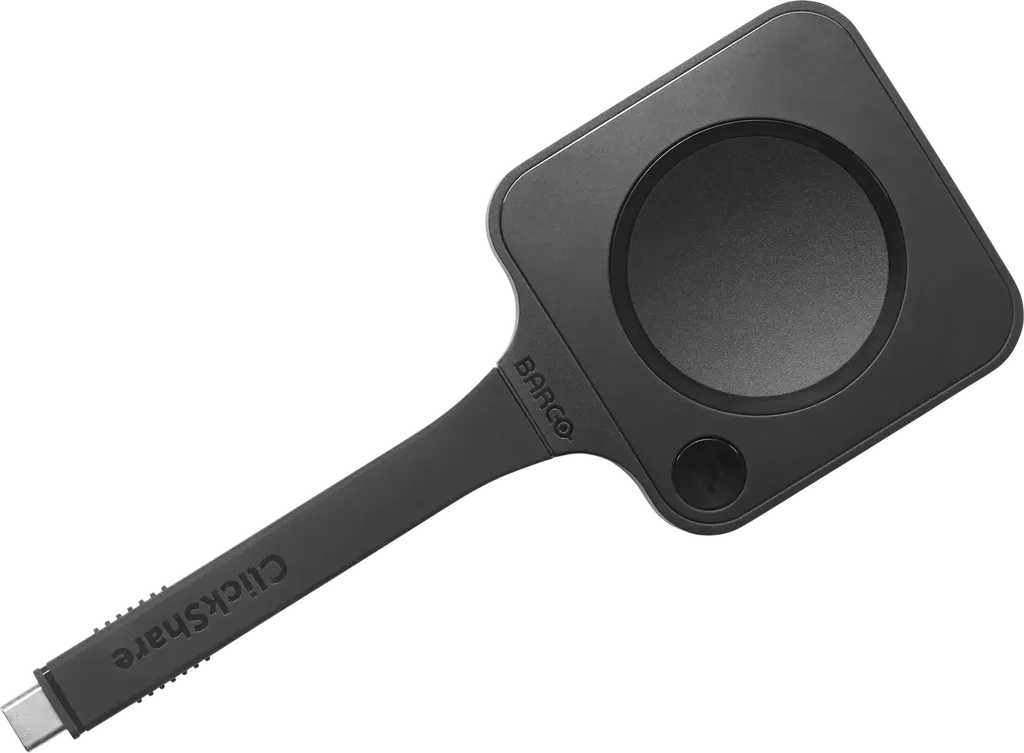
Next-gen ClickShare Button
Barco Next-gen ClickShare Button 4K Wireless Presentation Button
Priceon request
QuotationWithin 1 working day
DeliveryConfirmed with your quote, based on stock
Overview
The Barco Next-gen ClickShare Button is a wireless sharing button that plugs into a laptop's USB-C port and outputs up to 4K at 30fps to a ClickShare Base Unit, with no software or driver downloads. It supports Wi-Fi 6E across the 2.4GHz, 5GHz and 6GHz bands, uses WPA3-SAE in standalone mode and reaches up to 30 m. It suits meeting rooms, boardrooms and training rooms in Doha and Lusail where visitors bring their own laptops.
What the Next-gen ClickShare Button does
The Barco Next-gen ClickShare Button is a wireless sharing button for meeting rooms. A presenter plugs it into the USB-C port of a laptop, and the content is shared to the room display through the ClickShare system. This fifth-generation button keeps the simple plug-in workflow that ClickShare users already know, while adding Wi-Fi 6E connectivity and support for up to 4K output at 30 frames per second.
Performance and connectivity facts that matter
- 4K output: up to 3840x2160 at 30fps, suited to detailed slides, charts and video clips.
- Wi-Fi 6E: IEEE 802.11 a/b/g/n/ac/ax, operating across 2.4GHz, 5GHz and 6GHz bands.
- Reach: up to 30 m (100 ft) between the Button and the ClickShare Base Unit.
- Security: WPA3-SAE authentication in standalone mode.
- Connector: USB Type-C 3.1 Gen1 with USB-C DisplayPort Mode.
For IT and facilities teams, the practical benefit is that guests can share without installing software or drivers. The product is listed as compatible with all major operating systems, so a mixed set of visiting laptops can use the same button without extra setup on the venue side.
Where it fits in Qatar
In a boardroom in West Bay hosting a visiting delegation, the first minutes of a meeting are often lost to connecting laptops to the display. A guest who plugs in the button and shares immediately keeps the agenda on track.
In a lecture hall at Education City, several lecturers and visiting researchers may present within one session. A single button that moves between laptops is simpler to manage than separate cables for each presenter.
In a hotel conference room in Lusail running a client workshop, attendees arrive with different laptops and operating systems. The same button can serve every session of the workshop, with no software to install on each device.
What to plan for before you order
The button measures 16 x 63 x 161.3 mm and weighs 88 g, so it is small enough to keep at the presenter's lectern or near the room display. Its operating range is 0 to 40 degrees C with 0 to 85% relative humidity, non-condensing. Summer temperatures in Qatar often exceed 45 degrees C, so keep it in air-conditioned rooms and away from hot cars, sunny windowsills and outdoor kiosks. If you are unsure about a specific space, SmartRooms Qatar can arrange a free site survey before you commit.
Power comes over USB, rated at 5V DC, with 600mA typical and 900mA maximum draw. Check that each laptop port can supply this current. For projects covering several rooms, send a room list with quantities. SmartRooms Qatar supplies the equipment, delivers to all eight municipalities of Qatar and offers professional installation. Schools and government buyers can work with purchase orders (LPOs) and tenders, and payment is accepted by bank transfer, cheque or purchase order.
Request a quote from SmartRooms Qatar with your room count and laptop types, and we will send a quotation for the Barco Next-gen ClickShare Button.
Highlights
- Up to 4K (3840x2160) output at 30fps
- USB Type-C 3.1 Gen1 with USB-C DisplayPort Mode
- Wi-Fi 6E across 2.4GHz, 5GHz and 6GHz bands
- WPA3-SAE authentication in standalone mode
- Up to 30 m reach to the ClickShare Base Unit
- No software or driver downloads needed
- Powered over USB: 5V DC, 600mA typical
Room fit
Tell us the room size and platform (Teams, Zoom or BYOD) and we confirm the right combination with your quotation.
Estimated timeline
Quotation within 1 working day · delivery timing depends on stock availability, and we confirm it with your quotation.
Specifications
11 specifications · Source: manufacturer · checked Oct 2026
General specifications11
- Video outputs
- Up to 4K (3840x2160) 30fps
- Connectors
- USB Type-C 3.1 Gen1, supports USB-C DisplayPort™ Mode
- Authentication protocol
- WPA3-SAE in stand alone mode
- Wireless transmission protocol
- IEEE 802.11 a/b/g/n/ac/ax
- Reach
- Max. 30m (100ft) between ClickShare Button and ClickShare Base Unit
- Frequency band
- 2.4GHz, 5GHz and 6GHz
- Temperature range
- Operating: 0°C + 40°C (+32°F to +104°F) Storage: -20°C to +60°C (-4°F to + 140°F)
- Humidity
- Storage: 0 to 95% relative humidity, non-condensing Operation: 0 to 85% relative humidity, non- condensing
- Dimensions (HxWxD)
- 16 x 63 x 161.3 (mm)
- Power consumption
- Powered over USB 5V DC 600mA Typical 900mA Maximum
- Weight
- 88gr
Downloads
3 files from the manufacturerQuestions about Next-gen ClickShare Button
What is the Barco Next-gen ClickShare Button used for?
It is a wireless sharing button for meetings. A presenter plugs it into the USB-C port of a laptop and shares the screen with the room display through the ClickShare system. The same button can also be used to join video calls wirelessly, which suits meeting rooms, boardrooms and training rooms where people arrive with their own laptops and need to start quickly.
Do visitors need to install software or drivers to share?
No. The manufacturer lists the button as requiring no software or driver downloads, so a visitor can plug in and share from a personal laptop. For a hotel conference room in Lusail hosting a client workshop, attendees can present without asking venue IT staff for access. Confirm that your laptop's USB-C port supports DisplayPort before the event.
What is the maximum resolution it can share?
The button outputs up to 4K, which is 3840x2160 pixels at 30fps. That suits slides with detailed charts, large drawings and video clips shown on a big display. Because content is shown at up to 30 frames per second, plan for presentations and standard video rather than fast, high-frame-rate motion.
Which Wi-Fi standards and frequency bands does it support?
It supports IEEE 802.11 a/b/g/n/ac/ax and operates across the 2.4GHz, 5GHz and 6GHz bands, which is the Wi-Fi 6E range. The 6GHz band gives the connection access to additional spectrum where the network supports it. Ask your IT team which band the meeting room network uses before installation, so the setup matches the existing Wi-Fi.
How far can the button be from the ClickShare Base Unit?
The maximum reach is 30 m (100 ft) between the Button and the ClickShare Base Unit. In a lecture hall at Education City, where a presenter may stand at the front or move along the stage, measure the furthest likely position before placing the base unit. SmartRooms Qatar can arrange a free site survey to confirm placement.
How secure is the connection?
The button uses WPA3-SAE authentication in standalone mode. For corporate or government meeting rooms, IT teams should check that this fits their network security policy and that the button and base unit are configured according to the manufacturer's guidance. SmartRooms Qatar can discuss the setup with your team during the quotation process.
How is the button powered?
It is powered over USB, rated at 5V DC, with a 600mA typical and 900mA maximum current draw. Because power comes through the USB connection, the laptop port must be able to supply that current. The source data does not describe a separate power adapter, so do not assume one is included; confirm the full package in your quotation.
Can it be left in a hot car or outdoor kiosk in Doha?
No. Its operating range is 0 to 40 degrees C with 0 to 85% relative humidity, non-condensing. Storage is rated from -20 to +60 degrees C. Summer temperatures in Qatar often exceed 45 degrees C, so keep the button in air-conditioned rooms and away from hot cars, sunny windowsills and outdoor kiosks.
What laptop connection do we need?
The button uses USB Type-C 3.1 Gen1 and supports USB-C DisplayPort Mode, so each laptop needs a USB-C port with DisplayPort support. The product is listed as compatible with all major operating systems. For a mixed fleet of laptops, ask IT to check the USB-C port on each model before ordering.
Is it suitable for a boardroom in West Bay that hosts visiting delegations?
Yes, the guest-friendly approach suits this use. Visiting delegates can plug in and share from their own laptops without installing software, so the start of the meeting is not spent on setup. Confirm the room layout and the distance to the base unit, then request a quote covering every boardroom and breakout room you plan to equip.
How should a school in Al Wakrah order several units?
Send SmartRooms Qatar a list of rooms with the number of buttons needed and the laptops in use. A quotation usually comes within one working day. Schools can issue a local purchase order (LPO), and orders are delivered to all eight municipalities of Qatar, with professional installation available. Payment is accepted by bank transfer, cheque or purchase order.
Is the button covered by a warranty?
Yes, products supplied by SmartRooms Qatar are covered by the manufacturer's warranty. The source data used for this page does not state a warranty period or terms, so the quotation will set out the warranty information relevant to your order. Ask for those details before issuing a purchase order.



