





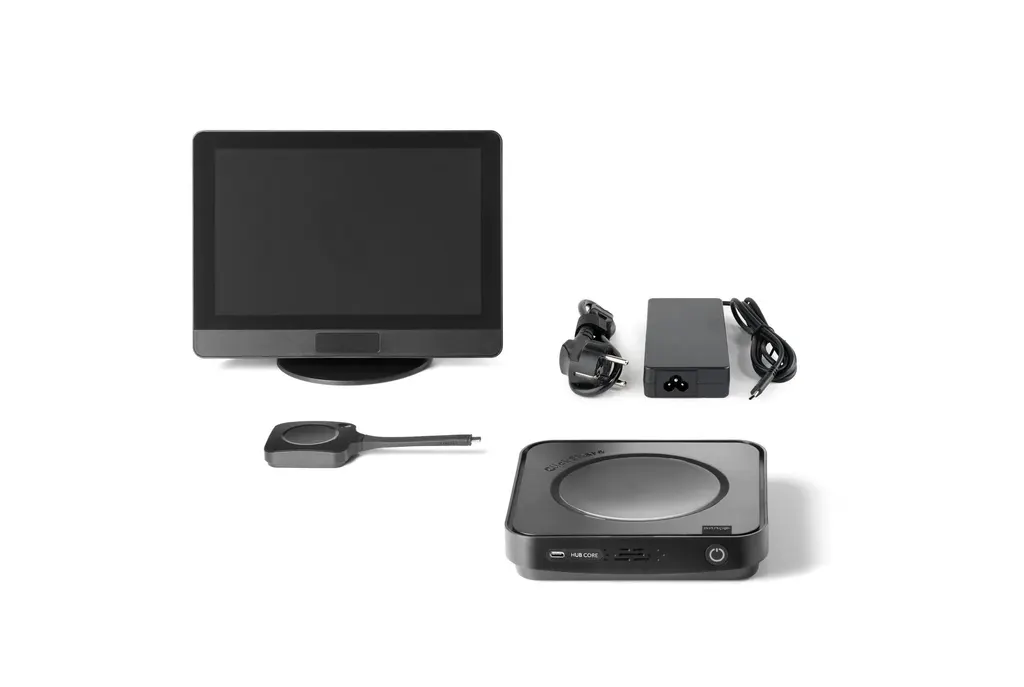
ClickShare Hub Core and Control Panel Kit
Barco ClickShare Hub Core and Control Panel Kit Video Conferencing System
- Video
- 1280*800 @60Hz
- Microphones
- Yes
- Platforms
- FCC/CE
- Connectivity
- USB Type-C 3.2 Gen1
Barco's ClickShare Hub Core and Control Panel Kit is a wireless video conferencing room system for Microsoft Teams Rooms. Participants start meetings from a 10.1-inch touchscreen control panel, and presenters share 4K content from a ClickShare Button. It offers a UW5K HDMI output and a Gigabit Ethernet port. Suited to meeting rooms in Doha, West Bay and Lusail that connect with teams abroad.
What the kit is and what it includes
The Barco ClickShare Hub Core and Control Panel Kit combines a wireless base unit with a touchscreen control panel, so a meeting room can be started, shared and managed from one place. It runs Microsoft Teams Rooms, which requires a Microsoft Teams Rooms license, and the system runs Android under the Microsoft Device Ecosystem Platform. The box holds the Hub Core base unit, a 5th generation ClickShare Button, the control panel, a 10 m USB-C cable for the panel, an external power supply and power cord, and mounting parts including an L-shape plate, a round base and a screw pack.
Control panel and everyday use
The 10.1-inch projected capacitive touchscreen has anti-glare and anti-fingerprint coatings and supports up to four touch points. Its 300-nit brightness suits most meeting rooms, and a sensor wakes the panel when someone moves within about two metres. The panel draws power over USB-C from the base unit, up to 7.3 W, and its 1280 x 800 display at 60 Hz is used to start and manage meetings. The panel measures 254.5 x 187.9 x 76.9 mm and weighs 820 g.
Sharing, connectivity and outputs
Presenters share from the ClickShare Button over 2.4 GHz, 5 GHz and 6 GHz bands, using IEEE 802.11 a/b/g/n/ac/ax/be and Bluetooth 5.3, with a reach of up to 30 metres from the base unit. The base unit accepts 4K UHD input at 30 Hz over HDMI 2.0 and outputs UW5K (5120 x 2160) at 30 Hz over HDMI 2.0, plus a DisplayPort 1.4 output via USB-C. Only one source can appear on screen at a time, so the chair decides what the room sees. Rear connections include 1 Gbit Ethernet, HDMI, USB-A and USB-C ports, and there is a front USB-C port. The wireless BYOD function lets participants run other platforms such as Zoom, WebEx and Google Meet from their own laptops.
Where it fits in Qatar
A mid-sized meeting room in Lusail or West Bay that holds hybrid calls with colleagues in Europe or Asia suits this kit: one tap on the panel starts the Teams session, and a visitor can share a presentation from a laptop without cables. A boardroom in Msheireb where senior staff join from other cities can keep one clear feed on screen, because only one source shows at a time. In Education City, a seminar room used for lectures and guest speakers can run remote sessions with the same controls, and staff can plan the room's wiring around the Ethernet port.
Planning the installation
- Licensing: confirm a Microsoft Teams Rooms license for each room before ordering.
- Environment: the base unit's listed operating range is 0°C to 40°C, with a 35°C maximum at 3,000 m. Install it in an air-conditioned room, away from sunlit windows and hot cabinets.
- Cable routing: the cable is VW-1 flame rated and not plenum rated, so keep it out of plenum air spaces. Keep the fixed bend radius at 60 mm or more; 30 mm applies only temporarily during handling.
- Power: the power supply accepts 100 to 240 V, 50 to 60 Hz, which covers Qatar's mains supply. Confirm the cord plug against your sockets before delivery.
The base unit measures 37 x 180 x 180 mm and weighs 720 g. Both units have a Kensington lock, the system is managed through XMS Cloud, and the manufacturer's standard warranty is three years.
SmartRooms Qatar supplies the kit across all eight municipalities of Qatar and can arrange professional installation. Free site surveys help you position the control panel and plan cable routes before any work starts. Request a quote, and the team will usually reply within one working day with a quotation that can be issued against a purchase order or LPO.
Highlights
- Start meetings with one tap on a 10.1-inch touchscreen control panel
- 4K UHD content sharing from a 5th generation ClickShare Button
- Wireless sharing across 2.4, 5 and 6 GHz bands
- Requires a Microsoft Teams Rooms license; runs Android (MDEP)
- External USB-C power supply: 100 to 240 V input, up to 180 W
- Managed through XMS Cloud, with Kensington lock and 3-year warranty
Room fit
Tell us the room size and platform (Teams, Zoom or BYOD) and we confirm the right combination with your quotation.
Estimated timeline
Quotation within 1 working day · delivery timing depends on stock availability, and we confirm it with your quotation.
Specifications
General Specifications31
- Operating system
- Android (MDEP)
- Microsoft Teams Rooms license required
- Yes
- System requirements
- For ClickShare App. Minimum: Intel Core i3 or AMD Ryzen 5, 8GB RAM, Windows 10 20HS; Intel Core i3 or Apple Silicon M1, 8GB RAM, macOS 11 Big Sur Recommended: Intel Core i5/Ultra 5 or AMD Ryzen 7, 8GB RAM, Windows 11 latest build; Apple Silicon M3, 8GB RAM, macOS latest build
- Video outputs
- HDMI: UW5K WUHD (5120*2160) @30Hz HDMI 2.0 eDP (Control Panel): HD (1280*800) @60Hz DP 1.4
- Video inputs
- 4K UHD (3840*2160) @30Hz HDMI 2.0
- Audio output
- USB-A 2.0/3.0 USB-C 2.0/3.0 HDMI 2.0
- ClickShare Buttons
- 1 ClickShare Button 5th Generation
- ClickShare App
- Desktop
- Maximum sources simultaneously on screen
- 1
- Noise Level
- Maximum 25 dBA @ 30°C
- Wireless transmission protocol
- IEEE 802.11 a/b/g/n/ac/ax/be and IEEE 802.15.1 BT 5.3
- Reach
- Max. 30m (100ft) between ClickShare Button and ClickShare Base Unit
- Frequency band
- 2.4GHZ, 5GHz and 6GHz DBS/HBS (DFS channels supported in select number of countries)
- Connections
- Back: 1x Ethernet LAN 1Gbit 1x USB-C Power delivery 3.1 EPR (for power adapter) 1x HDMI 2.0 output 1x USB-A 2.0/3.0 1x USB-C 2.0/3.0 1x USB-C 2.0/3.0 Device + USB-C DisplayPort™ output 1x USB-C 2.0 + USB-C DisplayPort™ output Front: 1x USB-C 2.0/3.0
- Temperature range
- Operating: 0°C + 40°C (+32°F to +104°F) Max 35°C (95°F) at 3000m Storage: -20°C to +60°C (-4°F to + 140°F) Operating: -10°C + 60°C (+14°F to +140°F) Storage: -20°C to +70°C (-4°F to + 158°F)
- Humidity
- Storage: 0 to 90% relative humidity, non-condensing Operation: 0 to 85% relative humidity, non-condensing Storage/Operation: 0 to 85% relative humidity, non-condensing
- Anti-theft system
- Kensington lock
- Certifications
- FCC/CE
- Network connection
- LAN
- Management and reporting
- Yes, XMS Cloud
- Warranty
- 3 years standard
- Dimensions (HxWxD)
- 37 * 180 * 180 (mm)
- Power consumption
- Operational: 140W (max)
- Power supply
- External USB-C charger 100W (PD3.0 SPR), 180W (PD3.1 EPR)
- Weight
- 720gr
- Box content
- ClickShare Hub Core Base Unit, 1 ClickShare Hub Button 5th Gen, Mounting disc, Safety manual, Quick setup guide, Control Panel, ClickShare 10M 20W USB-C AOC cable, L-Shape mounting plate, Round base, Screw pack, Quick setup guide, USB-C cable lock kit, Power cord, Power supply
- ClickShare 10M 20W USB-C AOC Cable (Directional) Cable Length / Diameter
- 10M / 6mm
- Interface
- USB Type-C 3.2 Gen1, DP 1.4
- Power Delivery
- 20W
- Bend Radius
- 60mm/30mm (Fixed/Temporarily) While a minimum bend of 30mm is acceptable during handling or routing, it must not be maintained as a permanent fixture
- Flame rated
- VW-1 (Not plenum reated)
Power supply7
- AC Input
- 100-240V~50-60Hz 2.4A
- DC Output
- 180W max (36V 5A) / 140W (28V 5A) / 100W (20V 5A) / 45W (15V 3A) / 27W (9V 3A) / 15W (5V 3A)
- Output Plug
- USB Type-C
- Input AC Type
- IEC60320-C6
- Energy Efficiency Level
- Comply with DOE standard Level VI
- Altitude
- 5,000 meters
- DC cable length
- 1.5m
Power cord4
- Color
- Black
- Length
- 0.5m
- Plug Type
- EU / US / UK / CN / CH / IN / ZA / ANZ
- Connector Type
- IEC60320-C5
Control Panel13
- Touchscreen
- 10.1-inch projected capacitive touchscreen with anti-fingerprint and anti-glare coatings, supporting up to 4 touch points for enhanced visibility and durability
- Resolution
- 1280*800 @60Hz
- Brightness
- 300 nits
- Contrast ratio
- Automatically detects in-room human movement within a 2-meter range and 90° field of view to wake the system.
- Viewing angle
- USB Type-C 2.0, DisplayPort Alt Mode, PD3.0 Recommend using the included ClickShare 10M USB-C AOC cable for optimal performance
- Human detection sensor
- 80° (Up/Down/Left/Right)
- Connections
- USB Type-C 2.0, DisplayPort Alt Mode, PD3.0 Recommend using the included ClickShare 10M USB-C AOC cable for optimal performance
- Anti-theft system
- Kensington lock
- Temperature range
- Operating: 0°C + 40°C (+32°F to +104°F) Storage: -20°C to +60°C (-4°F to + 140°F)
- Humidity
- Storage: 0 to 90% relative humidity, non-condensing Operation: 0 to 85% relative humidity, non-condensing
- Dimensions (HxWxD)
- 254.5 x 187.9 x 76.9 (mm)
- Power consumption
- Powered over USB from connected Base Unit Operational: 7.3W (max) Standby:
- Weight
- 820gr




