MVC S60
Yealink MVC S60 Microsoft Teams Rooms System with 360° Camera
- Field of view
- 360°
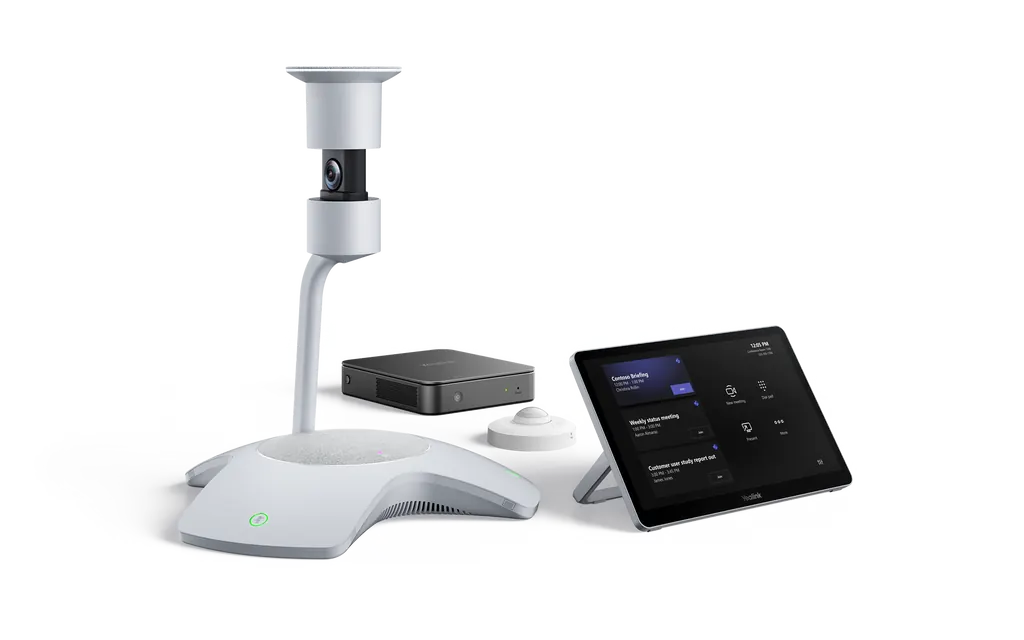
The Yealink MVC S60 is a Microsoft Teams Rooms system for small-to-medium meeting rooms, built around the SmartVision 60 all-in-one camera with a 360° field of view and a 10K dual-lens 360° camera system. The kit adds an MCore Pro mini-PC, an 11.6-inch MTouch Plus touch console and a RoomSensor. It suits a medium boardroom or training room where teams join from Doha and abroad.
What the MVC S60 kit contains
The Yealink MVC S60 Microsoft Teams Rooms on Windows kit brings four components into one room system: the SmartVision 60 all-in-one camera, the MCore Pro mini-PC, the MTouch Plus touch console and a RoomSensor. The configuration catalogued as MVC S60-C5-000 is listed for medium meeting rooms and includes all four, so your installer works from a single package rather than sourcing parts separately.
Camera and audio built for a medium room
The SmartVision 60 pairs a 10K dual-lens 360° camera system with a 60° vertical field of view and 5x digital zoom. Six microphone arrays handle meeting audio, while a 6+1 array set processes AI audio. A 7W speaker covers the room, and Multi-Stream IntelliFrame can show individual video feeds of up to four in-room active speakers beside the panoramic view. Speaker tracking, voice transcription, Cortana voice assistant and an automatic privacy cover are also built in.
Touch control, content sharing and connections
The MTouch Plus has an 11.6-inch narrow-bezel IPS display at 1920 x 1080. Its screen tilts between 30° and 70° to the desktop, and the support frame adjusts from 50° to 180°, so it works as a desk unit or a wall-mounted panel. Presenters can connect over HDMI or USB-C, and wireless sharing is available with the WPP30 presentation pod. The MCore Pro provides three HDMI outputs with CEC, four USB 3.0 Type-A ports, Wi-Fi 802.11 a/b/g/n/ac/ax, Bluetooth 5.2 and a 10/100/1000M Ethernet port, running on an 11th Gen Intel Core i5 with 8 GB memory and a 128 GB SSD.
Where it fits in Qatar
- A private school in Al Wakrah equipping a staff meeting room where department heads join colleagues from Doha through Teams.
- A consultancy office in West Bay or The Pearl running management meetings where clients or partners join from abroad.
- An energy project team in Mesaieed or Ras Laffan reviewing plans with head office staff in Doha, using the touch panel to share drawings.
Planning the installation before you order
Measure the wall or shelf where the camera will sit and check the sightline from the table to it. SmartRooms Qatar offers free site surveys, and we recommend one before any wall-mounting of the MTouch Plus. Keep these points in your plan:
- Use Yealink-certified USB 3.0 cables in 15 m or 30 m lengths to protect system stability.
- Allow for a single CAT5e run between the TV area and the table, which the data sheet says carries both data and power.
- Confirm the RoomSensor position within its 30 m Bluetooth reach.
- Keep the system in an air-conditioned room. The source does not list an operating temperature range, so confirm the environment with our team.
Send us your room dimensions and expected number of participants, and the SmartRooms Qatar team will prepare a quotation for the MVC S60 kit with installation options. Request a quote today, and we typically respond within one working day.
Highlights
- SmartVision 60 360° camera with 10K dual-lens 360° camera system
- 11.6-inch narrow-bezel MTouch Plus console at 1920 x 1080
- MCore Pro mini-PC: 11th Gen Intel Core i5, 8 GB, 128 GB SSD
- Three HDMI outputs with CEC on the MCore Pro
- RoomSensor detects occupancy, temperature, humidity and light
- Preloaded with Windows 11 IoT Enterprise and Teams Rooms app
Room fit
Tell us the room size and platform (Teams, Zoom or BYOD) and we confirm the right combination with your quotation.
Estimated timeline
Quotation within 1 working day · delivery timing depends on stock availability, and we confirm it with your quotation.
Specifications
Package Content1
- Details
- MCore Pro, Gen-3 Mini-PC MTouch Plus, Gen-3 touch panel SmartVision 60, All-in-One Audio and Video integration machine
Preload1
- Details
- Windows 11 IoT Enterprise X64 Windows 11 IoT Enterprise License Microsoft Teams Rooms App, support Skype for Business on-premise/online and Teams meetings Yealink RoomConnect
MCore Pro, Gen-3 Mini-PC5
- Memory
- 8 GB (2 x 4GB)
- Storage
- 128 GB SSD
- Wi-Fi
- IEEE 802.11 a/b/g/n/ac/ax
- Bluetooth
- BT 5.2
- Details
- 11th Gen Intel® Core i5 3x HDMI video output with CEC supported TPM2.0 Kernel DMA EDID 1 x Yealink MTouch port (RJ45), connect to MTouch Plus/MTouch E2 4 x USB 3.0 Type-A 1 x 10/100/1000M Ethernet port 1 x Power port 1 x Security lock slot, Integrated cable management
MTouch Plus1
- Details
- 11.6-inch narrow bezel IPS display 1920 x 1080 video resolution Angle between screen and desktop (30° ~ 70°) Adjustable angle of support frame (50° ~ 180°) Support wired and wireless (with WPP30) content sharing Support multi-screen control* Support third-party screen sharing* Support external PD power supply to power the sharing device Support HDMI/USB-C video input Support desktop placement, desktop fixed, wall-mounted deployment
SmartVision 603
- HFOV
- 360°
- VFOV
- 60°
- Details
- 2 x Microphone Mute/Unmute button 1 x Camera Mute/Unmute button 1 x USB Type-C 3.0 interface 1 x 15V/2.4A DC power supply Interface 1 x Reset (reset hole) Support Multi-Stream IntelliFrame (on device) Support Cortana voice assistant Support voice transcription Support automatic privacy cover
Package Features3
- N.W/CTN
- 3.2 kg
- G.W/CTN
- 5.5 kg
- Carton Meas
- 402mm x 393mm x 430mm