





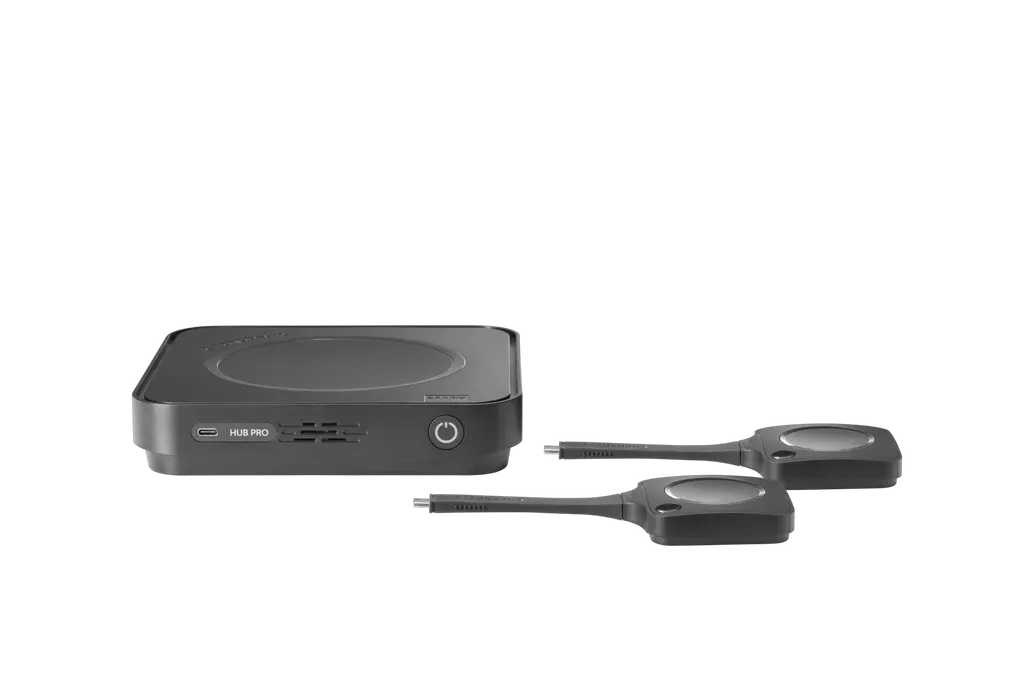
ClickShare Hub Pro
Barco ClickShare Hub Pro Wireless Video Conferencing Room System
- Microphones
- Yes
- Platforms
- FCC/CE
Barco ClickShare Hub Pro is a modular wireless room system for hybrid meetings. Meetings start from the ClickShare Control Panel, which is not included in this package. Two ClickShare Buttons share 4K content, and dual display support lets one room use two screens. It works with Microsoft Teams Rooms and can run other video platforms. Suited to boardrooms in West Bay and Lusail.
How the Hub Pro runs a hybrid meeting
The Barco ClickShare Hub Pro is the base unit of a wireless room system built for hybrid meetings, where some people sit in the room while others join remotely. A meeting starts from the ClickShare Control Panel with a single tap, so participants can begin quickly. The Control Panel is a separate item and is not included in this package, so add it to your quotation if your room needs it.
The unit suits IT teams that want one platform across many room types. It runs Android on the Microsoft Device Ecosystem Platform, requires a Microsoft Teams Rooms license, and can be managed and reported on through XMS Cloud.
Display, sharing and wireless facts that matter
- Dual display output: HDMI-1 supports UW5K WUHD at 5120 x 2160 and HDMI-2 supports 4K UHD at 3840 x 2160, both at 30Hz over HDMI 2.0.
- Wireless sharing: two 5th generation ClickShare Buttons share 4K content at up to 30 m from the base unit.
- Radio: IEEE 802.11 a/b/g/n/ac/ax/be and Bluetooth 5.3 across 2.4 GHz, 5 GHz and 6 GHz bands.
- Connectivity: 1 Gbit Ethernet LAN, USB-C with DisplayPort output, two HDMI 2.0 outputs and a front USB-C port.
Dual display support is the main gain for busy rooms, since one screen can carry the call while the other shows shared material. The listed maximum is one source on screen at any moment, so plan the layout around that limit.
Where it fits in Qatar
A boardroom in West Bay: executives in Doha join a call alongside colleagues abroad. One screen keeps remote participants visible while the presenter shares a slide deck from a ClickShare Button.
A lecture or seminar room in Education City: a visiting speaker connects a laptop wirelessly, and remote guests join the session through Microsoft Teams Rooms without cables being run across the floor.
A multi-room rollout for a school in Al Wakrah or a sales office in Lusail: several rooms need the same setup and a single cloud view for the IT team to monitor them.
What to plan before you order
- Power: the power cable and power cord are not included in this package. The listed external USB-C chargers are rated 100W (PD 3.0) and 180W (PD 3.1 EPR), and the unit draws up to 160W.
- Environment: the operating range is 0°C to 40°C, with humidity from 0 to 85% non-condensing. Keep the unit in air-conditioned rooms away from sun-exposed glass, because outdoor temperatures in Qatar's summer can exceed 45°C.
- Noise: the listed maximum is 25 dBA at 30°C, which matters in quiet meeting rooms.
- Reach and placement: the Buttons work up to 30 m from the base unit. A free site survey confirms where the base unit, Ethernet port and displays should sit.
- Presenter devices: the ClickShare desktop app runs on Windows 10 or 11 or macOS 11 Big Sur or later, with 8GB RAM as the listed minimum.
The Hub Pro carries the manufacturer's standard three-year warranty and has a Kensington lock for physical security.
Ready to plan your room?
Request a quote from SmartRooms Qatar for the Hub Pro base unit, the ClickShare Buttons and any accessories your room needs. We deliver to all eight municipalities of Qatar, arrange professional installation, and usually issue quotations within one working day. Purchase orders (LPOs) and government tenders, including Monaqasat, are welcome.
Highlights
- Wireless 4K sharing through two 5th generation ClickShare Buttons
- Dual display support for two screens at the same time
- Works with Microsoft Teams Rooms and wireless BYOD for other platforms
- Management and reporting through XMS Cloud
- Standard three-year manufacturer warranty
- Operating range 0°C to 40°C for air-conditioned indoor rooms
Room fit
Tell us the room size and platform (Teams, Zoom or BYOD) and we confirm the right combination with your quotation.
Estimated timeline
Quotation within 1 working day · delivery timing depends on stock availability, and we confirm it with your quotation.
Specifications
General Specifications26
- Operating system
- Android (MDEP)
- Microsoft Teams Rooms license required
- Yes
- System requirements
- For ClickShare App Minimum: Intel Core i3 or AMD Ryzen 5, 8GB RAM, Windows 10 20HS; Intel Core i3 or Apple Silicon M1, 8GB RAM, macOS 11 Big Sur Recommended: Intel Core i5/Ultra 5 or AMD Ryzen 7, 8GB RAM, Windows 11 latest build; Apple Silicon M3, 8GB RAM, macOS latest build
- Video outputs
- HDMI-1: UW5K WUHD (5120*2160) @30Hz HDMI 2.0 HDMI-2: 4K UHD (3840*2160) @30Hz HDMI 2.0 eDP (Control Panel): HD (1280*800) @60Hz DP 1.4
- Video inputs
- 4K UHD (3840*2160) @30Hz HDMI 2.0
- Audio output
- USB-A 2.0/3.0 USB-C 2.0/3.0 HDMI 2.0
- ClickShare Buttons
- 2 * ClickShare Button 5th Generation
- ClickShare App
- Desktop
- Maximum sources simultaneously on screen
- 1
- Noise Level
- Maximum 25 dBA @ 30°C
- Wireless transmission protocol
- IEEE 802.11 a/b/g/n/ac/ax/be and IEEE 802.15.1 BT 5.3
- Reach
- Max. 30m (100ft) between ClickShare Button and ClickShare Base Unit
- Frequency band
- 2.4GHZ, 5GHz and 6GHz DBS/HBS (DFS channels supported in select number of countries)
- Connections
- Back: 1x Ethernet LAN 1Gbit 1x USB-C Power delivery 3.1 EPR (for power adapter) 2x HDMI 2.0 output 2x USB-C 2.0/3.0 1x USB-A 2.0/3.0 1x USB-C 2.0/3.0 Device + USB-C DisplayPort™ output 1x USB-C 2.0 + USB-C DisplayPort™ output Front: 1x USB-C 2.0/3.0
- Temperature range
- Operating: 0°C + 40°C (+32°F to +104°F) Max 35°C (95°F) at 3000m Storage: -20°C to +60°C (-4°F to + 140°F)
- Humidity
- Storage: 0 to 90% relative humidity, non-condensing Operation: 0 to 85% relative humidity, non-condensing
- Anti-theft system
- Kensington lock
- Certifications
- FCC/CE
- Network connection
- LAN
- Management and reporting
- Yes, XMS Cloud
- Warranty
- 3 years standard
- Dimensions (HxWxD)
- 37 * 180 * 180 (mm)
- Power consumption
- Operational: 160W (max) Standby:
- Power supply
- External USB-C charger 100W (PD3.0 SPR), 180W (PD3.1 EPR)
- Weight
- 720gr
- Box content
- ClickShare Hub Pro Base Unit, 2 ClickShare Hub Button 5th Gen, Mounting disc, Safety manual, Quick setup guide




