






Barco
ClickShare Power Supply 100W
Barco ClickShare Power Supply 100W, 100-Watt Video Conferencing Accessory
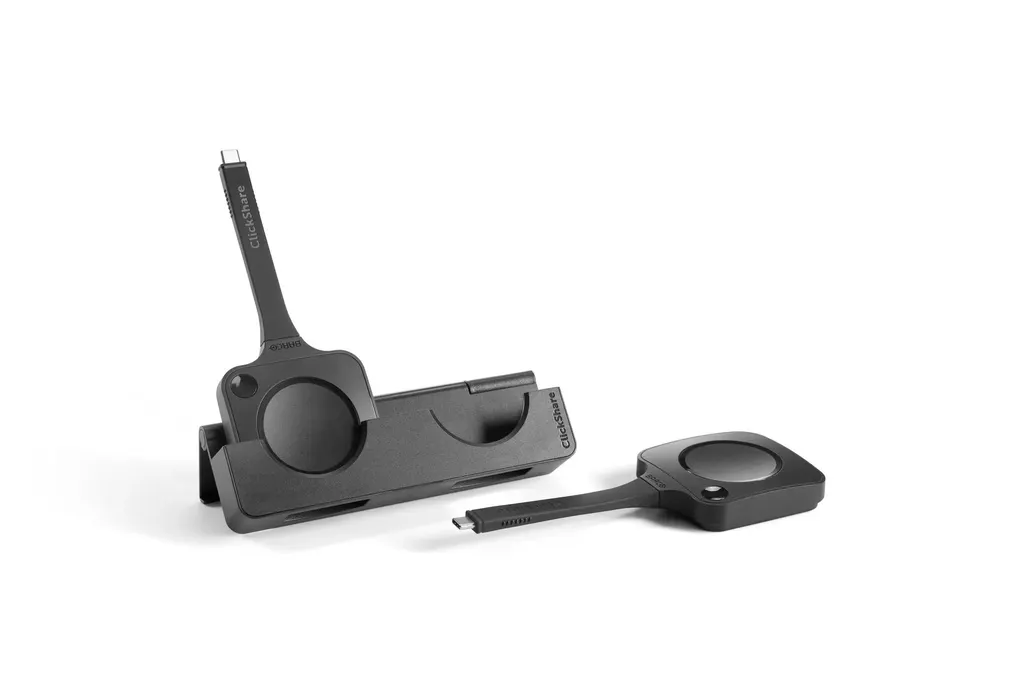
ClickShare 2-in-1 Tray
Barco ClickShare 2-in-1 Tray Accessory for ClickShare Buttons
Priceon request
QuotationWithin 1 working day
DeliveryConfirmed with your quote, based on stock
Overview
The Barco ClickShare 2-in-1 Tray is a holder for ClickShare Buttons, designed to take both the 5th generation and the earlier 4th generation Buttons. It measures 15.2 x 4.9 x 3 cm and weighs 171 g, so it is compact enough to keep on a table or shelf. It is included with the ClickShare Hub Pro and Control Panel kits and suits busy Doha meeting rooms.
What the ClickShare 2-in-1 Tray does on a meeting table
The Barco ClickShare 2-in-1 Tray is a holder for ClickShare Buttons, the wireless buttons people use to share content from their laptop or device onto a room display. Keeping the buttons together in one tray means they stay organised, are easy to locate and are ready when a meeting starts. In busy rooms, that small habit saves time and prevents buttons from going missing between sessions.
Compatibility with 5th and 4th generation Buttons
The tray is designed to accommodate the 5th generation ClickShare Buttons, and it still holds the previous 4th generation Buttons. That matters during a gradual upgrade, when a room may run both generations at once. One tray can keep the whole set together. Before ordering, count the buttons in each room and note their generation so you can plan quantities accurately.
Size, weight and what is included
At 15.2 cm high, 4.9 cm wide and 3 cm deep, weighing 171 g, the tray is small enough to sit at the edge of a conference table or on a shelf without taking up much room. The key details are below.
- Dimensions (HxWxD): 15.2 cm x 4.9 cm x 3 cm
- Weight: 171 g
- Included with: ClickShare Hub Pro and Control Panel kits
If your room already has a Hub Pro or Control Panel kit, the tray is listed as part of it. Ask the SmartRooms Qatar team to check your kit contents before you request a separate tray, so you do not duplicate something you already have.
Where it fits in Qatar
A corporate office in West Bay that holds regular meetings with teams abroad can keep its buttons in a fixed spot on the boardroom table, so the presenter can hand one out as soon as the call connects.
A university seminar room in Education City, where different departments share rooms through the day, benefits from a tray that stays with the room rather than with a particular lecturer.
A hotel meeting room in Lusail hosting back-to-back client sessions can reset quickly, with the buttons returned to the tray between events.
What to plan for before you order
- Count the ClickShare Buttons in each room and note their generation.
- Choose a table or shelf position close to the presenter's seat.
- Confirm which Hub Pro or Control Panel kit the room uses.
The source data does not give an operating temperature range for the tray, so confirm the room conditions with the SmartRooms Qatar team before placing it near a window or in an area without air conditioning. Summer temperatures in Qatar can exceed 45°C, so this check matters. Free site surveys are available if you are planning several rooms at once.
Requesting a quote
To add the tray to your room, request a quote from SmartRooms Qatar with the number of rooms, the button generations you use and the kit type. Quotations are usually sent within one working day. We deliver to all 8 municipalities of Qatar, can arrange professional installation, and accept LPOs, government tenders including Monaqasat, and payment by bank transfer, cheque or purchase order. Products are covered by the manufacturer's warranty.
Highlights
- Holds 5th generation ClickShare Buttons
- Also accommodates previous 4th generation Buttons
- Included with ClickShare Hub Pro and Control Panel kits
- Dimensions 15.2 x 4.9 x 3 cm, weight 171 g
- Compact tray for tidy, ready-to-use meeting tables
Room fit
Tell us the room size and platform (Teams, Zoom or BYOD) and we confirm the right combination with your quotation.
Estimated timeline
Quotation within 1 working day · delivery timing depends on stock availability, and we confirm it with your quotation.
Specifications
2 specifications · Source: manufacturer · checked Oct 2026
General Specifications2
- Dimensions (HxWxD)
- 15.2 cm * 4.9 cm * 3 cm
- Weight
- 171g
Downloads
2 files from the manufacturerQuestions about ClickShare 2-in-1 Tray
What is the Barco ClickShare 2-in-1 Tray used for?
It is a holder for ClickShare Buttons, keeping them organised and within reach in a meeting room, boardroom or classroom. The buttons stay together in one place, so presenters do not search for them before a session starts. It is designed for the 5th generation Buttons and still accommodates the previous 4th generation Buttons, which suits rooms with mixed sets.
Does the tray hold both 5th and 4th generation ClickShare Buttons?
Yes. The tray is designed for 5th generation Buttons and also holds the earlier 4th generation Buttons. This helps organisations in the middle of a staged upgrade, where a meeting room may run both generations side by side. Count the buttons in each room before ordering so you know how many trays and which mix of buttons you need.
Is the tray included with ClickShare kits?
Yes, the tray is included in the ClickShare Hub Pro and Control Panel kits. If your meeting room already runs one of these kits, the tray may already be part of your setup. Ask the SmartRooms Qatar team to check the kit contents when you request a quote, so you only add trays where they are genuinely needed.
What are the dimensions and weight of the tray?
The tray measures 15.2 cm high, 4.9 cm wide and 3 cm deep, and weighs 171 g. Its small footprint means it can sit at the edge of a conference table or on a shelf. Measure the space you have in mind, particularly on a crowded boardroom table, before you request a quote.
Will it suit a boardroom in West Bay that holds frequent calls with teams abroad?
It can, provided the boardroom uses ClickShare Buttons. A fixed tray keeps the buttons on the table, so the chair can hand one to each presenter as soon as a video call connects with teams abroad. Confirm the button count and generation with SmartRooms Qatar, then request a quote for the quantity you need.
Is it useful for a school in Al Wakrah fitting out several classrooms?
Yes, if the classrooms use ClickShare Buttons. Because the tray is compact, a school can place one in each room and keep the buttons near the display rather than in a staff room cupboard. Schools can order through a purchase order (LPO), and SmartRooms Qatar can quote for several rooms in one request.
Can I keep the tray near a window in a hot Doha room?
The source data does not give an operating temperature range for the tray, so we cannot confirm one. Keep it in an air-conditioned meeting room and avoid placing it on a sunlit window ledge. Summer temperatures in Qatar can exceed 45°C, so ask SmartRooms Qatar to confirm the room conditions before you decide on a position.
Can the tray be wall-mounted?
The source data does not describe a wall mount, so this page does not state one. The tray's small size and weight of 171 g point to a table or shelf position, which is the placement to plan for. If you need a fixed position in a crowded room, arrange a free site survey with SmartRooms Qatar first.
How many buttons does the tray hold?
The source data does not state the number of button slots, so we cannot give a capacity figure. Before ordering, count the ClickShare Buttons in each room, including any 4th generation units, and tell the SmartRooms Qatar team the total. This lets the quotation match your room layout and avoids buying more trays than you need.
How do we order trays for a multi-room project in Doha?
Send one request listing each room, the number of buttons, their generation and the Hub Pro or Control Panel kit used. Quotations are usually provided within one working day. SmartRooms Qatar delivers to all 8 municipalities of Qatar and accepts LPOs and government tenders, including Monaqasat, with payment by bank transfer, cheque or purchase order.
Is the tray covered by a warranty?
Products supplied by SmartRooms Qatar are covered by the manufacturer's warranty. The source data does not state a warranty length or terms, so ask the team to confirm the warranty details for the tray before you buy. Keep the quotation and purchase order together for your records.
Can SmartRooms Qatar install the tray and help with the wider ClickShare setup?
Professional installation is available, and a free site survey can confirm where the tray and its ClickShare kit should go. The tray is a simple accessory, so planning focuses on its position and on the kit it belongs to. Ask for the survey when you request a quote, particularly for boardrooms in Msheireb or Doha office towers.



