






Barco
ClickShare Power Supply 100W
Barco ClickShare Power Supply 100W, 100-Watt Video Conferencing Accessory
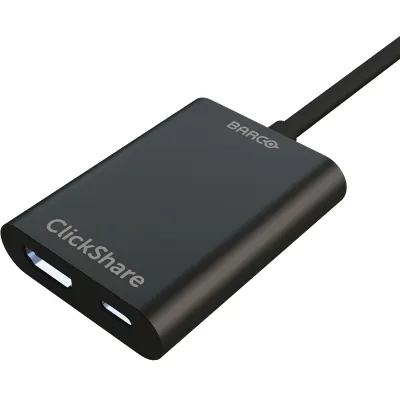
ClickShare USB-C Input converter
Barco ClickShare USB-C Input converter: HDMI and USB 3.2 to USB-C DisplayPort
Priceon request
QuotationWithin 1 working day
DeliveryConfirmed with your quote, based on stock
Overview
The Barco ClickShare USB-C Input converter accepts HDMI 2.0 and USB 3.2 Gen1 (5Gbps) inputs and outputs USB-C DisplayPort 1.2. It is a compact accessory measuring 60 x 30 x 180 mm and weighing 100 g, rated for operation between -10°C and 60°C. It suits Qatari meeting rooms and boardrooms where a laptop needs to reach a USB-C DisplayPort input. Request a quote from SmartRooms Qatar.
What this converter does
The Barco ClickShare USB-C Input converter is an accessory from the ClickShare series that sits between a source device and a screen or conferencing system with a USB-C DisplayPort 1.2 input. It accepts HDMI 2.0 and USB 3.2 Gen1 at 5Gbps on its input side and delivers the signal through a USB-C DisplayPort 1.2 output. Its practical value is that a laptop does not need to change its port to reach a display already fitted in the room.
Connection and size details that matter for planning
Check the ports before ordering. The inputs are HDMI 2.0 and USB 3.2 Gen1, and the output is USB-C DisplayPort 1.2. The receiving display or system needs a USB-C port that supports DisplayPort 1.2, and the source device must have one of the two input types.
- Inputs: HDMI 2.0 and USB 3.2 Gen1 (5Gbps)
- Output: USB-C DisplayPort 1.2
- Dimensions (H x W x D): 60 x 30 x 180 mm
- Weight: 100 g
- Operating and storage temperature: -10°C to 60°C
Environment and placement in Qatar
Summer temperatures in Doha and across Qatar can exceed 45°C, and cabinets, credenzas and AV racks can run hotter than the room around them. The published range of -10°C to 60°C describes the device itself, not the enclosure it sits in. Place the converter in a ventilated spot away from direct sunlight and heat sources, and confirm the installation space with the SmartRooms Qatar team before fitting it inside an enclosed unit.
Where it fits in Qatar
Three situations commonly call for an adapter like this:
- A private school in Al Wakrah refitting classrooms, where teachers bring HDMI laptops but the new display has only a USB-C DisplayPort input.
- A government office in Msheireb, where meeting-room staff laptops need to reach a newer USB-C screen without replacing each machine.
- A hotel meeting room in West Bay, where visiting presenters arrive with HDMI or USB 3.2 devices while the installed panel uses USB-C DisplayPort.
What to plan before you order
List every source in each room, from presenter laptops to fixed PCs, and count the USB-C DisplayPort ports on the display or collaboration system. At 100 g and 60 x 30 x 180 mm, the unit is easy to tuck into a cabinet or set beside a screen, but leave room for cable reach and airflow. The manufacturer data does not list power requirements or cable lengths, so ask SmartRooms Qatar to confirm these before ordering. SmartRooms Qatar offers free site surveys to check spacing and connections in person.
Organisations buying several units can raise a purchase order or LPO, and sending the room list with your request lets the quotation cover every location. Products are covered by the manufacturer's warranty. Request a quote from SmartRooms Qatar, and our team usually responds with a quotation within one working day.
Highlights
- Accepts HDMI 2.0 and USB 3.2 Gen1 (5Gbps) inputs
- Outputs USB-C DisplayPort 1.2
- Compact body measuring 60 x 30 x 180 mm
- Weighs 100 g
- Operating range from -10°C to 60°C
Room fit
Tell us the room size and platform (Teams, Zoom or BYOD) and we confirm the right combination with your quotation.
Estimated timeline
Quotation within 1 working day · delivery timing depends on stock availability, and we confirm it with your quotation.
Specifications
4 specifications · Source: manufacturer · checked Oct 2026
General specifications4
- Connections
- Input: HDMI 2.0, USB 3.2 Gen1 (5Gbps) Output: USB-C DisplayPort™ 1.2
- Temperature range
- Operation: -10°C ~ 60°C Storage: -10°C ~ 60°C
- Dimensions (HxWxD)
- 60 * 30 * 180 mm
- Weight
- 100g
Downloads
2 files from the manufacturerQuestions about ClickShare USB-C Input converter
What is the Barco ClickShare USB-C Input converter used for?
It is an accessory from the ClickShare series that accepts HDMI 2.0 and USB 3.2 Gen1 inputs and outputs a USB-C DisplayPort 1.2 signal. Use it when a laptop or source has an HDMI or USB 3.2 connection but the display or conferencing system only offers a USB-C DisplayPort input. It is a bridge between connector types, not a display or camera, so it needs a source and a receiving screen to be useful.
Which input and output ports does it provide?
The inputs are HDMI 2.0 and USB 3.2 Gen1 at 5Gbps, and the output is USB-C DisplayPort 1.2. Before ordering, check the source device's port and the USB-C port on the receiving screen, which must support DisplayPort 1.2. Confirm this against the display's specification sheet to avoid a mismatch in the meeting room.
Can it cope with the heat in Qatar?
The source data gives an operating and storage range of -10°C to 60°C. Summer temperatures in Doha and across Qatar can exceed 45°C, so keep the unit in a ventilated spot out of direct sunlight and away from hot equipment. A closed cabinet in a warm room can run hotter than the room itself, so confirm the installation space with the SmartRooms Qatar team before enclosing it.
Does it need its own power supply?
The manufacturer data does not list a power input or power consumption for this converter, so a power requirement cannot be confirmed from the specification alone. Qatar mains supply is 240 V at 50 Hz with BS 1363 (Type G) sockets. Ask SmartRooms Qatar to confirm the power arrangement for each room before ordering, especially if the unit will sit in a cabinet without a nearby socket.
How big is the unit, and does it need much space?
It measures 60 x 30 x 180 mm (H x W x D) and weighs 100 g, so it is a small accessory that can sit beside a display, on a shelf or inside a cabinet. Plan for cable reach from the source to the display, and leave room for airflow. A free site survey from SmartRooms Qatar can confirm the best position in a boardroom, classroom or hotel meeting room.
Is it the right choice for a classroom refit in Al Wakrah?
It can be, if the teaching laptops use HDMI 2.0 or USB 3.2 Gen1 and the classroom display offers a USB-C DisplayPort 1.2 input. A private school in Al Wakrah refitting several classrooms should list each room's source and display ports first. If a room's display accepts only HDMI, this converter will not solve that room's connection. Send the room list with your quote request so the team can match each classroom.
Would it suit a ministry meeting room in Msheireb?
It may, if the room's screen has a USB-C DisplayPort input and staff laptops output HDMI, because the converter avoids swapping every laptop. Government offices often work in Arabic and English side by side and run meetings across the Sunday to Thursday week, so check that the unit fits the existing cabling before procurement. Government bodies can raise a purchase order or LPO and request a quote for the converter alongside the display.
Is it useful for a hotel meeting room in West Bay?
It helps when visiting presenters arrive with HDMI 2.0 or USB 3.2 Gen1 devices and the installed screen uses USB-C DisplayPort 1.2. Hotel meeting rooms can host several groups in one day, so cable reach and quick connection matter. Check the cabinet location and ventilation, since rooms in West Bay can run warm in summer. Request a quote for the number of rooms that need equipping.
Can a university lecture room in Education City use it?
Yes, if the fixed PC or lecturer laptop uses HDMI 2.0 or USB 3.2 Gen1 and the room's display or collaboration system has a USB-C DisplayPort 1.2 input. Lecture rooms often have several sources, so record which inputs each room uses before ordering. The compact 60 x 30 x 180 mm body helps where equipment cabinets are tight. Quotations are usually provided within one working day.
Does it suit a boardroom in Lusail that runs video conferencing?
The data confirms the inputs and output but does not name the ClickShare base units or conferencing systems the converter supports. For a Lusail boardroom, confirm compatibility with your specific conferencing hardware and screen before ordering. Once confirmed, the converter can connect a presenter's HDMI 2.0 or USB 3.2 Gen1 device to a USB-C DisplayPort 1.2 input in the room.
Is it covered by warranty, and how can a government body order it?
Products supplied by SmartRooms Qatar are covered by the manufacturer's warranty. The source data does not state a warranty length, so ask the team for the terms that apply to this model. Government bodies and companies can issue a purchase order or LPO, and payment can be made by bank transfer, cheque or purchase order. Delivery covers all eight municipalities of Qatar.
What should we confirm before ordering several units?
Confirm each room's source ports, the USB-C DisplayPort 1.2 input on each display, the operating environment and the mounting position. Note the stated operating range of -10°C to 60°C and the 100 g weight when planning placement. A free site survey from SmartRooms Qatar lets the team check cable runs and space before the quotation. Send the room list with your request so the quote covers every location.



