






Barco
ClickShare Power Supply 100W
Barco ClickShare Power Supply 100W, 100-Watt Video Conferencing Accessory
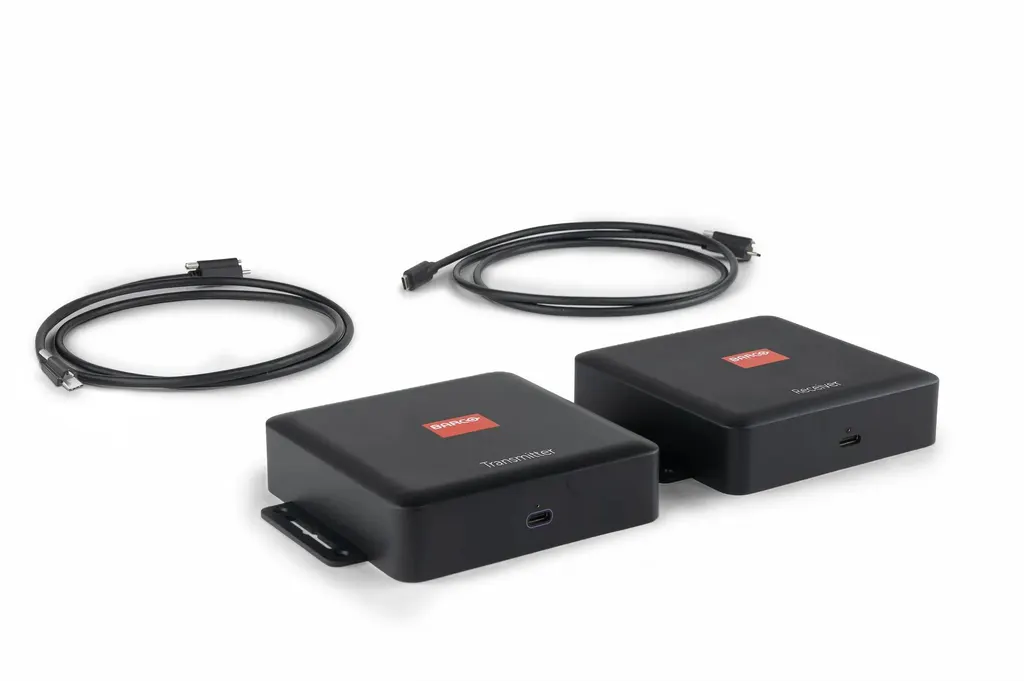
ClickShare USB-C Extension over CAT kit
Barco ClickShare USB-C Extension over CAT Kit
- Video
- When connected between…
- Platforms
- For connection between Base…
Priceon request
QuotationWithin 1 working day
DeliveryConfirmed with your quote, based on stock
Overview
The Barco ClickShare USB-C Extension over CAT kit pairs TX and RX boxes to carry USB 2.0 and DisplayPort over standard CAT cable, so the Control Panel or a laptop can sit away from the Hub. The Hub powers both boxes on the Control Panel link, and wired laptop sharing reaches 4K at 30Hz. Suited to boardrooms, lecture halls and hotel rooms in Doha and Lusail. Request a quote.
A wired link that keeps the Hub out of sight
This kit is a matched pair of boxes, a TX unit and an RX unit, that carry USB 2.0 and DisplayPort signals over ordinary CAT network cable. That lets you put the ClickShare Control Panel, or a presenter's laptop, well away from the ClickShare Hub, which can stay in a comms cabinet or rack. Each box has a USB-C port that handles DisplayPort and USB 2.0, plus an RJ45 socket used only for HDBaseT transmission between the two boxes. The socket carries no Ethernet traffic.
Signal limits, cable lengths and power by link
The figures change with the link you run, so check them against your room layout before ordering:
- Hub to Control Panel: up to 1080p at 60Hz over Cat 5e, Cat 6, Cat 6a or Cat 7.
- Hub to laptop, wired sharing: up to 4K at 30Hz over the same cable types.
- Cable length, Control Panel link: up to 60m on Cat 5e or Cat 6, and up to 70m on Cat 6a or Cat 7.
- Cable length, laptop link: up to 35m on Cat 5e or Cat 6, and up to 40m on Cat 6a or Cat 7.
- Power: the Hub powers both boxes on the Control Panel link. On a laptop link the Hub powers the RX box and the laptop powers the TX box.
The product overview quotes a 40m reach over standard CAT 5e or higher, which differs from the longer figures in the specification table. Confirm the exact route length and cable category with the SmartRooms Qatar team before cabling.
Where it fits in Qatar
In a boardroom in West Bay, the Control Panel can sit at the table while the Hub stays in a cabinet elsewhere on the floor, which keeps the table clear of cables. In a lecture theatre at Education City, a presenter's laptop can connect at the lectern over a wired link, giving the lecturer a wired option alongside wireless. In a hotel conference room in Lusail, a ceiling or wall-mounted RX box can serve a control point near the stage while the Hub sits in the back-of-house equipment room.
Planning the cable run and the enclosure
Each box measures 122 x 152 x 34 mm and weighs 333g (TX) and 315g (RX). Mounting holes are built in for desk, ceiling or wall fixing, and screws are included. The operating range is 0 to 40°C at up to 85% humidity, non-condensing, while Qatar summers can exceed 45°C. A closed cabinet or hot ceiling void can push the boxes beyond that range, so plan ventilation for the enclosure before fixing the units. The kit includes two 1.2m USB-C to USB-C cables, so check distances from each box to its devices.
The kit carries a 1-year warranty from the manufacturer. For a boardroom or lecture hall, a free site survey from SmartRooms Qatar lets the team check the route, the enclosure and the cable category before anything is ordered or fitted. Send your room layout, Hub model and intended cable route, and request a quote. Quotations are usually issued within one working day.
Highlights
- Extends USB 2.0 and DisplayPort over standard CAT 5e or higher
- Wired laptop sharing reaches up to 4K at 30Hz
- Control Panel link supports up to 1080p at 60Hz
- Hub powers both boxes on the Control Panel link
- Cable runs up to 60m on Cat 5e or Cat 6
- Works with ClickShare Hub Core/Pro; CX-50 Gen2 for wired sharing
Room fit
Tell us the room size and platform (Teams, Zoom or BYOD) and we confirm the right combination with your quotation.
Estimated timeline
Quotation within 1 working day · delivery timing depends on stock availability, and we confirm it with your quotation.
Specifications
14 specifications · Source: manufacturer · checked Oct 2026
General Specifications14
- System requirements
- When connected with laptop for wired content sharing: USB 2.0/3.0, USB-C DP alt mode and PD charging
- Resolution
- When connected between ClickShare Hub & Control Panel: -Cat 5e/Cat 6/Cat 6a/Cat 7: up to 1080p, 60Hz Between ClickShare Hub & Laptop for wired content sharing: -Cat 5e/Cat 6/Cat 6a/Cat 7: up to 4k, 30Hz
- Connections
- TX box: USB-C Port-1: support DP signal(maximum 4k@30) and USB2.0 interface RJ45: for HDBaseT transmission, no ethernet connectivity USB-C Port-2: for external USB-C power adapter RX box: USB-C: support DP signal(maximum 4k@30) and USB2.0 interface RJ45: for HDBaseT transmission, no ethernet connectivity
- Temperature range
- Operational: 0 ~40 Storage: -40 ~85
- Humidity
- Operational: 85% non-condensing Storage: 95% non-condensing
- Warranty
- 1 year
- Dimensions (HxWxD)
- 122 *152 *34 (mm)
- Power consumption
- Between ClickShare Hub & Control Panel: TX box: 19.894W / RX box: 4.623W Between ClickShare Hub & Laptop for wired content sharing: TX box: 4.621W / RX box: 5.615W
- Weight
- TX box: 333g RX box: 315g
- Box content
- TX box, RX Box, 1.2M USB-C to USB-C cable*2, screws
- Maximum cable length
- Between ClickShare Hub & Control Panel: -Cat 5e/Cat 6: up to 60m -Cat 6a/Cat 7: up to 70m Between ClickShare Hub & Laptop for wired content sharing: -Cat 5e/Cat 6: up to 35m -Cat 6a/Cat 7: up to 40m
- Power
- Connected to ClickShare Hub & Control Panel: TX and RX power from ClickShare Hub Core/Pro Connected to ClickShare Hub & laptop: TX power from laptop, RX power from ClickShare Hub Core/Pro Connected to ClickShare Hub & laptop, with an external PSU: TX power from external USB-C power adapter (>100W), RX power from ClickShare Hub Core/Pro
- Compatibility
- For connection between Base Unit and Control Panel: ClickShare Hub Core/Pro For wired content sharing: ClickShare Hub Core/Pro, ClickShare CX-50 Gen2
- Mounting
- Mounting holes build-in the housing for desk, ceiling or wall.
Downloads
2 files from the manufacturerQuestions about ClickShare USB-C Extension over CAT kit
What is the ClickShare USB-C Extension over CAT kit for?
It is a TX and RX box pair that carries USB 2.0 and DisplayPort signals over standard CAT cable, so the ClickShare Control Panel or a presenter's laptop can be placed away from the ClickShare Hub. It suits rooms where the Hub sits in a comms cabinet and the meeting table is at the far end of a building or on another floor, such as a Doha boardroom with a crowded equipment rack.
Which ClickShare hubs are compatible with this kit?
The Control Panel link is listed for the ClickShare Hub Core and Hub Pro. For wired content sharing from a laptop, the compatibility list names Hub Core, Hub Pro and the CX-50 Gen2. Before ordering for an office in Doha or a school in Lusail, confirm which Hub model is installed in the room, because the kit is specified only for the units listed here.
What resolution can a laptop send over the wired link?
Between a laptop and the Hub, wired sharing supports up to 4K at 30Hz over Cat 5e, Cat 6, Cat 6a or Cat 7 cable. The Hub to Control Panel link is lower, at up to 1080p at 60Hz. In an Education City lecture theatre, a lecturer presenting slides and documents at the lectern will get 4K detail, but 30Hz is not suited to fast-moving video playback.
How far can the TX and RX boxes be from the Hub?
The product overview rates the kit to 40m over standard CAT 5e or higher. The specification table gives longer limits: up to 60m on Cat 5e or Cat 6 to the Control Panel, and up to 35m on Cat 5e or Cat 6 for wired laptop sharing, rising to 40m on Cat 6a or Cat 7. For a boardroom in West Bay, confirm the route length and cable category with SmartRooms Qatar before cabling.
Does the kit need its own power supply?
Not on the Control Panel link, because the ClickShare Hub powers both boxes. On a laptop link, the Hub powers the RX box while the laptop powers the TX box. If you want the laptop to charge while connected, add an external USB-C power adapter rated above 100W to supply the TX box. An office in Msheireb that shares meeting rooms can plan for that adapter during the design stage.
Can the boxes go in a hot cabinet during Qatar summers?
The operating range is 0 to 40°C, with humidity up to 85% non-condensing. Summer temperatures in Qatar can exceed 45°C, so a closed rack or an unventilated ceiling void may push the boxes beyond their rating. Plan airflow in the enclosure, and ask SmartRooms Qatar to review the location during a free site survey before the units are fixed in place.
How are the TX and RX boxes mounted, and what size are they?
Each box has built-in mounting holes for desk, ceiling or wall fixing, and screws are supplied. Each measures 122 x 152 x 34 mm. The TX box weighs 333g and the RX box 315g. In a hotel conference room in Lusail with a ceiling-mounted RX box near the stage, plan the cable route before the ceiling is closed.
Can I connect the RJ45 socket to the office network?
No. The RJ45 socket is for HDBaseT transmission between the TX and RX boxes, and the specification states there is no Ethernet connectivity. Keep that link on its own cable run and do not patch it into a network switch. An IT manager at a government office in Doha should label the run so it is not mistaken for a data port.
What comes in the box?
The kit includes a TX box, an RX box, two 1.2m USB-C to USB-C cables and screws. The cables are short, so check the distance from each box to the devices it connects. If the Control Panel or laptop sits further away, plan any additional cabling separately, and ask SmartRooms Qatar to confirm cable lengths during a site survey.
What warranty applies to this kit?
The manufacturer provides a 1-year warranty on this kit. Alongside it, the operating range is 0 to 40°C and up to 85% humidity, non-condensing, so the boxes should be placed accordingly. For full warranty terms, ask SmartRooms Qatar when you request a quote.
How do government bodies in Qatar order this kit?
The kit is supplied on quotation, and SmartRooms Qatar accepts purchase orders (LPOs) and government tenders, including Monaqasat. Payment can be made by bank transfer, cheque or purchase order. Send the Hub model, the number of rooms and the cable routes with your request, and the team will confirm the link type and cable category in the quotation, which is usually issued within one working day.



