Thursday, 22 October 2026 · 11 Jumada I 1448 AH Sun – Thu · 9:00 – 18:00
+971 56 914 9477 العربية
WhatsApp

Meeting Hub (VC01A + TWY31)

BenQ Meeting Hub (VC01A + TWY31) Video Bar Meeting Kit

WhatsApp
Priceon request
QuotationWithin 1 working day
DeliveryConfirmed with your quote, based on stock
Overview

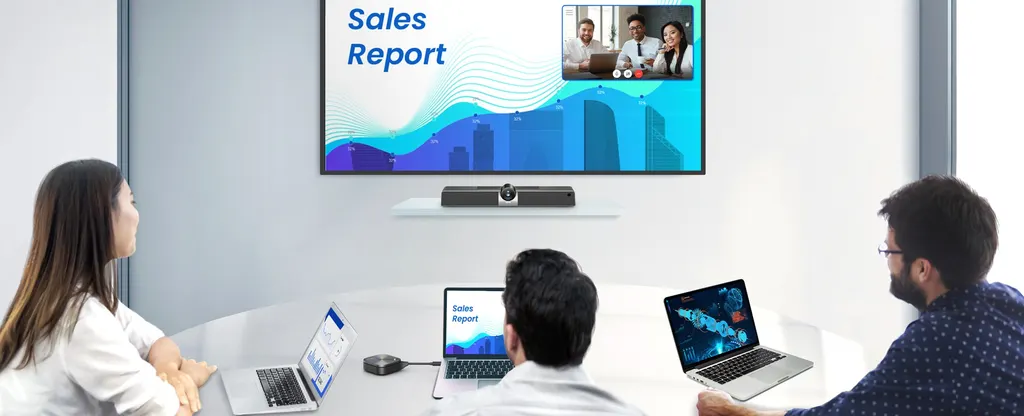
The BenQ Meeting Hub (VC01A + TWY31) pairs the VC01A video bar with the InstaShare Button, turning an existing TV or projector into a wireless presentation and video conferencing display. Its 4K UHD camera, 120° field of view and microphones reaching 8 meters suit boardrooms and training rooms across Doha and Lusail that already own a screen and want to host calls from their own laptop.

What the BenQ Meeting Hub is

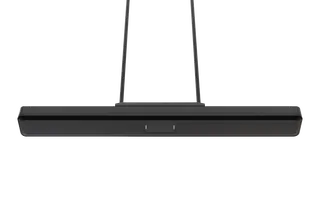
The BenQ Meeting Hub (VC01A + TWY31) is a video conferencing kit built around the VC01A, an all-in-one smart video bar. It gives an existing TV or projector a role as the centre of a video meeting. The bar supplies the camera, microphone array and speaker, while your own laptop runs the meeting software and shares content. Rooms that already have a large display but no dedicated conferencing system can gain a working setup without replacing the screen.

Camera, audio and wireless sharing

The VC01A records in 4K UHD with a 120° field of view. Auto framing and auto focus keep people in shot as they move, which helps in rooms where attendees sit around a long table or stand at a whiteboard. The omnidirectional microphone array captures voices from up to 8 meters, and the built-in 8W speaker carries remote participants clearly across the room.

The InstaShare Button handles content sharing. Once it is plugged in, a presenter can cast their screen from a Windows notebook, MacBook or Chromebook with a single click. Connected devices can also share a camera feed or individual files.

Key specifications that matter for planning

  • Camera: 4K UHD with 120° field of view, auto framing and auto focus
  • Audio: 8W speaker and omnidirectional mic array with pickup up to 8 meters
  • Sharing: one-click wireless presentation from Windows, MacBook and Chromebook
  • Expansion: optional USB camera, switchable with the VC01A
  • Management: built-in OS with remote management and updates through BenQ DMS

Where it fits in Qatar

A government boardroom in West Bay. A ministry meeting room with an existing display can host calls with colleagues in other cities or abroad, with participants joining through the software the department already uses.

A staff room at a private school in Al Wakrah. Teachers and administrators can run parent and partner calls from their own laptops, and the optional second camera lets a room show a presenter and the whiteboard from different angles.

A training room at an industrial company in Mesaieed. Trainers can share slides wirelessly with site teams, while remote specialists in Doha see and hear the room clearly.

What to plan before you request a quote

Start by measuring the room and noting the screen type, its size and where it is mounted. Our free site survey checks the position of the video bar relative to the display, the seating layout, power and network points, and the lighting. Rooms near windows should be checked for glare, and hot or dusty areas should be confirmed with our team before installation.

Schools and government offices can order through a purchase order or submit the requirement under a government tender. If you are equipping several rooms, tell us the number of rooms and their screen sizes so we can prepare one quotation. Quotations are usually issued within one working day, and products are covered by the manufacturer's warranty.

Request a quote from SmartRooms Qatar for the BenQ Meeting Hub (VC01A + TWY31), and we will confirm the configuration, installation and delivery to your municipality.

Highlights

  • 4K UHD camera with 120° field of view
  • Auto framing and auto focus for video calls
  • 8W speaker and omnidirectional mic array
  • Microphones pick up voices up to 8 meters
  • One-click wireless sharing from Windows, MacBook and Chromebook
  • Remote management and updates through BenQ DMS

Room fit

Tell us the room size and platform (Teams, Zoom or BYOD) and we confirm the right combination with your quotation.

Estimated timeline

Quotation within 1 working day · delivery timing depends on stock availability, and we confirm it with your quotation.

Specifications

Source: manufacturer · checked Oct 2026
The full specification and datasheet for this model are available on request; we send them with your quotation.

Downloads

0 files from the manufacturer
No downloadable files are listed for this model yet. Ask us and we will send the datasheet.

Questions about Meeting Hub (VC01A + TWY31)

What is the BenQ Meeting Hub and who is it for?
The BenQ Meeting Hub (VC01A + TWY31) is a video conferencing kit that turns an existing TV or projector into a wireless presentation and video meeting display. It suits organisations in Qatar that already own a display and want a complete meeting room setup without replacing it, such as government offices, schools and companies with small or mid-sized meeting rooms. Request a quote to confirm the right configuration for your room.
Do I need a new TV or projector to use it?
No. The Meeting Hub is designed to upgrade an existing TV, projector or monitor. The VC01A includes a built-in OS that turns the display into a smart display, so you can keep the screen you already have. Before ordering, our team can check the screen type and its position in the room during a free site survey.
Which laptops work with the Meeting Hub?
The InstaShare Button works with Windows notebooks, MacBooks and Chromebooks. You plug it in and share your screen through the VC01A with one click, so staff can present from whichever laptop they bring. Because the system is designed for bring-your-own-meeting use, a laptop is the only device attendees need. Confirm your fleet with the SmartRooms Qatar team when you request a quote.
Can we use our own video conferencing software?
Yes. The camera, microphone array and speaker in the VC01A are used with the meeting software you prefer on your laptop. The room does not need a separate conferencing system, and your organisation keeps control of which applications it uses under its own IT policies.
What resolution and field of view does the camera offer?
The VC01A camera supports 4K UHD resolution with a 120° field of view. Auto framing and auto focus help keep participants sharp and in frame, which is useful in rooms where people move between seats or stand at a whiteboard. Image quality also depends on room lighting and your internet connection, so plan the lighting with your facilities team.
How far can the microphone pick up voices?
The omnidirectional microphone array captures voices from up to 8 meters away, so people seated at the far end of a boardroom table can be heard without a handheld microphone. The 8W speaker in the same bar carries remote participants' voices to everyone in the room. In very large halls, the layout and number of attendees should be reviewed during your site survey.
Can I add a second camera?
Yes. You can add a USB camera anywhere in the room and switch between it and the VC01A during a call. This helps when a presenter needs a different angle, such as a close-up of a speaker at a lectern or a wider view of a training room. Confirm the camera model you plan to use when requesting a quote.
How is the system managed and updated?
The VC01A supports remote management through BenQ DMS, which lets your IT team manage the smart bar and push updates without visiting each room. This is useful for schools and government offices where IT staff are not in every meeting room at all times. We can explain how this fits within your existing IT policies.
Which room sizes suit the Meeting Hub?
The Meeting Hub is designed for meeting rooms of varying sizes and adapts to different layouts. Small huddle rooms and mid-sized boardrooms are typical fits, and the 120° camera field of view and 8-meter microphone pickup define how much of the room is covered. Send us your floor plan and screen size so we can confirm the right placement.
Our West Bay office needs to call a team in Europe. Is this suitable?
Yes. The kit is built for video calls between a meeting room in Doha and remote colleagues. Participants join through the software your organisation already uses, the 4K UHD camera with auto framing keeps the speaker in view, and the microphone array picks up voices across the table. Ask your IT team to check your internet connection speed before the setup is finalised.
Our school in Al Wakrah wants to equip a staff room with a projector. Can we start with one unit?
Yes. The Meeting Hub can be ordered for a single room, and teachers or staff connect from their own laptops. Many schools start with one room and expand once staff are comfortable with the setup. Schools can raise a purchase order for their budget, and we deliver to all 8 municipalities of Qatar.
Is a site survey needed before installation?
We offer free site surveys. For the Meeting Hub, the survey confirms where the VC01A sits relative to the display, the seating layout, the power and network points, and the lighting. Ask our team to confirm the operating environment in writing before installation, especially in rooms near windows or hot areas.

Similar models

Biamp Parlé ABC 2500a Biamp Parlé ABC 2500a All-in-One Conferencing Audio Bar
Zoom Certified Microsoft Teams Certified
Biamp Parlé CBC 2500 CM Biamp Parlé CBC 2500 CM Ceiling-Mounted Conferencing Bar
Zoom Certified Microsoft Teams Certified
Biamp Parlé CBC 2500 PM Biamp Parlé CBC 2500 PM Pole-Mounted Conferencing Bar
Zoom Certified Microsoft Teams Certified
Biamp Parlé N 100 Biamp Parlé N 100 Network and USB Expander for Parlé Conferencing Bars
TAA Compliant
Biamp Parlé PMA 2000-DM Biamp Parlé PMA 2000-DM Display Mount Kit for Parlé 2000 Video Bars
Video bars
Email Call