






Barco
ClickShare Power Supply 100W
Barco ClickShare Power Supply 100W, 100-Watt Video Conferencing Accessory
VS20 Button Kit
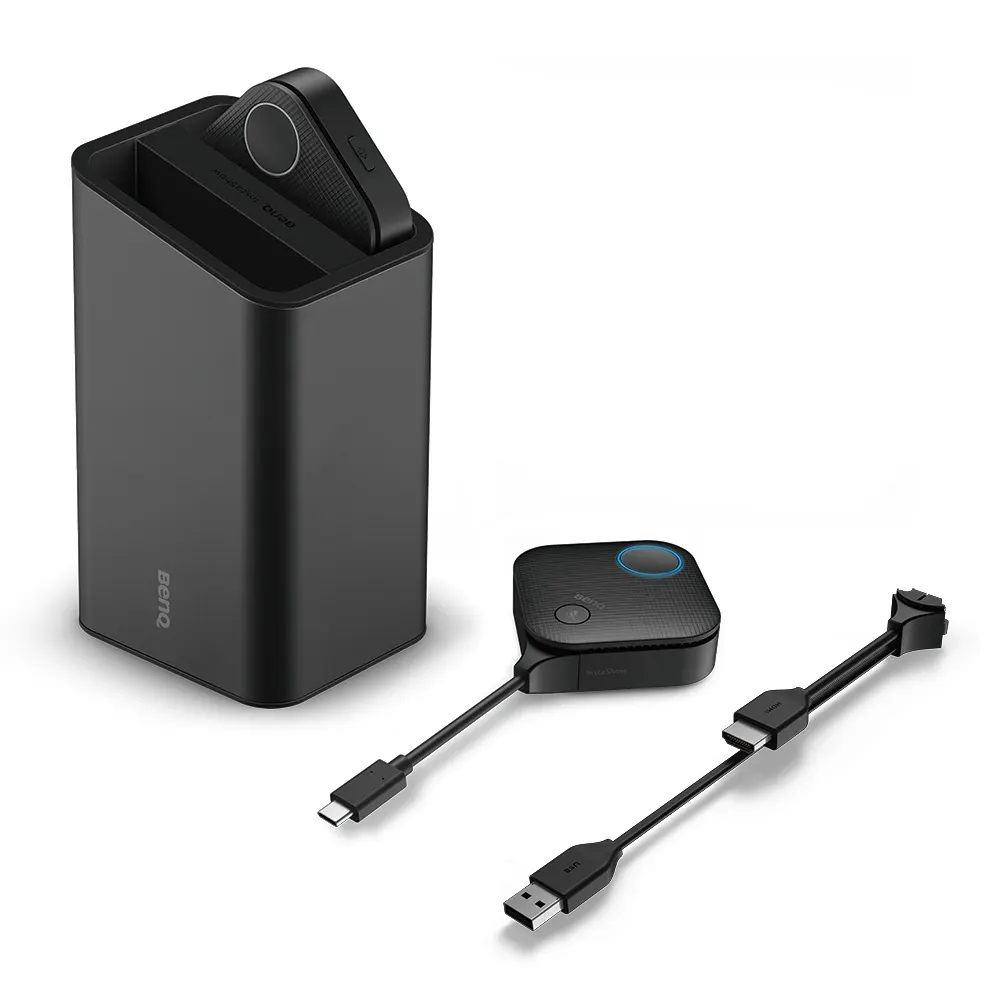
BenQ InstaShow VS20 Button Kit with Built-in Microphone Array
- Microphones
- WDC10
- Platforms
- WDC10
- Connectivity
- WDC10
Priceon request
QuotationWithin 1 working day
DeliveryConfirmed with your quote, based on stock
Overview
The BenQ InstaShow VS20 Button Kit is a plug-and-play button for wireless presentations, with a built-in microphone array. It handles input up to 4K at 30fps, switches between HDMI and USB-C, and offers a split-screen hotkey. It works with VS10 and VS20 host receivers. Well suited to boardrooms and lecture halls in Doha, Lusail and Education City. Request a quote from SmartRooms Qatar.
What the VS20 Button Kit does in a wireless presentation setup
The BenQ InstaShow VS20 Button Kit is a plug-and-play button that belongs to the InstaShow wireless presentation range. It works with VS10 and VS20 host receivers, letting a presenter share content to the room display without cables. Its built-in microphone array means the same unit also picks up audio in the room. BenQ advises using its buttons together with InstaShow host devices to keep wireless projection stable.
The specifications that matter when you plan
Input is rated up to 4K at 30 frames per second, and the connection switches between HDMI and USB-C, so the kit can be matched to the ports your presenters use. The built-in microphones work plug-and-play and can be extended with wireless microphone units in a cascade of up to 32 units. A split-screen hotkey is included for showing two sources side by side. The compatible hosts are the VS10 and VS20 receivers, and BenQ notes that receiver features vary by model, so confirm the host before you order.
Where it fits in Qatar
- Boardrooms in West Bay or The Pearl: a senior team presents from a laptop over USB-C, uses the built-in microphones, and shares to the room display while colleagues join from abroad.
- Lecture halls in Education City: a lecturer shares slides wirelessly and adds wireless microphone units as the number of speakers grows, so the audio setup can scale with the room.
- Meeting rooms in Msheireb: bilingual briefings where Arabic and English materials appear side by side, using the split-screen hotkey on one display.
What to plan before you order
Start by confirming the host receiver, because the button is matched to VS10 and VS20 hosts. Check which ports your source devices use, since the kit switches between HDMI and USB-C. Then decide how many wireless microphone units the room needs. A site survey helps confirm where the presenter will stand, where the host and display sit, and how the microphones will pick up speech in the room.
The specification data we work from does not include an operating temperature range or environmental ratings. For any space that is not air-conditioned, or that sits near windows or outdoor areas exposed to heat and dust, confirm the installation environment with the SmartRooms Qatar team before ordering.
Ordering from SmartRooms Qatar
SmartRooms Qatar supplies the VS20 Button Kit with delivery to all eight municipalities of Qatar and professional installation available. Free site surveys are offered, and quotations are usually issued within one working day. Schools, government entities and companies can order by LPO, through government tenders, or by bank transfer, cheque or purchase order. The product is covered by the manufacturer's warranty. Request a quote for the VS20 Button Kit and tell us your host model, source devices and room type, so we can match the configuration to your space.
Highlights
- Plug-and-play button for InstaShow wireless presentations
- Input support up to 4K at 30fps
- Switchable HDMI and USB-C connection
- Built-in microphone array with plug-and-play microphones
- Wireless cascade microphones for up to 32 units
- Split-screen hotkey; compatible with VS10 and VS20 hosts
Room fit
Tell us the room size and platform (Teams, Zoom or BYOD) and we confirm the right combination with your quotation.
Estimated timeline
Quotation within 1 working day · delivery timing depends on stock availability, and we confirm it with your quotation.
Specifications
7 specifications · Source: manufacturer · checked Oct 2026
General7
- Instashow Button
- WDC10 | WDC10C | VS10 | VS20
- Instashow Button Compatible model
- WDC10 WDC10 & WDC10C Host Receiver | WDC10C WDC10 & WDC10C Host Receiver | VS10 VS10 & VS20 Host Receiver | VS20 VS10 & VS20 Host Receiver
- Instashow Button Connectivity
- WDC10 HDMI | WDC10C USB-C | VS10 HDMI & USB-C (interchangeable) | VS20 HDMI & USB-C (interchangeable)
- Instashow Button Input source resolution
- WDC10 1080p@30fps | WDC10C 1080p@30fps | VS10 1080p@60fps | VS20 4K@30fps
- Instashow Button Plug n' play microphone
- WDC10 - | WDC10C - | VS10 - | VS20 Yes
- Instashow Button Wireless cascade microphone
- WDC10 - | WDC10C - | VS10 - | VS20 Yes (up to 32x)
- Instashow Button Split screen hotkey
- WDC10 - | WDC10C - | VS10 Yes | VS20 Yes
Downloads
0 files from the manufacturerNo downloadable files are listed for this model yet. Ask us and we will send the datasheet.
Questions about VS20 Button Kit
What is the BenQ InstaShow VS20 Button Kit used for?
It is a plug-and-play button for BenQ's InstaShow wireless presentation system and works with VS10 and VS20 host receivers. It lets a presenter start sharing from a laptop to the room display without cables. It includes built-in microphones and a split-screen hotkey, which makes it practical for meeting rooms and classrooms where presenters change often and the setup needs to stay simple.
Which host receivers does the VS20 Button Kit work with?
The VS20 Button Kit is listed as compatible with the VS10 and VS20 Host Receivers. BenQ notes that each InstaShow receiver model can have different features, so the button should match the receiver you run. Before you order, confirm your host model with SmartRooms Qatar so the quotation covers the right combination.
What is the maximum input resolution supported by the VS20 Button Kit?
The kit supports input resolutions up to 4K at 30 frames per second. That covers presentations from laptops and other sources that send a 4K signal at that frame rate. If your sources need a different frame rate, ask the SmartRooms Qatar team to confirm the match before you order.
Can I connect through HDMI or USB-C?
Yes. The connection switches between HDMI and USB-C, so you can connect a laptop or source device through whichever port it has. This helps in Doha offices where staff bring a mix of laptops, some with HDMI ports and others with only USB-C. Check the ports used in each room before deciding how many units to order.
How does the built-in microphone array work with other microphones?
The built-in microphones work plug-and-play, and they can be extended with wireless microphone units. BenQ rates the wireless cascade for up to 32 units. A ministry meeting room in Msheireb can start with the built-in array and add wireless units as the number of speakers grows. Confirm the microphone count and room layout during your site survey.
Does the VS20 Button Kit have a split-screen function?
Yes, the kit includes a split-screen hotkey. A presenter can use it to show two sources side by side on the display, which helps when comparing two documents or running a bilingual briefing where Arabic and English materials sit together. The feature is part of the button, so it works the same way in each room where you install a unit.
Is this kit a good fit for a lecture hall in Education City?
It suits lecturers who move around the room and need to share slides from their laptops without cables. The built-in microphones and support for up to 32 wireless microphone units can extend the audio setup as attendance grows. Whether it fits depends on room size, seating and the host receiver you choose, so send the room dimensions and seat count when you request a quote.
Can a school in Al Wakrah use it in several classrooms?
Yes, a unit can be installed in each classroom, provided each room has a compatible host receiver and display. A school fitting out several new classrooms can request one quotation covering the buttons and host receivers, then issue a single LPO for the full order. Tell the team how many classrooms are involved and what screen types they use so the configuration matches every room.
Does the VS20 Button Kit suit rooms that are not air-conditioned?
The specification data we work from does not include an operating temperature range or environmental ratings for this button. We therefore cannot confirm it for spaces that are not air-conditioned, or for rooms near windows or outdoor areas exposed to Qatar summer heat and dust. Confirm the installation environment with the SmartRooms Qatar team before you order.
Do I need a site survey before the VS20 Button Kit is installed?
A site survey is recommended because it confirms where the presenter stands, where the host and display sit, and how the microphones will pick up speech. SmartRooms Qatar offers free site surveys across Qatar. In a boardroom in West Bay, a survey can settle the placement of the button and host before the quotation is finalised, reducing the chance of rearranging equipment after installation.
How does the VS20 Button Kit differ from the VS10 button?
The VS20 Button Kit supports input up to 4K at 30fps and adds plug-and-play microphones and wireless cascade microphones of up to 32 units. The VS10 button is listed at 1080p at 60fps, and its specification does not include plug-and-play or wireless cascade microphone features. Choose based on your content resolution, room type and the number of microphones you need.



