






Barco
ClickShare Power Supply 100W
Barco ClickShare Power Supply 100W, 100-Watt Video Conferencing Accessory
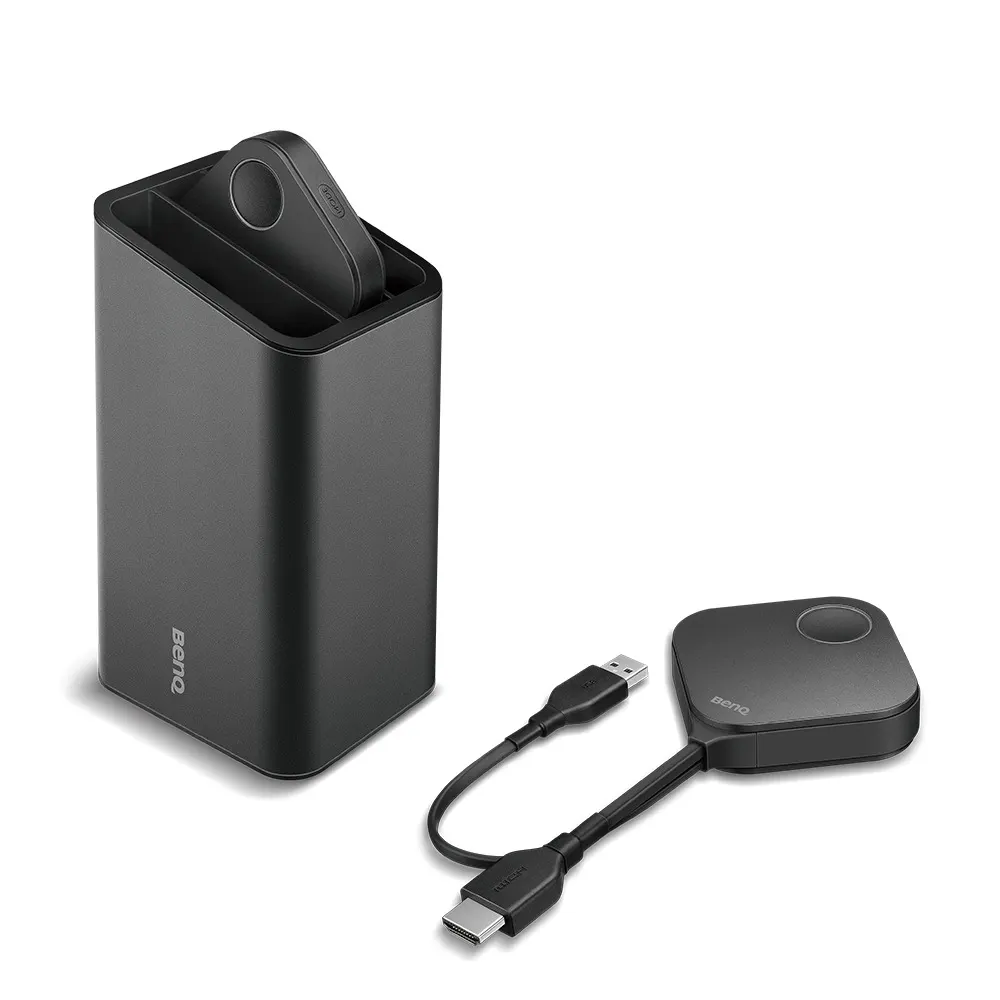
WDC10 Button Kit (HDMI)
BenQ WDC10 Button Kit (HDMI) InstaShow Wireless Presentation Accessory
- Microphones
- WDC10
- Platforms
- WDC10
- Connectivity
- WDC10
Priceon request
QuotationWithin 1 working day
DeliveryConfirmed with your quote, based on stock
Overview
The BenQ WDC10 Button Kit (HDMI) is an accessory for the InstaShow WDC10 wireless presentation host. It includes two buttons, a cradle and a USB Type A and HDMI cable set, so extra presenters can start sharing from their own seats. The host supports up to 16 paired devices. Suited to boardrooms and classrooms in Doha, Lusail and Education City. Request a quote from SmartRooms Qatar.
What the WDC10 Button Kit adds to an InstaShow room
The WDC10 Button Kit (HDMI) is an add-on for the InstaShow wireless presentation system from BenQ. Instead of one presenter controlling the room, the kit gives extra participants their own buttons, so several people can take turns sharing content from their devices during the same meeting. Each kit contains two WDC10 buttons, one cradle, and a cable set that includes a USB Type A cable and an HDMI cable.
Specifications that shape the purchase decision
- Compatible host: WDC10 and WDC10C host receivers.
- Button connectivity: HDMI.
- Input source resolution: 1080p at 30fps.
- Host capacity: up to 16 devices paired at the same time.
- Security: AES 128-bit encryption.
- Setup: plug and play, with no driver installation.
Confirm the host before ordering, because the button is listed for WDC10 and WDC10C receivers only. The 1080p at 30fps input rating means presenters should plan their source content around that figure, and the team can check a specific laptop or source with you during quoting. The AES 128-bit encryption is useful where shared material is confidential, such as board papers or project tender documents.
Where the kit fits across Qatar
Education City lecture hall. In a university lecture hall, student teams often present project work from their own laptops in one session. With the button kit, each team can take a turn without swapping cables at the front of the room, which keeps the session moving and the timetable on track.
West Bay boardroom. A boardroom where department heads update the executive committee each week can use the kit so that several managers present from their seats. The AES 128-bit encryption supports confidential reporting during the meeting.
Msheireb training centre. Workshops with small groups benefit when each group can show results without delay. A single host with extra buttons lets the facilitator move between teams quickly.
What to plan before installation
- Confirm the host model is a WDC10 or WDC10C receiver.
- Count the presenters you expect in the room and check them against the 16-device host capacity.
- Choose a cradle position on the table where the button and cable can reach presenters without crossing walkways.
- The data available to us does not give an operating temperature range for this kit. Confirm conditions with the SmartRooms Qatar team before placing it in any space that is not air-conditioned, since summer temperatures in Qatar often exceed 45°C.
- A free site survey helps confirm host placement, table layout and cable routing before you order.
Request a quote for your room
Send us your host model, room layout and the number of presenters you expect, and request a quote from SmartRooms Qatar. Quotations are usually issued within one working day. Schools, ministries and other public bodies can order by LPO or through a government tender, including Monaqasat. The kit is covered by the manufacturer's warranty, and payment can be made by bank transfer, cheque or purchase order.
Highlights
- Two WDC10 buttons, one cradle, USB Type A and HDMI cables included
- Compatible with WDC10 and WDC10C host receivers
- Host supports up to 16 paired devices at the same time
- Button input source resolution rated at 1080p at 30fps
- Plug and play setup with no driver installation
- AES 128-bit encryption for confidential presentations
Room fit
Tell us the room size and platform (Teams, Zoom or BYOD) and we confirm the right combination with your quotation.
Estimated timeline
Quotation within 1 working day · delivery timing depends on stock availability, and we confirm it with your quotation.
Specifications
7 specifications · Source: manufacturer · checked Oct 2026
General7
- Instashow Button
- WDC10 | WDC10C | VS10 | VS20
- Instashow Button Compatible model
- WDC10 WDC10 & WDC10C Host Receiver | WDC10C WDC10 & WDC10C Host Receiver | VS10 VS10 & VS20 Host Receiver | VS20 VS10 & VS20 Host Receiver
- Instashow Button Connectivity
- WDC10 HDMI | WDC10C USB-C | VS10 HDMI & USB-C (interchangeable) | VS20 HDMI & USB-C (interchangeable)
- Instashow Button Input source resolution
- WDC10 1080p@30fps | WDC10C 1080p@30fps | VS10 1080p@60fps | VS20 4K@30fps
- Instashow Button Plug n' play microphone
- WDC10 - | WDC10C - | VS10 - | VS20 Yes
- Instashow Button Wireless cascade microphone
- WDC10 - | WDC10C - | VS10 - | VS20 Yes (up to 32x)
- Instashow Button Split screen hotkey
- WDC10 - | WDC10C - | VS10 Yes | VS20 Yes
Downloads
0 files from the manufacturerNo downloadable files are listed for this model yet. Ask us and we will send the datasheet.
Questions about WDC10 Button Kit (HDMI)
What is included in the WDC10 Button Kit (HDMI)?
The kit contains two WDC10 buttons, one cradle, and a cable set with a USB Type A cable and an HDMI cable. The buttons extend an InstaShow WDC10 host so that more participants can take turns presenting from their own devices. The kit is sold by quotation, so ask the team to confirm the exact package contents on your quote before ordering.
Which host receivers does this kit work with?
The WDC10 button is listed for WDC10 and WDC10C host receivers. Before ordering, check which host your meeting room already uses, or which one you plan to install, so the buttons pair correctly. If your room uses an older InstaShow setup, send the model number when you request a quote so the team can confirm compatibility.
How many people can present at the same time?
The WDC10 host can keep up to 16 devices paired at the same time, and participants take turns presenting from them. The button kit helps extend that group in a room where a single presenter would otherwise control the display. In a workshop in Msheireb, for example, the facilitator can switch between teams quickly without stopping the session.
Does the kit require software or drivers on presenters' laptops?
No driver installation is needed. The manufacturer describes the system as plug and play and compatible with any operating system or hardware platform, subject to the footnote in its compatibility statement. For a Doha office where staff use mixed laptops, confirm your exact device list with SmartRooms Qatar before the site survey.
What input resolution does the button support?
The WDC10 button is rated for a 1080p input source at 30fps. Presenters who use higher-resolution content should test their source before the meeting. SmartRooms Qatar can help check your laptop and room setup during the quotation stage, so you know what to expect in the room before you buy.
Is the wireless connection secure enough for confidential meetings?
The kit uses AES 128-bit encryption, a recognised standard for protecting data. It suits meetings where shared material is sensitive, such as draft board papers at a ministry in Doha or contract documents at a real estate developer in Lusail. Your IT team should still review the network policy for the room before deployment.
How does the button connect to the system?
The WDC10 button's connectivity is listed as HDMI, and the package includes an HDMI cable and a USB Type A cable. Confirm with your installer which cable runs to each port on the host and display in your room. A free site survey is the easiest way to check port positions and cable routes before the kit is installed.
Is this kit suitable for a boardroom in West Bay?
Yes, provided the boardroom uses a WDC10 or WDC10C host. The kit lets several executives or department heads present from their own seats during a meeting, so the chair does not need to pass a single controller around the table. Plan which seats will hold buttons with the team, because the kit includes one cradle.
Can a university lecture hall in Education City use it for group presentations?
Yes. Student project teams can present from their own laptops in turn, with one host managing up to 16 paired devices. The kit suits lecturers running group presentation sessions in classrooms or lecture halls, and the 1080p at 30fps input rating is a useful reference for slides and videos. Check the display and host with the team before purchase.
How should I plan the cradle and cable positions on a meeting table?
Measure the table and the distance from each presenter seat to the host, then decide where the single cradle will sit so presenters can reach it easily. Keep cables away from walkways and chairs. Because the kit includes one cradle, plan the buttons carefully before ordering, and ask SmartRooms Qatar for a site survey to confirm the layout.
Can I use this kit in a room without air conditioning?
The data we hold does not give an operating temperature range for this kit. Qatar summer temperatures can exceed 45°C, so do not install it in any space that is not air-conditioned until SmartRooms Qatar confirms the conditions. This applies to covered outdoor areas and unventilated store rooms as well.
Can schools and government entities buy this kit through an LPO or tender?
Yes. SmartRooms Qatar supplies against purchase orders (LPOs) and government tenders, including Monaqasat, and accepts payment by bank transfer, cheque or purchase order. A public school in Al Rayyan equipping several meeting rooms can request one quotation covering the kits, cables and installation needs for each room.



