






Barco
ClickShare Power Supply 100W
Barco ClickShare Power Supply 100W, 100-Watt Video Conferencing Accessory
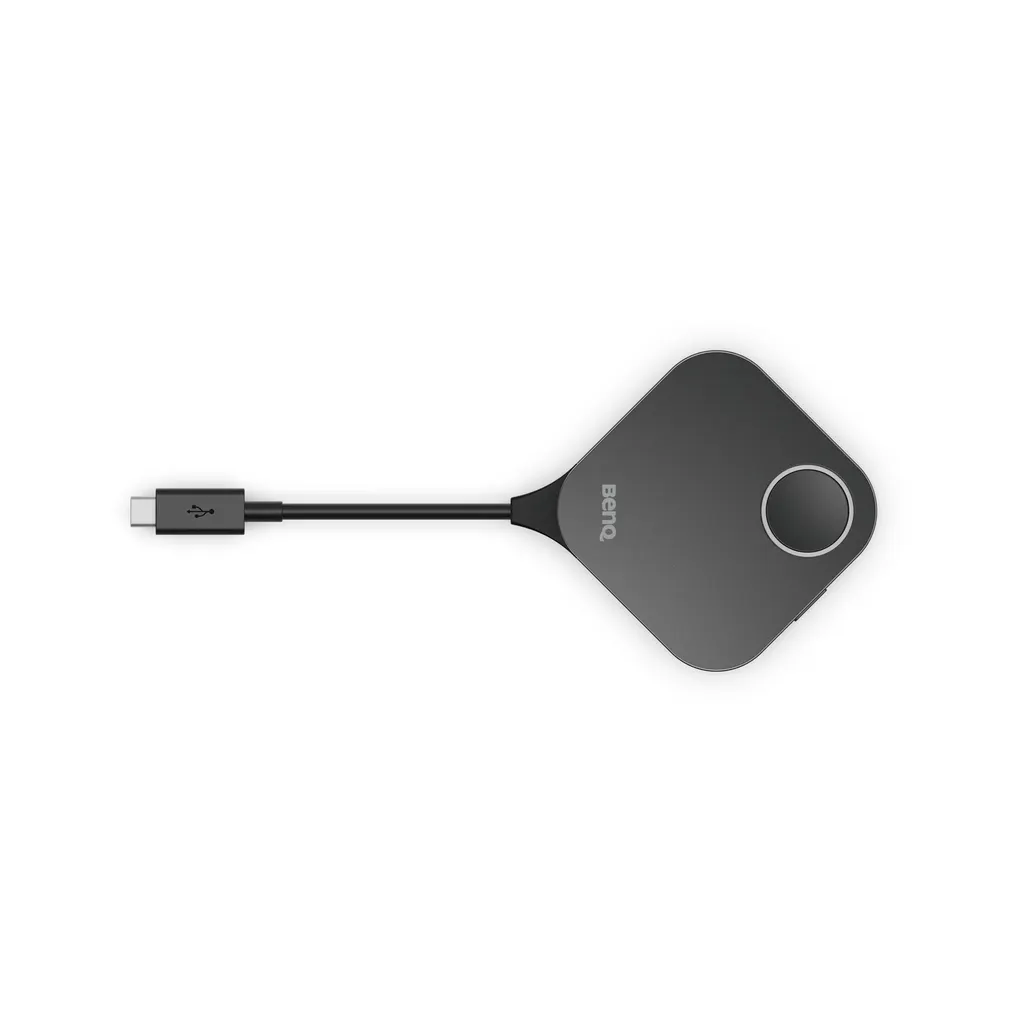
WDC15 Button Kit
BenQ InstaShow WDC15 Button Kit Wireless Presentation Accessory
Priceon request
QuotationWithin 1 working day
DeliveryConfirmed with your quote, based on stock
Overview
The BenQ InstaShow WDC15 Button Kit is an accessory for the WDC15 receiver that lets a presenter start wireless sharing from a small button transmitter, with no apps or drivers to install. It supports up to 4K at 30fps over HDMI or Type-C, and a side button switches between presentation and video mode. It suits Qatar meeting rooms where guests need to share quickly.
What the WDC15 Button adds to an InstaShow room
The BenQ InstaShow WDC15 Button Kit is a wireless presentation accessory built around the WDC15 receiver. Instead of asking a guest to hunt for the right cable or install an app, the presenter uses a small button transmitter to start sharing. The kit supports resolutions up to 4K at 30fps over HDMI or Type-C, so slides, documents and video clips can be shown from a guest's own device in a meeting room.
Because the button is designed to work with the receiver, it is best understood as the presenter-side part of a wireless setup. Rooms that already run a WDC15 receiver can add the button to speed up how visitors start presentations, while new rooms should specify the receiver and button together.
Plug options, cable and the swap procedure
The kit uses swappable HDMI and Type-C plugs, so the same button can be matched to the port on a particular device. Changing a plug requires a Phillips #0 screwdriver to loosen, remove and replace it. Because this is a small hardware change, it suits the IT team that prepares devices in advance rather than a presenter in the middle of a meeting.
The package includes one button transmitter, one button HDMI cable and one safety statement. When planning the cable route, consider where the presenter will stand or sit, because the button needs to reach that position comfortably.
Where the kit fits in Qatar meeting rooms
- Ministry boardrooms in West Bay or Msheireb: staff and visiting delegations can share presentations from their own laptops with one press of the button, with AES128 encryption and WPA3 listed for the wireless link.
- Seminar rooms in Education City: guest lecturers and visiting researchers can present without installing drivers or setting up a network, which keeps sessions moving between speakers.
- Hotel and serviced-apartment meeting rooms in The Pearl or Lusail: a quick-share button lets a client start a presentation from their own device without support staff preparing each session.
What to plan before you order
Confirm that the room has a compatible WDC15 receiver or will receive one. Check the display connection and the receiver position so the button and its cable reach the presenter's spot. The wireless link runs on the 5G band, rated AC1200 with a maximum data rate of 867 Mbps, so the Wi-Fi environment should be checked on site before installation.
SmartRooms Qatar offers free site surveys, which are useful in older buildings or rooms with thick walls. Professional installation covers all 8 municipalities of Qatar. Schools and departments ordering several sets can cover the full list with a single purchase order (LPO).
Request a quote for your presentation setup
If you are adding the WDC15 Button Kit to an existing InstaShow room or planning a new meeting room, request a quote from the SmartRooms Qatar team. Tell us the receiver model, the number of rooms and the devices your presenters use, and we will confirm the plug type, cables and installation for your site.
Highlights
- Works with the InstaShow WDC15 receiver
- Plug-and-play: no apps, drivers or network setup
- Supports up to 4K at 30fps via HDMI or Type-C
- Swappable HDMI and Type-C plugs
- Side button switches between presentation and video modes
- Includes button transmitter, HDMI cable and safety statement
Room fit
Tell us the room size and platform (Teams, Zoom or BYOD) and we confirm the right combination with your quotation.
Estimated timeline
Quotation within 1 working day · delivery timing depends on stock availability, and we confirm it with your quotation.
Specifications
10 specifications · Source: manufacturer · checked Oct 2026
InstaShow Package3
- Button (Transmitter)
- (x1)
- Safety Statement
- (x1)
- Button HDMI cable
- (x1)
InstaShow Features7
- Video Outputs
- HDMI 1.4 (with HDCP)
- Advanced Encryption Standard
- AES128
- Maximum Output Resolution (Receiver)
- Up to 4K 30Hz
- WiFi Standard
- 5
- Wireless Frequency
- 5G
- Wireless Data Rate (Maximum)
- AC1200 (5G 867 Mbps)
- WiFi Protected Access
- WPA3
Downloads
0 files from the manufacturerNo downloadable files are listed for this model yet. Ask us and we will send the datasheet.
Questions about WDC15 Button Kit
What does the BenQ WDC15 Button Kit do?
It is a button transmitter for the InstaShow WDC15 receiver. A presenter presses the button to start wireless sharing, with no apps, drivers or network setup needed on the presenting device. It supports up to 4K at 30fps through HDMI or Type-C, so slides, documents and video clips can be shared from a guest's own device in a meeting room.
Does the button work without a WDC15 receiver?
No. The kit is designed to work with the InstaShow WDC15 receiver, so the receiver must be in place before the button is used. If your room already has this receiver, the button offers a faster way to start a presentation. If the room is new, request a quote so the receiver and button are specified together.
What resolution and frame rate does it support?
The kit supports resolutions up to 4K at 30fps over HDMI and Type-C. The receiver's maximum output is listed as up to 4K at 30Hz. That suits presentation slides, spreadsheets and most video playback in a conference room, but it is not the right choice for fast-motion content. Check the content types your presenters use before ordering.
Do guests need to install software to present?
No. The kit is driver-free and app-free, and the presenter needs no network setup. This matters in Qatar, where visiting delegations and guest speakers often bring their own laptops and may not have rights to install software. A single press of the button starts the share in the room.
What does the side button do?
The side button switches the kit from presentation mode to video mode with a single click. Presenters can move between slides and video playback without restarting the session. This is useful in a training session in Doha or a school in Al Rayyan that alternates between documents and recorded clips.
Can I change between HDMI and Type-C plugs?
Yes. The HDMI and Type-C plugs are swappable. Loosening, removing and replacing the plug requires a Phillips #0 screwdriver. This change is best made by the IT team preparing the kit before installation, not by a presenter during a meeting. Keep the screwdriver with the room equipment so changes can be made on site.
What comes in the box?
The package includes one button transmitter, one button HDMI cable and one safety statement. The WDC15 receiver is not listed in the package contents, so confirm the receiver status when you request a quote. Plan the length of the button cable so it reaches the presenter's position at the table or lectern.
How secure is the wireless connection?
The InstaShow specifications list AES128 encryption and WPA3 protection. For ministries and corporate boardrooms in West Bay or Msheireb, where presentations may contain confidential figures, these standards help protect content shared over the wireless link. Ask your IT team to confirm they meet your internal security policy before rollout.
What wireless band and speed does it use?
The wireless link runs on the 5G band, with a maximum data rate listed as AC1200 (5G 867 Mbps). That is a maximum rating, and real throughput depends on the room, devices and network. Before installing in a large meeting room in Lusail or The Pearl, ask for a site survey so the wireless environment is checked before the receiver is placed.
Is it suitable for a seminar room in Education City?
It suits seminar and breakout rooms where guest lecturers or students give short presentations. Driver-free sharing means a visiting researcher can present without IT help. For a large lecture theatre with fixed seating, plan the receiver and button position together with the display so the presenter can reach the button easily.
How should I plan the installation in a room?
Plan the receiver position, the button cable route and the display connection before ordering. SmartRooms Qatar offers free site surveys and professional installation across all 8 municipalities of Qatar. A survey is especially useful in a boardroom where the presenter sits far from the display, so the cable length can be confirmed in advance.
Can we buy several units with an LPO or through a government tender?
Yes. SmartRooms Qatar supplies against purchase orders (LPOs) and government tenders, including Monaqasat. A school or ministry ordering sets for several rooms can send one purchase order. Payment is by bank transfer, cheque or purchase order, and quotations are usually issued within one working day.



