






Barco
ClickShare Power Supply 100W
Barco ClickShare Power Supply 100W, 100-Watt Video Conferencing Accessory
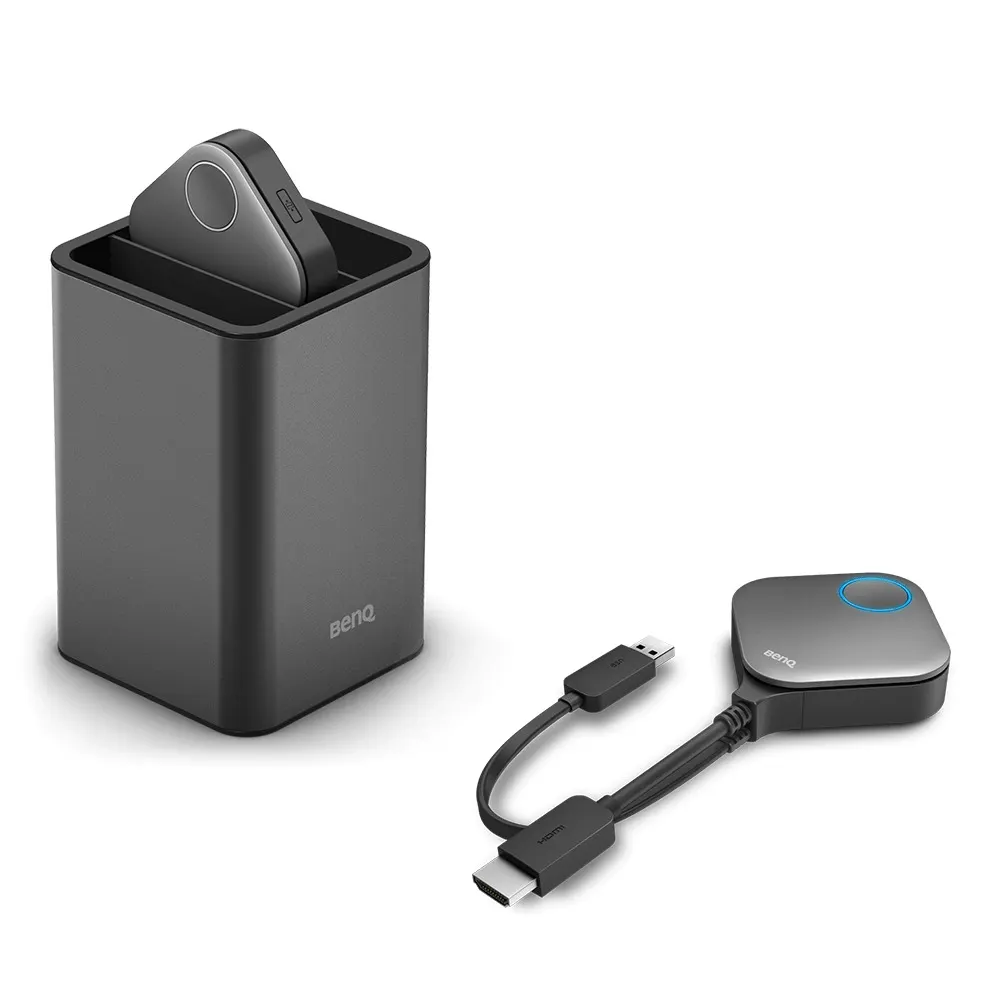
WDC20 Button Kit (InstaShow S, HDMI)
BenQ WDC20 Button Kit (InstaShow S, HDMI) Wireless Presentation Accessory
Priceon request
QuotationWithin 1 working day
DeliveryConfirmed with your quote, based on stock
Overview
The BenQ WDC20 Button Kit is an HDMI accessory for the InstaShow S wireless presentation system. Plug the button into a laptop and present without installing software. Up to four users can connect and present at the same time, with split-screen support for side-by-side review. Its security features suit confidential corporate meetings. Request a quote for your Doha meeting rooms.
What the WDC20 Button Kit does in an InstaShow S setup
The WDC20 Button Kit is an HDMI button accessory for the InstaShow S wireless presentation system. A presenter plugs the button into a laptop and can start sharing to the meeting display straight away, with no software to install on that laptop. For rooms where presenters change often, this removes the step of loading each person's files onto a shared computer or passing a cable from one speaker to the next.
Multi-presenter sessions and split-screen review
Up to four users can connect and present at the same time. That suits workshops where several contributors bring their own material, or a review where a team needs to compare two documents on one screen. Split-screen support keeps those sessions organised and gives brainstorming groups a practical way to place ideas next to each other.
Security for confidential corporate meetings
BenQ positions InstaShow S for confidential corporate scenarios and describes its security features as part of that case. The source material does not list the individual security protocols, so ask the SmartRooms Qatar team and your IT department to confirm them before rollout, particularly for board papers, tender evaluations and internal audits.
Pairing with InstaShow S host devices
The button sends a large volume of image data over a wireless network. BenQ states that the InstaShow S host unit is built to work with the button and strongly advises using them together for the most stable wireless projection in all situations. Treat the button and the host as one system when you plan a room, and request a quote covering both if you are starting from scratch.
Where it fits across Qatar
- Boardroom in West Bay: executives and advisers present from their own laptops during a quarterly review, so the meeting never stops to change sources.
- Seminar room in Education City: student groups take turns at the front, and up to four contributors can show content at once for a joint project.
- Training room in Msheireb: facilitators run team exercises in English and Arabic, with each group presenting from its own device.
Before ordering, confirm the laptop models your staff use, the host unit you plan to pair with the button, and the wireless environment in the room. The source data does not give operating system support, dimensions or mounting options for the button, so these details should come from the quotation rather than assumptions.
Send your room list and the number of regular presenters to SmartRooms Qatar and request a quote. Quotations are usually issued within one working day. We deliver to all eight municipalities of Qatar, install systems professionally, and accept purchase orders and government tenders, including Monaqasat.
Highlights
- Plug-in HDMI button; no software installation needed
- Up to four users can connect and present simultaneously
- Split-screen support for side-by-side review and brainstorming
- Security features aimed at confidential corporate meetings
- BenQ recommends pairing with InstaShow S host devices
Room fit
Tell us the room size and platform (Teams, Zoom or BYOD) and we confirm the right combination with your quotation.
Estimated timeline
Quotation within 1 working day · delivery timing depends on stock availability, and we confirm it with your quotation.
Specifications
Source: manufacturer · checked Oct 2026
The full specification and datasheet for this model are available on request; we send them with your quotation.
Downloads
0 files from the manufacturerNo downloadable files are listed for this model yet. Ask us and we will send the datasheet.
Questions about WDC20 Button Kit (InstaShow S, HDMI)
What is the BenQ WDC20 Button Kit used for?
It is an HDMI button accessory for the InstaShow S wireless presentation system. A presenter plugs the button into a laptop and shares that screen to the meeting display without installing software on the laptop. It is designed for meeting rooms where presenters change often.
How many people can present at the same time?
Up to four users can connect and present simultaneously. In a Lusail project team or an Al Sadd training group, that lets several contributors bring their own material into one session. Split-screen support then places their content side by side on the display, which helps reviews and brainstorming.
Do presenters need to install software on their laptops?
No. BenQ describes InstaShow S as working without software, so presenters can start after plugging in the button. The source data does not list supported operating systems, so before ordering, confirm which laptop models your staff use with the SmartRooms Qatar team.
Does the button work without an InstaShow S host unit?
BenQ strongly advises using the button with InstaShow S host devices for the most stable wireless projection in all situations. The source data does not say the button performs reliably on its own, so treat the host unit as part of the setup and ask for a quotation covering both.
Is it secure enough for confidential corporate meetings?
BenQ positions InstaShow S for confidential corporate scenarios and highlights its security features. The source data does not list the individual protocols, so ask your IT department to review them against your network policy before deployment, particularly for board papers, tender evaluations or internal audit reviews.
How would this suit a boardroom in West Bay?
An executive team in a West Bay boardroom can have each presenter share from their own laptop during a quarterly review, so the meeting does not pause to change sources. With up to four users able to present at once, the kit fits a board with several department heads reporting in the same session.
Is it suitable for seminar rooms in Education City?
It suits group work in seminar rooms. Student teams can take turns at the front, and up to four contributors can show content at once. Confirm the room's display and wireless network with the SmartRooms Qatar team, as the source does not describe display requirements.
Can a government ministry in Doha use it for multi-department meetings?
A ministry meeting that brings together several departments can use the kit so each team presents from its own laptop. Split-screen support helps compare reports on one display. Because ministry meetings often involve sensitive material, check the security features with your IT team before deployment.
Can a hospital administration meeting room use it?
An administration meeting room in a Qatari hospital can use the kit for operational reviews where staff present from their laptops. For confidential administrative material, confirm the security features with your IT department first, since the source does not list individual protocols.
What connection types does the kit use?
The model name identifies this as an HDMI button kit, and the button plugs into the presenter's laptop. The source data does not list other ports, cable lengths, resolutions or wireless standards, so do not assume support for other inputs until SmartRooms Qatar confirms the details.
How should I plan the room before the button arrives?
The source data gives no dimensions or mounting options for the button, so do not assume a bracket is included. Plan the seating and display position, a wireless network that reaches the room, and the laptops that will connect. A free site survey from SmartRooms Qatar can confirm the layout before installation.
How do we order for a private school in Al Wakrah?
Send your room list and the number of regular presenters to SmartRooms Qatar and request a quote. Quotations are usually issued within one working day. We deliver to all eight municipalities of Qatar, offer professional installation, and accept purchase orders (LPOs), with payment by bank transfer, cheque or purchase order.



