






Biamp
Evoko Kleeo Desk Manager 6-pack + 1yr license
Biamp Evoko Kleeo Desk Manager 6-Pack (910-01972) Desk Booking Display
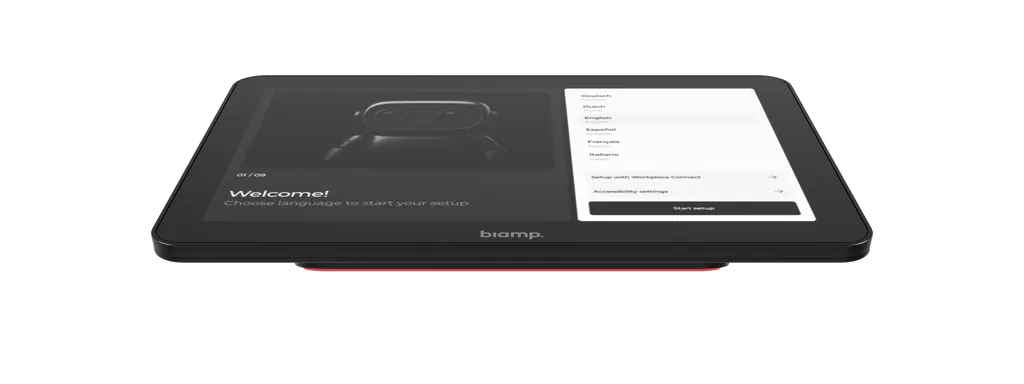
Apprimo Touch 10 UCX-T
Biamp Apprimo Touch 10 UCX-T 10.1-inch Tabletop Touch Controller
Priceon request
QuotationWithin 1 working day
DeliveryConfirmed with your quote, based on stock
Overview
The Biamp Apprimo Touch 10 UCX-T is a 10.1-inch IPS tabletop touch controller built for Devio UCX 1000, 2000 and 3000 meeting room systems. It takes power and data from a single PoE+ Class 4 cable, offers a 1920 x 1200 display rated at 380 cd/m² with auto-brightness, and includes a USB-C port for BYOM and content sharing at the table. It suits boardrooms and executive meeting rooms in Doha, West Bay and Lusail that need one clean control point.
A tabletop controller built around one Devio UCX cable
The Apprimo Touch 10 UCX-T is a 10.1-inch touch controller that sits on the meeting table and puts call control in front of every participant. It is made for Devio UCX meeting room systems. A single PoE+ Class 4 cable from the Devio UCX unit carries both its power and its data, so no separate mains outlet has to be run to the table.
The 1920 x 1200 IPS panel is optically bonded to its capacitive touch layer, which reduces glare and keeps taps responsive. A proximity sensor wakes the screen as people walk in, and the panel adjusts its brightness to the light in the room.
Display, touch and build details that matter at the table
Readability at a seat is what most users notice first, so the panel is rated at 380 cd/m² with automatic brightness control. Its 20-degree viewing angle suits people seated around a conference table rather than standing in front of a wall screen. The anti-fingerprint, diffuse surface stays clean through daily use, and the stamped-metal body is thin and rigid.
- Anti-slip foot: keeps the panel securely in place during use.
- Ultrasonic beacon: supports proximity join for Microsoft Teams Rooms and Zoom Rooms.
- Built-in cable management: keeps the tabletop tidy around the panel.
- Dimensions: 243.6 mm wide, 154.8 mm deep and 66.3 mm high.
Power, network and what IT teams manage
The controller draws less than 25.5 W from its PoE+ Class 4 input and connects over 100/1000 Ethernet or Wi-Fi 6 (802.11ac). It runs Microsoft Device Ecosystem Platform (MDEP) based on Android 15, with a Qualcomm Dragonwing QCS5430 processor and 8 GB of memory. The supported UC platforms are Microsoft Teams Rooms for Android and Zoom Rooms Appliance.
For IT teams, security features include Secure Boot, signed firmware updates, hardware-based attestation with Microsoft PKI, 802.1X network authentication and WPA3 Wi-Fi. Status can be monitored remotely in Biamp Workplace. Device management sits in Microsoft 365 Admin, Entra ID and Intune, and room management in the Teams Admin Center or Teams Rooms Pro Management Portal.
Where it fits in Qatar
Three situations suit this model well. In a boardroom in West Bay, a leadership team running Microsoft Teams Rooms can start and manage calls with colleagues abroad from the table, without reaching for a separate tablet. In a seminar room at Education City, a presenter can connect a laptop through the USB-C port and share content while the room joins a call with a partner institution.
Government ministry meeting rooms in Msheireb often need the same control layout repeated across several rooms, and one model makes that easier to specify. Heat is worth planning for. The operating range is 0–40°C, while outdoor summer temperatures in Qatar can exceed 45°C. Place the panel in air-conditioned rooms, away from direct sun through unshaded glass.
What to plan before you order
- Confirm the Devio UCX model in each room: UCX 1000, 2000 or 3000.
- Check that the network switch can supply PoE+ Class 4 power, 25.5 W per panel.
- Decide whether you need the optional Apprimo Touch 10 UCX-TMA table mount or the UCX-PSA power supply.
- Book a free site survey to check table surfaces, cable routes and room conditions.
Send your room layout and Devio UCX model to SmartRooms Qatar and request a quote. Quotations are usually issued within one working day, and purchase orders and bank transfers are accepted.
Highlights
- 10.1-inch IPS LCD with 1920 x 1200 resolution
- 380 cd/m² brightness with automatic adjustment
- Single PoE+ Class 4 cable for power and data
- USB-C port for BYOM and content sharing at the table
- Compatible with Devio UCX 1000, 2000 and 3000
- Operating range 0–40°C, for air-conditioned rooms
Room fit
Tell us the room size and platform (Teams, Zoom or BYOD) and we confirm the right combination with your quotation.
Estimated timeline
Quotation within 1 working day · delivery timing depends on stock availability, and we confirm it with your quotation.
Specifications
19 specifications · Source: manufacturer · checked Oct 2026
COMPATIBILITY1
- Operating System(s)
- Operating System: Microsoft Device Ecocsystem Platform (MDEP) based on Android 15 UC Vendors: Microsoft Teams Rooms for Android, Zoom Rooms Appliance Compatiblity: Devio UCX 1000, Devio UCX 2000, Devio UCX 3000 Processor: Qualcomm Dragonwing QCS5430 Memory: 8 GB
GENERAL6
- Height
- 2.61 inches (66.3 mm)
- Width
- 9.59 inches (243.6 mm)
- Depth
- 6.09 inches (154.8 mm)
- Display
- Angle: 20º
- Mounting
- Anti-Slip Base
- Optional Accessories
- Apprimo Touch 10 UCX-TMA table mount accessory Apprimo Touch 10 UCX-PSA power supply accessory
POWER3
- Power Consumption
- < 25.5W, < 100W when charing external USB-C device
- PoE Input
- PoE+ Class 4 powered device, 25.5W
- PoE Output
- Optional USB-C 100W power supply for Wi-Fi or 65W USB-C device charging
CONTROL1
- Control
- Biamp Workplace: Remote status monitoring, Biamp Launch Report Cards MDEP: Microsoft 365 Admin, Entra ID, Intune Microsoft Teams Rooms: Teams Admin Center, Teams Rooms Pro Management Portal
NETWORK1
- Network Connection(s)
- Ethernet: Primary LAN, 100/1000, PoE+ Class 4 PD Wireless: Wi-Fi 6, 802.11ac
CONTROLS & INDICATORS1
- Control
- Ambient Light: Auto-brightness Ultrasound: Ultrasonic beacon for Microsoft Teams Rooms and Zoom Rooms proximity join Motion Detection: Wake system on motion
COMPLIANCE1
- Compliance
- Security: Platform: Secure Boot, Signed Firmware Update MDEP: Hardware-based attestation with Microsoft PKI, Microsoft Secure Pairing Network: 802.1X, Wi-Fi WPA 3, Proxy Server
ENVIRONMENTAL3
- Ambient Operating Temperature Range
- 32-104° F (0–40° C)
- Humidity
- 0–98%, non-condensing
- Altitude
- 0-6,600 feet (0–2000 Meters) MSL
VIDEO1
- Video
- Size: 10.1" diagonal IPS LCD Resolution: 1920 x 1200 Brightness: 380 cd/m², auto-adjusting Touch Screen: Capacitive touch, optically bonded with LCD, anti-fingerprint coating, diffuse texture
DATA1
- USB Specification
- USB-C Input: Content Sharing and BYOM Switch, USB-C DP 1.4a Alt Mode, 4K 30Hz USB-C Charging: 65W USB-C device charing when optional power supply is connected Power Input: Optional 100W USB-C power supply for Wi-Fi connections and 65W device charging
Downloads
1 file from the manufacturerQuestions about Apprimo Touch 10 UCX-T
What is the Apprimo Touch 10 UCX-T used for?
It is a 10.1-inch touch controller for video meetings held on Devio UCX systems. Participants use it to start, join and manage calls from the table, and presenters can share content from a laptop through its USB-C port. It suits boardrooms and executive meeting rooms where the controller should sit within easy reach of every seat.
Which Devio UCX models is it compatible with?
The manufacturer lists compatibility with Devio UCX 1000, Devio UCX 2000 and Devio UCX 3000. Confirm which model is installed in each meeting room before ordering, because the panel is designed to work with these systems. SmartRooms Qatar can check the room setup during a free site survey and match the right number of panels to each room.
Does it need its own power socket on the table?
No. It is a PoE+ Class 4 powered device rated at 25.5 W, so one Ethernet cable from the Devio UCX unit supplies power and data. The optional Apprimo Touch 10 UCX-PSA power supply accessory adds 65 W USB-C device charging when connected, for presenters who need to charge a laptop at the table. Check that your switch budget allows 25.5 W per panel.
Can presenters share a laptop from the table?
Yes. The USB-C input supports content sharing and BYOM (bring your own meeting) at the table, with DisplayPort 1.4a alt mode at 4K 30Hz. A presenter can connect a laptop directly to the controller and show slides or video in the room. Laptop charging through the port requires the optional power supply accessory.
Which video platforms does it run?
The controller supports Microsoft Teams Rooms for Android and Zoom Rooms Appliance. It runs Microsoft Device Ecosystem Platform based on Android 15, with a Qualcomm Dragonwing QCS5430 processor and 8 GB of memory. If your organisation uses a different platform, confirm compatibility with the SmartRooms Qatar team before ordering.
Will the screen be readable in a sunlit boardroom in West Bay?
The surface has an anti-glare, diffuse texture, and the panel is rated at 380 cd/m² with automatic brightness adjustment to the ambient light. That helps in boardrooms with large glazed walls, which are common in West Bay office towers. Position the panel so it faces the seated user, avoid placing it directly beneath a bright skylight, and test the view during the site survey.
Can it be used in a room without air conditioning, or outdoors?
No. Its ambient operating temperature range is 0–40°C, with 0–98% non-condensing humidity, and it is rated up to 2000 m altitude. Summer temperatures in Qatar can exceed 45°C, so install it only in air-conditioned meeting rooms. Avoid outdoor areas, unconditioned spaces and rooms open to dust or sand, and confirm room conditions during the site survey.
Can it be mounted on a boardroom table?
It sits on an anti-slip base, and the optional Apprimo Touch 10 UCX-TMA table mount accessory is available. The source data does not give a table cut-out or mounting-hole specification, so confirm the mounting method and cable route before ordering. Built-in cable management helps keep the tabletop tidy. A site survey lets the team check the table surface and the position of the Devio UCX unit.
How do IT teams monitor and manage it?
Biamp Workplace provides remote status monitoring and Biamp Launch Report Cards. Microsoft-managed deployments use Microsoft 365 Admin, Entra ID and Intune, while Teams Rooms deployments use the Teams Admin Center or the Teams Rooms Pro Management Portal. Security features include Secure Boot, signed firmware updates, 802.1X network authentication and WPA3 Wi-Fi, so the panel can be controlled centrally.
Is it suitable for a university seminar room in Education City?
Yes, for seminar rooms where a presenter shares content from a laptop and the room joins a remote call. The panel gives the chair call controls at the table, while the USB-C input handles content sharing. Plan one panel for each Devio UCX room system, and confirm the table layout with the SmartRooms Qatar team before ordering.
We are a school in Al Wakrah fitting out staff meeting rooms. Can we order several units on an LPO?
Yes. SmartRooms Qatar accepts purchase orders (LPOs), bank transfers, cheques and purchase orders for payment, and quotations are usually issued within one working day. Delivery covers all eight municipalities of Qatar, including Al Wakrah. List the Devio UCX model for each room in your request so the quotation matches your setup.
Can this model be included in a government tender?
Yes. SmartRooms Qatar responds to government tenders, including those published on Monaqasat, and quotes can name the exact model. Include the Biamp model number 910-02284 and the Devio UCX model in your tender documents. Products are covered by the manufacturer's warranty, and the team can confirm the warranty terms within your quotation.
Similar models



Biamp
Evoko Liso Freestand Mount - Boltable
Biamp Evoko Liso Freestand Mount (Boltable) 910-01935 Floor Stand
