






Barco
ClickShare Power Supply 100W
Barco ClickShare Power Supply 100W, 100-Watt Video Conferencing Accessory
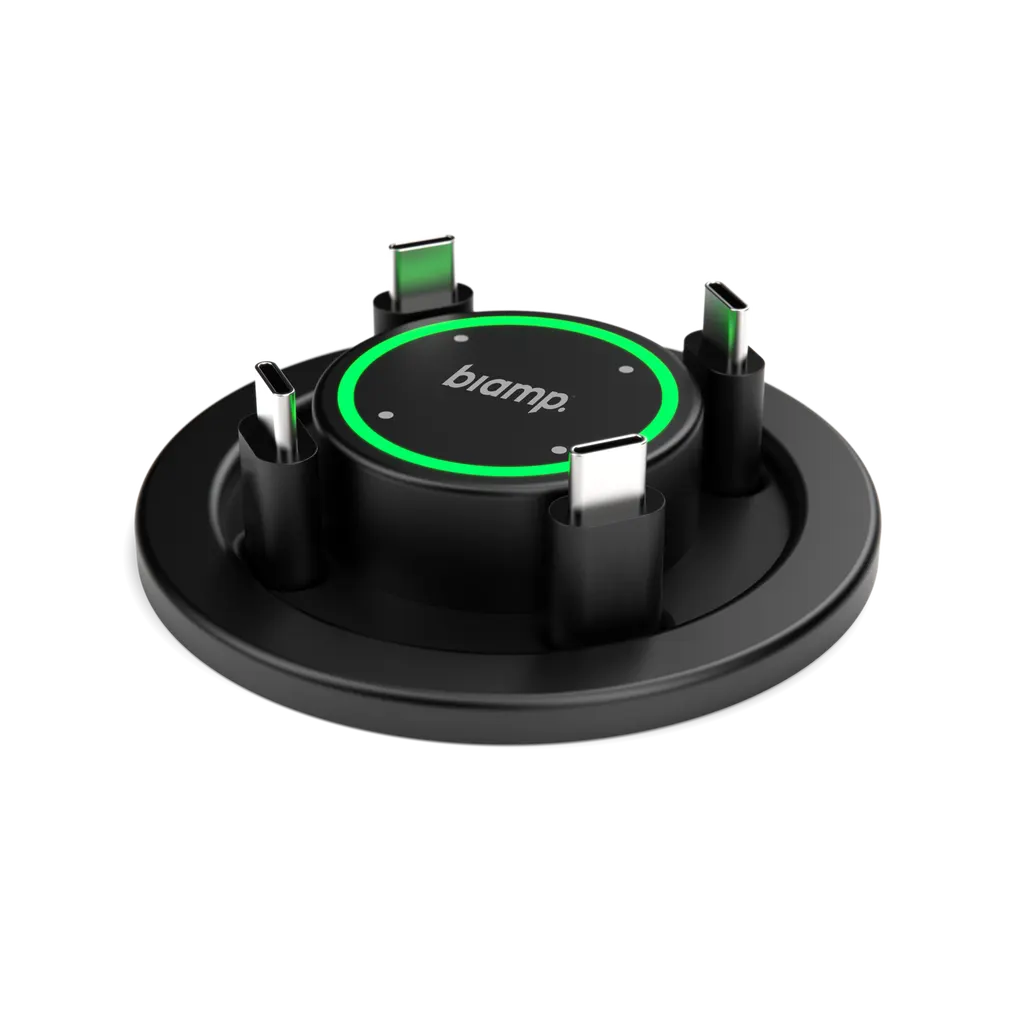
EasyConnect MPX 200
Biamp EasyConnect MPX 200 USB-C Screen Sharing and Charging Hub
Priceon request
QuotationWithin 1 working day
DeliveryConfirmed with your quote, based on stock
Overview
The Biamp EasyConnect MPX 200 is a meeting room hub that uses one USB-C cable to link a laptop with the room's display, camera, microphone and speakers. It charges connected laptops with up to 100W, works with Microsoft Teams, Zoom, Webex and Google Meet, and provides four USB-C connection points. It suits hybrid boardrooms and conference rooms in Doha and Lusail. Request a quote.
One USB-C cable for the whole meeting table
The Biamp EasyConnect MPX 200 is a connection hub built for hybrid meeting rooms. A participant plugs a laptop into the hub with a single USB-C cable, and the room's display, camera, microphone and speakers become available through that same connection. The laptop charges at the same time, so a long session does not end with a flat battery or a tangle of adaptors on the table.
Power, platforms and switching between modes
Integrated USB-C charging supplies up to 100W to connected devices, enough to keep a laptop topped up through a long board or project meeting. The MPX 200 is platform-agnostic and supports the major unified communications applications, including Microsoft Teams, Zoom, Webex and Google Meet, so the room does not depend on a single vendor's software.
A long press on the unit toggles between BYOM mode, where participants use their own meeting software, and the dedicated UC system installed in the room. Facilities teams can keep a standard room set-up while visiting staff still join with their own accounts.
- Four USB-C connection points for several participants at the same table
- One cable linking the display, camera, microphone and speakers
- Up to 100W charging for connected devices
Where it fits in Qatar
In a ministry or energy company office in West Bay or Msheireb, the hub lets executives attend from Doha while colleagues in offices abroad join by video. An international school in Lusail or Al Rayyan can give teachers one simple way to share lesson material and join remote training. A university training centre in Education City can use it in shared seminar rooms where people arrive with different laptops and different meeting platforms.
What to plan before installation
The unit includes integrated under-table cable management, which keeps cables out of sight and the table surface clear. Before ordering, check where the hub will sit relative to the table edge, the cable routes to the display, camera, microphone and speakers, and where each participant will sit. The variant listed for this page carries a US wall plug, so confirm the power arrangement with the SmartRooms Qatar team against Qatar's 240 V, 50 Hz supply and BS 1363 (Type G) sockets. The manufacturer's data does not give an operating temperature range, so confirm the installation environment when you request a quote.
Request a quote for your meeting room
Tell SmartRooms Qatar how many rooms you are equipping, which displays and conferencing systems are already in place, and whether you need a purchase order or tender paperwork. The team usually provides a quotation within one working day, offers free site surveys, and arranges professional installation across all eight municipalities of Qatar. The manufacturer backs the unit with a 3-year warranty. Request a quote today.
Highlights
- One USB-C cable connects laptop to display, camera, microphone and speakers
- Integrated USB-C charging of up to 100W for connected devices
- Compatible with Microsoft Teams, Zoom, Webex and Google Meet
- Long press switches between BYOM mode and the room's UC system
- Four USB-C connection points for several participants
- Under-table cable management and a 3-year warranty
Room fit
Tell us the room size and platform (Teams, Zoom or BYOD) and we confirm the right combination with your quotation.
Estimated timeline
Quotation within 1 working day · delivery timing depends on stock availability, and we confirm it with your quotation.
Specifications
Source: manufacturer · checked Oct 2026
The full specification and datasheet for this model are available on request; we send them with your quotation.
Downloads
7 files from the manufacturer
PDF
Biamp EasyConnect MPX 200 datasheets (PDF, 685 KB)
PDF
Biamp EasyConnect MPX 200 manuals & guides (PDF, 174 KB)
PDF
Biamp EasyConnect MPX 200 manuals & guides (PDF, 2.1 MB)
PDF
Biamp EasyConnect MPX 200 manuals & guides (PDF, 1.9 MB)
DMG
Biamp EasyConnect MPX 200 software & firmware (DMG)
EXE
Biamp EasyConnect MPX 200 software & firmware (EXE)
PDF
Biamp EasyConnect MPX 200 other documents (PDF, 571 KB)
Questions about EasyConnect MPX 200
What does the Biamp EasyConnect MPX 200 do?
It is a plug-and-play screen sharing hub for meeting rooms. One USB-C cable connects a laptop to the room's display, camera, microphone and speakers while charging the laptop at the same time. Four USB-C connection points let several participants share content at the same table, which suits hybrid meetings where people bring their own devices. Request a quote to plan the set-up for your room.
How much power does it deliver to laptops?
Integrated USB-C charging provides up to 100W to connected devices, which keeps a laptop charged through a long board or project meeting. The manufacturer's data does not state how much power each of the four connection points delivers, so confirm the charging allocation with the SmartRooms Qatar team before planning a layout where several laptops connect at once.
Which meeting platforms does it work with?
The MPX 200 is platform-agnostic and supports the major unified communications applications, including Microsoft Teams, Zoom, Webex and Google Meet. In Qatar, where a Doha office may use one platform internally and a partner abroad another, this lets staff keep the application their team already approved.
How do I switch between BYOM mode and the room system?
A long press on the unit toggles between BYOM mode, in which participants use their own laptop and meeting software, and the dedicated UC system installed in the room. This is useful in a shared room where a facilities team wants a standard set-up for daily use while visiting staff can still join with their own accounts.
Is it suitable for a boardroom in West Bay?
Yes, for a boardroom where executives attend in person from Doha while colleagues join from other offices. One cable links the laptop to the display, camera, microphone and speakers, and charging keeps the laptop ready for the full meeting. Before installation, SmartRooms Qatar recommends a site survey to choose where the hub sits relative to the table edge and the cable routes.
How could a school in Al Rayyan or Lusail use it?
In a staff meeting room or training space, a teacher or coordinator can connect a laptop with one USB-C cable and begin sharing lesson material while the battery charges. With four USB-C connection points, several teachers can share content in the same session without swapping adaptors. Schools ordering for several rooms can ask SmartRooms Qatar to quote each room in one package.
Will it work for training rooms at Education City?
It suits shared seminar and training rooms where attendees arrive with different laptops and meeting applications. Support for Microsoft Teams, Zoom, Webex and Google Meet helps a trainer move between in-room sessions and remote participants, and the under-table cable management keeps leads out of the way during workshops. Confirm room layout and seating with the team before ordering.
What should I check before installing it under a conference table?
Check the table thickness, the clearance underneath, the cable routes to the display, camera, microphone and speakers, and where each participant will sit. The unit includes under-table cable management, but the manufacturer's data does not list physical dimensions, so SmartRooms Qatar provides a free site survey to confirm fit before professional installation.
Does the power plug match Qatar sockets?
The variant listed for this page comes with a US wall plug, while Qatar uses a 240 V, 50 Hz supply with BS 1363 (Type G) sockets. Confirm the power arrangement with the SmartRooms Qatar team when requesting a quote and before scheduling installation, so the hub is powered correctly in your meeting room from the start.
Can it handle Qatar's summer heat?
The manufacturer's data does not give an operating temperature range, so we cannot confirm performance in hot conditions. Summer temperatures in Qatar can exceed 45°C, so if the room has a window, a glazed wall or limited cooling, ask SmartRooms Qatar to confirm the installation environment before you order.
Is it covered by a warranty?
Yes. The manufacturer backs the EasyConnect MPX 200 with a 3-year warranty, as stated in its data, and SmartRooms Qatar supplies the unit with that manufacturer's warranty in place. For the full warranty terms and what they cover, ask the team to confirm them in writing with your quotation.
Can a government office order several units with a purchase order?
Yes. SmartRooms Qatar accepts purchase orders (LPOs) and government tenders, including those issued through Monaqasat, and accepts payment by bank transfer, cheque or purchase order. Authorities equipping several meeting rooms can submit one purchase order covering every unit, and the team can arrange a site survey for each room before installation.



