






Barco
ClickShare Power Supply 100W
Barco ClickShare Power Supply 100W, 100-Watt Video Conferencing Accessory
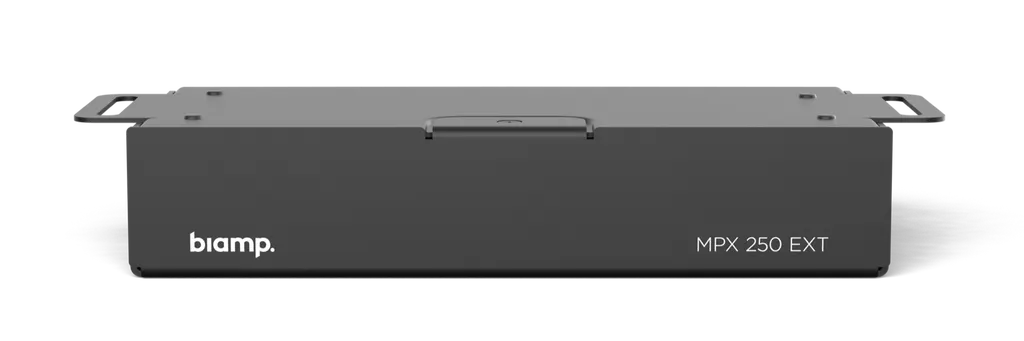
EasyConnect MPX 250 EXT 30
Biamp EasyConnect MPX 250 EXT 30 Table-to-Display Extension Kit
- Platforms
- TAA Compliant
- Connectivity
- HDMI 2.1
Priceon request
QuotationWithin 1 working day
DeliveryConfirmed with your quote, based on stock
Overview
The Biamp EasyConnect MPX 250 EXT 30 carries an MPX 250 table connection up to 30 feet (10 m) to a wall-mounted display using one cable. Power, AV signals and data pass through together, so presenters keep the same table experience. It suits meeting rooms in Doha, West Bay and Lusail where the display sits away from the table and a tidy single-cable run matters. TAA compliant, 3-year warranty.
What the EasyConnect MPX 250 EXT 30 does
The Biamp EasyConnect MPX 250 EXT 30 extends an existing MPX 250 table connection by up to 30 feet (10 m), so a wall-mounted display can be served from a conference table at a distance. Rather than running separate video, USB, network and power cables across the room, the installer uses one active optical cable. The table side keeps the same MPX 250 behaviour, so users see no change in how they connect.
The display side uses a compact receiver that mounts behind the screen with the brackets included in the kit. Keeping the electronics out of sight leaves the front of the room tidy, which matters in boardrooms and lecture halls where the wall is visible to everyone. The listed weight is 380 g (0.84 lbs).
Specifications that matter for planning
- Video: HDMI 2.1 output rated for 8K at 60Hz and up to 32 Gbps, with 2-lane DisplayPort 1.4 (HBR3) on the link.
- USB: USB-C input with USB 3.2 Gen 2 at up to 10 Gbps, and two USB-A ports at 10 Gbps, 5V/0.9A each.
- Power: up to 100W power delivery over USB-C, with a 60W standard supply (12V/5A) and a 200W optional supply (20V/10A).
- Network: RJ45 at 100/1000 Mbps, shared through the USB-C connection.
- Compliance: TAA compliant, CE marked and RoHS compliant.
In practice, one cable carries the picture, data and power for the table. A laptop on the table can show content on the wall display and draw power through the same run, which keeps the table free of trailing leads.
Where it fits in Qatar
In a boardroom in West Bay, the table often sits in the middle of the room while the display is on the far wall. A 30-foot run covers that distance with one cable, and the receiver stays hidden behind the screen, so the room looks clean without leads across the floor.
A university in Education City fitting out several seminar rooms can use the same table-to-display layout in each room. Lecturers who move between rooms then follow the same connection routine, and the facilities team documents one standard arrangement.
A hotel conference room in Lusail with a flexible layout suits bring-your-own-meeting setups, where guests connect their own laptops, while the table keeps a fixed extension to the display. The cable route can be planned once for the room rather than rebuilt for each event.
What to plan before installation
- Measure the route from the table outlet to the display, including vertical drops and bends, and confirm it stays within the 30-foot (10 m) reach.
- Keep the wall-side receiver in an air-conditioned space. The ambient operating range is 5°C to 40°C with humidity up to 90% RH, which matters during Qatar summers.
- Plan conduit routing where needed. The cable is Kevlar-reinforced and conduit-ready, but confirm fire and building rules with your electrical contractor, as the source data does not list a fire rating.
- Confirm the mains supply for the power adapter with the SmartRooms Qatar team before fixing the unit.
SmartRooms Qatar offers free site surveys, which are worth booking before wall-mounting a display and running cable through finished walls. Quotations are usually issued within one working day, and we accept purchase orders (LPOs) and government tenders through Monaqasat. Products are covered by the manufacturer's 3-year warranty.
Request a quote for your room
Send the room dimensions, display height, table position and the MPX 250 unit you plan to pair with, and our team will confirm the cable route and kit. Request a quote for the EasyConnect MPX 250 EXT 30 today, and we will return a quotation with the cable and bracket details.
Highlights
- Extends an MPX 250 table connection up to 30 feet (10 m)
- One active optical cable for video, USB, network and power
- HDMI 2.1 output rated for 8K at 60Hz
- USB-C input supports up to 100W power delivery
- Ambient operating range 5°C to 40°C, humidity up to 90% RH
- TAA compliant, CE marked, RoHS compliant, 3-year warranty
Room fit
Tell us the room size and platform (Teams, Zoom or BYOD) and we confirm the right combination with your quotation.
Estimated timeline
Quotation within 1 working day · delivery timing depends on stock availability, and we confirm it with your quotation.
Specifications
22 specifications · Source: manufacturer · checked Oct 2026
DATA5
- Max. Data Rate
- USB Support: USB 2.0 HS (480 Mbps) USB 3.2 Gen 2 (10 Gbps) Video Support: 2-lane DisplayPort 1.4 (HBR3, 2 × 8.1 Gbps)
- Connector Type
- USB-C Active Optical Cable, Uni-directional USB-C Input Port: USB 3.2 Gen 2, up to 10 Gbps, DP Alt Mode 1.4, up to 100W USB-C Extension Port: DP Alt Mode 1.4, up to 32 Gbps, USB 3.2 Gen 2 USB-C Dual Role: Port USB 3.2 Gen 2, 10 Gbps, device or host mode USB-A Ports: 2 x USB 3.2 Gen 2, 10 Gbps, 5V / 0.9A HDMI Output: HDMI 2.1, 8K @ 60Hz, up to 32 Gbps video Ethernet: RJ45, 100/1000 Mbps, shared via USB-C
- USB Specification
- USB 3.2 Gen 2
- USB Standard
- USB 3.2 Gen 2
- HDMI Version
- 2.1
OTHER3
- Signal Type
- Active
- Display Port
- 2-lane DisplayPort 1.4
- HDMI
- 2-lane DisplayPort 1.4 (HBR3, 2 × 8.1 Gbps)
GENERAL3
- Weight
- 0.84 lbs (380g)
- Mounting
- Behind-display brackets included
- Kit Contents
- MPX 250 EXT: Wall-side unit, power adapter, mounting brackets. MPX 250 Link 10: 30ft active optical cable, attachable electronics.
POWER2
- Power
- 60W standard (12V/5A) 200W optional (20V/10A)
- Max. Power Delivery
- Up to 100W
NETWORK2
- Network Connection(s)
- RJ45
- Port Speed
- 100/1000 Mbps (shared via USB-C)
CERTIFIED SOLUTIONS2
- TAA Compliant
- TAA Compliant
- Certified Solutions
- TAA Compliant
COMPLIANCE1
- Certifications
- CE marked RoHS compliant
ENVIRONMENTAL2
- Ambient Operating Temperature Range
- 5°-40°C
- Humidity
- Up to 90% RH
VIDEO2
- Video
- 8K @ 60Hz, up to 32 Gbps video
- Physical Interfaces
- HDMI 2.1
Downloads
6 files from the manufacturer
PDF
Biamp EasyConnect MPX 250 EXT 30 datasheets (PDF, 247 KB)
PDF
Biamp EasyConnect MPX 250 EXT 30 manuals & guides (PDF, 3.3 MB)
RFA
Biamp EasyConnect MPX 250 EXT 30 drawings & cad (RFA)
RFA
Biamp EasyConnect MPX 250 EXT 30 drawings & cad (RFA)
RVT
Biamp EasyConnect MPX 250 EXT 30 drawings & cad (RVT)
EXE
Biamp EasyConnect MPX 250 EXT 30 software & firmware (EXE)
Questions about EasyConnect MPX 250 EXT 30
What does the EasyConnect MPX 250 EXT 30 do?
It extends an existing MPX 250 table connection by up to 30 feet (10 m), so a wall-mounted display can be served from a conference table that sits some distance away. Video, USB, network and power travel through one active optical cable rather than several separate runs. The table side keeps the same MPX 250 functionality, so users connect the way they already know.
We are fitting out several seminar rooms at a university in Education City. Can we use one layout for all of them?
Yes, the same table-to-display layout can be repeated in each room, which simplifies installation and training for facilities teams. Each room still needs its own cable route measured from the table outlet to the display, because the reach is 30 feet (10 m) per run. SmartRooms Qatar can survey the rooms and quote them together.
Our boardroom in West Bay has the table at one end and the display on the far wall. Will 30 feet be enough?
The EXT 30 is rated for up to 30 feet (10 m), so it covers that layout only if the measured route, including vertical drops and bends, stays within that length. Measure the actual cable path rather than the straight-line distance. If the route is tight, a site survey before ordering will confirm it. Request a quote with your room dimensions and table position.
What video resolution can it carry?
The HDMI 2.1 output is rated for 8K at 60Hz with up to 32 Gbps of video bandwidth. The link between the table and the display side uses 2-lane DisplayPort 1.4 at HBR3. Check that your display and sources support the resolution you plan to use, because the display determines the final picture quality.
How do I plan the cable route?
Measure from the table outlet to the display position, adding allowance for vertical drops, trunking and bends where the cable changes direction. The kit uses a single 30-foot active optical cable, and that length is the maximum reach. Leave some slack at the table end so the table can be moved for cleaning without strain.
Can the cable be run inside conduit in a permanent installation?
Yes, the cable is Kevlar-reinforced and described as conduit-ready, which suits permanent conference rooms where cables run inside walls or trunking. The source data does not list a fire rating or jacket classification, so confirm your building requirements with your electrical contractor before pulling the cable. SmartRooms Qatar can advise on the install plan during a site survey.
What power does the wall-side unit need?
The standard supply is 60W at 12V/5A, and a 200W option at 20V/10A is listed. The USB-C input supports up to 100W power delivery. The kit includes a power adapter, but the source data does not state its mains input rating, so confirm the mains supply with the SmartRooms Qatar team before installation.
Can the receiver sit in a hot lobby cabinet during Qatar summers?
Not without checking first. The ambient operating range is 5°C to 40°C with humidity up to 90% RH, and cabinets in sun-facing lobbies or unventilated walls can exceed 40°C in summer. Keep the wall-side unit in an air-conditioned room and confirm the enclosure temperature with the SmartRooms Qatar team before fixing it to the wall.
What ports are on this connection?
The connector list includes a USB-C input port, two USB-A ports, an HDMI 2.1 output and an RJ45 network port at 100/1000 Mbps. The network port is shared through the USB-C connection. Plan which peripherals will connect at the display side, such as a camera or a wireless presentation receiver, and check they fit these ports before ordering.
Is it compatible with the MPX 250 and other EasyConnect products?
It is designed to extend the MPX 250 and carries EasyConnect features such as power delivery and AV routing from the table to the display. The source data does not list compatibility with other EasyConnect models, so ask SmartRooms Qatar to confirm the exact table unit and firmware before ordering. Quote item number 920-02276-00001 so the correct kit is matched.
We run a hotel meeting room in Lusail with a flexible layout. Does this suit guests bringing their own laptops?
The product is aimed at both fixed UC rooms and flexible BYOM setups, where a presenter connects a personal device through the table. The table keeps a permanent extension to the wall display, so the connection point stays consistent between events. Confirm the configuration with your IT team and request a quote with your room layout.
How would a school in Al Wakrah order several units with a purchase order?
Send the LPO details and a list of rooms with the table-to-display distance for each. SmartRooms Qatar usually issues quotations within one working day and accepts purchase orders, bank transfer, cheque or purchase order payment. The unit carries the manufacturer's 3-year warranty, is TAA compliant and CE marked, and a free site survey can be arranged before ordering.



