






Barco
ClickShare Power Supply 100W
Barco ClickShare Power Supply 100W, 100-Watt Video Conferencing Accessory
EasyConnect MPX 250
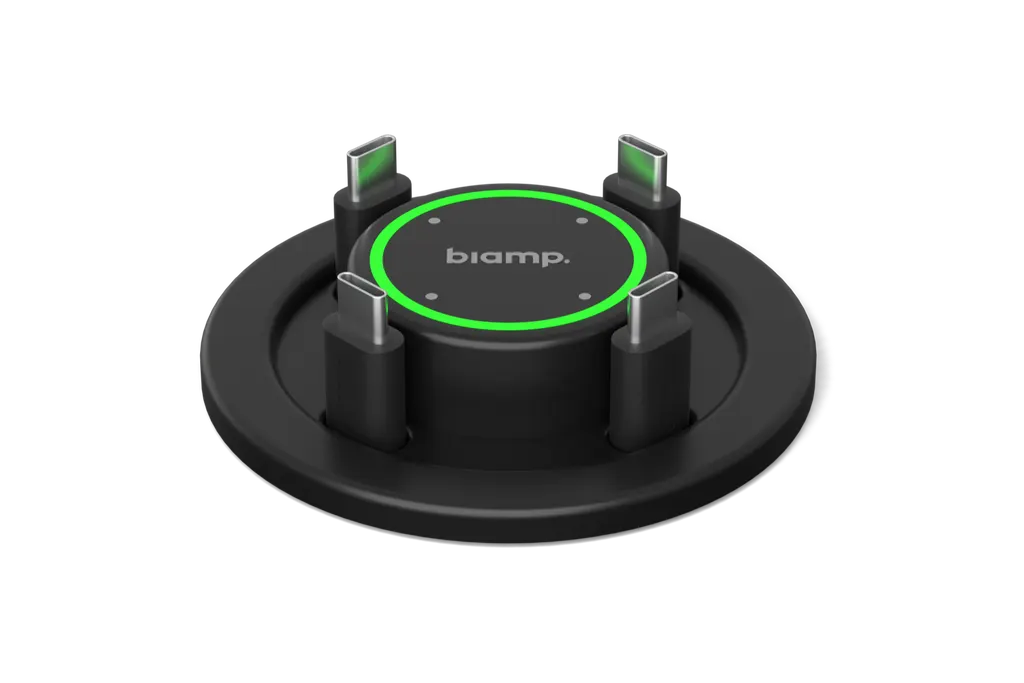
Biamp EasyConnect MPX 250 BYOM Collaboration Switcher for Meeting Tables
- Platforms
- TAA Compliant
Priceon request
QuotationWithin 1 working day
DeliveryConfirmed with your quote, based on stock
Overview
Biamp's EasyConnect MPX 250 is a table-mounted BYOM collaboration switcher. One USB-C cable from a laptop provides up to 100W charging, screen sharing, internet and access to room audio and video. Four USB-C inputs let several participants share in one meeting, and a touch controller switches between BYOM and UC room modes. It suits executive boardrooms and hybrid meeting rooms in West Bay or Lusail. Request a quote.
What the EasyConnect MPX 250 does at the table
The Biamp EasyConnect MPX 250 is a table connection hub built for meeting rooms that run bring-your-own-meeting (BYOM) sessions alongside a dedicated unified communications (UC) room system. It brings charging, content sharing, internet access and room control together on one USB-C link. A participant plugs in a laptop, keeps the battery topped up and shares to the room display without changing settings or moving cables.
Hybrid meetings in Qatar often mix people in the boardroom with colleagues in branch offices or abroad, and the switcher is designed for that mix. It is platform-agnostic, so the same table works with Microsoft Teams, Zoom, Webex and Google Meet.
Connectivity and power figures that matter
The specification sheet gives these figures for the unit:
- Charging: up to 100W through the four USB-C input ports, which also run USB 3.2 Gen 2 at up to 10 Gbps with DisplayPort Alt Mode 1.2 to 1.4.
- Downstream: two USB-C ports at 5V / 3A with Power Delivery 3.0, plus two USB-A ports at 5V / 0.9A.
- Network: a 10/100 Mbps RJ45 port for management, a 10/100/1000 Mbps RJ45 port for internet sharing, and 2.4 GHz Wi-Fi for the management console.
- Video: HDMI 2.1 at up to 8K at 60Hz with HDCP 2.3 and FRL mode, a USB-C extension port for video output, and dual display support.
Where it fits in Qatar meeting rooms
In a boardroom at a bank in West Bay or a government office in Msheireb, the table is the first thing a presenter touches. Attendees arrive with laptops that need power for a two-hour session, and the MPX 250 charges them through the same cable that carries the screen. The touch controller lets a chair or room coordinator switch between BYOM and the UC system without calling IT.
In a training room at a university in Education City or a private school in Al Wakrah, several participants can share content at once through the four USB-C points, which suits group work and paired presentations. A conference room at a hotel in The Pearl or an administration meeting room at a hospital in Al Sadd can use the same setup for visiting teams joining from abroad.
What to plan before installation
The unit is a pre-mounted, under-table installation with an integrated retractable cable management system, so the table must be prepared to take it. Check the table thickness and the space beneath the surface before ordering. The MPX 250 is rated for 5°C to 40°C and 5% to 80% humidity, so keep it in an air-conditioned room. In Qatar's summer, confirm the installation environment with the SmartRooms Qatar team, particularly if the table sits near a window or an open lobby. Wall-side and direct connection options are also available through the EXT 30 Wall Side Extension Kit and the MPX 250 DC Direct Connection Hub.
Ordering and support from SmartRooms Qatar
The kit includes the table connection box with touch controller, mounting brackets, a power adapter with a 1-metre AC cord, four USB-C cables with cable weights and management console software for PC and Mac. The manufacturer backs the unit with a 3-year warranty. SmartRooms Qatar delivers to all eight municipalities of Qatar and offers professional installation and free site surveys, which we recommend before fitting a table unit. Quotations are usually issued within one working day, and we accept purchase orders and government tenders. Request a quote for the EasyConnect MPX 250 and tell us your table type and room size.
Highlights
- Up to 100W USB-C charging for connected laptops
- One USB-C cable for power, screen sharing and internet
- Four USB-C input points for multi-participant sharing
- Touch controller switches between BYOM and UC room modes
- TAA compliant; CE, FCC, ETL, RoHS and REACH certified
- 3-year manufacturer warranty
Room fit
Tell us the room size and platform (Teams, Zoom or BYOD) and we confirm the right combination with your quotation.
Estimated timeline
Quotation within 1 working day · delivery timing depends on stock availability, and we confirm it with your quotation.
Specifications
17 specifications · Source: manufacturer · checked Oct 2026
OTHER2
- Length
- 4 x 2 meters
- HDMI
- HDMI 2.1, max resolution 8K @ 60Hz HDCP v2.3, FRL mode
GENERAL3
- Mounting
- Pre-mounted table installation with integrated retractable system
- Optional Accessories
- EasyConnect MPX 250 EXT 30 Wall Side Extension Kit MPX 250 DC Direct Connection Hub
- Kit Contents
- - EasyConnect MPX 250 Table Connection box with touch controller and mounting brackets for under-table installation. - Power adapter with 1-meter AC cord. - Mounting system with retractable cable management. - 4 x USB-C cables with cable weights. - Management console software (PC & Mac).
POWER1
- Power Input
- DC IN - 20V / 10A power supply input
CONFERENCING1
- USB
- USB-C Input Ports: 4 x USB Type-C 3.2 Gen 2, up to 10 Gbps, DP Alt Mode 1.2-1.4, up to 100W USB-C Downstream Ports: 2 x USB 3.2 Gen 2, up to 10 Gbps, 5V / 3A, Power Delivery 3.0 USB-A Ports: 2 x USB 3.2 Gen 2, up to 10 Gbps, 5V / 0.9A
NETWORK2
- Network Connection(s)
- Network RJ45 Port 1: 10/100 Mbps Ethernet (Management) RJ45 Port 2: 10/100/1000 Mbps Ethernet (Internet Sharing) Wi-Fi: 2.4 GHz Wi-Fi for MPX 250 Management Console
- Port Speed
- Extension Port USB-C Extension Port: DP Alt Mode 1.4, up to 4 x 8.1 Gbps, video output
CONTROLS & INDICATORS2
- Control
- Touch Interface: Capacitive touch buttons for each port with LED status indicators.
- Front Panel Indicator(s)
- Visual LED indicators (idle, connected, sharing, BYOM mode)
CERTIFIED SOLUTIONS2
- TAA Compliant
- TAA Compliant
- Certified Solutions
- TAA Compliant
COMPLIANCE1
- Certifications
- CE, FCC, ETL, RoHS, REACH
ENVIRONMENTAL2
- Ambient Operating Temperature Range
- 5°–40° C
- Humidity
- 5% – 80%
DATA1
- HDMI Version
- 2.1, max resolution 8K @ 60Hz HDCP v2.3, FRL mode
Downloads
9 files from the manufacturer
PDF
Biamp EasyConnect MPX 250 datasheets (PDF, 827 KB)
PDF
Biamp EasyConnect MPX 250 manuals & guides (PDF, 3.3 MB)
PDF
Biamp EasyConnect MPX 250 manuals & guides (PDF, 2.1 MB)
RFA
Biamp EasyConnect MPX 250 drawings & cad (RFA)
RFA
Biamp EasyConnect MPX 250 drawings & cad (RFA)
RFA
Biamp EasyConnect MPX 250 drawings & cad (RFA)
RVT
Biamp EasyConnect MPX 250 drawings & cad (RVT)
DMG
Biamp EasyConnect MPX 250 software & firmware (DMG)
EXE
Biamp EasyConnect MPX 250 software & firmware (EXE)
Questions about EasyConnect MPX 250
Which Qatar meeting rooms suit the EasyConnect MPX 250?
The EasyConnect MPX 250 suits meeting rooms where staff bring their own laptops but the room also has a dedicated UC system. It works well in boardrooms in West Bay or Lusail, and in hybrid rooms where people in the room and remote colleagues join the same call. One USB-C cable per laptop handles charging, screen sharing and internet, so the table stays tidy during a session with several presenters.
Will it work for a Doha team joining Teams or Zoom calls with colleagues abroad?
Yes. The design is platform-agnostic and the manufacturer names Microsoft Teams, Zoom, Webex and Google Meet, with support for other platforms as well. A Doha team can join a Teams call with colleagues abroad from a laptop plugged into the table, while the room system handles the shared display. Confirm your specific UC platform and room hardware with the SmartRooms Qatar team before ordering.
How does a meeting coordinator switch between BYOM and the UC room system?
A long press switches the MPX 250 between BYOM mode and the dedicated UC room system. The touch controller has capacitive buttons for each port and LED indicators showing idle, connected, sharing and BYOM status. This lets a coordinator change modes mid-meeting without reconfiguring cables. The touch interface also supports room control, including simple BYOM and UC switching and more advanced room automations triggered by use of the unit.
How much power can it supply to connected laptops?
The four USB-C input ports are rated for up to 100W, which is the figure to check against each laptop's charger. Power comes from a DC IN 20V / 10A supply, and the kit includes a power adapter with a 1-metre AC cord. The two downstream USB-C ports output 5V / 3A with Power Delivery 3.0, and the two USB-A ports output 5V / 0.9A. For a room with several high-power laptops, confirm the total load with the SmartRooms Qatar team before ordering.
What network connections does it need?
The unit has two RJ45 ports: a 10/100 Mbps port for management and a 10/100/1000 Mbps port for internet sharing. It also offers 2.4 GHz Wi-Fi for the management console. Management console software is included for PC and Mac. Before installation, identify the network point at the table location, because boardroom tables are often far from the nearest wired outlet and cable routes need planning early.
Can it be fitted into a boardroom table in West Bay?
Yes, the unit is a pre-mounted under-table installation with mounting brackets and an integrated retractable cable management system. Before ordering, measure the table thickness and the space beneath the surface, and plan the cable route to the power and network points. SmartRooms Qatar offers a free site survey and professional installation, which is worth booking for a corporate boardroom where the table is fixed and changes are costly.
Can it sit in a meeting room with a window in Qatar's summer heat?
The MPX 250 is rated for ambient operating temperatures of 5°C to 40°C and humidity of 5% to 80%. Summer outdoor temperatures in Qatar can exceed 45°C, so place the table in an air-conditioned room and keep it away from direct sun and dust. If the meeting room has a large window or an open lobby, confirm the conditions with the SmartRooms Qatar team before installation.
Is the wall-side kit useful for a training room in Education City?
It can be. The optional EXT 30 Wall Side Extension Kit suits rooms where a table-mounted unit is not the best fit, such as a training room where presenters work from a wall. The MPX 250 DC Direct Connection Hub is the other listed accessory. Both are optional and are not included in the kit, so specify them in the quotation if your layout needs them.
Does it connect to room displays, microphones and cameras?
The manufacturer describes the MPX 250 as giving participants access to room displays, microphones, cameras and speakers through one USB-C connection. It also integrates with room control for switching modes. The source data does not list specific third-party display, camera or microphone models, so confirm compatibility with your existing room hardware before ordering. The SmartRooms Qatar team can review your equipment list as part of the quotation.
What is included in the box?
The kit includes the table connection box with touch controller and mounting brackets for under-table installation, a power adapter with a 1-metre AC cord, a mounting system with retractable cable management, four USB-C cables with cable weights, and management console software for PC and Mac. The manufacturer provides a 3-year warranty, so the box covers both the hardware and the setup tools needed for installation.
How do I plan a training room layout with the MPX 250?
Plan for the number of participant points you need, since the unit has four USB-C input ports for shared content. Map the table position relative to the presenter's screen and the power and network outlets. Allow for the retractable cable system beneath the table and check the room stays within 5°C to 40°C. A site survey before ordering helps confirm the layout for a classroom or training room.
Which certifications and compliance does it carry?
The EasyConnect MPX 250 is listed as TAA compliant and carries CE, FCC, ETL, RoHS and REACH certifications. Procurement teams preparing a tender or purchase order can cite these from the specification. If your tender requires specific documentation, ask the SmartRooms Qatar team when you request a quote so the right paperwork is included with your quotation.



