






Biamp
Evoko Kleeo Desk Manager 6-pack + 1yr license
Biamp Evoko Kleeo Desk Manager 6-Pack (910-01972) Desk Booking Display
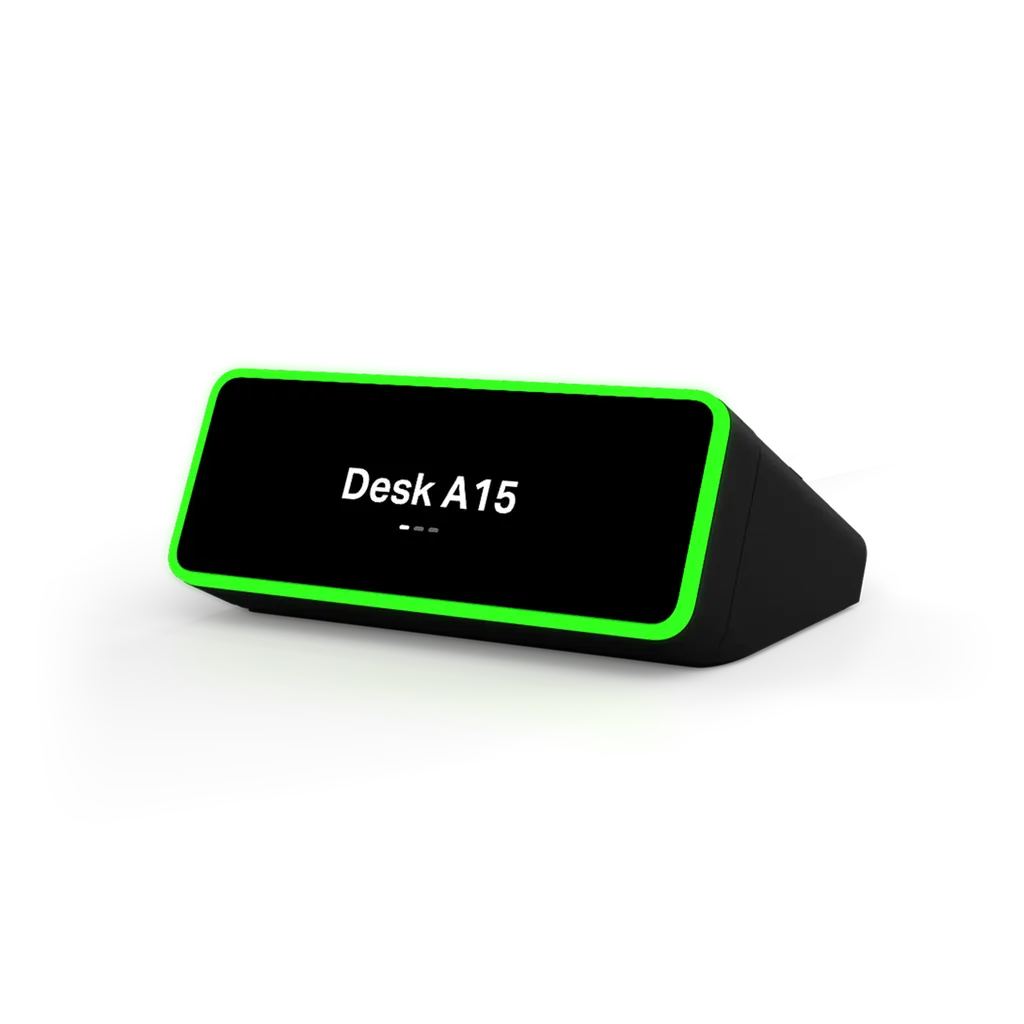
Evoko Kleeo Desk Manager 1-Pack
Biamp Evoko Kleeo Desk Manager 1-Pack Desk Booking Display
- Zoom
- Zoom Certified
- Platforms
- SIGN-IN OPTIONS
- Connectivity
- Wifi - Dual band:
Priceon request
QuotationWithin 1 working day
DeliveryConfirmed with your quote, based on stock
Overview
The Biamp Evoko Kleeo Desk Manager 1-Pack is a desk booking display that shows whether a desk is available, booked or occupied. Its 2.05-inch OLED touch screen lets staff book, extend or end a reservation, while RFID and proximity sensors handle check-in. It is certified for Zoom Workspace Reservation, connects over dual-band WiFi and is managed from Biamp Workplace. Suited to Doha offices running hybrid desk schemes.
What the Kleeo Desk Manager does at each workstation
The Biamp Evoko Kleeo Desk Manager 1-Pack is a desk-mounted booking display for shared and hybrid offices. Each pack contains one main unit with a 2.05-inch capacitive OLED touch screen and one sensor unit. It shows whether a desk is free, reserved or in use, and it lets people book the space directly on the device. This listing includes a 1-year desk licence.
Status lights, sensors and on-device controls
Colour-coded status lights show available, booked or occupied at a glance. From the touch screen, staff can book, extend or end a session. Check-in works in two ways: an RFID reader that accepts MIFARE Classic cards, and a passive infrared proximity sensor. A presence sensor can also enable automatic booking, and Focus Mode signals that someone needs uninterrupted concentration time.
The interface is available in more than 20 languages, including Arabic and English, which suits offices where both languages are used side by side.
Zoom certification and central management
Kleeo is certified for Zoom Workspace Reservation. In that arrangement Zoom handles the booking experience, while Kleeo supplies the hardware layer at the desk where people check in and manage their session. Organisations already working in Zoom keep a familiar reservation flow.
The device connects to Biamp Workplace, a cloud platform where facilities teams configure the units, monitor desk usage and adjust settings across sites.
Where it fits in Qatar
- Government office in West Bay: a shared floor of workstations where staff reserve a desk for the day and the display shows which ones are free.
- Consultancy or bank in Lusail: hybrid teams who come into the office on set days and need visible, bookable desks without a front-desk coordinator.
- Research or training space in Education City or Al Sadd: hot desks shared between projects or course groups, where double-booking wastes time.
Planning the installation
The main unit can sit on top of the desk or mount to its front edge, while the sensor unit fixes to the underside. The box includes a desk stand, cable ties and an installation template. Plan the sensor position before fixing, and check that the underside of the desk is accessible. The main unit measures 83 mm high, 37 mm wide and 68 mm deep and weighs 105 g. The sensor unit measures 40 mm by 40 mm by 12 mm and weighs 13 g.
Power comes from USB-C at 5.0V, 1A maximum. The USB-A charger and the USB-C to USB-A cable, which can run up to 5 metres, are sold separately. Each charger port should provide at least 5V and 1A, not shared. Qatar mains is 240 V, 50 Hz, so confirm the charger and its plug suit local sockets before ordering. Wireless uses dual-band WiFi (2.4GHz with 802.11n and 5.0GHz with 802.11n/ac), so check signal strength at each desk, especially on large floors with thick partitions.
The source data does not give an operating temperature range, so confirm the intended environment with the SmartRooms Qatar team before installing the unit anywhere that is not air-conditioned.
Ordering and support
The Kleeo Desk Manager carries a 3-year manufacturer warranty and is CE marked and RoHS compliant. SmartRooms Qatar offers free site surveys, professional installation and delivery to all eight municipalities, with quotations usually within one working day. For a full floor of desks, request one quotation covering every unit. Payment can be made by purchase order (LPO), bank transfer or cheque. Request a quote to plan your desk booking rollout across your Qatar sites.
Highlights
- Certified for Zoom Workspace Reservation
- Colour-coded lights show available, booked or occupied desks
- RFID and proximity sensors for automatic check-in
- Dual-band WiFi: 802.11n at 2.4GHz, 802.11n/ac at 5GHz
- Biamp Workplace cloud management and 3-year warranty
- USB-C powered at 5V, 1A; charger sold separately
Room fit
Tell us the room size and platform (Teams, Zoom or BYOD) and we confirm the right combination with your quotation.
Estimated timeline
Quotation within 1 working day · delivery timing depends on stock availability, and we confirm it with your quotation.
Specifications
16 specifications · Source: manufacturer · checked Oct 2026
GENERAL8
- Height
- Main Unit: 3.27 inches (83 mm) Sensor Unit: 1.6 inches (40mm)
- Width
- Main Unit: 1.46 inches (37 mm) Sensor Unit: 1.6 inches (40mm)
- Depth
- Main Unit: 2.68 inches (68 mm) Sensor Unit: 0.5 inches (12 mm)
- Weight
- Main Unit: 3.7 oz (105 g) Sensor Unit: 0.46 oz (13 g)
- Display
- 2.05-inch capacitive OLED touch display
- Mounting
- Main unit - Placed on top of the desk, or mounted to the front edge of the desk. Sensor unit: - Mounted to the underside of the desk.
- Kit Contents
- • 1x Main unit • 1x Desk stand • 1x Sensor unit • 2x Cable ties • 1x Installation template
- Compatible Platforms
- SIGN-IN OPTIONS Microsoft Office 365 Google Workspace Apple ID Email & Password
POWER1
- Power
- Device power - Standard USB-C to USB-A 5.0V, 1A max. USB power - USB-A charger (AC/DC adapter) sold separately. - Single port: req. 5V, 1A min. - Multiport: 5V, 1A min./port, not shared. - USB-C to USB-A cable sold separately. Maximum 5 meters.
NOTES1
- Specification Notes
- USER INTERFACE LANGUAGES Arabic, Catalan, Chinese (Simplified and Traditional), Czech, Danish, Dutch, English, Estonian, Finnish, French, Galician, German, Italian, Japanese, Latvian, Lithuanian, Norwegian, Polish, Portuguese, Russian, Spanish, Swedish
CERTIFIED SOLUTIONS2
- Zoom
- Zoom Certified
- Certified Solutions
- Zoom Certiifed
NETWORK1
- Network Connection(s)
- Wifi - Dual band: - 2.4GHz, 802.11n - 5.0 GHz, 802.11n/ac RFID - MIFARE Classic
CONTROLS & INDICATORS2
- Proximity Sensor
- Proximity - passive infra red sensor
- Connectivity
- Wifi - Dual band: - 2.4GHz, 802.11n - 5.0 GHz, 802.11n/ac RFID - MIFARE Classic
COMPLIANCE1
- Compliance
- CE marked and compliant with the RoHS directive
Downloads
7 files from the manufacturer
PDF
Biamp Evoko Kleeo Desk Manager 1-Pack datasheets (PDF, 219 KB)
PDF
Biamp Evoko Kleeo Desk Manager 1-Pack datasheets (PDF, 917 KB)
PDF
Biamp Evoko Kleeo Desk Manager 1-Pack manuals & guides (PDF, 720 KB)
PDF
Biamp Evoko Kleeo Desk Manager 1-Pack brochures (PDF, 3.0 MB)
RFA
Biamp Evoko Kleeo Desk Manager 1-Pack drawings & cad (RFA)
PDF
Biamp Evoko Kleeo Desk Manager 1-Pack other documents (PDF, 80 KB)
PDF
Biamp Evoko Kleeo Desk Manager 1-Pack other documents (PDF, 365 KB)
Questions about Evoko Kleeo Desk Manager 1-Pack
What is the Evoko Kleeo Desk Manager 1-Pack used for?
It is a desk booking display for shared and hybrid workspaces. A status light shows whether a desk is available, booked or occupied, and the touch screen lets people book, extend or end a session at the desk itself. It suits organisations where staff reserve workstations rather than keeping assigned seats, such as government offices, consultancy teams and training centres across Doha.
Is the Kleeo Desk Manager compatible with Zoom Workspace Reservation?
Yes. Kleeo is certified for Zoom Workspace Reservation. Zoom handles the booking flow, and Kleeo adds the desk-side layer where people check in and manage a session. If your organisation already uses Zoom, this certified route keeps the reservation experience familiar to staff without introducing a separate booking tool for them to learn.
How does automatic check-in work?
A desk can be checked in by RFID card or by the passive infrared proximity sensor. The RFID reader works with MIFARE Classic cards. A presence sensor can also enable automatic booking, which reduces how often staff need to touch the device. These options suit offices that want fewer steps in the daily routine for employees arriving at the desk.
Which sign-in methods does the device support?
The listed sign-in options are Microsoft Office 365, Google Workspace, Apple ID, and email with password. If your organisation runs a mix of Microsoft and Google accounts across offices in Doha and Lusail, ask the SmartRooms Qatar team to review how these options match your account setup before the rollout begins.
Which wireless standards does it use?
It uses dual-band WiFi: 2.4GHz with 802.11n and 5.0GHz with 802.11n/ac. The RFID reader uses MIFARE Classic cards. On a large floor, ask your IT team to check signal strength at each desk location, because range varies with walls and nearby equipment. SmartRooms Qatar can also carry out a free site survey to review desk positions before you order.
Does it need its own power supply, and what should I buy?
Yes. The device is powered over USB-C at 5.0V, 1A maximum. The USB-A charger is sold separately, and each port should provide at least 5V and 1A, not shared. The USB-C to USB-A cable is also sold separately and can be up to 5 metres long. Qatar mains is 240 V, 50 Hz, so confirm the charger and its plug suit local sockets before ordering.
How is it mounted, and what is in the box?
The box contains a main unit, a desk stand, a sensor unit, two cable ties and an installation template. The main unit sits on top of the desk or mounts to its front edge, and the sensor unit mounts underneath. The main unit measures 83 mm high, 37 mm wide and 68 mm deep. Use the template to fix the position before installing. SmartRooms Qatar can install it professionally across Doha.
Would a government office in West Bay use this to manage shared workstations?
Yes, where a floor has shared workstations that staff book for set days. The display shows free desks before staff arrive, and users can extend or end a booking on the device. Facilities teams can monitor usage through Biamp Workplace. For a government body, SmartRooms Qatar can issue one quotation covering several desks, which can be ordered on a purchase order or supported for a Monaqasat tender.
Can a consultancy or bank in Lusail use it for hybrid teams?
Yes, for teams that come into the office on set days. The display shows which desks are booked, occupied or free, so a visiting colleague can reserve a desk without asking a coordinator. Zoom Workspace Reservation keeps the booking flow connected to the meeting tools the team already uses. Before installation, confirm the sensor position under each desk and check WiFi coverage at each location.
Would a research or training office in Education City benefit from it?
Yes, particularly where research groups share desks between projects or course cohorts. Live status reduces double-booking, and Focus Mode signals when someone needs quiet time. The interface supports Arabic and English, so mixed-language teams can use the same screen. Ask the SmartRooms Qatar team to review your desk layout before ordering.
How could a training centre in Al Sadd use this device?
A training centre running workshops on shared desks can show which workstations are reserved for sessions and which remain free for drop-in learners. Learners check in with an RFID card or by proximity, so instructors do not need to manage a paper register. When fitting out a full room, all units can be ordered under one purchase order (LPO).
How would an energy company at Ras Laffan order and install several units?
The administration office would request one quotation covering every unit and then issue a single purchase order. SmartRooms Qatar can supply the units, deliver to any of Qatar's eight municipalities and install them professionally after a free site survey. Each desk fitted with a unit needs a sensor placed underneath, so the survey should confirm access to the underside of every desk.
Similar models



Biamp
Evoko Liso Freestand Mount - Boltable
Biamp Evoko Liso Freestand Mount (Boltable) 910-01935 Floor Stand
