






Biamp
Evoko Kleeo Desk Manager 6-pack + 1yr license
Biamp Evoko Kleeo Desk Manager 6-Pack (910-01972) Desk Booking Display
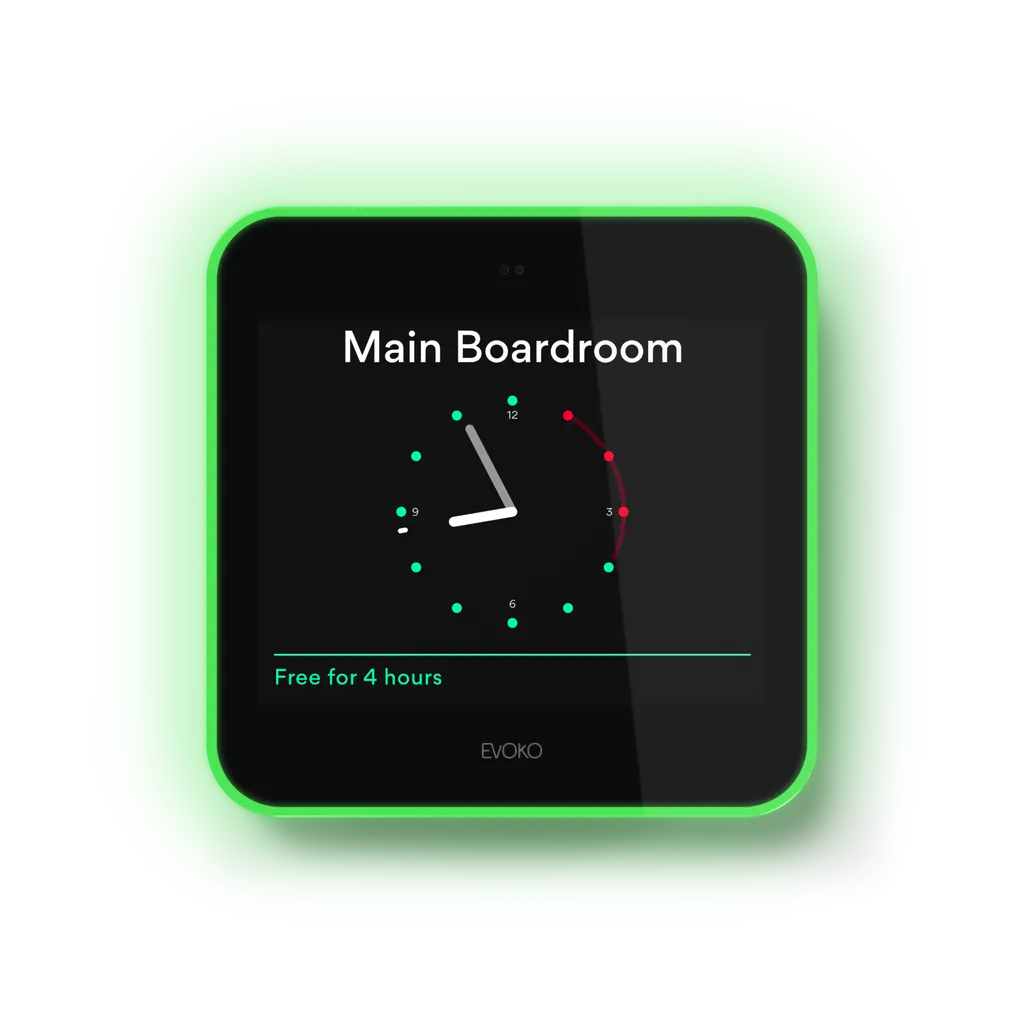
Evoko Liso Room Manager
Biamp Evoko Liso Room Manager 8-inch Room Booking Panel
- Platforms
- Microsoft Office 365 with Grap API
- Connectivity
- Wi-Fi - 802.11 a/b/g/n
Priceon request
QuotationWithin 1 working day
DeliveryConfirmed with your quote, based on stock
Overview
The Biamp Evoko Liso Room Manager is an 8-inch touch panel that shows meeting room availability and handles bookings at the door. Its light aura is visible from a distance, and staff can book, check in, extend or end meetings directly on the screen. It runs on Evoko Home server software you host yourself and connects to Microsoft 365, Exchange, Google Workspace and IBM Domino. It suits offices, government sites and universities in Qatar that manage many rooms.
What the Liso Room Manager does in a meeting room
The Biamp Evoko Liso Room Manager is an 8-inch touch panel mounted beside a meeting room door. It shows the room's current status and upcoming bookings, and lets staff book, check in, extend or end a meeting from the screen itself. Its data is managed through Evoko Home, server software you host yourself, so room records stay inside your own network.
The panel measures 200 mm square and 25 mm deep, and weighs 1.30 kg. Its capacitive touchscreen has an anti-fingerprint finish, which keeps the display easier to read in busy corridors.
Room status you can read from the corridor
A three-way indirect light aura around the panel shows room status from a distance. Green means the room is free, red means it is occupied, and amber signals a meeting that is about to start. A proximity sensor shows a clock when nobody is nearby, then reveals booking details as someone approaches.
Calendar, network and access card connectivity
- Calendars: works with Microsoft 365 through Graph API, Microsoft Exchange 2016 and 2019, Google Workspace, and IBM/Lotus Domino.
- Network: Wi-Fi to 802.11 a/b/g/n, plus an RJ-45 Ethernet port at 10/100/1000 Mbit with PoE and PoE+ support.
- Access cards: a 13.56 MHz RFID reader for ISO/IEC 14443A/B, supporting MIFARE 4K and 1K cards.
- Server: Evoko Home is recommended on a dual-core CPU with 4GB of memory and 30GB of storage.
The reader does not support ISO/IEC 15693 or MIFARE Ultralight C cards, so check your staff badge technology before ordering.
Where it fits in Qatar
A government authority in Doha with several floors of meeting rooms can place one panel outside each room, so staff see what is free before walking down a corridor. In Education City, a university booking seminar rooms and study spaces can show students what is available, while analytics reveal which rooms are under-used. A hotel in West Bay or a serviced apartment building in Lusail can use panels to manage shared meeting rooms.
Glass partitions are common in head offices in Msheireb and The Pearl, so the mounting kits for standard and glass walls are an important part of the planning. A five-way cable exit helps route cabling neatly.
What to plan before installation
- Choose the power route: PoE, or the 12V AC/DC power adapter sold as an accessory.
- Confirm the server host and network access before connecting the first room.
- Check the wall type and mounting kit for each room.
- Agree the placement with the SmartRooms Qatar team if a panel will sit near a window facing direct sun, as we cannot confirm an operating temperature range for this model.
Existing Liso installations can move to Biamp Workplace cloud management through a guided firmware update, with no replacement hardware needed. The unit carries a three-year limited hardware warranty. Request a quote and the SmartRooms Qatar team will confirm the number of panels, server requirements and mounting for your site.
Highlights
- 8-inch capacitive touchscreen with anti-fingerprint finish
- Three-way light aura shows room status from a distance
- Book, check in, extend and end meetings on the panel
- Self-hosted with Evoko Home server software
- PoE and PoE+ Ethernet plus 802.11 a/b/g/n Wi-Fi
- Three-year limited hardware warranty and TAA compliant
Room fit
Tell us the room size and platform (Teams, Zoom or BYOD) and we confirm the right combination with your quotation.
Estimated timeline
Quotation within 1 working day · delivery timing depends on stock availability, and we confirm it with your quotation.
Specifications
15 specifications · Source: manufacturer · checked Oct 2026
GENERAL9
- Height
- 7.9 inches (200mm)
- Width
- 7.9 inches (200mm)
- Depth
- 1 inch (25mm)
- Weight
- 2.87 lbs (1.30 kg)
- Display
- 8-inch capacitive touch with antifinger print treatment
- Mounting
- Mounting options for both standard and glass walls 5-way cable exit option for easy and clean installation
- Included Accessories
- Evoko Liso Room Manager hardware Mounting kits for both standard and glass walls Evoko Home application: (used for configuration, synchronization and administration) Software upgrades for the Liso Room Manager unit and Evoko Home
- Compatible Platforms
- Microsoft Office 365 with Grap API Microsoft Exchange 2016/2019 Google Workspace IBM/Lotus Domino Smartcloud IBM/Lotus Domino 8.5.3 – or later Evoko booking (stand-alone version)
- Warranty
- Three-year limited hardware warranty included.
POWER1
- Power
- Power over Ethernet (PoE), or 12V AC/DC power adapter (accessory)
NOTES1
- Specification Notes
- 3-way indirect light aura to make room status visible already from a distance Open API for third party integration Communication via real-time two-way connection Remote management with multi-site support Real-time monitoring & statistics Server Recommended Specifications: Dual Core CPU-4GB-30GB USER INTERFACE LANGUAGES: Arabic, Catalan, Chinese, Simplified & Traditional, Czech, Danish, Dutch, English, Estonian, Finnish, French, Galician, German, Italian, Japanese, LatvianLithuanian, Norwegian, Polish, Portuguese, Russian, Spanish, Swedish, Thai
CERTIFIED SOLUTIONS2
- TAA Compliant
- TAA Compliant
- Certified Solutions
- TAA Compliant
CONTROLS & INDICATORS2
- Proximity Sensor
- Proximity sensor
- Connectivity
- Wi-Fi - 802.11 a/b/g/n Ethernet - RJ-45, 10/100/1000Mbit PoE & PoE + RFID 13.56 MHz reader ISO/IEC 14443A/B Supports MIFARE 4K/1K card (does not support ISO/IEC 15693 or MIFARE Ultra light C)
Downloads
14 files from the manufacturer
PDF
Biamp Evoko Liso Room Manager datasheets (PDF, 31 KB)
PDF
Biamp Evoko Liso Room Manager datasheets (PDF, 1.3 MB)
PDF
Biamp Evoko Liso Room Manager datasheets (PDF, 219 KB)
PDF
Biamp Evoko Liso Room Manager datasheets (PDF, 926 KB)
PDF
Biamp Evoko Liso Room Manager manuals & guides (PDF, 551 KB)
GZ
Biamp Evoko Liso Room Manager manuals & guides (GZ)
PDF
Biamp Evoko Liso Room Manager brochures (PDF, 3.0 MB)
RFA
Biamp Evoko Liso Room Manager drawings & cad (RFA)
URL
Biamp Evoko Liso Room Manager certificates & compliance (URL)
EXE
Biamp Evoko Liso Room Manager software & firmware (EXE)
EXE
Biamp Evoko Liso Room Manager software & firmware (EXE)
DOCX
Biamp Evoko Liso Room Manager software & firmware (DOCX)
ZIP
Biamp Evoko Liso Room Manager software & firmware (ZIP)
GZ
Biamp Evoko Liso Room Manager software & firmware (GZ)
Questions about Evoko Liso Room Manager
What is the Biamp Evoko Liso Room Manager used for?
It is a room booking panel placed outside a meeting room. It shows whether the room is free, booked or occupied, and lets staff book, check in, extend or end a meeting on the screen itself. It suits offices, government floors and universities in Qatar that want one clear view of room use across many rooms.
Does the Liso need a cloud service to work?
No. The Liso is self-hosted and connects to Evoko Home server software that runs on your own server, which keeps room data inside your network under central control. The recommended server is a dual-core CPU with 4GB of memory and 30GB of storage. Existing units can later move to Biamp Workplace cloud management through a guided firmware update. Discuss the best setup with SmartRooms Qatar when requesting a quote.
Which calendar systems does the Liso work with?
The specifications list Microsoft Office 365 with Graph API, Microsoft Exchange 2016 and 2019, Google Workspace, IBM/Lotus Domino, and a stand-alone Evoko booking version. If your Doha office runs Microsoft 365 or Google Workspace, confirm your account setup with SmartRooms Qatar before ordering so the panel reads the correct room calendars.
Can staff see room status from across the corridor?
Yes. A three-way indirect light aura around the panel shows green for available, red for occupied and amber for an upcoming meeting. The proximity sensor displays a clock when nobody is nearby, then shows booking details as someone approaches. This helps staff in hospitals and government buildings check a room without entering it first.
Which access cards does the reader support?
The reader uses 13.56 MHz RFID and supports ISO/IEC 14443A/B, including MIFARE 4K and 1K cards. It does not support ISO/IEC 15693 or MIFARE Ultralight C cards. Before ordering for a university or company that issues staff passes, check which card technology your badges use and send the details with your quotation request to confirm compatibility.
How is the Liso powered and connected?
It supports Power over Ethernet, PoE and PoE+, through its RJ-45 port running at 10/100/1000 Mbit, or it can use a 12V AC/DC power adapter sold as an accessory. It also offers Wi-Fi to 802.11 a/b/g/n. In a new office fit-out in Doha, PoE removes the need for a power outlet near the wall box, and the team can advise on the best option for your site.
Does the Liso support Arabic?
Yes. The user interface languages include Arabic, English, French and many others. Arabic-speaking staff can book rooms in their own language at the door, which suits ministries, Arabic-curriculum schools and teams that work in Arabic and English side by side. Ask SmartRooms Qatar to confirm the language set on your server before rollout.
Can the Liso be installed on a glass wall?
Yes. The included mounting kits cover both standard and glass walls, and the five-way cable exit helps keep wiring clean. For a meeting room with a glass partition in Msheireb or West Bay, the SmartRooms Qatar team can arrange a free site survey to confirm the wall type, cable route and mounting height before installation.
What should I know about the panel size before installation?
The unit measures 200 mm square, 25 mm deep, and weighs 1.30 kg, with an 8-inch screen. Its compact size suits placement beside a door or on a partition. Plan a mounting height that is comfortable to reach, and check that the cable exit lines up with your wall box. A site survey helps confirm this across a multi-room floor.
What warranty comes with the Liso Room Manager?
The Liso includes a three-year limited hardware warranty and is TAA compliant, as stated by the manufacturer. For a government tender or LPO, keep the warranty documents with your purchase order file, and ask SmartRooms Qatar for the full warranty terms when requesting a quote. Quotations are usually issued within one working day.
Can users report room faults from the panel?
Yes. The equipment reporting feature lets users log a room or device problem directly from the panel, so facilities teams see the issue without a phone call. Combined with analytics on utilisation rates and occupancy trends, facilities managers at a hotel or corporate campus can identify rooms that need repeated maintenance and plan space use better.
Can one administrator manage several sites?
The specifications list remote management with multi-site support, plus real-time monitoring and statistics. For a group with offices in Doha, Lusail and Al Khor, these features let administrators review bookings across sites. Confirm the number of rooms and the layout of each site when requesting a quote, so the server and panel count are planned together.
Similar models



Biamp
Evoko Liso Freestand Mount - Boltable
Biamp Evoko Liso Freestand Mount (Boltable) 910-01935 Floor Stand
