






Biamp
Evoko Kleeo Desk Manager 6-pack + 1yr license
Biamp Evoko Kleeo Desk Manager 6-Pack (910-01972) Desk Booking Display
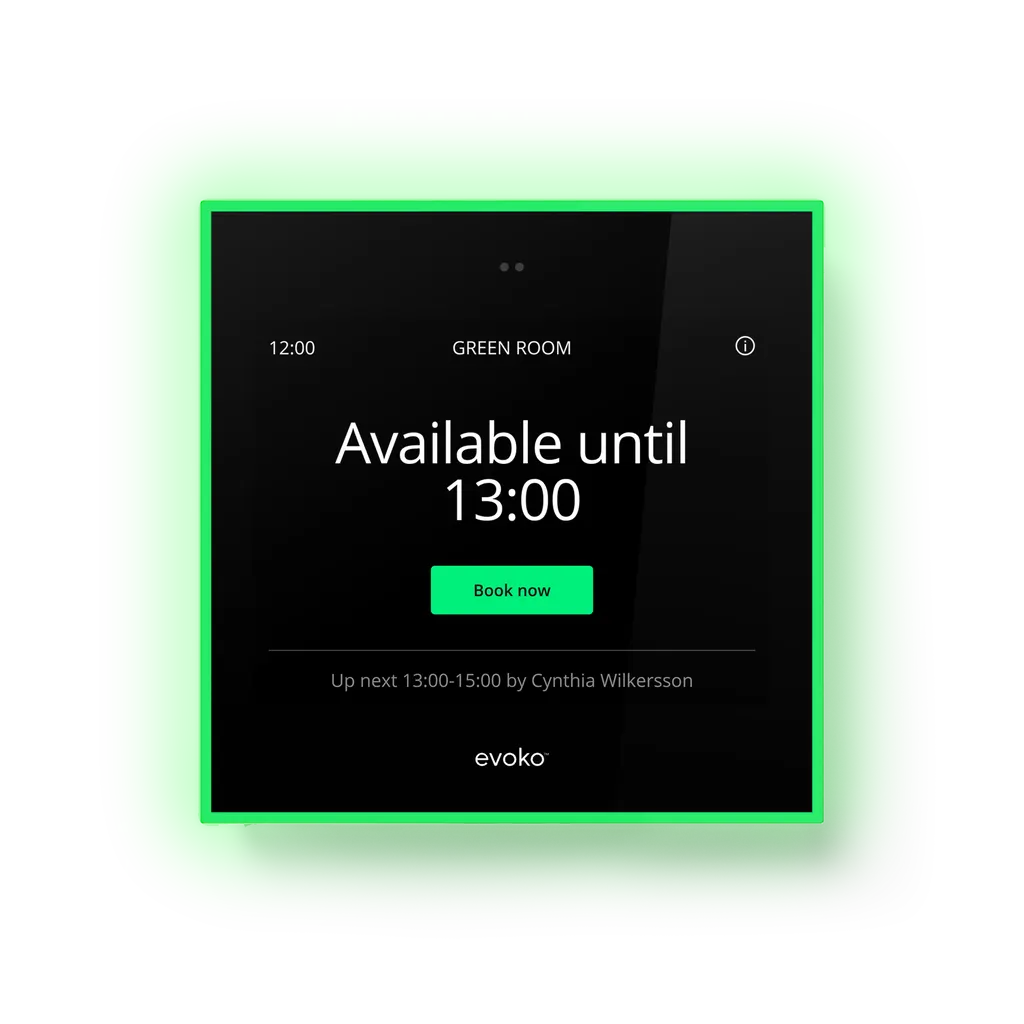
Evoko Naso
Biamp Evoko Naso 910-02267 Room Scheduling Panel
- Platforms
- Microsoft Office 365
- Connectivity
- Wi-Fi - 802.11b/g/n/ac 2.4ghz
Priceon request
QuotationWithin 1 working day
DeliveryConfirmed with your quote, based on stock
Overview
The Biamp Evoko Naso (910-02267) is an 8-inch touch room scheduling panel that shows room availability through LED status lights visible from a distance. Users book, check in, extend and end meetings on the device. It works natively with Microsoft 365 and Google Workspace, is managed through Biamp Workplace, and includes a 1-year Evoko Room License. It suits government offices, universities and companies in Doha that share meeting rooms across several floors.
What the Evoko Naso does beside each meeting room
The Evoko Naso is a room and desk booking panel that mounts beside a meeting room door. Its 8-inch capacitive touch screen lets staff book a room, check in, extend a session or end it early without opening a laptop. At 195 mm wide and high, 35 mm deep and 0.9 kg, it takes up little wall space, which suits busy corridors in office towers and school buildings.
Status lights that read from a distance
Three colours show a room's state at a glance: green for available, red for occupied and amber for an upcoming booking. The 3-way indirect light aura makes the status visible from a distance, so a visitor at the far end of a corridor can see whether a room is free before walking to it.
- Green: room is available
- Red: room is occupied
- Amber: upcoming booking
Connecting to Microsoft 365, Google Workspace and Biamp Workplace
The panel works natively with Microsoft 365 and Google Workspace, so bookings made in the calendar your organisation already uses appear on the panel. Users identify themselves with an RFID card or a PIN, and the interface supports multiple languages, which helps teams working in Arabic and English side by side. Administrators receive analytics on room use, booking patterns and trends, while on-device equipment reporting lets any user flag a room or hardware fault from the panel itself.
As a Workplace Ready device, the Naso connects to Biamp Workplace for remote monitoring, configuration and management, and it receives firmware updates over the air. Wireless connectivity is Wi-Fi 802.11b/g/n/ac on the 2.4 GHz band, with a 10/100Mbps Ethernet port and Bluetooth 4.2 (BLE) also included.
Mounting and power planning for Qatar installations
The included mounting kits fit both standard and glass walls, and the 5-way cable exit helps keep cabling neat behind the panel. Power comes from PoE (802.3at PD type 1, rated 13W) over an RJ45 connection, or from a 5V AC/DC power adapter that is listed as an accessory. Confirm that the switch port can supply 13W before ordering. The data for this model does not give an operating temperature range, so ask SmartRooms Qatar to confirm the installation environment before fitting panels in a hot or dusty area. A free site survey helps check wall type and cable routes before installation.
Where the Naso fits in Qatar
A ministry office in Msheireb with rows of shared meeting rooms can use the panels to show availability at each door and reduce double bookings. A university building in Education City can equip seminar rooms and group study spaces, and one purchase order can cover several units at once. In West Bay, a hotel or serviced apartment operator can place panels beside conference rooms so guests and staff see availability without calling the front desk.
SmartRooms Qatar supplies the Naso to all eight municipalities of Qatar, provides professional installation and free site surveys, and usually issues quotations within one working day. We accept purchase orders (LPOs), government tenders including Monaqasat, and payment by bank transfer, cheque or purchase order. Request a quote for the Biamp Evoko Naso 910-02267 with the number of rooms you need to equip.
Highlights
- 8-inch capacitive touch display, 195 mm wide and high
- Green, red and amber LED room status lights
- Book, check in, extend and end meetings on the device
- Native Microsoft 365 and Google Workspace compatibility
- PoE 802.3at input rated 13W over RJ45
- 1-year Evoko Room License and 3-year warranty
Room fit
Tell us the room size and platform (Teams, Zoom or BYOD) and we confirm the right combination with your quotation.
Estimated timeline
Quotation within 1 working day · delivery timing depends on stock availability, and we confirm it with your quotation.
Specifications
15 specifications · Source: manufacturer · checked Oct 2026
COMPATIBILITY1
- Operating System(s)
- Microsoft Office 365 Google Workspace
GENERAL8
- Height
- 7.7 in (195 mm)
- Width
- 7.7 in (195 mm)
- Depth
- 1.37 in (35 mm)
- Weight
- 2.0 lbs (0.9 kg)
- Display
- 8-inch capacitive touch
- Mounting
- Mounting options for both standard and glass walls 5-way cable exit option for easy and neat installation
- Included Accessories
- Evoko Naso hardware Mounting kits for both standard and glass walls 1 year Evoko Room License
- Compatible Platforms
- Microsoft Office 365 Google Workspace
POWER2
- PoE Input
- PoE RJ45 802.3at PD type 1 (13W)
- Power Input
- 5V AC/DC power adapter (accessory)
NOTES1
- Specification Notes
- 3-way indirect light aura to make room status visible already from a distance Book, end and extend on device On device check-in User identification with RFID Insights & analytics Remote administration and management Real time device management Firmware updates (Over-the-air)
CONTROLS & INDICATORS2
- Proximity Sensor
- Yes
- Connectivity
- Wi-Fi - 802.11b/g/n/ac 2.4ghz Ethernet - 10/100Mbps RFID: - NFCIP-1, NFCIP-2 protocol ISO/IEC 14443A, ISO/IEC 14443B PICC mode via host interface - MIFARE PCD encryption mechanism (MIFARE 1K/4K) - NFC Forum tag 1 to 4, (MIFARE Ultralight, Jewel, Open FeliCa tag MIFARE DESFire) Bluetooth 4.2 (BLE)
COMPLIANCE1
- Compliance
- CE marked Compliant with the RoHS directive
Downloads
6 files from the manufacturerQuestions about Evoko Naso
What is the Biamp Evoko Naso used for?
The Evoko Naso is a room scheduling panel for meeting rooms and desks. It shows whether a room is available, occupied or about to be booked, and lets users book, check in, extend or end meetings on its touch screen. It suits organisations in Doha that share meeting rooms across several floors, such as government offices, schools and corporate headquarters in West Bay or Lusail.
Does the Evoko Naso work with Microsoft 365 and Google Workspace?
Yes. The Naso is listed as compatible with Microsoft Office 365 and Google Workspace and integrates with both natively, so bookings made in those calendars appear on the panel. If your organisation uses another calendar system, ask the SmartRooms Qatar team to confirm compatibility before ordering, because the data for this model names only these two platforms.
What do the LED status lights mean?
Green means the room is available, red means it is occupied and amber signals an upcoming booking. The 3-way indirect light aura is designed to make room status visible from a distance, so a visitor at the end of a corridor can see whether a room is free before walking to it.
How is the Evoko Naso powered?
The Naso accepts PoE over an RJ45 connection under the 802.3at PD type 1 standard, rated at 13W. A 5V AC/DC power adapter is available as an accessory if PoE is not available at the door. Ask your IT team to confirm that the network switch can supply 13W on the port before installation.
What wired and wireless connections does it have?
The panel supports Wi-Fi 802.11b/g/n/ac on the 2.4 GHz band, a 10/100Mbps Ethernet connection, Bluetooth 4.2 (BLE), and NFC protocols used by RFID cards. In office buildings with dense wireless networks, check access point coverage at the planned mounting location before fixing the panel to the wall.
How do people sign in at the panel?
Users are identified with RFID cards, and the panel also supports PIN-based access, which suits visitors who do not have a card. In a ministry that receives visiting delegations, staff can give each visitor a PIN to check in at the meeting room without issuing a permanent access card.
Will the Evoko Naso fit on a glass wall?
Yes. The included mounting kits support both standard and glass walls, and the 5-way cable exit helps keep cabling tidy. For a glass-walled meeting room in a Lusail office, a free site survey can confirm the glass type and cable route before installation, which avoids delays on the day of fitting.
What is included with the Evoko Naso?
The package includes the Evoko Naso hardware, mounting kits for standard and glass walls, and a 1-year Evoko Room License. The 5V AC/DC power adapter is listed as an accessory, so confirm whether you need it. The data does not describe what the license covers in detail, so ask about its terms when you request a quote.
How does the Naso help IT teams manage several rooms?
As a Workplace Ready device, the Naso connects to Biamp Workplace for cloud-based monitoring, configuration, remote management and real-time device management. Firmware updates are delivered over the air. At a university campus in Education City, one IT team can manage panels spread across several buildings without visiting each room.
Can staff report a faulty room or device from the panel?
Yes. The on-device equipment reporting feature lets users flag a room or hardware problem immediately from the touch screen. Administrators also receive analytics on room utilisation, so they can see which rooms generate the most issues. In a hotel conference centre, a faulty projector can be reported from the door before the next event starts.
Is the Evoko Naso suitable for hot or dusty entrances?
The data for this model does not list an operating temperature range or dust rating, so it should not be assumed suitable for outdoor, window-facing or unconditioned lobbies. Ask the SmartRooms Qatar team to confirm the environment before ordering, especially for areas exposed to summer temperatures above 45°C or dust storms.
How do we order panels for a multi-room building?
Each room that needs a booking display requires one panel, so the order quantity follows the number of rooms you want to connect to the calendar. SmartRooms Qatar usually issues quotations within one working day and accepts purchase orders (LPOs), government tenders and payment by bank transfer, cheque or purchase order. Request a quote with your room list.
Similar models



Biamp
Evoko Liso Freestand Mount - Boltable
Biamp Evoko Liso Freestand Mount (Boltable) 910-01935 Floor Stand
