






Biamp
Evoko Kleeo Desk Manager 6-pack + 1yr license
Biamp Evoko Kleeo Desk Manager 6-Pack (910-01972) Desk Booking Display
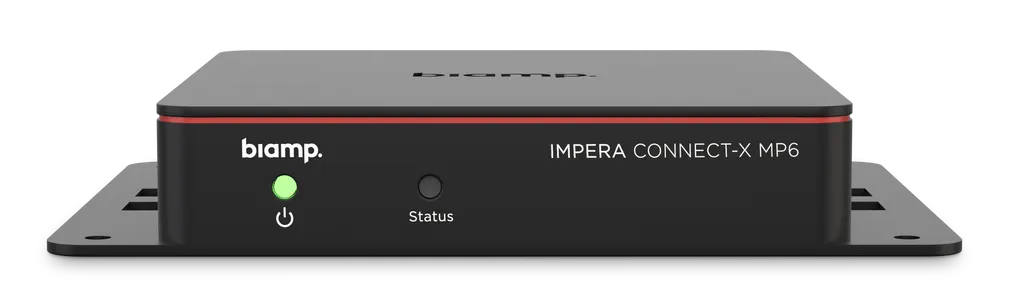
Impera Connect-X MP6
Biamp Impera Connect-X MP6 Multiport Control Extender
Priceon request
QuotationWithin 1 working day
DeliveryConfirmed with your quote, based on stock
Overview
The Biamp Impera Connect-X MP6 is a small Ethernet-connected control extender for Impera controllers. It provides one bidirectional RS-232/IR port with feedback, two unidirectional RS-232/IR ports and three GPIO ports, and draws power over a single CAT5e or CAT6 cable through PoE. It suits boardrooms and meeting rooms in Doha and Lusail that need one controller for displays and cameras. Request a quote from SmartRooms Qatar.
What the Connect-X MP6 adds to an Impera system
The Biamp Impera Connect-X MP6 is a multiport control extender that works alongside Impera controllers, control pads and Apprimo Touch 8i control panels. It gives a networked Impera system the serial, IR and GPIO connections it needs to command equipment that has no Ethernet interface, so one controller can run a room that includes displays, cameras, lighting or environmental equipment.
Ports, power and network connection
Each unit offers one bidirectional RS-232/IR port with feedback, two unidirectional RS-232/IR ports and three GPIO ports. It also provides LAN control of two additional IP devices. The MP6 is PoE powered to IEEE 802.3at Class 1, 4W, so a single CAT5e or CAT6 cable carries both its network link and its power. Each I/O can draw up to 24DC / 500mA, and the Ethernet link runs at 10/100 Mbps with autosense.
Installation and capacity
- Size: 22 mm high, 127.2 mm wide with flange and 92.2 mm deep.
- Weight: 110 g (0.24 lb), light enough for under-table, wall or enclosure mounting.
- Mounting: screws, zip ties or double-sided tape. Mounting screws and zip ties are included.
- Capacity: each LAN-connected Impera controller can host up to eight MP6 units without using any of its own LAN ports.
Where it fits in Qatar
In a West Bay boardroom, one MP6 can switch a projector screen, room lighting and a motorised blind from the same Impera touch panel, keeping the control logic in one Project Designer file. An Education City training centre with several lecture rooms can host an MP6 in each room under one Impera controller, using the Ethernet cabling that reaches those rooms. A hotel meeting suite in The Pearl or a ministry meeting room in Msheireb can apply the same approach, with the controller handling displays and lighting while the MP6 supplies the serial and GPIO ports that older equipment needs.
Planning before you order
Start by listing every device that needs serial, IR or GPIO control, then count the ports each room needs. The data sheet does not give an operating temperature range, so confirm the mounting location before ordering. A unit in a hot equipment cabinet or near a window exposed to Doha summer heat needs its environment checked first. Programming is done in Project Designer software, so align the room design with the configuration early. SmartRooms Qatar offers free site surveys before installation and delivers to all 8 municipalities of Qatar.
To request a quote, send your room list and the devices you need to control. The SmartRooms Qatar team will return a quotation, usually within one working day, covering unit count, cabling and accessories. We accept purchase orders (LPOs) and government tenders.
Highlights
- One bidirectional RS-232/IR port with feedback, plus two unidirectional ports
- Three GPIO ports and LAN control of two additional IP devices
- PoE powered to IEEE 802.3at Class 1, 4W over one CAT5e/CAT6 cable
- Up to eight units per Impera controller without using LAN ports
- 110 g body, mounted with screws, zip ties or double-sided tape
- 5-year manufacturer warranty
Room fit
Tell us the room size and platform (Teams, Zoom or BYOD) and we confirm the right combination with your quotation.
Estimated timeline
Quotation within 1 working day · delivery timing depends on stock availability, and we confirm it with your quotation.
Specifications
9 specifications · Source: manufacturer · checked Oct 2026
GENERAL5
- Height
- 0.86 inches (22 mm)
- Width
- 5 inches (127.2 mm) with flange
- Depth
- 3.8 inches (92.2 mm)
- Weight
- 0.24 lb (110 g)
- Included Accessories
- Included: Mounting screws and zipties
POWER2
- Power
- PoE (IEEE 802.3at Class 1, 4W)
- Power Consumption
- Each I/O can draw up to 24DC / 500mA
NETWORK1
- Network Connection(s)
- Ethernet Port Speed: 10/100 Mbps Autosense: Yes Number of 3rd-party devices supported: 2
CONTROLS & INDICATORS1
- RS-232
- Number of Ports: 1 (bidirectional) 2 (unidirectional)
Downloads
5 files from the manufacturerQuestions about Impera Connect-X MP6
What would a West Bay boardroom use the Connect-X MP6 for?
A boardroom in West Bay could use the Connect-X MP6 to link an Impera controller or touch panel to the room's projector screen, lighting and blinds. Its serial, IR and GPIO outputs handle equipment that cannot join the network directly, so one touch panel runs the whole room. The control logic stays in a single Project Designer file that is easy to update when the room's use changes.
How would an Education City training centre plan control across several lecture rooms?
Each lecture room can have its own MP6, and one LAN-connected Impera controller can host up to eight of them without using any of its LAN ports. Start by counting the ports each room needs: one bidirectional RS-232/IR port with feedback, two unidirectional RS-232/IR ports and three GPIO ports per unit. Then confirm the cable route to each room, since every unit needs one CAT5e or CAT6 cable for data and PoE power.
How would a hotel meeting suite in The Pearl use the MP6?
A meeting suite in The Pearl might need one touch panel to switch a display, dim the lights and trigger an audio or relay device during events. Use the GPIO ports for simple on-off triggers and the RS-232/IR ports for devices that accept serial or infrared commands. Before requesting a quote, ask the SmartRooms Qatar team to confirm each device's control method, because the serial and IR outputs must match what the equipment accepts.
Where would a ministry meeting room in Msheireb fit the MP6?
The unit should sit where it can reach the devices it controls, such as a wall box or equipment cabinet near the room's displays. It weighs 110 g and mounts with screws, zip ties or double-sided tape, so it suits tight spaces. Book a free site survey before installation so the team can check cable routes and the mounting point, and confirm the location against the room layout.
How could an Industrial Area control room use the GPIO ports?
A site control room in the Industrial Area could use the GPIO ports to send simple signals to local equipment or receive them from it, while the Impera controller handles the logic. Use the three GPIO ports for on-off signals and the serial ports for equipment with its own command protocol. Check that the load on each I/O, up to 24DC / 500mA, suits the equipment connected to it.
Which Impera devices work with the Connect-X MP6?
The Connect-X MP6 extends Impera controllers, control pads and Apprimo Touch 8i control panels. It adds serial, IR, GPIO and LAN control to any Impera controller connected to a local area network. Because it bridges Ethernet and conventional AV ports, installers can bring those ports to devices over Ethernet cabling instead of running separate control wires.
How many ports does the Connect-X MP6 provide?
The MP6 has one bidirectional RS-232/IR control port with feedback, two unidirectional RS-232/IR control ports and three GPIO ports. It also provides LAN control of two additional IP devices. The bidirectional port returns feedback from the connected device, so the controller can check that a command was received.
How is the Connect-X MP6 powered, and what cable does it need?
The MP6 is PoE powered to IEEE 802.3at Class 1, 4W, so one CAT5e or CAT6 cable handles both data and power. The Ethernet link runs at 10/100 Mbps with autosense. Each I/O can draw up to 24DC / 500mA, so check that figure against the connected equipment and choose a PoE source that matches the unit's Class 1 rating.
Can one Impera controller host more than one Connect-X MP6?
Yes. Each LAN-connected Impera controller can host up to eight Connect-X MP6 multiport extenders without consuming any LAN ports. One controller can therefore cover several devices in a room or a row of rooms over a single network connection. Plan the total port count against the controller before requesting a quote so the layout matches the number of units you need.
Can the MP6 control third-party displays, cameras, lighting and HVAC?
The unit supports integration with third-party devices through RS-232, GPIO and PoE connectivity, and the manufacturer data lists displays, cameras, lighting and HVAC systems as examples. Whether a specific device works depends on its control protocol and command set. Send the make and model of each device to SmartRooms Qatar so the team can confirm compatibility before you request a quote.
How is the MP6 mounted, and what comes in the box?
The Connect-X MP6 weighs 110 g and can be mounted with screws, double-sided tape or zip ties. Mounting screws and zip ties are included. It measures 22 mm high, 127.2 mm wide with its flange and 92.2 mm deep, so measure the available space before choosing a location.
Can the Connect-X MP6 be installed in a hot location in Qatar?
The manufacturer data does not state an operating temperature range for this model, so do not place it in an unconditioned or outdoor space until the environment is confirmed. Summer temperatures in Qatar can exceed 45°C, and dust can affect equipment near open windows. Ask the SmartRooms Qatar team to confirm the location and enclosure details before you request a quote.
Similar models



Biamp
Evoko Liso Freestand Mount - Boltable
Biamp Evoko Liso Freestand Mount (Boltable) 910-01935 Floor Stand
