






Biamp
Evoko Kleeo Desk Manager 6-pack + 1yr license
Biamp Evoko Kleeo Desk Manager 6-Pack (910-01972) Desk Booking Display
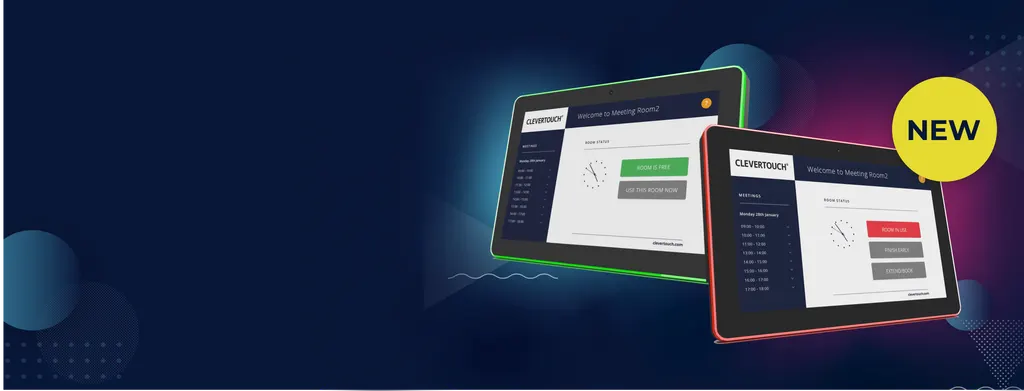
CleverLive Rooms 2
Clevertouch CleverLive Rooms 2 10.1-inch Room Booking Panel
- Video
- 1280*800
- Microphones
- Micro USB OTG
- Speakers
- 2*2W
- Platforms
- CCC/CE/FCC
Priceon request
QuotationWithin 1 working day
DeliveryConfirmed with your quote, based on stock
Overview
The Clevertouch CleverLive Rooms 2 is a 10.1-inch touch room booking panel mounted beside meeting room doors. Green and red LED status shows at a glance whether a room is free, and it syncs with Microsoft Office 365, Microsoft Exchange and Google Calendar. When a room is idle, the panel can show digital signage. It suits offices, universities and government sites across Qatar that share meeting rooms and need fast, clear booking.
What the CleverLive Rooms 2 does at the meeting room door
The CleverLive Rooms 2 is a 10.1-inch touch panel that sits beside a meeting room and shows whether that room is free or booked. It runs Android 13 on a quad-core RK3566 processor with 4GB of RAM and 16GB of internal storage. Its 10-point capacitive touchscreen lets people look up and book rooms directly at the door, while the booking data stays in the calendar your staff already use.
The 1280 x 800 IPS display has a 16:10 aspect ratio, 280 cd/m2 luminance, a 1500:1 contrast ratio and 16.7M colours, with viewing angles of 85 degrees left, right, up and down. That is enough to read room names, times and booking details from a standing position in a corridor.
Calendar sync and at-a-glance room status
The panel integrates with Microsoft Office 365, Microsoft Exchange and Google Calendar, so a booking made from a desktop appears on the door panel, and a room can also be booked on the spot. A green light means the room is available and a red light means it is in use. The surrounding LED light bar supports RGB and mixed colours, so the status is visible from along the corridor.
Availability can also be broadcast as a timetable summary to large format displays in reception areas or on each floor. The clock can be set to 12-hour or 24-hour time, which suits mixed teams used to different formats.
Where it fits in Qatar
- A government ministry in West Bay with shared rooms on several floors can check availability at each door instead of phoning the department that manages bookings.
- A university or training centre in Education City running many small seminar rooms can reduce double bookings and show room status to visiting staff.
- A hotel or serviced apartment in The Pearl or Lusail can show branded welcome messages and event timetables on the panel when the room is not booked.
Planning the installation
Plan power and network first. The panel supports Power over Ethernet to IEEE 802.3at, up to 30W, and also has a DC power input. Confirm that the switch port serving each room supports 802.3at before ordering. Wireless connectivity covers 802.11a/b/g/n/ac and Bluetooth 5.4, and a wired Ethernet port (10M/100M/1000M) gives a more stable link.
Choose the mounting position carefully. The VESA pattern is 75 x 75 mm, and the panel can be set to landscape or portrait. The operating temperature range is 0°C to 40°C, while Qatar outdoor summer temperatures can exceed 45°C, so mount it inside air-conditioned corridors and keep it away from direct sun through glazing. A free site survey from SmartRooms Qatar can confirm position, cable routes and environment before installation.
Other details to plan around: two 2W speakers, a 3.5mm earphone socket with microphone, a USB 3.0 host port, a USB port for RS232 serial connection, micro USB OTG and an SD card slot supporting up to 64GB. It is listed with CCC, CE and FCC certificates.
Next step
Tell SmartRooms Qatar how many meeting rooms need a panel, describe the building layout and name your calendar platform, then request a quote. Quotations usually arrive within one working day. Purchase orders (LPOs) and government tenders, including Monaqasat, are accepted, and the product is covered by the manufacturer's warranty.
Highlights
- 10.1-inch IPS LCD, 1280 x 800 resolution, 16:10 aspect ratio
- Green and red LED status visible from the corridor
- Syncs with Microsoft Office 365, Exchange and Google Calendar
- Android 13, quad-core RK3566, 4GB RAM, 16GB internal storage
- Power over Ethernet to IEEE 802.3at, up to 30W
- Operating temperature 0°C to 40°C, indoor mounting advised
- Listed with CCC, CE and FCC certificates
Room fit
Tell us the room size and platform (Teams, Zoom or BYOD) and we confirm the right combination with your quotation.
Estimated timeline
Quotation within 1 working day · delivery timing depends on stock availability, and we confirm it with your quotation.
Specifications
33 specifications · Source: manufacturer · checked Oct 2026
System5
- CPU
- RK3566 Quad core cortex A55
- RAM
- 4GB
- Internal Memory
- 16GB
- Operation System
- Android 13
- Touch Screen
- 10-Point capacitive touch
Display11
- Panel
- 10.1" LCD panel
- Panel Type
- IPS
- Resolution
- 1280*800
- Display Colours
- 16.7M Colors | 16.7M Colors
- Viewing Angle
- R/L 85/85, U/D 85/85
- Display Mode
- Normally black
- Contrast Ratio
- 1500:1
- Response Time
- 25ms
- Back-light Type
- ELed
- Luminance
- 280cd/m2
- Aspect Ratio
- 16:10
Network3
- WiFi
- IEEE 802.11a/b/g/n/ac
- Bluetooth
- Bluetooth 5.4
- Ethernet
- 10M/100M/1000M ethernet
Interface6
- SD Slot
- SD card ,Max support to 64GB
- Earphone
- 3.5mm earphone + Microphone
- USB
- USB 3.0 host, USB for serial (RS232 Level)
- RJ45
- Ethernet interface
- Micro USB
- Micro USB OTG
- Power jack
- DC power input
Other8
- VESA
- 75*75 mm
- Button
- Power
- Orientation
- Landscape/Portrait
- Speaker
- 2*2W
- LED light bar
- LED light bar with RGB and mixed color
- Certificates
- CCC/CE/FCC
- POE
- Yes Supports IEEE802.3at,up to 30W )
- Working Temperature
- 0ºC - 40ºC
Downloads
4 files from the manufacturerQuestions about CleverLive Rooms 2
What is the CleverLive Rooms 2 used for?
It is a room booking panel mounted outside a meeting room. It shows whether the room is free or booked, lets staff book from the touchscreen and syncs with their calendar. Organisations with several shared rooms, such as a ministry floor in West Bay, use it to stop double bookings and avoid walking to rooms that are already taken.
Which calendars does it work with?
The panel integrates with Microsoft Office 365, Microsoft Exchange and Google Calendar. Staff can book from their desktop calendar or directly at the panel for ad-hoc meetings. A team in a Doha office running Exchange sees the same room bookings on the door panel that they make in Outlook.
How does the room status light work?
A green light means the room is available and a red light means it is in use. The surrounding LED light bar supports RGB and mixed colours. A university in Education City running many small seminar rooms can use this status to see availability from the corridor before walking to a room.
Can the panel show digital signage?
Yes. When a room is not booked, the panel can display digital signage when connected to CleverLive digital signage software. A private school in Al Rayyan could post timetable notices between bookings, and an office can share internal announcements. Ask SmartRooms Qatar to confirm which software components are included in your quotation.
What hardware and operating system does it use?
It runs Android 13 on a quad-core Cortex-A55 based RK3566 processor with 4GB RAM and 16GB internal memory. The 10-point capacitive touchscreen supports multi-touch input. Storage can be expanded with an SD card of up to 64GB. These specifications suit booking and signage playback rather than heavy video editing.
Can it be powered over Ethernet?
Yes. It supports Power over Ethernet to IEEE 802.3at, up to 30W, so one cable can carry both network and power to the door panel. A DC power input is also provided. Before ordering, confirm with your IT team that the switch port in each room supports 802.3at.
Can I mount it on a sun-facing external wall in Qatar?
No. The operating temperature range is 0°C to 40°C, and Qatar outdoor summer temperatures can exceed 45°C. Mount it indoors inside air-conditioned corridors, away from direct sun through glazing. Confirm the environment with the SmartRooms Qatar team during the free site survey before installation.
How is it mounted and how much space does it need?
It has a 75 x 75 mm VESA mounting pattern and can be used in landscape or portrait orientation. Plan wall space beside the room door for a 10.1-inch panel and route Ethernet and power cabling to that point. A free site survey from SmartRooms Qatar helps confirm the position and cable runs.
Does it support Arabic language menus?
The source data does not list interface languages, so confirm language options with SmartRooms Qatar before ordering. What is confirmed is the Android 13 platform, template-based branding and a choice of 12-hour or 24-hour time. These options suit offices in Doha that work in Arabic and English side by side.
What connectivity and ports does it have?
It supports 802.11a/b/g/n/ac WiFi, Bluetooth 5.4 and 10M/100M/1000M Ethernet through an RJ45 port. It also has a USB 3.0 host port, a USB port for RS232 serial connection, micro USB OTG, a 3.5mm earphone jack with microphone and an SD card slot. Speakers are 2 x 2W. A wired connection is recommended for a stable booking sync.
Which certifications does it carry?
The panel is listed with CCC, CE and FCC certificates. Procurement teams preparing a government tender in Qatar should include these certificates in the tender file. Ask the SmartRooms Qatar team which supporting documents to attach to your quotation.
How do I order and is it under warranty?
Products are covered by the manufacturer's warranty. Request a quote from SmartRooms Qatar and quotations usually arrive within one working day. Purchase orders (LPOs), government tenders including Monaqasat, and payment by bank transfer, cheque or purchase order are all accepted.
Similar models



Biamp
Evoko Liso Freestand Mount - Boltable
Biamp Evoko Liso Freestand Mount (Boltable) 910-01935 Floor Stand
