





Thursday, 22 October 2026 · 11 Jumada I 1448 AH Sun – Thu · 9:00 – 18:00
+971 56 914 9477 العربية
WhatsApp

Edge Connect 4K Conference Camera

Elo Edge Connect 4K Conference Camera E988153

Video
640 x 360p @30fps/25fps
Field of view
Vertical: 65° ± 5%
Microphones
Beamforming Mic Array
Platforms
Yes - UVC 1.1
WhatsApp
Priceon request
QuotationWithin 1 working day
DeliveryConfirmed with your quote, based on stock
Overview

The Elo Edge Connect E988153 is a 4K conference camera for huddle rooms and smaller meeting spaces. It captures video at 30fps, offers a 110° diagonal field of view and an 85° tilt range, and includes auto framing and an integrated beamforming microphone array. It connects to a compute device over USB 3.0 Type-C and works with Microsoft Teams, Zoom and Cisco Webex. It suits meeting rooms across Qatar.

What the Edge Connect E988153 does in a meeting room

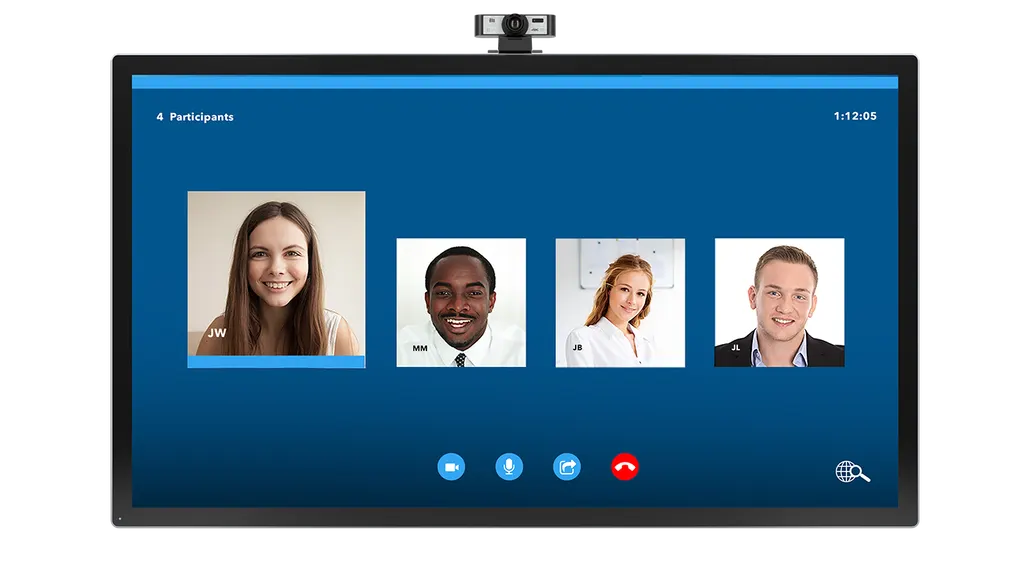
The Elo Edge Connect E988153 is a 4K camera built for video calls in smaller rooms. You attach it to an interactive display, connect it to a compute device over a single USB 3.0 Type-C interface, and run your conferencing software. Remote colleagues then see everyone seated at the table rather than a fixed corner of the room.

Field of view, tilt and framing

The camera offers a 110° diagonal field of view, with 80° horizontal and 65° vertical coverage, each specified within a ±5% tolerance. The adjustable tilt covers 85°, so the lens can be angled down toward a table or aimed at a presenter standing near the screen. Auto framing and ePTZ help keep speakers inside the picture as they move, and the IR remote lets someone in the room adjust the view from their seat without touching the camera.

Video, audio and software compatibility

Supported resolutions run from 640 x 360 and 720p through 960 x 540 and 1080p up to 4K, at 30fps or 25fps. Output formats include H.264, MJPEG, YUY2 and NV12. The beamforming microphone array is designed to work with your collaboration apps to optimise room acoustics. The camera is UVC 1.1 compatible and supports Microsoft Teams, Zoom, Cisco Webex, GoToMeeting and BlueJeans. Windows 7 is limited to 1080p and below, while Windows 8.1, 10 and 11, macOS 10.10 or later, Chromebook from version 29.0.1547.70 and Linux with UVC support are also listed.

Where it fits in Qatar

  • Leadership huddle room in West Bay: a small management meeting where a few members join from regional offices abroad.
  • Staff room at a university in Education City: hybrid sessions where colleagues on another campus need a clear view of the presenter at the table.
  • Ministry meeting room in Msheireb: a room used for weekly meetings from Sunday to Thursday, with officials joining calls from outside Doha.

Planning the installation

Measure the distance between the mounting point and the seating area before ordering, because the included cable is 1.8 m long. The box contains two M3 mounting screws, a remote control and a quick install guide. Check how your display or wall mount will accept the camera, and confirm that the compute device has a USB-A port for the included Type-C to USB-A cable. The manufacturer data does not list an operating temperature range, so confirm the environment with the SmartRooms Qatar team before placing the camera near a window, in a lobby or in any space without air conditioning. SmartRooms Qatar offers free site surveys to check the layout first. The manufacturer data lists a one-year warranty, and a replacement remote control, part E157834, is available as an optional accessory.

Request a quote from SmartRooms Qatar for the Elo Edge Connect E988153. Our team will confirm the details, availability and installation options in your quotation, usually within one working day.

Highlights

  • 4K video at 30fps or 25fps, with 720p and 1080p modes
  • 110° diagonal field of view, 80° horizontal, 65° vertical
  • 85° adjustable tilt for varied room layouts
  • Auto framing, ePTZ and IR remote control included
  • USB 3.0 Type-C, UVC 1.1 compatible with major conferencing apps
  • One-year manufacturer warranty listed in the source data

Room fit

Tell us the room size and platform (Teams, Zoom or BYOD) and we confirm the right combination with your quotation.

Estimated timeline

Quotation within 1 working day · delivery timing depends on stock availability, and we confirm it with your quotation.

Specifications

19 specifications · Source: manufacturer · checked Oct 2026
Technical19
Part Number(s)
E988153
Enclosure Color
Black
Supported Video Resolutions
640 x 360p @30fps/25fps 720p @30fps/25fps 960 x 540p @30fps/25fps 1080p @30fps/25fps 4k @30fps/25fps
Video Format
H.264 MJPEG YUY2 NV12
Frame Rate
30fps @ UHD (4K)
Field of View
Vertical: 65° ± 5% Horizontal: 80° ± 5% Diagonal: 110° ± 5%
Focus Type
Fixed Focus
Microphone
Beamforming Mic Array
Other Features
IR Remote control ePTZ Feature Auto Framing Feature Automatic gain control Automatic exposure control Automatic white balance control Automatic black level calibration
Interface
USB 3.0, Type-C
UVC Compatible
Yes - UVC 1.1
Supported Operating Systems
Windows 7 (1080p and under only) / 8.1, 10, 11 or higher macOS 10.10 or higher Google™ Chromebook™ Version 29.0.1547.70 or higher Linux (support UVC)
Dimensions
4.72" x 2.76" x 2.76" / 120 mm x 70 mm x 70 mm
Shipping Box Dimensions
Individual: 11.02" x 6.89" x 9.05" / 280 mm x 175 mm x 230 mm 10 box/carton: 27.44" x 8.27" x 22.09" / 697 mm x 210 mm x 561 mm
Weight (Unpackaged)
0.46 lbs / 0.22 kg
Weight (Packaged)
1.65 lbs / 0.75 kg
Warranty
1-year
Optional Accessories
Replacement Remote - E157834
What's in the Box
Elo Conference Camera Remote Control 2x M3 mounting screws 1.8m Type-C to USB-A cable Quick Install Guide


Downloads

0 files from the manufacturer
No downloadable files are listed for this model yet. Ask us and we will send the datasheet.

Questions about Edge Connect 4K Conference Camera

What is the Elo Edge Connect E988153 used for?
It is a 4K conference camera for huddle rooms and smaller meeting spaces. You attach it to your interactive display, connect it to a compute device over USB 3.0 Type-C, and run your video conferencing software. It suits teams that hold regular calls with colleagues in Lusail, Al Rayyan or abroad and need everyone at the table to be visible on the remote screen.
Which video conferencing apps does it support?
The camera is UVC 1.1 compatible, and the manufacturer lists support for Microsoft Teams, Zoom, Cisco Webex, GoToMeeting and BlueJeans. Other applications are not named in the manufacturer data, so confirm your platform with SmartRooms Qatar before ordering. This matters if your organisation uses a regional or internal conferencing service.
What video resolutions and frame rates does it output?
Supported resolutions are 640 x 360, 720p, 960 x 540, 1080p and 4K, each at 30fps or 25fps, and 4K runs at 30fps. Output formats include H.264, MJPEG, YUY2 and NV12. Your compute device and conferencing software determine which mode works in practice, so check your setup with the SmartRooms Qatar team before the installation date is planned.
How wide is the field of view and how far can the camera tilt?
The diagonal field of view is 110°, with 80° horizontal and 65° vertical coverage, each specified within a ±5% tolerance. The adjustable tilt covers 85°. A wide angle helps when people stand to present at a whiteboard or move around the room. Before mounting, check the seating line from the planned position, because a wide view can also capture background detail on both sides of the table.
Does it have a microphone and automatic framing?
Yes. It has a beamforming microphone array, which the manufacturer says is designed to work with collaboration apps to optimise room acoustics. It also includes auto framing and ePTZ features. The manufacturer data does not give a microphone pickup range, so test audio pickup in your actual room during the site survey before deciding on the layout.
Can I use it with Windows 7?
Windows 7 is supported only at 1080p and below. Windows 8.1, 10 and 11 are listed with full resolution support, along with macOS 10.10 or later, Chromebook from version 29.0.1547.70, and Linux with UVC support. If a staff room still runs Windows 7, plan for 1080p at most and confirm the setup with SmartRooms Qatar before you request a quote.
Is it suitable for a classroom with an interactive display?
The manufacturer positions this camera for conference and huddle rooms. In a classroom, such as one at an international or Arabic-curriculum school in Al Wakrah, the field of view and tilt must suit the teacher's usual position and the pupils' seating. The 1.8 m cable also limits placement. A free site survey from SmartRooms Qatar can confirm whether the layout works before you buy.
What is in the box, and how long is the cable?
The box includes the Elo Conference Camera, a remote control, two M3 mounting screws, a 1.8 m Type-C to USB-A cable and a quick install guide. The cable length limits how far the camera can sit from a USB-A port on the compute device. Measure the route from the mounting point to the computer before ordering, and plan cable routing so it does not cross walking paths.
Can it be installed outdoors or in a hot, dusty space?
The manufacturer data does not list an operating temperature range, humidity rating or dust protection, so do not assume the camera suits outdoor, unventilated or dusty areas. Qatar summer temperatures can exceed 45°C. Ask SmartRooms Qatar to confirm the environment before installing it near a window, in a lobby or in any room without air conditioning.
What warranty does the camera come with?
The manufacturer data lists a one-year warranty for the Elo Edge Connect E988153, and products supplied by SmartRooms Qatar are covered by the manufacturer's warranty. The data does not list further warranty terms, so ask for the full conditions when you request a quote. Facilities managers can use this to record coverage for each room before a project is signed off.
Can I buy a replacement remote control?
Yes. The replacement remote control, part E157834, is listed as an optional accessory for this camera. Keeping a spare remote with the room equipment saves time if the original is lost or damaged, since the remote adjusts the picture from the seating area. Include the part number E157834 in your quote request so the replacement is listed with the camera.
How do we order for a government ministry or a school in Qatar?
Request a quote with the room details and the number of cameras required. SmartRooms Qatar usually provides quotations within one working day. We accept purchase orders (LPOs) and government tenders, including Monaqasat submissions, and payment can be made by bank transfer, cheque or purchase order. Multi-room projects, such as a school fitting out several classrooms, can be quoted together.

Similar models

Biamp Vidi 100 Biamp Vidi 100 4K Conferencing Camera
Cameras
Biamp Vidi 150 Biamp Vidi 150 4K Conferencing Camera
Cameras
Biamp Vidi 250 Biamp Vidi 250 4K Conferencing Camera
120 Degrees Zoom Certified
Biamp Vidi 280 Biamp Vidi 280 4K Conferencing Camera with Dual Sensors
Ultrawide Lens Zoom Certified
Biamp Vidi Content Cam 250 Biamp Vidi Content Cam 250 4K Whiteboard Content Camera Kit
120° Up to 5x digital zoom
Email Call


