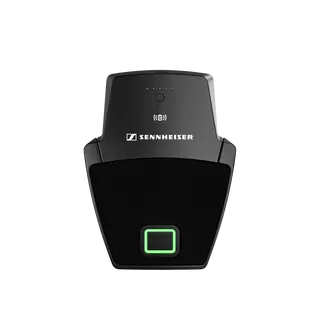
Sennheiser
SL Boundary 114-S DW-3 B
Sennheiser SL Boundary 114-S DW-3 B Wireless Table Boundary Microphone
DS-QAPMGR-N
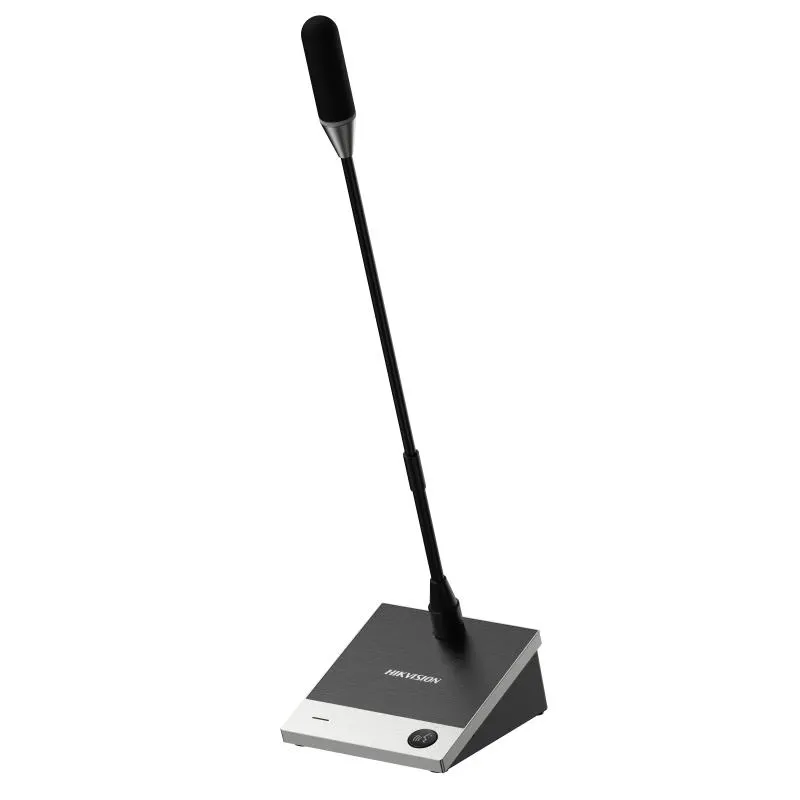
Hikvision DS-QAPMGR-N Network Gooseneck Microphone
- Microphones
- Support
- Pickup range
- 96 dB
- Connectivity
- RJ45 100 M Ethernet port × 1
Priceon request
QuotationWithin 1 working day
DeliveryConfirmed with your quote, based on stock
Overview
Silver desktop gooseneck microphone for conference rooms, powered and connected over one network cable through PoE. Its Ø14 mm gold-plated diaphragm, 48 kHz/24-bit digital audio and built-in DSP suit boardrooms in Doha, Lusail and West Bay running video calls with overseas teams. Request a quote.
What the DS-QAPMGR-N is built to do
The Hikvision DS-QAPMGR-N is a silver desktop gooseneck microphone from the Pro Microphone series, made for conference tables where every speaker needs to be heard without a tangle of cables across the room. Its electret capsule uses a Ø14 mm gold-plated large diaphragm. The unit converts sound to digital audio inside the microphone and sends it across an Ethernet network rather than over an analogue line, which makes it a good fit for networked AV installations where audio and control share the same infrastructure.
Power and connectivity over one network cable
The microphone is powered by PoE, with an input range of 36 V to 57 V and a maximum draw of 3.6 W. A single RJ45 100 M Ethernet port carries both power and audio, so the cable run from a PoE switch to the table is the only wiring it needs. Before you order, confirm that the switch port or injector in your comms room delivers power within that range. The network stack supports AES67, RTP, RTSP, NTP and IEEE1588 timing, and the management interface runs over HTTPS with TLS 1.2 or 1.3.
Speech audio and pickup control
Audio is sampled at 48 kHz with 24-bit quantisation and processed by a built-in DSP chip. The frequency response covers 20 Hz to 20 kHz, with a signal-to-noise ratio of 73 dB, a dynamic range of 96 dB and an acoustic overload point of 120 dB. Total harmonic distortion is below 0.1% at 94 dBSPL and 1 kHz. You can select cardioid, hyper-cardioid, super-cardioid or figure-8 pickup. Built-in algorithms include AFC, AGC, PEQ, noise gate and compression. The Audio Assistant Tool handles network audio link setup, network settings, algorithm adjustment and audio tuning, and the microphone includes abnormal condition detection.
Where it fits in Qatar
Three situations suit this model well:
- A boardroom in West Bay or Lusail where executives sit around a table and join a call with colleagues abroad. The cardioid pattern keeps pickup focused on the people in front of the microphone.
- A lecture or training room at an Education City campus where the presenter speaks from the table and questions come from the floor, with the microphone tuned for speech.
- A meeting room in Mesaieed or Ras Laffan for an energy or industrial team, where a network-connected microphone can sit on the same managed AV network as the rest of the room equipment.
The operating range is -10 °C to 50 °C with humidity up to 90% non-condensing. An air-conditioned meeting room sits comfortably within that range. If the table is beside a sun-facing window, which can get very hot in Qatar summers, confirm the room conditions with the SmartRooms Qatar team before installation.
What to plan before installation
Plan the cable route from the comms room to the table, the switch port, and the computer that will run the Audio Assistant Tool. The tool is recommended on Windows 10 and is compatible with Windows 7, 8.1 and 11. The recommended computer has an Intel i3-9100 at 4.2 GHz or better, 4 GB RAM, 20 GB of storage and a 1920 × 1080 display. The metal body measures 202.2 mm × 116 mm × 473.9 mm, and the packaged unit weighs 1473 g. The status light shows solid red when the microphone is active, goes off when muted, and flashes red on a fault. The system language is English.
SmartRooms Qatar supplies the DS-QAPMGR-N across all 8 municipalities of Qatar, with professional installation and free site surveys. Payment by bank transfer, cheque or purchase order is accepted, and LPOs and government tenders are welcome. Request a quote and we will confirm the PoE requirements, cable plan and installation details with you.
Highlights
- Power and audio over one RJ45 network cable using PoE
- Ø14 mm gold-plated large diaphragm electret capsule
- 48 kHz, 24-bit digital audio with built-in DSP
- Cardioid, hyper-cardioid, super-cardioid and figure-8 pickup patterns
- AFC, AGC, PEQ, noise gate and compression algorithms
- Operating range -10 °C to 50 °C, up to 90% humidity non-condensing
Room fit
Tell us the room size and platform (Teams, Zoom or BYOD) and we confirm the right combination with your quotation.
Estimated timeline
Quotation within 1 working day · delivery timing depends on stock availability, and we confirm it with your quotation.
Specifications
27 specifications · Source: manufacturer · checked Oct 2026
Microphone9
- Type
- electret
- Polar Pattern
- Cardioid, hyper-cardioid, super-cardioid, and figure-8
- Frequency Response
- 20 Hz to 20 kHz
- Sensitivity
- -37 dB
- SNR
- 73 dB
- Sampling Rate
- 48 kHz
- Dynamic Range
- 96 dB
- Acoustic Overload Point (AOP)
- 120 dB (1%THD.@1 kHz)
- Quantization Bits
- 24 bit
Function2
- Audio Algorithm
- AFC, AGC, PEQ, NOISE GATE, COMP
- Microphone Abnormal Detection
- Support
Network3
- Network Protocol
- AES67, TCP/IP, ICMP, HTTP, HTTPS, DNS, RTP, RTSP, RTCP, NTP,QoS, UDP, SSL/TLS, IEEE1588
- Interface Protocol (API)
- OTAP
- Network Security
- Password protection, complicated password, HTTPS encryption, basic and digest authentication for HTTP/HTTPS, security audit log, TLS 1.2/1.3
Interface3
- Network Interface
- RJ45 100 M Ethernet port × 1
- LED Indicator
- 1. Microphone status indicator (on the microphone pole): Solid red: Microphone is active (capturing audio). Light off: Microphone is muted. 2. Speaking status indicator (on the base): Solid red: Microphone is active (capturing audio). Light off: Microphone is muted. 1+2: Breathing White: The device is powering on and initializing. Light turns off after successful startup. Flashing White (10 times): Device recognition is in progress (when there are multiple devices in the system, click Identify Device on the client. Flashing Red: Device fault.
- Reset
- Support
General10
- Power
- PoE: 36 V to 57 V, 0.06 A to 0.1 A, max. 3.6W
- Material
- Metal
- Dimension
- 202.2 mm × 116 mm × 473.9 mm (7.96" × 4.57" × 18.66")
- Package Dimension
- 515 mm × 215 mm × 96 mm (20.28" × 8.46" × 3.78")
- With Package Weight
- 1473 g (3.25 lb.)
- System Requirement
- Recommended system configuration for Audio Assistant Tool: Operating System: Windows(R) 10 (recommended), Compatible with Windows(R) 7 / Windows(R) 8.1 / Windows(R) 11 CPU: Intel(R) i3-9100@4.2 GHz or above RAM: 4 GB and above Video Card: GT1030 D5 HDD: 20 GB Display: 1920 × 1080 and above
- Color
- Silver
- Operating Temperature
- -10 °C to 50 °C (14 °F to 122 °F)
- Operating Humidity
- 90% or less (non-condensing)
- System Language
- English
Downloads
4 files from the manufacturerQuestions about DS-QAPMGR-N
What is the Hikvision DS-QAPMGR-N and who is it for?
It is a silver desktop gooseneck microphone for conference tables. It combines a Ø14 mm gold-plated large diaphragm with cardioid, hyper-cardioid, super-cardioid and figure-8 pickup options and 48 kHz, 24-bit digital audio. It suits boardrooms, meeting rooms and training rooms where people speak from a table and remote participants need clear audio.
How is the microphone powered?
It is powered entirely by PoE, with an input range of 36 V to 57 V and a maximum draw of 3.6 W. Power and audio share one RJ45 100 M Ethernet port, so no separate power adaptor is needed. Before ordering, confirm that the PoE switch or injector feeding the cable delivers power within that range.
Which pickup pattern should I choose for a boardroom?
Cardioid is the usual choice for a table where people sit in front of the microphone, because it favours sound from the front and rejects sound from behind. Figure-8 picks up from both the front and the back, which can suit a table where speakers sit on opposite sides. Hyper-cardioid and super-cardioid are narrower patterns. SmartRooms Qatar can help you choose once we know the table layout.
Can it integrate with an existing IP audio system?
The microphone supports AES67, RTP, RTSP, NTP and IEEE1588 timing, so it can be integrated with networked audio platforms that use these protocols. Confirm the exact requirements of your existing DSP or conferencing platform before ordering. Our team can review your network plan as part of the quotation process.
What do the status lights mean?
A solid red light on the pole and base means the microphone is active and capturing audio. When the light is off, the microphone is muted. Flashing red indicates a device fault. During startup the light breathes white, and during device identification in the client software it flashes white ten times. Use these signals when troubleshooting a meeting room.
Is it suitable for a staff meeting room at a private school in Al Wakrah?
Yes, for a staff meeting room where teachers sit at a central table and join calls with colleagues or external partners. The cardioid pickup keeps focus on the people seated in front, and the 48 kHz, 24-bit audio keeps speech clear. Because the interface language is English, confirm your setup requirements with the SmartRooms Qatar team.
Can it be used near a window in a hot room?
The operating range is -10 °C to 50 °C with humidity up to 90% non-condensing. A standard air-conditioned meeting room falls well within that range. If the table sits beside a sun-facing window, where temperatures can rise sharply in a Qatar summer, ask the SmartRooms Qatar team to check the conditions before installation so the placement suits the room.
What computer do I need for the Audio Assistant Tool?
Windows 10 is recommended, and Windows 7, 8.1 and 11 are listed as compatible. The recommended configuration includes an Intel i3-9100 at 4.2 GHz or above, 4 GB RAM, 20 GB storage and a 1920 × 1080 display. The tool is used to set up network audio links, adjust algorithms and tune audio. The system language is English.
What security features does it offer for IT teams?
The microphone supports password protection with complicated passwords, HTTPS encryption, and basic and digest authentication for HTTP and HTTPS. It also keeps a security audit log and supports TLS 1.2 and 1.3. These features help IT managers in government and corporate offices bring the device under the same security policies as other networked AV equipment.
How much desk space and cable length should I plan for?
The unit measures 202.2 mm × 116 mm × 473.9 mm, and the packaged unit measures 515 mm × 215 mm × 96 mm and weighs 1473 g. Plan the cable route from the switch to the table with enough slack to reach the gooseneck position. A site survey helps confirm the placement before the cable is pulled.
Can a ministry or authority buy this through a tender or LPO?
Yes. SmartRooms Qatar works with purchase orders (LPOs) and government tenders, including Monaqasat, and accepts payment by bank transfer, cheque or purchase order. A ministry or authority fitting out several conference rooms can request one quotation covering each DS-QAPMGR-N unit, along with the PoE and cabling details for each room.
Do you carry out a site survey before installing it?
Yes, SmartRooms Qatar offers free site surveys. For a desktop microphone, the survey checks the table layout, the distance to the PoE switch, the cable route and the computer that will run the Audio Assistant Tool. Quotations are usually provided within one working day, and installation is handled by our professional team across all 8 municipalities of Qatar.
Similar models
Sennheiser
SL Boundary 114-S DW-4 B
Sennheiser SL Boundary 114-S DW-4 B Wireless Table Boundary Microphone