





Thursday, 22 October 2026 · 11 Jumada I 1448 AH Sun – Thu · 9:00 – 18:00
+971 56 914 9477 العربية
WhatsApp

DS-UVC-P22

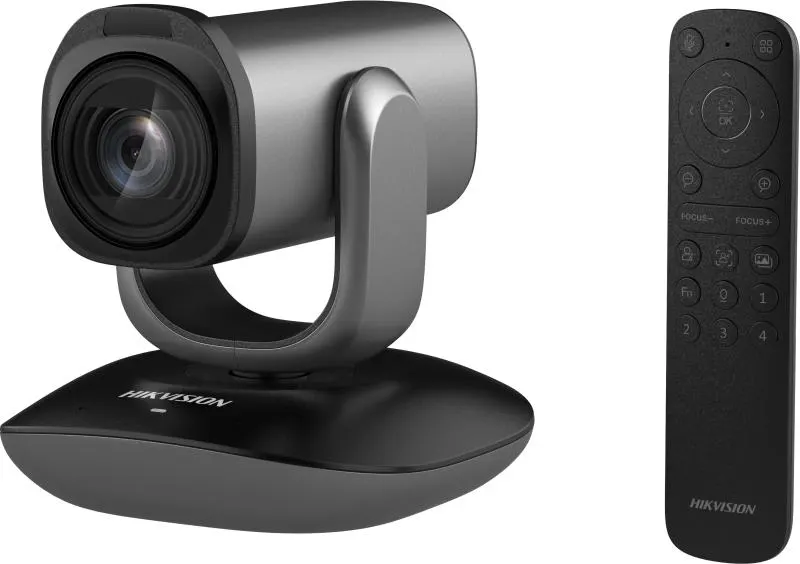
Hikvision DS-UVC-P22 12x Optical Zoom PTZ Video Conference Camera

WhatsApp
Priceon request
QuotationWithin 1 working day
DeliveryConfirmed with your quote, based on stock
PDFDownload datasheet (DS-UVC-P22_Datasheet_20260430.pdf)
Overview

The Hikvision DS-UVC-P22 is a PTZ conference camera with a 12x optical zoom lens, Full HD 1920×1080 output and a 2 MP WDR CMOS sensor. Dual built-in microphones, face focus, human body following and up to five custom scene presets set by remote make it practical for boardrooms and training rooms. Its USB Type-C link is plug-and-play with no driver and supports mainstream conferencing software.

What the camera does in a meeting room

The Hikvision DS-UVC-P22 is built to frame participants in rooms where a single fixed lens cannot cover the table, the whiteboard and the presenter together. Its 12x optical zoom lens, with an equivalent focal length from 23.1 mm to 277.2 mm, lets an operator tighten the shot on a distant speaker or widen it to show the full table, while autofocus keeps the image sharp as the framing changes.

Image quality and automatic framing

The camera uses a 2 MP WDR CMOS sensor and outputs 1920×1080 resolution. WDR balances bright and dark areas within the same frame, which helps when daylight enters through a window behind the seating. For tracking, the DS-UVC-P22 supports human body following and face focus, so the image can stay on a presenter who moves between the screen and the table. Digital zoom reaches 4x for extra reach, but the optical zoom is the figure to compare when you plan the distance between the camera and the seating.

Sound and preset control

Two microphones are built into the camera body, which removes the need for a separate pickup in small and medium rooms. Up to five custom scene presets can be saved and recalled, which suits a room used for different layouts during the day, such as a board session in the morning and a training workshop in the afternoon. The related camera parameters are adjusted with the remote control.

Connecting it and where it fits in Qatar

The USB Type-C interface follows the USB 2.0 protocol and works plug-and-play, with no driver software to install. It is compatible with multiple mainstream communication applications, so the same camera can serve a video meeting platform used by a government office in Msheireb or a remote lecture set-up at a university in Education City.

  • A boardroom in West Bay where executives join calls with teams abroad
  • A training room at a private school in Al Wakrah or a training centre in Al Rayyan
  • A hotel or serviced apartment meeting room in Lusail hosting hybrid events

What to plan before you order

Measure the room and choose the mounting position with the seating in view. Confirm that the computer or conferencing unit receiving the camera has a USB Type-C port, and check which communication software your team uses. If the planned location faces a window or sits in a lobby, confirm the installation position with the SmartRooms Qatar team before fixing anything in place.

SmartRooms Qatar offers free site surveys, so sight lines and the cable route can be checked before any equipment is mounted. We supply and deliver to all 8 municipalities of Qatar and can arrange professional installation. Public bodies and schools can order by LPO or through government tenders, and payment by bank transfer, cheque or purchase order is accepted. Request a quote for the DS-UVC-P22 and our team will usually reply within one working day.

Highlights

  • 12x optical zoom, 23.1 mm to 277.2 mm equivalent focal length
  • Full HD 1920×1080 output from a 2 MP WDR CMOS sensor
  • Dual microphones built into the camera for clear sound
  • Human body following and face focus for moving presenters
  • Up to five custom scene presets recalled by remote control
  • USB Type-C with USB 2.0 protocol, plug-and-play, no driver needed

Room fit

Tell us the room size and platform (Teams, Zoom or BYOD) and we confirm the right combination with your quotation.

Estimated timeline

Quotation within 1 working day · delivery timing depends on stock availability, and we confirm it with your quotation.


Specifications

Source: manufacturer · checked Oct 2026
The full specification and datasheet for this model are available on request; we send them with your quotation.

Downloads

6 files from the manufacturer

Questions about DS-UVC-P22

What is the Hikvision DS-UVC-P22 and who is it for?
The DS-UVC-P22 is a PTZ video conference camera from Hikvision's PTZ Camera Series. It suits organisations that run video calls from a boardroom, training room or lecture hall and need a camera that can zoom and frame people without a separate operator. Ministries, schools, universities and companies with hybrid meetings are typical buyers in Qatar.
How much zoom does the camera offer?
It has a 12x optical zoom lens with an equivalent focal length from 23.1 mm to 277.2 mm, plus 4x digital zoom. Optical zoom keeps image detail when you frame a speaker at the far end of a long room, so compare that figure first when you plan the distance between the camera and the seating.
Does it connect to a laptop or conferencing system without drivers?
Yes. The USB Type-C interface uses the USB 2.0 protocol and is plug-and-play, so no driver software needs to be installed. It is compatible with multiple mainstream communication software packages. Check that the receiving laptop or codec has a USB Type-C port before ordering, or ask our team which connection suits your setup.
Will it track a presenter who moves around the room?
The camera supports human body following and face focus, which help keep a moving presenter in frame. These features are useful in training rooms where a trainer walks between the whiteboard and the screen. Test the tracking in the actual room during your site survey, since lighting and seating positions affect how well automatic framing performs.
Is the built-in microphone enough for a boardroom in West Bay?
The camera has dual microphones built in, which give clear sound for small and medium rooms. For a large boardroom with a long table or a room with noisy air conditioning, tell our team the room size when you request a quote so we can advise whether the audio setup needs extra equipment.
Can I save different camera layouts for different meetings?
Yes. You can store up to five custom scene presets and recall them with the remote control. A government meeting room in Msheireb that hosts a morning board session and an afternoon workshop can keep a different framing for each. The remote control adjusts the related parameters, so the camera can be set without moving to the back of the room.
What should a school in Al Wakrah consider before fitting this camera in a classroom?
Start with the room layout and where the teacher usually stands. Position the camera so it can see the whiteboard and the front seats, and plan the cable route from the camera to the USB Type-C port of the teaching computer. A free site survey from SmartRooms Qatar can confirm sight lines before anything is fixed to the wall.
Is the camera suitable for a room with a window behind the seating?
The DS-UVC-P22 uses a WDR sensor, which is designed to balance bright and dark areas in the same frame, so it handles daylight behind participants better than a standard sensor. Avoid aiming the lens straight into strong sunlight, and confirm the planned position with the SmartRooms Qatar team, especially for window-facing or lobby locations.
What resolution does the camera output, and does it matter for a meeting?
The camera outputs 1920×1080 (Full HD) from a 2 MP CMOS sensor. This gives participants a clear view of faces and documents at normal call distances. Check the resolution your conferencing platform negotiates on a call, so you know what your remote participants will actually receive before comparing it with higher-resolution cameras.
How do I request a quote for the DS-UVC-P22?
Send the room size, the number of units and the conferencing software you use through the quote request. The SmartRooms Qatar team usually replies with a quotation within one working day. We supply and deliver to all 8 municipalities of Qatar and can arrange professional installation after the site survey.
Can I order several units for a school or university?
Yes. Schools and universities ordering several DS-UVC-P22 cameras for classrooms or lecture halls can order by LPO or through government tenders, including Monaqasat. Tell us how many rooms need cameras so the quotation covers supply and delivery to each site, and free site surveys help standardise mounting across rooms.
Is this model suitable for hybrid meetings between Doha and teams abroad?
Yes, hybrid meetings are one of its main uses. The camera connects over USB Type-C and is compatible with multiple mainstream communication software, so it can feed a call from a Doha boardroom to colleagues abroad. Confirm the software your teams already use and test a call during the site survey.

Similar models

Biamp Vidi 100 Biamp Vidi 100 4K Conferencing Camera
Cameras
Biamp Vidi 150 Biamp Vidi 150 4K Conferencing Camera
Cameras
Biamp Vidi 250 Biamp Vidi 250 4K Conferencing Camera
120 Degrees Zoom Certified
Biamp Vidi 280 Biamp Vidi 280 4K Conferencing Camera with Dual Sensors
Ultrawide Lens Zoom Certified
Biamp Vidi Content Cam 250 Biamp Vidi Content Cam 250 4K Whiteboard Content Camera Kit
120° Up to 5x digital zoom
Email Call


