






Biamp
Evoko Kleeo Desk Manager 6-pack + 1yr license
Biamp Evoko Kleeo Desk Manager 6-Pack (910-01972) Desk Booking Display
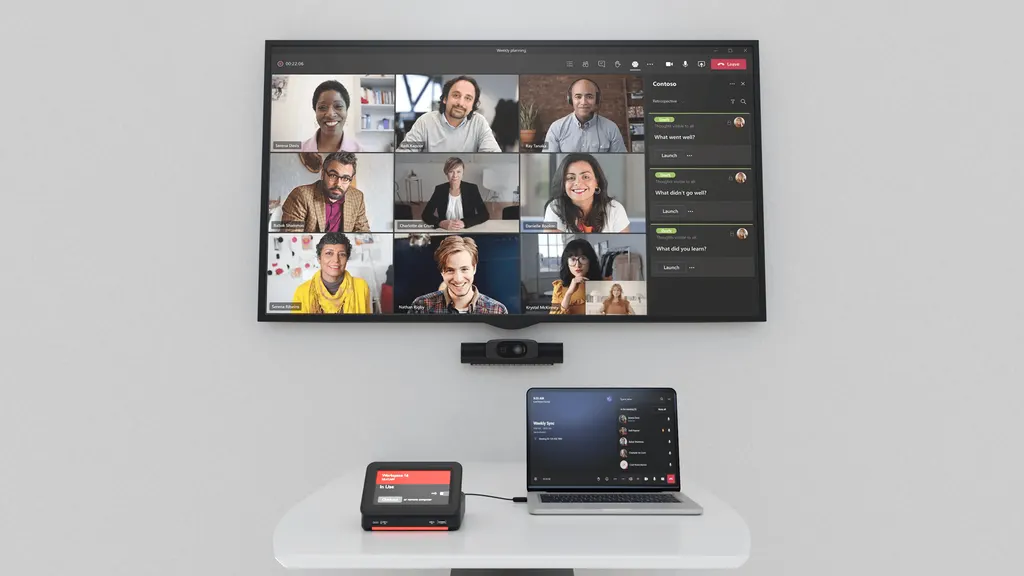
WBD-0500
IAdea WBD-0500 5-inch Workspace Booking Dock
Priceon request
QuotationWithin 1 working day
DeliveryConfirmed with your quote, based on stock
Overview
The IAdea WBD-0500 pairs a 5-inch touch display with a USB-C dock for reserving huddle spaces and workstations. It has a 400-nit screen, Outlook calendar integration with Microsoft Teams and Zoom compatibility, and a USB-C connection to a laptop with up to 100W charging. It suits hybrid offices and shared desk floors across Doha. Request a quote.
What the WBD-0500 does in a hybrid office
The IAdea WBD-0500 Workspace Booking Dock puts a 5-inch touch screen and a USB-C dock into one unit. Staff use the screen to reserve a huddle space or a workstation, then connect their own laptop with a single USB-C cable to the room or desk equipment. It is designed for offices where desks and small meeting rooms are shared rather than assigned to one person.
Specifications that matter for a booking deployment
The touch display is rated at 400 nits and includes an ambient light sensor. A programmable full-colour LED shows status at a glance. Inside, an Android 13 system runs on an ARM processor with a neural processing unit rated at 4 TOPS, 4GB LPDDR4 memory and 32GB eMMC storage. A hardware 4K encoder and decoder and a RESTful API for device control complete the platform.
Ports and charging
- Front: USB-C 10Gbps 3.2 Gen 2 with 20W PD charging, plus USB-A 10Gbps 3.2 Gen 2
- Cable management cabinet: USB-C to laptop with up to 100W PD charging, one USB-C port and two USB-A ports
- HDMI with PD for dual display up to 4K at 60Hz
- RJ-45 network port rated 100M bps, Micro USB expansion and DC input
- Mini USB for Android Debug Bridge, 3.5 mm stereo audio out and an SD card slot expandable to 64GB
Where it fits in Qatar
In a West Bay or Msheireb office with a hot-desk floor, a unit at each cluster of bookable workstations lets staff reserve a desk in the morning and connect on arrival. A university training centre in Education City could fit one to each breakout room, so tutors and students book the room and connect a laptop without hunting for cables. An energy company's site office in Mesaieed or Ras Laffan can apply the same approach to shared meeting rooms used by visiting teams.
The unit integrates with Outlook calendars and is compatible with Microsoft Teams and Zoom, so organisations that already run their meetings in those tools can keep their existing workflow.
Planning the installation
Heat is the main environmental limit to plan for. The operating range is 0 to 40 °C, with humidity from 10 to 85 percent at 40 °C, non-condensing. Qatar summers regularly push outdoor temperatures above 45 °C, so mount the unit in an air-conditioned room, away from direct sun through glass and away from hot equipment cabinets.
Power is supplied by a 135W adapter, with a 180W version available as an option. The Kensington lock-compatible slot and desktop screw slots allow the unit to be secured to a desk. Before ordering, a free site survey can check desk layout, cable routes and the room conditions. Every order is handled through a quotation, and LPO and government tender purchasing is supported. Request a quote for the number of rooms and desks you plan to equip, and the SmartRooms Qatar team will confirm lead times with the quotation.
Highlights
- 5-inch touch display rated at 400 nits
- USB-C 10Gbps front port with 20W PD charging
- Cabinet USB-C port charges laptops up to 100W
- HDMI with PD for dual display up to 4K at 60Hz
- Outlook calendar integration; Microsoft Teams and Zoom compatible
- Operating range 0 °C to 40 °C
Room fit
Tell us the room size and platform (Teams, Zoom or BYOD) and we confirm the right combination with your quotation.
Estimated timeline
Quotation within 1 working day · delivery timing depends on stock availability, and we confirm it with your quotation.
Specifications
13 specifications · Source: manufacturer · checked Oct 2026
Technical Specification13
- Screen
- 5" touch display 400-nit high brightness
- Computing
- High-performance ARM CPU with Cortex A78 x 2 + A55 x 6 High-performance Neural Processing Unit (NPU) with 4 TOPS performance Hardware-based 4K encoder and decoder Memory: 4GB LPDDR4 Storage: 32GB eMMC
- OS/API
- Android 13 RESTful API for device control
- Front Ports
- USB-C 10Gbps 3.2 Gen 2 with 20W PD charging USB-A 10Gbps 3.2 Gen 2
- I/O Port
- Mini USB for ADB (Android Debug Bridge) 3.5 mm analog stereo audio out SD card slot, memory expendable to 16 GB / 32 GB / 64 GB
- Back Ports
- Cable management cabinet containing: USB-C to laptop 10Gbps 3.2 Gen 2 with up to 100W PD charging USB-C 10Gbps 3.2 Gen 2 x 1 USB-A 10Gbps 3.2 Gen 2 x 2 HDMI+PD dual display up to 4K @ 60Hz x 1 Expansion x 1(Micro USB) RJ-45 100M bps DC-in
- Anti-theft
- Kensington lock-compatible slot Desktop screw slots
- Power Adapter
- 135W (180W optional)
- Environmental
- Operating temperature:0 °C – 40 °C / 32 °F – 104 °F Humidity: 10 % to 85 % @ 40 °C non-condensing
- Status Indicator
- Programmable full-color range LED
- Sensor
- Ambient light
- Calendar Integration
- Outlook (MS Teams and Zoom compatible)
- Remote Monitoring
- Optional IAdeaCare cloud-based remote management
Downloads
2 files from the manufacturerQuestions about WBD-0500
What is the IAdea WBD-0500 used for?
It is a booking dock for shared spaces. Staff use the 5-inch touch screen, rated at 400 nits, to reserve a huddle space or workstation, then connect a laptop through USB-C to the room or desk equipment. It suits hybrid offices where desks and small meeting rooms are not assigned to one person. The platform also offers a RESTful API for device control, which is useful for organisations that manage devices centrally.
Does the WBD-0500 work with Outlook, Microsoft Teams and Zoom?
The unit supports Outlook calendar integration and is compatible with Microsoft Teams and Zoom. Organisations that schedule rooms and desks through Outlook can link those bookings to the device, and meetings held in Teams or Zoom can run from a laptop connected to the dock. Confirm your calendar setup and meeting platform with the SmartRooms Qatar team before ordering, so the configuration matches your existing systems.
How much power can it deliver to a laptop?
The cable management cabinet has a USB-C to laptop port with up to 100W power delivery at 10Gbps. The front USB-C port provides 20W PD charging. The standard power adapter is 135W, with a 180W version available as an option. Actual charging depends on the laptop's own power requirements, so check the models in your fleet against the adapter rating before choosing the configuration.
Can it be installed in a sunny, glass-walled meeting room in Doha?
Only in an air-conditioned room where temperatures stay within the rated range of 0 to 40 °C, with humidity from 10 to 85 percent at 40 °C, non-condensing. Summer temperatures in Qatar regularly exceed 45 °C outdoors, so keep the unit away from direct sunlight through glass and away from hot equipment. A SmartRooms Qatar site survey can assess the room before installation.
Can I connect an external monitor to it?
Yes. The cable management cabinet includes an HDMI port with PD that supports dual display up to 4K at 60Hz. This is useful when a staff member needs a second screen at a hot-desk workstation while keeping a laptop connected through the dock. Check that your monitor supports 4K at 60Hz before ordering, so the resolution you expect is delivered.
Which ports are available for peripherals and networking?
The front has a USB-C port and a USB-A port, both 10Gbps. The cable management cabinet adds one USB-C port, two USB-A ports, an RJ-45 network port rated 100M bps, a Micro USB expansion port and a DC input. There is also a 3.5 mm stereo audio output and an SD card slot expandable to 64GB, along with a Mini USB port for Android Debug Bridge.
How do I secure the unit to a desk?
The unit includes a Kensington lock-compatible slot and desktop screw slots, which allow it to be fixed to a desk. This matters in shared offices where workstations change hands and equipment must stay in place. Before installing, plan the cable route from the desk to the laptop and the power adapter. The free site survey from SmartRooms Qatar covers desk layout and cable routing.
Is remote management available for the WBD-0500?
Remote management is available as an optional IAdeaCare cloud-based service, not as part of the base specification. If you plan to run several units across floors or sites in Doha, Lusail or Al Khor, ask for it to be included in your quotation so the scope is clear. The core device specification stays the same whether or not you add the optional service.
We are fitting out a hot-desk floor in West Bay. How many units do we need?
Start by counting the bookable workstations and small meeting rooms that need reservation. Many offices place one unit per cluster of workstations, adjusted for screen position and nearby power. A free site survey from SmartRooms Qatar can confirm placement before purchase. Multiple units can be covered in one quotation, and purchase orders (LPOs) are accepted, which suits corporate procurement teams.
Would it suit breakout rooms at a training centre in Education City?
Yes, for small breakout rooms where tutors and students need to book a room and connect a laptop quickly. Each room can have one dock, and users connect with a single USB-C cable rather than a set of adapters. Before ordering, count the rooms that need booking and confirm the room conditions, including air conditioning, since the operating range is 0 to 40 °C.
Is it suitable for a site office in Mesaieed or Ras Laffan?
It fits shared meeting rooms in site offices where visiting teams need to reserve a room and connect their own laptops. Confirm that the room stays within the 0 to 40 °C operating range and is protected from dust and heat near the entrance. The SmartRooms Qatar team can help choose a location and confirm the number of units in the quotation.
Is it suitable for a serviced office in The Pearl with changing clients?
Serviced offices change occupants often, so it helps to see which desks and rooms are free at a glance. The 5-inch touch display and programmable full-colour status LED support that workflow, and Outlook calendar integration helps where the office manages bookings in that calendar. Ask for a quotation that lists the number of units and whether remote management should be included.
Similar models



Biamp
Evoko Liso Freestand Mount - Boltable
Biamp Evoko Liso Freestand Mount (Boltable) 910-01935 Floor Stand
