






Biamp
Evoko Kleeo Desk Manager 6-pack + 1yr license
Biamp Evoko Kleeo Desk Manager 6-Pack (910-01972) Desk Booking Display
WBP-130
IAdea WBP-130 e-Paper Desk Booking Panel
Priceon request
QuotationWithin 1 working day
DeliveryConfirmed with your quote, based on stock
Overview
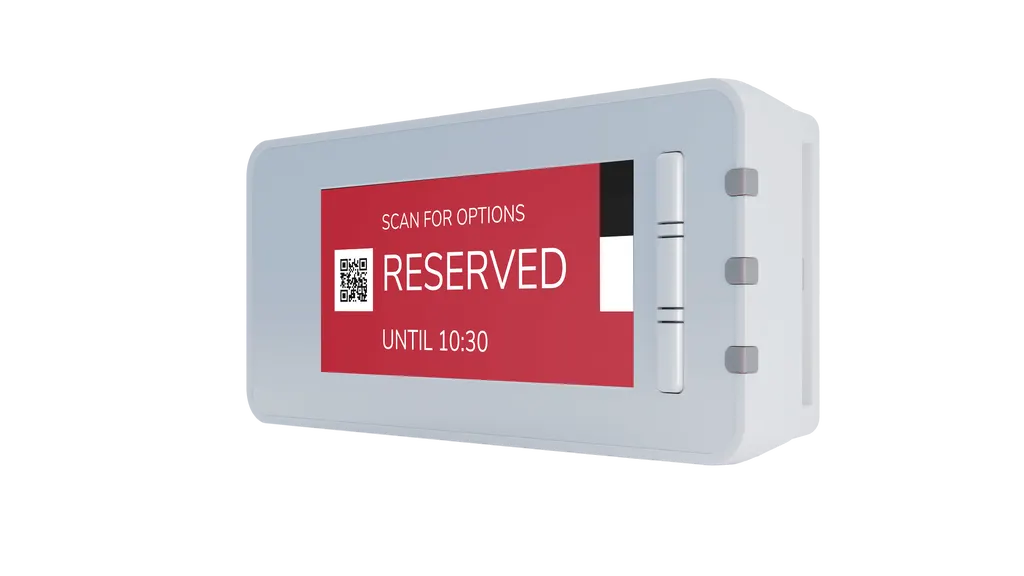
The IAdea WBP-130 is a battery-powered e-paper desk booking panel with a tricolor red, black and white display that shows whether a desk is free. Staff can reserve a desk in advance through partner workplace apps or on the spot with one of its three programmable buttons. It needs no cabling at each desk. It suits hybrid offices and co-working floors in Doha, Lusail and West Bay.
What the WBP-130 does at each desk
The IAdea WBP-130 is an e-paper desk booking panel built for hybrid offices, where workstations are shared rather than assigned. It mounts at a desk and shows, on a tricolor red, black and white screen, whether that desk is free or reserved. Staff can book in advance through the workplace apps of IAdea's selected software partners, or reserve on the spot by pressing one of the panel's buttons, so nobody needs to check in at a front desk to find a seat.
The specifications that shape your plan
The screen measures 67 x 29.7 mm and has a resolution of 296 x 128 pixels, a compact size suited to a single desk or a small meeting space rather than a wall display. The panel has three programmable buttons and is powered by four CR2450 batteries rated at 2480mAh. The battery is rated for 10,000 updates, which the manufacturer equates to more than three years when the display refreshes eight times a day. Those figures assume that refresh pattern, so a different update frequency will change the estimate.
Connectivity and coverage limits
The WBP-130 is cable-free. It combines Wi-Fi with a built-in battery, and each panel must stay within range of a desk booking router. The router works with the desk booking gateway, and the family components are listed below.
- Desk booking router: 12VDC, 3W, Wi-Fi IEEE 802.11b/g/n 2T2R and Zigbee IEEE 802.15.4, 143 x 101 x 30 mm, supports up to 400 WBP-130 panels.
- Coverage: 15m with wireless signal penetrable obstacles, or 25m without obstacles.
- Desk booking gateway: 12VDC, 14.04W, Ethernet connectivity, 133.8 x 43.1 x 94.2 mm, supports up to 25 routers.
Where it fits in Qatar
A consultancy in West Bay running a hybrid week from Sunday to Thursday can place panels beside hot-desk stations, so staff see availability before walking to the floor. In a co-working space in Lusail, one desk booking router can serve up to 400 panels, as long as each one stays in range, which lets the floor grow as new desks are added. At a training centre or university unit in Education City, panels on study desks and small booths let students book the space they need in advance.
What to plan before ordering
- Map each desk against router range, allowing for walls and partitions.
- Confirm which functions your booking software assigns to the three buttons.
- Check the operating environment. The source data gives no operating temperature range, so avoid sun-exposed or non-air-conditioned spots until you have confirmed it with us.
- Track how often each display updates, since refresh frequency drives battery life.
A free site survey is the simplest way to confirm panel and router quantities before purchase. SmartRooms Qatar delivers to all 8 municipalities of Qatar, and multi-unit orders can be placed by purchase order (LPO) or through a government tender on Monaqasat. Products are covered by the manufacturer's warranty. Request a quote with your desk count and floor plan, and we will confirm the panel, router and gateway quantities for your site.
Highlights
- Tricolor red, black and white e-paper display
- Screen 67 x 29.7 mm with 296 x 128 pixels
- Three programmable buttons for on-the-spot booking
- Battery rated for 10,000 updates
- Cable-free design with Wi-Fi and onboard battery
- Router supports up to 400 panels; gateway up to 25 routers
Room fit
Tell us the room size and platform (Teams, Zoom or BYOD) and we confirm the right combination with your quotation.
Estimated timeline
Quotation within 1 working day · delivery timing depends on stock availability, and we confirm it with your quotation.
Specifications
6 specifications · Source: manufacturer · checked Oct 2026
WBP-1306
- Workplace E-paper Panel Family · Screen Dimensions
- 67 x 29.7 mm
- Workplace E-paper Panel Family · Resolution
- 296 x 128 pixels
- Workplace E-paper Panel Family · Color
- Red/Black/White
- Workplace E-paper Panel Family · Interactive
- Three programmable buttons
- Workplace E-paper Panel Family · Battery
- CR2450 x 4 (2480mAh) Lasts 10,000 updates (3+ years if updated 8 times daily)
- Workplace E-paper Panel Family · Availability
- Standard Product
Downloads
0 files from the manufacturerNo downloadable files are listed for this model yet. Ask us and we will send the datasheet.
Questions about WBP-130
What is the IAdea WBP-130 used for?
The WBP-130 is an e-paper desk booking panel that shows whether a single desk is free or reserved. It suits hybrid offices where staff book workstations rather than keeping a fixed desk. Team members can reserve in advance through partner workplace apps or press one of the three programmable buttons to book on the spot. Its tricolor red, black and white screen is clear at the desk, and it needs no network cabling at each workstation.
How does the WBP-130 differ from the WBP-160?
The WBP-130 has a 67 x 29.7 mm screen with a resolution of 296 x 128 pixels and three programmable buttons. Before comparing it with the WBP-160, check the screen size, resolution and button count against your space and how users will interact with the panel. Both are listed in the same workplace e-paper family. Ask SmartRooms Qatar to confirm the exact WBP-160 specifications when you request a quote, so the choice matches your desk layout.
How long does the WBP-130 battery last?
The panel is powered by four CR2450 batteries rated at 2480mAh and is rated for 10,000 updates. The manufacturer states this is more than three years if the display updates eight times a day. A panel that refreshes more often will last a shorter time, so estimate the update frequency for each desk before ordering. Share your expected usage with the SmartRooms Qatar team so it can be reviewed with your quotation.
Does the WBP-130 need cabling at each desk?
No. The WBP-130 is designed as a cable-free panel that combines Wi-Fi connectivity with an onboard battery. Each panel must stay within range of a desk booking router, which is 15m through obstacles that wireless signals can penetrate, or 25m with no obstacles. Mapping the floor plan before installation helps avoid placing panels behind thick walls or outside router coverage.
How many panels can one router and gateway support?
The desk booking router supports up to 400 WBP-130 panels within its coverage range. The desk booking gateway, connected by Ethernet, supports up to 25 routers. On a large floor the number of routers depends on the layout, because walls and partitions shorten the reach to 15m, compared with 25m in open space. A free site survey will confirm how many routers and gateways your building needs before you request a quote.
What are the three programmable buttons for?
The panel has three programmable buttons, giving users a physical control at the desk. The source data does not list the function of each button, so confirm the button set-up with SmartRooms Qatar and your booking software provider before ordering. Agreeing the button functions early lets your IT team configure the booking system and makes the panel easier for staff to use from day one.
Can the WBP-130 be used in a Doha office hot-desk area?
Yes. A professional services office in West Bay or central Doha running a hybrid week from Sunday to Thursday can fit a panel beside each shared desk. Staff see whether a desk is free before walking to the floor, which reduces the need to ask at reception. Plan panel positions around the router's coverage range and confirm placement during a free site survey.
Is it suitable for a co-working space in Lusail?
A co-working floor in Lusail with many shared desks can use a router's capacity of up to 400 WBP-130 panels, provided each panel is within range. Members can reserve in advance through a partner workplace app or press a button when they arrive. Because the panel is cable-free, it can move with the floor layout, but each relocation should be checked against router coverage.
Can I install it near windows or in a non-air-conditioned area in Qatar?
The source data does not state an operating temperature range for the WBP-130, so SmartRooms Qatar cannot confirm it for sun-exposed or non-air-conditioned spaces. Summer temperatures in Qatar can exceed 45°C, and dust storms are common. Place panels in air-conditioned office areas away from direct sunlight, and confirm the environment with the SmartRooms Qatar team before installation.
How should a government office order several units?
A ministry or government authority can order several WBP-130 panels by purchase order (LPO) or through a government tender on Monaqasat. Include the desk count, floor locations and router requirements in your request. SmartRooms Qatar usually provides a quotation within one working day, and a free site survey confirms how many routers and gateways are needed. Products are covered by the manufacturer's warranty, so ask for the warranty terms in your quotation.
Would a university or training centre in Education City use it for study desks?
Yes. Study desks, small booths and seminar tables in a university unit or training centre in Education City can each carry a panel, so students see which spaces are free. Booking can be made in advance through a partner workplace app or on the spot with the panel's buttons. Confirm the room layout and router positions during a site survey, and request a quotation covering all desks in the same zone.
Similar models



Biamp
Evoko Liso Freestand Mount - Boltable
Biamp Evoko Liso Freestand Mount (Boltable) 910-01935 Floor Stand
