






Biamp
Evoko Kleeo Desk Manager 6-pack + 1yr license
Biamp Evoko Kleeo Desk Manager 6-Pack (910-01972) Desk Booking Display
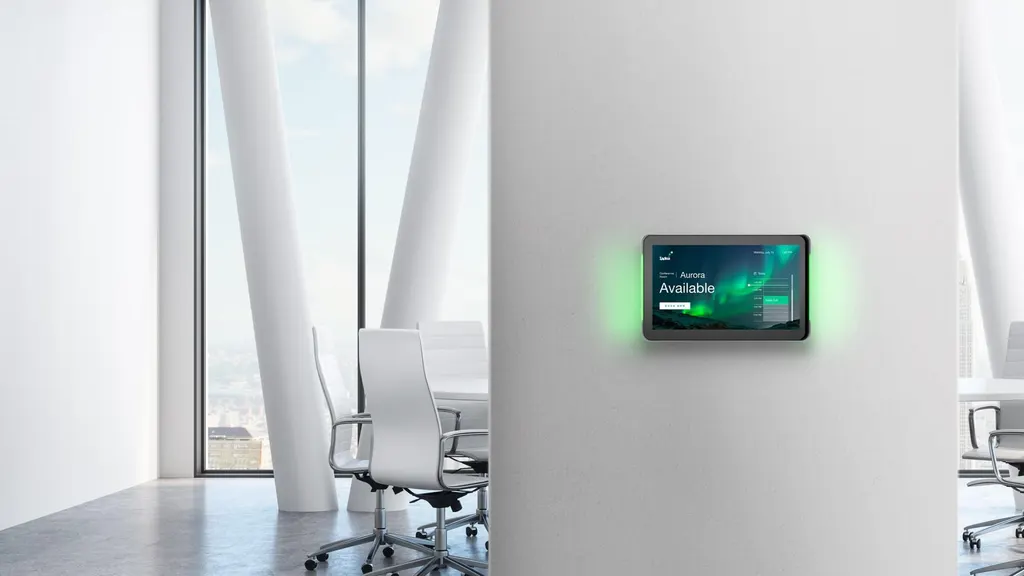
XDS-1078
IAdea XDS-1078 10.1-inch Room Booking Panel
- Platforms
- CE / FCC / RoHS
- Connectivity
- W-Fi: 802.11 b/g/n
Priceon request
QuotationWithin 1 working day
DeliveryConfirmed with your quote, based on stock
Overview
The IAdea XDS-1078 is a 10.1-inch touchscreen room booking panel running Android 12. It mounts flush to a wall or stands on a table, and its programmable LED side lights show green when a room is free and red when it is not, readable from a distance. It accepts PoE+ power over Ethernet and suits offices, schools and government buildings in Qatar that run shared meeting rooms. Request a quote.
A booking panel built for the meeting room door
The XDS-1078 combines a 10.1-inch LCD touchscreen, an Android 12 operating system and a pair of programmable LED side lights in one compact unit. Staff tap the screen to see the day's schedule and book a free slot on the spot, while the LED bars give everyone in the corridor a readable status signal. The display measures 269.88 mm by 170.77 mm, is 28.5 mm deep and weighs 727 g, so it sits neatly beside a door without dominating the wall.
Specifications that shape the purchase
- Display: 10.1-inch LCD, 1280 x 800 resolution, 10-point capacitive multi-touch and a 160 by 160 degree viewing angle.
- Status lights: LED bars with six primary colours on each side, set to green for available and red for unavailable.
- Software: Android 12, a Chromium-based browser engine, HTML5 widgets for calendar, clock and news, and the SignApps Express Utility for content.
- Power: PoE+ under IEEE 802.3at, an Eco mode on IEEE 802.3af, or an external supply with 12 V and 2 A output and 100 to 240 V, 50 to 60 Hz input.
- Connectivity: 802.11 b/g/n Wi-Fi, 10/100 Ethernet, one USB 2.0 and one USB 3.0 port, a 3.5 mm audio output and two built-in speakers.
- Reliability: AlwaysOn and AppLock features, StrongCache playback when the network drops, auto-play after power returns, and a real-time clock with a backup battery.
Where it fits in Qatar
A consultancy in Lusail with a row of glass-walled meeting rooms can fit one panel beside each door, so staff check availability before walking in and book from the touchscreen when a room is empty. A private school in Al Rayyan can use the same layout for staff rooms, interview rooms and counselling offices across a campus block. In a government ministry in West Bay, the panel should sit in an air-conditioned area rather than an exposed lobby, because its rated operating range tops out at 40 °C while Doha summer temperatures can exceed 45 °C.
What to plan before ordering
Check that each door has an Ethernet point with PoE+ support, or plan for the external power supply instead. The unit has no camera, microphone, NFC, HID or door access control, so card-based entry needs a different panel. The manufacturer data gives 350 nits maximum brightness in its technical specification but 300 nits in its comparison table, so confirm the figure before comparing it with other panels. The built-in VESA-compatible 75 mm by 75 mm posts and flush-to-wall back cover suit a standard mount, while the optional glass mount, tilt wall mount and table stand cover other layouts. The power adapter and plug are listed as optional accessories. SmartRooms Qatar offers a free site survey before wall mounting, and quotations are usually issued within one working day.
Ready to plan your room booking displays?
Send the number of rooms, the mounting surfaces and the available network points to SmartRooms Qatar and request a quote for the XDS-1078. Lead times are based on stock and will be confirmed in the quotation, which can cover delivery to any of Qatar's eight municipalities.
Highlights
- 10.1-inch LCD with 1280 x 800 resolution and 10-point touch
- Programmable LED bars show room availability from a distance
- Android 12 with the latest Google security updates
- PoE+ (IEEE 802.3at) power with Eco mode on 802.3af
- Flush-to-wall back cover and 28.5 mm display depth
- Operating range 0 °C to 40 °C, so keep it indoors
Room fit
Tell us the room size and platform (Teams, Zoom or BYOD) and we confirm the right combination with your quotation.
Estimated timeline
Quotation within 1 working day · delivery timing depends on stock availability, and we confirm it with your quotation.
Specifications
30 specifications · Source: manufacturer · checked Oct 2026
Technical Specification17
- Display
- 10.1" LCD panel 10 points capacitive multi-touch 350 nits maximum brightness 1280 x 800 panel resolution Viewing angle (H / V): 160 / 160 LED bar with 6 primary colors x 2
- Video Format Supported
- H.264 / AVC up to 1080p (1920 x 1080) H.265 / HEVC up to 1080p (1920 x 1080) MPEG-4 up to 1080p (1920 x 1080) MPEG-2 up to 1080p (1920 x 1080) MPEG-1 up to 1080p (1920 x 1080) VC-1 up to 1080p (1920 x 1080)
- Image Format Supported
- JPEG up to 1920 x 1080 PNG up to 1920 x 1080
- Audio Format Supported
- MP3 up to 320 kbps
- Content Management
- SignApps Express Utility Third party solution (optional license)
- Open Standards Supported
- HTML5, Javascript and CSS Android 12 API W3C SMIL for cross-platform management W3C HTML5 widgets Multimedia content playback
- HTML Supported
- Widgets for calendar, clock, news, and web page integration HTML5 technology including CSS and Javascript Chromium-based browser engine, same as Google Chrome™
- Advanced Signage Features
- Remote commissioning AlwaysOn, AppLock to prevent unauthorized access StrongCache for continuous playback even when network unavailable Multi-zone screen layout, transparent PNG overlay, and graphical scrolling ticker Auto-play after power re-established Automatic error recovery with built-in WDT Real-time clock with backup clock battery
- Connectivity
- W-Fi: 802.11 b/g/n Micro USB for ADB Ethernet RJ45: 10/100 BASE-T USB 2.0 x 1 + USB 3.0 x 1 Built-in one-way stereo speakers x 2 3.5 mm analog stereo audio out Optional 3G / 4G mobile module via USB Mirco SD card slot, memory expendable to 16 GB / 32 GB / 64 GB (card replaces internal storage)
- Mounting Options
- Inbuilt VESA compatible 75 mm x 75 mm posts Flush-to-wall mount back cover
- Supplied Accessories
- DC in & micro SD stopper Hardware & software quick start guide
- Optional Accessories
- PGM-001 Glass Mount Solution PTM-101 Tilt Wall Mount PVK-102 Pivot Table Stand PWM-011 & PWM-041 Premium Window Mount Table stand Adapter Power plug
- Power Requirement
- Input: 100 - 240 V, 50 - 60 Hz, 0.7A Output: 12 V, 2 A UL / CB certified power supplies Interchangeable connector system includes US plugs (optional for EU, UK, and AUS plugs) IEEE 802.3at (PoE+) Eco mode: IEEE 802.3af PoE
- Environmental
- Operating temperature: 0 °C to 40 °C Humidity: 10 % to 85 % @ 40 °C non-condensing
- Dimensions for Product & Package
- Display size (mm): 269.88 x 170.77 x 28.5 (10.62" x 6.72" x 1.12") Display weight (g): 727 (1.6 lbs) Individual package size (mm): 336 x 100 x 227 (27.36" x 10.23" x 20.86") Outer carton size (W x D x H; mm): 522 x 356 x 259 Units per outer carton: 5
- Certifications
- CE / FCC / RoHS
- Warranty
- 1-year limited parts & labor (varies based on region, contact sales for more details)
Series comparison13
- XDS-1078 · Click to learn more
- Interactive room panel with status lights
- XDS-1078 · Android
- 12.0
- XDS-1078 · Brightness (nits)
- 300
- XDS-1078 · Resolution
- 1280 x 800
- XDS-1078 · Camera
- -
- XDS-1078 · Microphone
- -
- XDS-1078 · NFC
- -
- XDS-1078 · HID
- -
- XDS-1078 · Door access control
- -
- XDS-1078 · Touch
- ●
- XDS-1078 · Status light
- LED light bars
- XDS-1078 · PoE+ / PoE (Eco Mode)
- ●
- XDS-1078 · Wi-Fi
- ●
Downloads
27 files from the manufacturer
PDF
IAdea XDS-1078 datasheets (PDF, 399 KB)
PDF
IAdea XDS-1078 datasheets (PDF, 648 KB)
URL
IAdea XDS-1078 datasheets (URL)
PDF
IAdea XDS-1078 manuals & guides (PDF, 4.2 MB)
PDF
IAdea XDS-1078 manuals & guides (PDF, 1.8 MB)
PDF
IAdea XDS-1078 manuals & guides (PDF, 327 KB)
PDF
IAdea XDS-1078 manuals & guides (PDF, 1.1 MB)
PDF
IAdea XDS-1078 manuals & guides (PDF, 2.3 MB)
PDF
IAdea XDS-1078 manuals & guides (PDF, 2.6 MB)
PDF
IAdea XDS-1078 manuals & guides (PDF, 2.7 MB)
PDF
IAdea XDS-1078 manuals & guides (PDF, 2.8 MB)
PDF
IAdea XDS-1078 manuals & guides (PDF, 3.0 MB)
PDF
IAdea XDS-1078 manuals & guides (PDF, 2.8 MB)
PDF
IAdea XDS-1078 manuals & guides (PDF, 2.9 MB)
PKG
IAdea XDS-1078 manuals & guides (PKG)
PKG
IAdea XDS-1078 manuals & guides (PKG)
PKG
IAdea XDS-1078 manuals & guides (PKG)
PKG
IAdea XDS-1078 manuals & guides (PKG)
PKG
IAdea XDS-1078 manuals & guides (PKG)
PKG
IAdea XDS-1078 manuals & guides (PKG)
PKG
IAdea XDS-1078 manuals & guides (PKG)
PKG
IAdea XDS-1078 manuals & guides (PKG)
PKG
IAdea XDS-1078 manuals & guides (PKG)
PKG
IAdea XDS-1078 manuals & guides (PKG)
PKG
IAdea XDS-1078 manuals & guides (PKG)
PKG
IAdea XDS-1078 manuals & guides (PKG)
PKG
IAdea XDS-1078 manuals & guides (PKG)
Questions about XDS-1078
What is the IAdea XDS-1078 used for?
The XDS-1078 is a room booking panel that shows a meeting room's schedule and availability on a 10.1-inch touchscreen. It suits shared meeting rooms, hot desks and collaboration spaces in offices, schools and government buildings where staff need to know whether a room is free before they walk in. Staff can also book an open slot directly on the screen.
Can people see whether a room is free from a distance?
Yes. The programmable LED side lights show green when the room is available and red when it is not, so the status can be read from across a corridor. The panel has two LED bars with six primary colours each. For a row of meeting rooms along a long corridor in a Doha office, this lets people check availability before they reach the door.
Which operating system does it use, and how are security updates handled?
The XDS-1078 runs Android 12 and supports the latest security updates from Google. Its browser engine is Chromium-based, the same engine as Google Chrome, and the AppLock feature helps prevent unauthorised access to the device. IT managers in government and corporate offices with strict security requirements should review these points during the quotation process.
What are the display resolution and touch specifications?
The panel is a 10.1-inch LCD with 1280 x 800 resolution, 10-point capacitive multi-touch and a viewing angle of 160 degrees horizontal and 160 degrees vertical. The manufacturer data gives 350 nits maximum brightness in its technical specification and 300 nits in its comparison table, so SmartRooms Qatar will confirm the figure before you compare it. Its compact size suits a wall beside a door rather than a large display.
How is it powered, and will it work with Qatar's 240 V supply?
The XDS-1078 supports PoE+ under IEEE 802.3at and offers an Eco mode on IEEE 802.3af. If Ethernet power is not available, its external power supply accepts 100 to 240 V at 50 to 60 Hz and outputs 12 V and 2 A, so it works with Qatar's 240 V, 50 Hz mains. Confirm the plug type for BS 1363 sockets when ordering, and check that each door has a PoE+ port before you order.
Does it include a camera, NFC or card reader for access control?
No. According to the manufacturer comparison data, the XDS-1078 has no camera, microphone, NFC, HID or door access control. It is a booking and status panel. If entry to a room depends on staff cards or mobile credentials, you will need a different room panel from the same range, and the SmartRooms Qatar team can advise which one fits.
Can it be mounted on a glass meeting room wall?
Yes, with the optional PGM-001 Glass Mount Solution, which is designed for glass meeting rooms and allows simple installation on glass. On solid walls, the panel can use its built-in VESA-compatible 75 mm by 75 mm posts or its flush-to-wall back cover. The team will confirm the right mount for each door during the free site survey before installation.
Can it be installed in a sunny entrance or an unshaded area?
We recommend a climate-controlled indoor space. The operating temperature range is 0 °C to 40 °C, and humidity is 10 to 85 percent at 40 °C, non-condensing. Doha summer temperatures can exceed 45 °C, which is beyond that range, so the panel should sit inside air-conditioned rooms rather than a sunlit entrance. The data gives no dust rating, so keep it in enclosed spaces.
Can it show content as well as bookings?
Yes. The XDS-1078 plays JPEG and PNG images, and video in H.264, H.265, MPEG-1, MPEG-2, MPEG-4 and VC-1 formats up to 1080p, with MP3 audio up to 320 kbps. SignApps Express Utility manages content, and a third-party solution is available under an optional licence. HTML5 widgets can show a calendar, clock, news or web page, and the multi-zone layout supports transparent PNG overlays and a scrolling ticker.
What happens during a power cut or network outage?
StrongCache keeps content playing when the network is unavailable, and the unit starts automatically once power is restored. Automatic error recovery with a built-in watchdog timer helps it recover from faults without staff intervention, and the real-time clock has a backup battery to keep the time. Facilities teams planning a government office or school deployment should note these features when comparing options.
How would a private school in Al Rayyan order several units?
A school in Al Rayyan fitting out staff rooms, interview rooms and counselling offices can order several XDS-1078 units on one purchase order (LPO). Before quoting, the school should list each room, its door type and its network point, because the glass mount, tilt wall mount and table stand are separate accessories. SmartRooms Qatar delivers to all eight municipalities and accepts bank transfer, cheque or purchase order payment.
What comes in the box, and which accessories are optional?
The package includes a DC input and micro SD stopper, plus a hardware and software quick start guide. The power adapter, power plug and table stand are listed as optional accessories, as are the glass mount PGM-001, tilt wall mount PTM-101, pivot table stand PVK-102 and window mounts PWM-011 and PWM-041. Request a quote that lists the accessories for each room so the order is complete.
Similar models



Biamp
Evoko Liso Freestand Mount - Boltable
Biamp Evoko Liso Freestand Mount (Boltable) 910-01935 Floor Stand
