Thursday, 22 October 2026 · 11 Jumada I 1448 AH Sun – Thu · 9:00 – 18:00
+971 56 914 9477 العربية
WhatsApp

PanaCast 40 VBS Bar Only

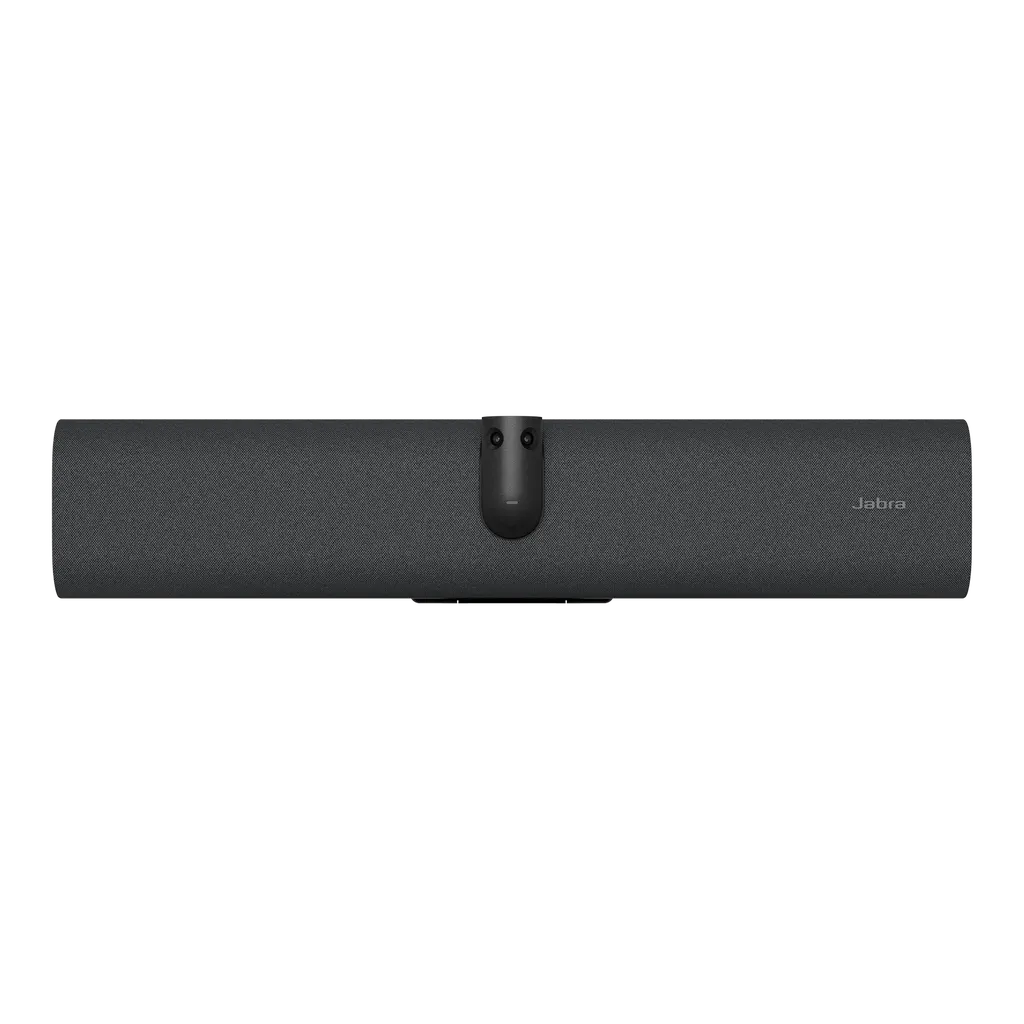
Jabra PanaCast 40 VBS Bar Only 4K Video Bar for Small Meeting Rooms

Zoom
True
Microphones
True
Speakers
True
Platforms
Microsoft Teams Rooms; Zoom…
WhatsApp
Priceon request
QuotationWithin 1 working day
DeliveryConfirmed with your quote, based on stock
PDFDownload datasheet (EN-AU--PanaCast-40-VBS-Bar-Only-Datasheet-20260716.pdf)
Overview

The PanaCast 40 VBS Bar Only is a 4K video bar for small meeting rooms and huddle spaces. Its 180° panoramic view, 4x digital zoom and AI framing keep every participant in shot, and it works without a separate touch controller. Available as separate SKUs for Microsoft Teams Rooms, Zoom Rooms or UC, it suits small boardrooms in West Bay and training rooms across Doha.

What this video bar does in a small room

The PanaCast 40 VBS Bar Only combines two cameras, six microphones and one speaker in a single 530 mm wide bar. Its dual camera panoramic system offers a 180° horizontal and 50° vertical field of view and captures UHD 2160p (4K) video. People seated along the table, close to the screen or against the wall stay in the picture, and 4x digital zoom lets you frame detail without moving the bar.

The bar runs onboard AI on Android 13, and the specification lists its video output as compatible with touch displays, so a simple videoconferencing setup can be built around a touchscreen without a separate touch controller. It is designed for huddle rooms and small meeting spaces rather than large auditoriums.

Framing, audio and platform options

Dynamic Composition in single-stream mode shows close-up views of up to four people in the room alongside a full room view, and Virtual Director moves the picture toward whoever is speaking. On Zoom, multi-stream mode can share three speaker streams plus the full room view. Intelligent Meeting Space lets you set the boundaries of the meeting area so that people outside a glass-walled room are not pulled into the call.

Six microphones with noise reduction and echo cancellation pick up the room, and the speaker covers 80 Hz to 20 kHz. Connections include one HDMI video input, USB-A, USB-C, Ethernet (RJ45), Wi-Fi, Bluetooth 5.2 and a 3.5 mm jack for an assistive listening device. Three SKUs match your meeting platform: 8701-231 for Microsoft Teams Rooms, 8702-231 for Zoom Rooms and 8700-231 for UC. The specification lists certification for Microsoft Teams Rooms, Zoom Rooms and ADA.

Where it fits in Qatar

  • Boardroom in West Bay: a management team that regularly joins calls with partners abroad, with the 180° view keeping everyone at the table in frame.
  • Seminar room in Education City: a tutor running hybrid sessions who needs remote students clearly visible on the call.
  • Government office in Msheireb: a compact meeting room where staff host colleagues from other departments on Microsoft Teams.

Planning the installation

Check the environment first. The operating range is 5 to 35°C (41 to 95°F), and storage is rated from -20 to 60°C. With summer temperatures in Qatar above 45°C, install the bar in an air-conditioned room away from direct sunlight through windows. The power supply accepts 100 to 240 V input and a regional power cable is included, but confirm the plug type against the BS 1363 socket in your room before ordering.

The bar measures 530 mm wide, 105 mm high and 60 mm deep, and weighs 1.8 kg. The integrated hinge fixes it to the wall, the box includes a wall mount, and the manufacturer also lists VESA mount, table stand and tripod options. SmartRooms Qatar offers a free site survey before wall mounting, which is worth booking for glass or plasterboard walls.

Request a quote

Tell us your room size, display and meeting platform, and we will confirm the right SKU and installation plan. Quotations are usually issued within one working day, and we accept purchase orders and government tenders. Request a quote from SmartRooms Qatar today.

Highlights

  • 4K UHD capture with 180° horizontal field of view
  • Dual camera panoramic system with up to 4x digital zoom
  • AI speaker framing with Dynamic Composition and Virtual Director
  • Six microphones with noise reduction and echo cancellation
  • Separate SKUs for Microsoft Teams Rooms, Zoom Rooms or UC
  • Wall mount and privacy cover included in the box

Room fit

Tell us the room size and platform (Teams, Zoom or BYOD) and we confirm the right combination with your quotation.

Estimated timeline

Quotation within 1 working day · delivery timing depends on stock availability, and we confirm it with your quotation.

Specifications

103 specifications · Source: manufacturer · checked Oct 2026
Catalogue attributes103
AccessManagement
Jabra Plus; Web interface; Local account password policy configuration; VaaS Admin Portals including MS Teams Admin Center and Zoom Device Management
Accountpasswordstrengthcheckandenforcement
True
ApplianceMode
True
Audiocodecssupported
SBC
AudioInput
1x HDMI
AuthenticatedaccesstoAdminsetting
True
Automaticpeopleframing
True
AutomaticSpeakerDetection
True
AutoMDIX
True
AuxOutforassistivelisteningdevice
3.5mm jack
Bluetoothversion
5.2
BYODMode
True
Cablemanagement_retentionsystem
True
cameramount
Wall Mount
CameraPrivacyCover
True
cameraresolution_multiselect
3840 x 1080 px
Captureresolution
UHD 2160p (4K)
Certifications
Microsoft Teams Rooms; Zoom Rooms; ADA
Connectivity
Bluetooth; USB-A; 3.5 mm jack plug; USB-C; Ethernet (RJ45) for connection to supported management systems; Wi-Fi; HDMI
ContentSharing
Apple Airplay (only supported by Zoom); HDMI input; Microsoft Teams-Cast (only supported by Teams)
Depth
60
Depthinch
2.37
DeviceLockeddownforsecurity
True
DynamicComposition
Yes
ElectronicPanTiltZoom
True
Ethernet
RJ45
fieldofviewhorizontal
180
fieldofviewvertical
50
Heightinch
4.13
Heightmm
105
IntegratedPeopleCount
True
IntelligentMeetingSpace
True
IntelligentZoom
True
Interfaces
USB-A; USB-C; Ethernet (RJ45); HDMI; Wi-Fi; 3.5mm jack port
InternetProtocol
IPv4; IPv6
Launchdate
2025-06-11
LEDfeatuesandfunctions
Firmware update status; Mute/unmute; Power indicator; Streaming
LockdownwithsecurebootAndroidverifiedbootVendorlock
True
Logretrievalviawebconsole
True
ManualPanTiltZoom
True
MediaEncryption
Provided by VaaS Partner
Microphonefrequencyrange_DigitalHighkHz
16000
Microphonefrequencyrange_DigitalLowHz
100
Microphonesensitivity
-37dBFS
MicrosoftandZoombasedVaasaccountauthentication
True
Mobnumberofmicrophones
6
Mobnumberofspeakers
1
Mobprotectivebag
True
Mobwhatsinthebox
PanaCast 40 VBS; USB-C to USB-C cable (3m /9.8ft); Power supply; Wall mount; Privacy cover; 1 x HDMI cable 1.83m/6ft; 1 x regional power cable
Model
VSM050
MultiStreamDynamicComposition
Yes
NoiseReductionEchoCancellation
True
NonSpeechNoiseSuppression
True
numberofcameras
2
onboard_AI
True
OnetouchMeetingJoin
True
Operatingsystem
Android 13
OperatingtempC_max
35
OperatingtempC_min
5
OperatingtempF_max
95
OperatingtempF_min
41
operatingvoltage
100-240V
OptimizedforPublicWeb
Microsoft Teams Rooms
Packagingdimensions_inch_depth
8.28
Packagingdimensions_inch_height
4.34
Packagingdimensions_inch_width
23.21
Packagingdimensions_mm_depth
210
Packagingdimensions_mm_height
110
Packagingdimensions_mm_width
589
Portfolio
Jabra
Primaryusagearea
Office; Professional products
Producttype
Video conferencing
proxy
HTTP; HTTPS
SecurityManagement
Remote logging with support for TLS
SimpleCertificateEnrollmentProtocol
True
sku
8701-231
SoftwareApp
Jabra Plus; Jabra WebConsole for remote device management via HTTPs; Support for native 3rd party applications, including Microsoft Teams Room for Android and Zoom Room; Cloud service provider including Microsoft Teams Admin Center and Zoom Device Management
SpeakerfrequenzyrangeHighkHz
20000
SpeakerfrequenzyrangeLowHz
80
StoragetempC_max
60
StoragetempC_min
-20
StoragetempF_max
140
StoragetempF_min
-4
SupportDHCP
True
supportedusbversions
USB 2.0; USB 3.0
SupportforSecondaryExternalUSBCamera
True
SupportStaticIPAddress
True
typeofcamera
Dual camera panoramic
Usbcablelength_ft
9.8
Usbcablelength_inch
118.11
Usbcablelength_m
3
VideoInput
1 x HDMI
VideoOutput
Supports up to 4K; Touch Display Compatible
Viewingangle
180
VirtualDirector
True
Weight_kg
1.8
Weight_lbs
3.9
Weight_packaged_kg
4.19
Weight_packaged_lbs
9.22
Width
530
Widthinch
20.87
Wirelesstechnology
Bluetooth
Zoom
Up to 4x digital zoom

Downloads

27 files from the manufacturer
PDF Datasheets EN-AU--PanaCast-40-VBS-Bar-Only-Datasheet-20260716.pdf 73 KB Jabra PanaCast 40 VBS Bar Only datasheets (PDF, 73 KB) PDF Datasheets EN-EMEA--PanaCast-40-VBS-Bar-Only-Datasheet-20260716.pdf 73 KB Jabra PanaCast 40 VBS Bar Only datasheets (PDF, 73 KB) PDF Datasheets EN-GB--PanaCast-40-VBS-Bar-Only-Datasheet-20260716.pdf 73 KB Jabra PanaCast 40 VBS Bar Only datasheets (PDF, 73 KB) PDF Datasheets EN-IN--PanaCast-40-VBS-Bar-Only-Datasheet-20260716.pdf 73 KB Jabra PanaCast 40 VBS Bar Only datasheets (PDF, 73 KB) PDF Datasheets EN-US--PanaCast-40-VBS-Bar-Only-Datasheet-20260716.pdf 73 KB Jabra PanaCast 40 VBS Bar Only datasheets (PDF, 73 KB) PDF Manuals & guides EN-PanaCast-VB-Series-BYOD-Mode.pdf 1002 KB Jabra PanaCast 40 VBS Bar Only manuals & guides (PDF, 1002 KB) PDF Manuals & guides Jabra-PanaCast-40-VBS-Screen-Mount-assembly_EN_English_RevA.pdf 2.7 MB Jabra PanaCast 40 VBS Bar Only manuals & guides (PDF, 2.7 MB) PDF Manuals & guides Jabra-PanaCast-40-VBS-Wall-Mount-assembly_EN_English_RevA.pdf 1.3 MB Jabra PanaCast 40 VBS Bar Only manuals & guides (PDF, 1.3 MB) PDF Manuals & guides Jabra-Panacast-40-VBS-User-manual_AR_Arabic_RevB.pdf 2.1 MB Jabra PanaCast 40 VBS Bar Only manuals & guides (PDF, 2.1 MB) PDF Manuals & guides Jabra-Panacast-40-VBS-User-manual_EN_English_RevB.pdf 2.0 MB Jabra PanaCast 40 VBS Bar Only manuals & guides (PDF, 2.0 MB) PDF Manuals & guides Jabra-Panacast-40-VBS_Administrator-Guide_RevC.pdf 595 KB Jabra PanaCast 40 VBS Bar Only manuals & guides (PDF, 595 KB) PDF Manuals & guides Jabra-Table-Stand-assembly_AR_Arabic_RevB.pdf 3.1 MB Jabra PanaCast 40 VBS Bar Only manuals & guides (PDF, 3.1 MB) PDF Manuals & guides Jabra-Table-Stand-assembly_EN_English_RevB.pdf 3.0 MB Jabra PanaCast 40 VBS Bar Only manuals & guides (PDF, 3.0 MB) PDF Manuals & guides Jabra-Video-Solutions-Guide-Zoom-011125_WEB.pdf 18.0 MB Jabra PanaCast 40 VBS Bar Only manuals & guides (PDF, 18.0 MB) PDF Manuals & guides Jabra-Video-Solutions-Guide_MS-Teams_011125.pdf 5.0 MB Jabra PanaCast 40 VBS Bar Only manuals & guides (PDF, 5.0 MB) PDF Other documents EN-PanaCast-VB-Series-802,-d-,1X-Whitepaper.pdf 4.5 MB Jabra PanaCast 40 VBS Bar Only other documents (PDF, 4.5 MB) PDF Other documents EN-PanaCast-VB-Series-Audio-Capabilities.pdf 508 KB Jabra PanaCast 40 VBS Bar Only other documents (PDF, 508 KB) PDF Other documents EN-PanaCast-VB-Series-Aux-Out.pdf 485 KB Jabra PanaCast 40 VBS Bar Only other documents (PDF, 485 KB) PDF Other documents EN-PanaCast-VB-Series-Intelligent-Meeting-Space.pdf 526 KB Jabra PanaCast 40 VBS Bar Only other documents (PDF, 526 KB) PDF Other documents EN-PanaCast-VB-Series-Multi-stream-Dynamic-Composition-for-Zoom.pdf 725 KB Jabra PanaCast 40 VBS Bar Only other documents (PDF, 725 KB) PDF Other documents EN-PanaCast-VB-Series-Network-Protocols.pdf 4.0 MB Jabra PanaCast 40 VBS Bar Only other documents (PDF, 4.0 MB) PDF Other documents EN-PanaCast-VB-Series-Noise-Suppression.pdf 918 KB Jabra PanaCast 40 VBS Bar Only other documents (PDF, 918 KB) PDF Other documents EN-PanaCast-VB-Series-Permanent-BYOD.pdf 390 KB Jabra PanaCast 40 VBS Bar Only other documents (PDF, 390 KB) PDF Other documents EN-PanaCast-VB-Series-Single-stream-Dynamic-Composition.pdf 556 KB Jabra PanaCast 40 VBS Bar Only other documents (PDF, 556 KB) PDF Other documents Network-interfaces-and-services-PanaCast-40-VBS-RevA.pdf 62 KB Jabra PanaCast 40 VBS Bar Only other documents (PDF, 62 KB) PDF Other documents WP_panacast_series_security_whitepaper_080825.pdf 14.2 MB Jabra PanaCast 40 VBS Bar Only other documents (PDF, 14.2 MB) URL Other documents · Opens on manufacturer site PanaCast 40 VBS 2D/3D files (PDF, DXF) Jabra PanaCast 40 VBS Bar Only other documents (URL)

Questions about PanaCast 40 VBS Bar Only

Who is the PanaCast 40 VBS Bar Only designed for?
It suits small meeting rooms and huddle spaces where a few people sit around a table or a compact display, rather than large auditoriums. Typical users include a boardroom in West Bay or a training room in the Industrial Area that holds frequent hybrid meetings. The 180° view captures participants close to the screen or sitting against the wall.
What does the 180° field of view mean in practice?
The dual camera panoramic system covers 180° horizontally and 50° vertically, so people along a long table, close to the screen or at the side of the room all appear in frame. The camera records UHD 2160p (4K), and 4x digital zoom lets you frame a speaker without moving the bar. Mount it centred on the wall facing the seating.
What does Dynamic Composition show during a call?
In single-stream mode, Dynamic Composition shows close-up views of up to four people in the room alongside a full room view, so remote participants see faces and the layout together. Virtual Director adjusts the picture toward the current speaker. On Zoom, multi-stream mode can share three speaker streams plus the full room view. Confirm which mode your platform supports before ordering.
Which SKU should I order for my meeting platform?
The bar is offered under three SKUs for different platforms: 8701-231 for Microsoft Teams Rooms, 8702-231 for Zoom Rooms and 8700-231 for UC. Choose the SKU that matches the software your organisation uses for meetings. The specification lists certification for Microsoft Teams Rooms and Zoom Rooms. Name your platform in the quote request so we can confirm the correct SKU.
Do I need a separate touch controller?
No. The PanaCast 40 VBS Bar Only is designed to run a simple videoconferencing setup on a touchscreen without a separate touch controller. The specification lists its video output as touch display compatible, and the bar takes one HDMI video input. Ask SmartRooms Qatar to confirm touch support on your existing display when you request a quote.
Can I install it in a room that is not air-conditioned?
This is not recommended. The operating temperature range is 5 to 35°C (41 to 95°F), while summer temperatures in Qatar can exceed 45°C. Install the bar in an air-conditioned meeting room, away from direct sunlight through windows. The storage range of -20 to 60°C applies to storage and transport, not to running the device in heat. Confirm your room conditions with the SmartRooms Qatar team before ordering.
How is it mounted on a wall?
The integrated hinge fixes the bar to the wall, and the box includes a wall mount. The manufacturer also lists attachment to a VESA mount, table stand or tripod. Measure the bar's 530 mm width and 105 mm height against the wall space and the display position. For glass-walled rooms in Lusail or The Pearl, SmartRooms Qatar offers a free site survey before installation.
What ports and connections does it offer for a laptop and display?
The bar has one HDMI video input, USB-A and USB-C ports, an Ethernet (RJ45) port, Wi-Fi, Bluetooth 5.2 and a 3.5 mm jack port. Content sharing options include HDMI input, Microsoft Teams-Cast (Teams only) and Apple AirPlay (Zoom only). The box includes a 3 m USB-C to USB-C cable and a 1.83 m HDMI cable.
Is it suitable for hybrid teaching rooms at Education City?
It suits seminar rooms, tutorial rooms and small breakout spaces where a lecturer and a limited number of students are on camera. The 4K capture and 180° view help remote students see the room clearly, and the 3.5 mm jack supports an assistive listening device. Large lecture halls with many tiered rows may need a different camera layout, so ask us to review the room plan.
What power supply does it need in Qatar?
The power supply accepts 100 to 240 V input, and a regional power cable is included in the box. Qatar mains supply is 240 V at 50 Hz, but the plug on the regional cable should be checked against the BS 1363 socket in the room before installation. Ask SmartRooms Qatar to review the cable and socket arrangement when you request a quote.
Can a school buy several units for sites across a campus?
Yes. Schools often buy several units for classrooms and meeting rooms across one or more buildings. A purchase order (LPO) or a government tender can be used, and each SKU is listed separately on the quotation, so rooms using Microsoft Teams and rooms using Zoom can be ordered together. Professional installation is available after a site survey.

Similar models

Biamp Parlé ABC 2500a Biamp Parlé ABC 2500a All-in-One Conferencing Audio Bar
Zoom Certified Microsoft Teams Certified
Biamp Parlé CBC 2500 CM Biamp Parlé CBC 2500 CM Ceiling-Mounted Conferencing Bar
Zoom Certified Microsoft Teams Certified
Biamp Parlé CBC 2500 PM Biamp Parlé CBC 2500 PM Pole-Mounted Conferencing Bar
Zoom Certified Microsoft Teams Certified
Biamp Parlé N 100 Biamp Parlé N 100 Network and USB Expander for Parlé Conferencing Bars
TAA Compliant
Biamp Parlé PMA 2000-DM Biamp Parlé PMA 2000-DM Display Mount Kit for Parlé 2000 Video Bars
Video bars
Email Call