Thursday, 22 October 2026 · 11 Jumada I 1448 AH Sun – Thu · 9:00 – 18:00
+971 56 914 9477 العربية
WhatsApp

PanaCast 40 VBS

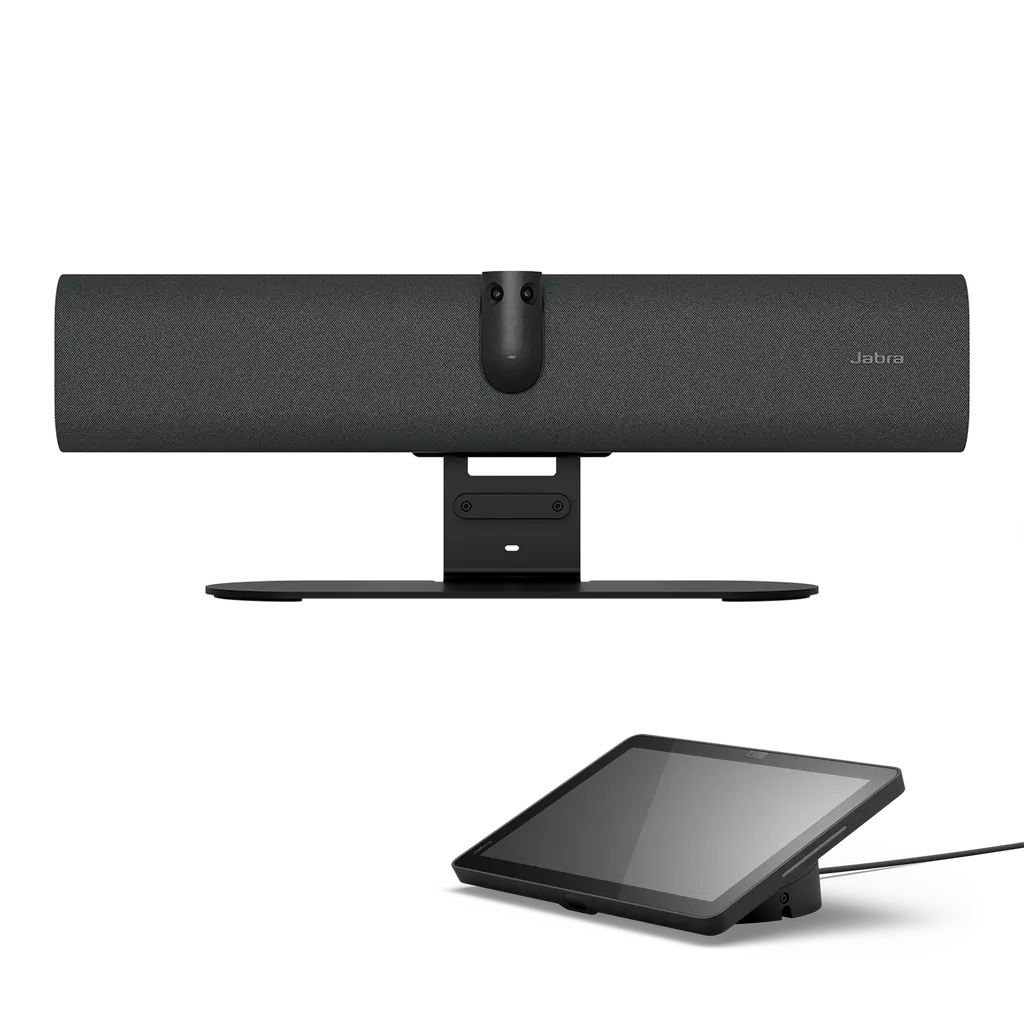
Jabra PanaCast 40 VBS 4K Video Bar for Small Meeting Rooms

Video
Up to 3840 x 1080 px
Field of view
Horizontal: 180°
Zoom
Up to 4x digital zoom
Microphones
Yes
WhatsApp
Priceon request
QuotationWithin 1 working day
DeliveryConfirmed with your quote, based on stock
PDFDownload datasheet (EN-APAC--PanaCast-40-VBS-Datasheet-20260716.pdf)
Overview

The Jabra PanaCast 40 VBS is a video bar for rooms up to 4.5 m x 4.5 m. Two panoramic cameras give a 180° horizontal view and 4K capture, with six microphones and one speaker. It runs Android 13 with Microsoft Teams Rooms and Zoom Rooms support, plus a 10.1-inch touch controller. It suits huddle rooms and small boardrooms across Qatar. Request a quote for mounting and setup.

What the PanaCast 40 VBS is built to do

The PanaCast 40 VBS is a single video bar that combines two panoramic cameras, a six-microphone array and one speaker. It runs Android 13 and is certified for Microsoft Teams Rooms and Zoom Rooms, so a small meeting room can join calls on either platform. A single HDMI input accepts content from a laptop, and the platform-specific sharing options include Apple AirPlay with Zoom and TeamsCast with Teams.

Camera coverage for rooms up to 4.5 m square

The two cameras provide a 180° horizontal field of view and a 50° vertical field of view, with camera resolution up to 3840 x 1080 px and 4K capture. In Teams and Zoom, Dynamic Composition shows close-up views of up to four people alongside a full-room view. Virtual Director uses the on-board Edge-AI chipset to follow the active speaker, and a 4x digital zoom plus manual pan, tilt and zoom give the room operator extra control. The stated room size is up to 4.5 m x 4.5 m (15 ft x 15 ft), which suits most huddle rooms and compact meeting rooms.

Audio and touch control

Six microphones work with noise reduction, echo cancellation and full duplex operation, and the single speaker covers 80 Hz to 20 kHz. Automatic speaker detection helps the system decide which part of the room to show. A 3.5 mm aux-out supports assistive listening devices, and ADA appears among the unit's listed certifications. The Jabra Control IP touch controller has a 10.1-inch landscape display at 1920 x 1200, two proximity sensors and a 0° to 25° position angle. It is powered over Ethernet to IEEE 802.3af.

Where it fits in Qatar

  • Huddle room in a Doha office: a team in West Bay or Msheireb that holds regular calls with colleagues abroad can frame everyone around a table without a camera operator.
  • Seminar room on a campus in Education City: a training room where a lecturer and a few students need to appear clearly to a remote group.
  • Board room in a Lusail corporate office: a smaller boardroom where Teams or Zoom meetings must show every attendee on a single feed.

What to plan before installation

The stated operating range is 5°C to 35°C, with storage between -20°C and 60°C. Outdoor summer temperatures in Qatar regularly exceed 45°C, so install the bar only in an air-conditioned room, away from direct sunlight and window glare. The power supply accepts 100-240V and a regional power cable is included, so confirm the cable matches the BS 1363 sockets in the room. The bar can be fixed to the wall with its integrated hinge or mounted on a VESA mount, table stand or tripod. Plan cable routes for the 3 m USB-C cable, the 1.83 m HDMI cable and an Ethernet run for the touch controller. SmartRooms Qatar offers a free site survey before wall mounting.

Management and warranty

Administrators can manage devices remotely through Jabra Plus, the Jabra WebConsole and the Microsoft Teams and Zoom admin portals. The unit includes secure boot, device lockdown, password strength enforcement and log retrieval. Products are covered by the manufacturer's warranty, and Jabra offers an optional Warranty+ add-on for extended coverage. Send your room dimensions, display size and the number of rooms to SmartRooms Qatar, and we will return a quotation, usually within one working day. Request a quote today.

Highlights

  • Two panoramic cameras with 180° horizontal field of view
  • Up to 4K capture with 4x digital zoom
  • Six microphones with echo cancellation and noise reduction
  • Android 13 with Microsoft Teams Rooms and Zoom Rooms certification
  • 10.1-inch Jabra Control IP touch controller powered over PoE
  • Room coverage up to 4.5 m x 4.5 m; operating range 5°C to 35°C

Room fit

Tell us the room size and platform (Teams, Zoom or BYOD) and we confirm the right combination with your quotation.

Estimated timeline

Quotation within 1 working day · delivery timing depends on stock availability, and we confirm it with your quotation.

Specifications

71 specifications · Source: manufacturer · checked Oct 2026
General info13
Box contents
PanaCast 40 VBS, Jabra Control IP, USB-C to USB-C cable (3m/9.8ft), Power supply, Privacy cover, 1 x HDMI cable 1.83m/6ft, 1 x regional power cable
Operating system
Android 13
Packaging dimensions (WxHxD)
866 x 110 x 210 mm | 34.13 x 4.34 x 8.28 in
Main unit dimensions (WxHxD)
530 x 105 x 60 mm | 20.87 x 4.13 x 2.37 in
Main unit weight (base unit)
1.8 kg | 3.9 lbs
Package weight
4.19 kg | 9.22 lbs
Onboard AI
Yes
Cable management
Yes
Kensington lock compatible
Yes
Operating voltage
100-240V
LED features and functions
Firmware update status, Mute/unmute, Power indicator, Streaming
Certifications and compliance
Microsoft Teams Rooms, Zoom Rooms,ADA
Room size
Up to 4.5m x 4.5m | 15ft x 15ft
Video13
Video input
1 x HDMI
Supported display resolution
Supports up to 4K, Touch Display Compatible
Content sharing
Apple Airplay (only supported by Zoom), HDMI input, Microsoft TeamsCast (only supported by Teams)
Number of cameras
2
Type of camera
Dual camera panoramic
Camera resolution
Up to 3840 x 1080 px
Zoom
Up to 4x digital zoom
Field of view
Horizontal: 180°,Vertical: 50°
Intelligent Meeting Space
Yes
Multi-stream Dynamic Composition
Yes
Dynamic Composition
Yes
Virtual director
Yes
Support secondary external USB camera
Yes
Audio9
Speaker frequency range
80Hz - 20000Hz
Number of speakers
1
Automatic Speaker Detection
Yes
Full Duplex
Yes
Noise Reduction Echo Cancellation
Yes
Number of microphones
6
Microphone sensitivity
-37dBFS
Microphone frequency range
100Hz - 16000Hz
Aux-Out for assistive listening devices
3.5mm jack
Security9
Media encryption
Provided by VaaS Partner
Access management
Jabra Plus; Jabra WebConsole; Local account; VaaS Admin Portals including MS Teams Admin Center and Zoom Device Management
Security management
Remote log in via Jabra Plus, Jabra WebConsole and VaaS Admin Portal
Authenticated access to Admin settings, Jabra WebConsole, Jabra Plus
Yes
Account password strength check and enforcement
Yes
Device locked down for security
Yes
Lockdown with secureboot, OS verified boot, Vendor lock
Yes
Log retrieval via Jabra Web Console
Yes
Microsoft and Zoom based VaaS account authentication
Yes
Connectivity4
Interfaces
USB-A, USB-C, Ethernet (RJ45), HDMI,Wi-Fi, 3.5mm jack port
Bluetooth version
5.2
Supported USB versions
USB 2.0, USB 3.0
Recommended USB cable length
Up to 3m | 9.8ft
Network6
Internet Protocol
(IP) IPv4, IPv6
Ethernet
10/100/1000 Mbps
Auto-MDIX
Yes
Support DHCP
Yes
Support Static IP Address
Yes
Simple Certificate Enrollment Protocol
Yes
Software & Apps2
System requirements
Compatible with Android 13
Compatible software and apps
Jabra Plus; Jabra WebConsole for remote device management via HTTPS; Support for native 3rd party applications, including Microsoft Teams Room for Android and Zoom Rooms; Cloud service providers including Microsoft Teams Admin Center and Zoom Device Management
Ease of use6
Appliance mode
Yes
BYOD mode
Yes
Digital pan/tilt/zoom
Yes
Manual Pan-Tilt-Zoom (PTZ)
Yes
One touch meeting join
Yes
Camera privacy cover
Yes
Jabra Control IP9
Weight
670.72g | 23.63oz
Display size
10.1″
Display orientation
Landscape
Display resolution
1920 x 1200
PoE
Yes
Power over ethernet (PoE)
IEEE 802.3af
Position angle
0° / 25°
Proximity sensor
2 sensors
Kensington lock compatible
Yes

Downloads

35 files from the manufacturer
PDF Datasheets EN-APAC--PanaCast-40-VBS-Datasheet-20260716.pdf 90 KB Jabra PanaCast 40 VBS datasheets (PDF, 90 KB) PDF Datasheets EN-AU--PanaCast-40-VBS-Datasheet-20260716.pdf 99 KB Jabra PanaCast 40 VBS datasheets (PDF, 99 KB) PDF Datasheets EN-Control-IP-Datasheet_21082025.pdf 137 KB Jabra PanaCast 40 VBS datasheets (PDF, 137 KB) PDF Datasheets EN-EMEA--PanaCast-40-VBS-Datasheet-20260716.pdf 100 KB Jabra PanaCast 40 VBS datasheets (PDF, 100 KB) PDF Datasheets EN-GB--PanaCast-40-VBS-Datasheet-20260716.pdf 100 KB Jabra PanaCast 40 VBS datasheets (PDF, 100 KB) PDF Datasheets EN-US--PanaCast-40-VBS-Datasheet-20260716.pdf 98 KB Jabra PanaCast 40 VBS datasheets (PDF, 98 KB) PDF Manuals & guides EN-PanaCast-VB-Series-BYOD-Mode.pdf 1002 KB Jabra PanaCast 40 VBS manuals & guides (PDF, 1002 KB) PDF Manuals & guides Jabra-PanaCast-40-VBS-Room-Set-up-Guide-250425-WEB.pdf 3.6 MB Jabra PanaCast 40 VBS manuals & guides (PDF, 3.6 MB) PDF Manuals & guides Jabra-PanaCast-40-VBS-Screen-Mount-assembly_EN_English_RevA.pdf 2.7 MB Jabra PanaCast 40 VBS manuals & guides (PDF, 2.7 MB) PDF Manuals & guides Jabra-PanaCast-40-VBS-Wall-Mount-assembly_EN_English_RevA.pdf 1.3 MB Jabra PanaCast 40 VBS manuals & guides (PDF, 1.3 MB) PDF Manuals & guides Jabra-Panacast-40-VBS-Installation-manual_AR_Arabic_RevB.pdf 3.1 MB Jabra PanaCast 40 VBS manuals & guides (PDF, 3.1 MB) PDF Manuals & guides Jabra-Panacast-40-VBS-Installation-manual_EN_English_RevB.pdf 2.8 MB Jabra PanaCast 40 VBS manuals & guides (PDF, 2.8 MB) PDF Manuals & guides Jabra-Panacast-40-VBS-User-manual_AR_Arabic_RevB.pdf 2.1 MB Jabra PanaCast 40 VBS manuals & guides (PDF, 2.1 MB) PDF Manuals & guides Jabra-Panacast-40-VBS-User-manual_EN_English_RevB.pdf 2.0 MB Jabra PanaCast 40 VBS manuals & guides (PDF, 2.0 MB) PDF Manuals & guides Jabra-Panacast-40-VBS_Administrator-Guide_RevC.pdf 595 KB Jabra PanaCast 40 VBS manuals & guides (PDF, 595 KB) PDF Manuals & guides Jabra-Table-Stand-assembly_AR_Arabic_RevB.pdf 3.1 MB Jabra PanaCast 40 VBS manuals & guides (PDF, 3.1 MB) PDF Manuals & guides Jabra-Table-Stand-assembly_EN_English_RevB.pdf 3.0 MB Jabra PanaCast 40 VBS manuals & guides (PDF, 3.0 MB) PDF Manuals & guides Jabra-Video-Solutions-Guide-Zoom-011125_WEB.pdf 18.0 MB Jabra PanaCast 40 VBS manuals & guides (PDF, 18.0 MB) PDF Manuals & guides Jabra-Video-Solutions-Guide_MS-Teams_011125.pdf 5.0 MB Jabra PanaCast 40 VBS manuals & guides (PDF, 5.0 MB) PDF Other documents EN-PanaCast-40-VBS-Deployment-Flexibility-120826.pdf 630 KB Jabra PanaCast 40 VBS other documents (PDF, 630 KB) PDF Other documents EN-PanaCast-U30-and-PanaCast-40-VBS-Screen-and-Reflection-Detection-120826.pdf 826 KB Jabra PanaCast 40 VBS other documents (PDF, 826 KB) PDF Other documents EN-PanaCast-VB-Series-802,-d-,1X-Whitepaper.pdf 4.5 MB Jabra PanaCast 40 VBS other documents (PDF, 4.5 MB) PDF Other documents EN-PanaCast-VB-Series-Audio-Capabilities.pdf 508 KB Jabra PanaCast 40 VBS other documents (PDF, 508 KB) PDF Other documents EN-PanaCast-VB-Series-Aux-Out.pdf 485 KB Jabra PanaCast 40 VBS other documents (PDF, 485 KB) PDF Other documents EN-PanaCast-VB-Series-Intelligent-Meeting-Space.pdf 526 KB Jabra PanaCast 40 VBS other documents (PDF, 526 KB) PDF Other documents EN-PanaCast-VB-Series-Multi-stream-Dynamic-Composition-for-Zoom.pdf 725 KB Jabra PanaCast 40 VBS other documents (PDF, 725 KB) PDF Other documents EN-PanaCast-VB-Series-Network-Protocols.pdf 4.0 MB Jabra PanaCast 40 VBS other documents (PDF, 4.0 MB) PDF Other documents EN-PanaCast-VB-Series-Noise-Suppression.pdf 918 KB Jabra PanaCast 40 VBS other documents (PDF, 918 KB) PDF Other documents EN-PanaCast-VB-Series-Permanent-BYOD.pdf 390 KB Jabra PanaCast 40 VBS other documents (PDF, 390 KB) PDF Other documents EN-PanaCast-VB-Series-Single-stream-Dynamic-Composition.pdf 556 KB Jabra PanaCast 40 VBS other documents (PDF, 556 KB) PDF Other documents EN_MDEP-info-sheet_P50-VBS_P40-VBS.pdf 232 KB Jabra PanaCast 40 VBS other documents (PDF, 232 KB) PDF Other documents Network-interfaces-and-services-PanaCast-40-VBS-RevA.pdf 62 KB Jabra PanaCast 40 VBS other documents (PDF, 62 KB) PDF Other documents WP_panacast_series_security_whitepaper_080825.pdf 14.2 MB Jabra PanaCast 40 VBS other documents (PDF, 14.2 MB) URL Other documents · Opens on manufacturer site Control IP/Jabra Scheduler 2D/3D files (PDF and DXF). Jabra PanaCast 40 VBS other documents (URL) URL Other documents · Opens on manufacturer site PanaCast 40 VBS 2D/3D files (PDF, DXF) Jabra PanaCast 40 VBS other documents (URL)

Questions about PanaCast 40 VBS

What is the Jabra PanaCast 40 VBS designed for?
The PanaCast 40 VBS is a video bar for small rooms, from huddle rooms to small meeting rooms. Its two cameras capture a 180° horizontal view, so people seated near the screen, in corners or against the wall are included in remote calls. It suits offices and training spaces in Doha where teams regularly join Microsoft Teams or Zoom calls with colleagues abroad.
What size room does it cover?
The stated room size is up to 4.5 m x 4.5 m (15 ft x 15 ft). That covers many huddle rooms and small meeting rooms in West Bay or Lusail offices. For a larger room, such as a lecture hall, the source data does not support this model, so a larger-room product should be considered instead. Send your room dimensions with your quote request so the team can confirm fit.
Does it work with Microsoft Teams and Zoom?
Yes. The PanaCast 40 VBS is certified for Microsoft Teams Rooms and Zoom Rooms and runs Android 13. Content sharing differs by platform: Apple AirPlay is supported only with Zoom, and Microsoft TeamsCast is supported only with Teams. Confirm which platform your organisation uses before ordering, so the sharing method you rely on is available.
How many people can the camera frame individually?
Dynamic Composition in Teams and Zoom shows close-up views of up to four people in the room, plus a full-room view. Virtual Director uses AI to detect who is speaking and adjusts the picture to focus on them. This is useful in a boardroom in Msheireb where a chairperson and several senior staff take turns speaking to remote members of the same committee.
Can it be installed in a hot room in Qatar?
The stated operating temperature range is 5°C to 35°C, and storage is rated from -20°C to 60°C. Because Qatar summers regularly exceed 45°C outdoors, install the bar only in an air-conditioned room and keep it away from direct sunlight and window glare. A free site survey from SmartRooms Qatar can confirm the room's conditions before mounting.
What power supply does it need?
The operating voltage is listed as 100-240V, and a power supply and a regional power cable are included. This range covers Qatar's 240 V mains. Before installation, confirm that the supplied regional cable matches the BS 1363 sockets in the room, and plan a socket close to the mounting point so the bar and the touch controller can be powered reliably.
Which ports and connections does it have?
The bar has one HDMI video input, USB-A, USB-C, Ethernet (RJ45), Wi-Fi, a 3.5 mm jack and Bluetooth 5.2. It supports USB 2.0 and USB 3.0. The recommended USB cable length is up to 3 m, and an HDMI cable of 1.83 m is included. Ethernet supports 10/100/1000 Mbps with DHCP and static IP addressing, which helps IT teams in Qatar place it on a managed network.
How is the Jabra Control IP touch controller powered?
The Jabra Control IP is powered over Ethernet using IEEE 802.3af, so it needs a PoE-capable switch port. It has a 10.1-inch landscape display at 1920 x 1200, two proximity sensors and a 0° to 25° position angle. Plan a cable run from the network cabinet to the controller position on the table or wall before ordering, and ask SmartRooms Qatar to confirm the switch details in your quotation.
How do I mount it and plan the cabling?
The bar can be fixed to the wall with its integrated hinge, or attached to a VESA mount, table stand or tripod. Cable management is built in. Plan the route for the 3 m USB-C cable, the HDMI cable and the Ethernet run before the install day. SmartRooms Qatar offers free site surveys, which help confirm wall type, mounting height and cable routes before any drilling takes place.
We are a private school in Al Wakrah fitting out several classrooms. Is this suitable?
It can suit classrooms and seminar rooms up to 4.5 m square where teachers present to a class and link to remote specialists or parents. Schools in Qatar commonly buy several units against a single purchase order (LPO). Send the number of rooms and their dimensions, and SmartRooms Qatar will return a quotation, usually within one working day, with delivery and installation options.
Is it suitable for a government ministry or authority in Doha?
Government offices often need documented remote management and locked-down devices. The PanaCast 40 VBS supports remote management through Jabra Plus, the Jabra WebConsole and the Teams and Zoom admin portals. It includes secure boot, device lockdown, password strength enforcement and log retrieval. Ministries can procure through purchase orders or government tenders, and SmartRooms Qatar will provide a quotation for review.
Is there an extended warranty option?
Products are covered by the manufacturer's warranty. Jabra also offers a Warranty+ add-on service for extended warranty coverage for up to five years. Ask for this option in your quotation request if you want it priced alongside the bar and the Jabra Control IP, so the total cost of ownership is clear before you approve the purchase order.

Similar models

Biamp Parlé ABC 2500a Biamp Parlé ABC 2500a All-in-One Conferencing Audio Bar
Zoom Certified Microsoft Teams Certified
Biamp Parlé CBC 2500 CM Biamp Parlé CBC 2500 CM Ceiling-Mounted Conferencing Bar
Zoom Certified Microsoft Teams Certified
Biamp Parlé CBC 2500 PM Biamp Parlé CBC 2500 PM Pole-Mounted Conferencing Bar
Zoom Certified Microsoft Teams Certified
Biamp Parlé N 100 Biamp Parlé N 100 Network and USB Expander for Parlé Conferencing Bars
TAA Compliant
Biamp Parlé PMA 2000-DM Biamp Parlé PMA 2000-DM Display Mount Kit for Parlé 2000 Video Bars
Video bars
Email Call