






Biamp
Evoko Kleeo Desk Manager 6-pack + 1yr license
Biamp Evoko Kleeo Desk Manager 6-Pack (910-01972) Desk Booking Display
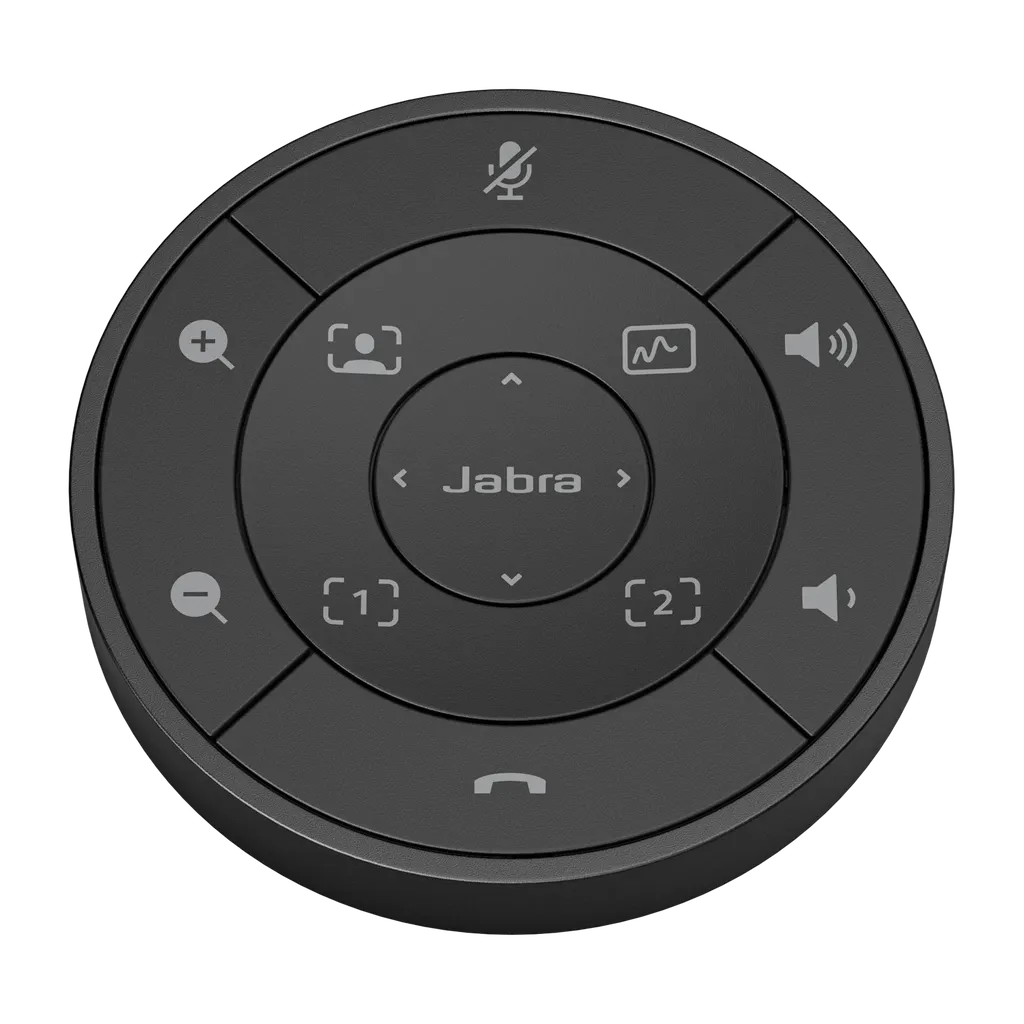
PanaCast 50 Remote
Jabra PanaCast 50 Remote Control, Black and Grey
Priceon request
QuotationWithin 1 working day
DeliveryConfirmed with your quote, based on stock
Overview
The Jabra PanaCast 50 Remote is a controller for the PanaCast 50 camera system. It lets the meeting host recall saved camera presets, move the camera with pan, tilt and zoom controls and adjust volume from their seat. Available in black (SKU 8220-209) and grey (SKU 8211-209) at 77 mm wide and 148 g, it suits boardrooms in Doha where one presenter leads the call.
What the PanaCast 50 Remote controls during a meeting
The Jabra PanaCast 50 Remote is a compact controller for the PanaCast 50 camera system. It keeps camera control with the person running the meeting, who can recall saved camera presets, move the camera with pan, tilt and zoom (PTZ) controls, and adjust volume from their own seat. Rather than walking to a laptop or asking a colleague to reframe the shot mid-discussion, the chair can change the view in a few presses.
Presets are the main reason to fit a remote like this. Once the key framings of a room are saved, such as the full table, the presentation screen or the speaker at the head of the room, a single control returns the camera to that view. This matters in boardrooms where seating changes between sessions, and in training rooms where the instructor moves between the whiteboard and the audience.
Dimensions, weight and build
The black model (SKU 8220-209) measures 77 mm wide, 77 mm deep and 14 mm high, which is 3.03 by 3.03 by 0.55 inches, and weighs 148 g (5 oz). The body is made from PC and PC/ABS plastic with silicone rubber parts. Its footprint is small enough to sit beside a laptop or notepad on a conference table without crowding the workspace. The grey model (SKU 8211-209) belongs to the same family, but its full dimensions should be confirmed with the SmartRooms Qatar team before you order.
Where it fits in Qatar
A boardroom in West Bay where the chair runs a long agenda with directors joining from Doha and abroad: the chair presses one preset to show the whole table, then moves to a close view of whoever is speaking, without anyone leaving their seat.
A training centre in Education City where several instructors share the same room during the week: each presenter saves a preferred framing before a course and recalls it within seconds at the start of a session.
An office in Lusail or Al Sadd that holds meetings from Sunday to Thursday with overseas teams: volume control from the seat lets the person facilitating the call keep the conversation clear without interrupting the session.
What to plan before you order
- Compatibility: the source data does not list the connection method or required software, so confirm compatibility with your camera and room system first.
- Colour: choose black (8220-209) or grey (8211-209) to suit the furniture and finishes in the room.
- Preset positions: agree the framings with the people who will run the meetings, so each saved view suits the seats in use.
- Environment: use the remote in air-conditioned meeting rooms, as the source data gives no operating temperature range.
If you are equipping several rooms, ask SmartRooms Qatar for a free site survey, then request a quote for the PanaCast 50 Remote in the colour you need. Quotations are usually issued within one working day, and purchase orders (LPOs) are accepted.
Highlights
- Black (8220-209) and grey (8211-209) versions available
- Recalls saved camera presets from the meeting seat
- Pan, tilt and zoom control for the person running the call
- Adjusts volume without leaving the seat
- 77 mm wide, 77 mm deep, 14 mm high
- 148 g body of PC/ABS plastic with silicone rubber parts
Room fit
Tell us the room size and platform (Teams, Zoom or BYOD) and we confirm the right combination with your quotation.
Estimated timeline
Quotation within 1 working day · delivery timing depends on stock availability, and we confirm it with your quotation.
Specifications
14 specifications · Source: manufacturer · checked Oct 2026
Catalogue attributes14
- Depth
- 77
- Depthinch
- 3.03
- Heightinch
- 0.55
- Heightmm
- 14
- Launchdate
- 2021-04-27
- Materialsused
- PC & PC/ABS plastic; Si rubber
- Mobcolor
- Black
- Portfolio
- Jabra
- Producttype
- Accessory
- sku
- 8220-209
- Weight
- 148
- Weightoz
- 5
- Width
- 77
- Widthinch
- 3.03
Downloads
0 files from the manufacturerNo downloadable files are listed for this model yet. Ask us and we will send the datasheet.
Questions about PanaCast 50 Remote
What does the Jabra PanaCast 50 Remote do?
It is a remote controller for the PanaCast 50 camera system. The person running a meeting can recall saved camera presets, move the camera with pan, tilt and zoom controls, and adjust volume from their seat. It suits boardrooms, seminar rooms and training rooms in Doha where one presenter leads the discussion and needs fast control of the camera framing.
Is there a difference between the black and grey versions?
The two colours are sold under different SKUs: the black model is 8220-209 and the grey model is 8211-209. The dimensions and weight on this page refer to the black model, so ask the SmartRooms Qatar team to confirm the grey model's specifications before you request a quote. Choosing the colour that matches your room furniture is the main decision to make.
Which camera functions can I control with it?
The remote provides access to camera presets and PTZ controls, meaning pan, tilt and zoom. Saved presets let a host jump to a framing such as the full table or the presenter at the front of the room in one press. The source data does not list further functions, so confirm any additional capability with the team before relying on it.
Can it adjust volume, and does it need to be close to the camera?
Volume adjustment is among its listed functions, so the person running the call can raise or lower the level from their seat. The source data does not state the connection method or the usable distance between the remote and the equipment, so confirm how it links to your room system before ordering, particularly if the table is far from the equipment rack.
How big is it and how does it fit on a meeting table in Doha?
The black model measures 77 mm wide, 77 mm deep and 14 mm high, which is 3.03 by 3.03 by 0.55 inches, and weighs 148 g. In a meeting room in Al Sadd or West Bay it can sit beside a laptop on the table without taking up much space. Measure the table before ordering, so you know how many units a row of seats can take.
Can I use it outdoors or in a hot space in Qatar?
The source data does not give an operating temperature range for the remote, so no hot or outdoor rating is confirmed. Qatar summer temperatures can exceed 45°C, so plan to use it in air-conditioned meeting rooms. If you are considering a lobby or a spot near a window, ask the SmartRooms Qatar team to confirm the environment before you request a quote.
Will it work with the video conferencing setup a school in Al Rayyan already has?
The remote belongs to the PanaCast series and its name points to the PanaCast 50 camera, but the source data does not list compatible devices, software or connection methods. If a school in Al Rayyan runs a different platform or an older camera, confirm compatibility in writing with SmartRooms Qatar before the purchase order is raised, so the remote matches the installed system.
How could a boardroom in West Bay use it?
In a West Bay boardroom, a chair running a long agenda with directors joining from Doha and abroad can press a preset that shows the whole table, then move to a close view of the speaker. Nobody needs to stand or reach for a laptop. Plan four to six presets that cover the seats and screen positions the room uses most.
How might a training centre in Education City use it?
At a training centre in Education City, several instructors often share the same room during a week. Each can save a preferred framing covering the whiteboard or their own position, then recall it within seconds at the start of a session. Volume control from the seat also helps when a trainer moves around the room while explaining.
Does it suit meetings with overseas teams across the Sunday to Thursday week?
Yes, it suits offices in Lusail, Al Sadd or Msheireb that hold calls with overseas teams during the Sunday to Thursday working week. The remote lets the facilitator keep the camera on the right speaker and manage volume without interrupting the call. Set up the room before the first session of the week and test the presets with the people who will run each meeting.
How do I order several units for a school, and which payment methods are accepted?
Send a list of the rooms and the colour needed for each, and SmartRooms Qatar will prepare a quotation, usually within one working day. Schools and government bodies can raise a purchase order or LPO. Payment is accepted by bank transfer, cheque or purchase order, and a free site survey can confirm the room layouts before you order. Products are covered by the manufacturer's warranty.
Similar models



Biamp
Evoko Liso Freestand Mount - Boltable
Biamp Evoko Liso Freestand Mount (Boltable) 910-01935 Floor Stand
