





Thursday, 22 October 2026 · 11 Jumada I 1448 AH Sun – Thu · 9:00 – 18:00
+971 56 914 9477 العربية
WhatsApp

PanaCast 50 Room System 2

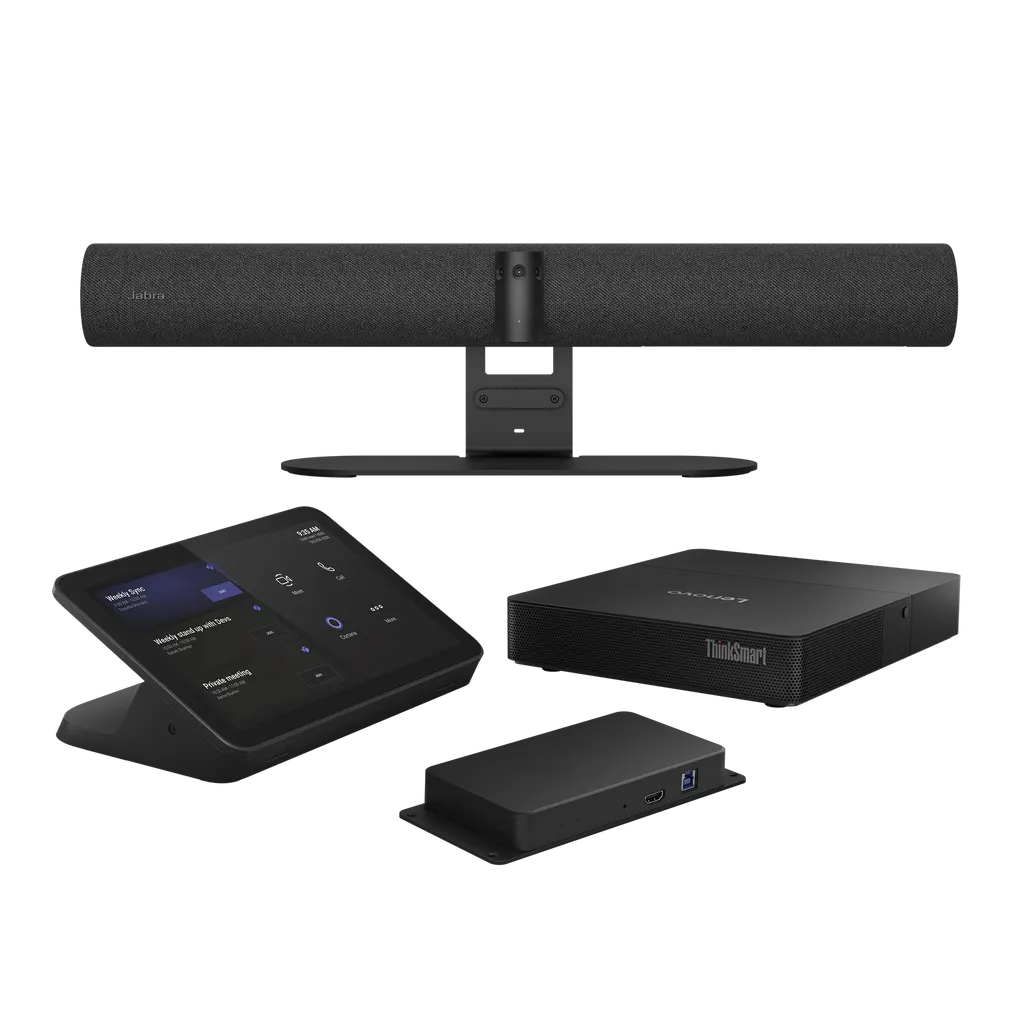
Jabra PanaCast 50 Room System 2 Video Conferencing Kit

Video
13 megapixels
Field of view
Horizontal: 180°
Zoom
Up to 6x lossless digital zoom
Microphones
8 microphone beamforming array…
WhatsApp
Priceon request
QuotationWithin 1 working day
DeliveryConfirmed with your quote, based on stock
PDFDownload datasheet (EN-Jabra-PanaCast-50-Room-System-2-with-IP-controller-Tech-Spec-180825-Web.pdf)
Overview

The Jabra PanaCast 50 Room System 2 is a complete kit for small and medium meeting rooms. Its 180° panoramic 4K camera combines three 13-megapixel sensors, eight beamforming microphones and four speakers, running Microsoft Teams Rooms on a Lenovo ThinkSmart Core Gen 2. Choose the USB or IP touch controller to suit your room. It suits hybrid meeting rooms across Doha. Request a quote from SmartRooms Qatar.

What the PanaCast 50 Room System 2 is

The Jabra PanaCast 50 Room System 2 is a video conferencing kit built for small and medium rooms. It includes a Lenovo ThinkSmart Core Gen 2 computing device and a touch controller, so a meeting room gets a camera, microphones, speakers and computer as one matched set rather than parts sourced from several suppliers. The Core Gen 2 comes with Microsoft Teams Rooms preloaded.

The two part numbers describe the same kit with different connection types. The 8612-337 is the IP variant and the 8602-337 is the USB variant. Confirm which one fits your network and touch controller setup before you order.

Camera and audio that cover the whole room

The camera is a panoramic multi-camera array of three 13-megapixel sensors. It delivers a 180° horizontal view and a 54° vertical view at Panoramic-4K resolution, 3840 x 1080 at 30 fps, with up to 6x lossless digital zoom. Intelligent Zoom adjusts framing around in-room participants, and Virtual Director shifts the view toward active speakers as the conversation moves across the table.

Audio comes from eight microphones in a beamforming array certified for rooms up to 4.5 m x 6 m, plus four speakers: two 50 mm woofers and two 20 mm tweeters, covering 80 Hz to 20 kHz. Automatic speaker detection helps remote colleagues follow each person clearly, which matters most when part of the team joins from another site.

Touch controllers, connections and installation

  • Lenovo ThinkSmart USB Touch Controller: a plug-and-play interface for simple meeting management.
  • Lenovo IP Touch Controller: a network-based option aimed at enterprise rooms that need more stability and flexibility.

Connections include USB-A, USB-C, Ethernet (RJ45) for supported management systems, and Wi-Fi, along with Bluetooth Low Energy for remote control and Sound+ access. USB 2.0 and USB 3.0 are supported. You can mount the camera on a wall, on a table stand or on a screen using VESA. The box includes a wall mount, a USB-C to USB-A cable, a privacy cover, mounting plates and a 10 m USB-C to C cable for the touch panel. The manufacturer lists a 3-year warranty for this model.

Where it fits in Qatar

  • Meeting room in West Bay or Msheireb: a medium room where a local team meets colleagues calling in from abroad.
  • Seminar room in Education City: hybrid seminars and thesis defences where external examiners join remotely.
  • Training room in Al Wakrah or Lusail: staff sessions where some learners attend in person and others join from home.

What to plan before ordering

The operating temperature range is 5°C to 35°C, so install the system in an air-conditioned room. Qatar summer heat can exceed 45°C outdoors, and direct sunlight through windows can raise the temperature inside a room, so keep the camera away from both. The Windows-only content camera shares whiteboard content. Microsoft Copilot features such as live transcription and recap need a separate Microsoft Copilot license.

A free site survey confirms the mounting position, cable routing and the power and network points before installation. Send the room dimensions and your preferred mounting option to the SmartRooms Qatar team and request a quote. Quotations are usually returned within one working day.

Highlights

  • Panoramic-4K camera with 180° horizontal field of view
  • Three 13-megapixel cameras with up to 6x lossless digital zoom
  • Eight beamforming microphones certified for rooms up to 4.5 m x 6 m
  • Lenovo ThinkSmart Core Gen 2 with Microsoft Teams Rooms preloaded
  • USB or IP touch controller, part numbers 8602-337 and 8612-337
  • Operating range 5°C to 35°C with a 3-year manufacturer warranty

Room fit

Tell us the room size and platform (Teams, Zoom or BYOD) and we confirm the right combination with your quotation.

Estimated timeline

Quotation within 1 working day · delivery timing depends on stock availability, and we confirm it with your quotation.

Specifications

42 specifications · Source: manufacturer · checked Oct 2026
Box contents3
Jabra PanaCast 50
PanaCast 50, power supply, wall mount, USB-C to USB-A cable 2m/6.6ft (USB 3.0), Privacy cover
Lenovo ThinkSmart Core Gen 2 and USB Controller
ThinkSmart Core Gen 2 computing device, ThinkSmart USB Controller display, Power Supply for Core Gen 2, wall Mounting Plate, Core Gen 2 Mounting Plate, power Supply mounting cage, 10m/32ft USB C to C Cable (for touch panel), 3m/9.8ft USB C Cable (for BYOM)
Preloaded application
Microsoft Teams Rooms
Video12
Number of cameras
3
Type of camera
Panoramic multi-camera array
Camera resolution
13 megapixels
Zoom
Up to 6x lossless digital zoom
Field of view
Horizontal: 180°, Vertical: 54°
Resolution
Panoramic-4K: 3840 x 1080 @ 30fps
Intelligent Zoom
Yes
Intelligent Meeting Space
Yes
Dynamic Composition
Single-stream Dynamic Composition (BYOD + MTR + ZR), Multi-stream Dynamic Composition
Virtual Director
Yes
Vivid HDR
Yes
Multi-stream IntelliFrame with people recognition
Yes
Audio10
Speakers
2 x 2" (50mm) woofers, 2 x 3/4" (20mm) tweeters
Speaker frequency range
80Hz - 20000Hz
Number of speakers
4
Automatic speaker detection
Yes
Microphone type
8 microphone beamforming array certified for room up to 4.5m x 6m
Number of microphones
8
Microphone sensitivity
-37dBFS
Microphone frequency range
100Hz - 8000Hz
Aux-Out
Yes
Microsoft intelligent speaker functionality
Yes
Software & Apps6
System requirements
Compatible with Windows 11, macOS 10.15 and later, including macOS 11.x
Compatible software and/or apps
Jabra+, Jabra Direct, Jabra Sound+, Jabra Xpress
Proxy support
HTTP, SOCKS4, SOCKS4A, SOCKS5, SOCKS5H
Integrated PeopleCount
Yes
Software Development Kit (SDK)
Yes
Whiteboard Sharing / Content Camera (Windows only)
Yes
Ease of use2
Manual Pan-Tilt-Zoom (PTZ)
Yes
Intelligent Speaker
Yes
Connectivity3
Connectivity
USB-A, USB-C, Ethernet (RJ45) for connection to supported management systems, Wi-Fi
Supported USB versions
USB 2.0, USB 3.0
Bluetooth Low Energy support
Yes, for remote control and Sound+ access
Extended info3
Operating temperature
5°C to 35°C | 41°F to 95°F
Storage temperature
-20°C to 60°C | -4°F to 140°F
Warranty
3 years
General info3
Packaging dimensions (D x W x H) cm/inch
19.6×69.8×51.9cm | 7.73×27.51×20.45in
Weight range, specific to regional power plug
10617.8g | 374.53oz | 23.36lb
Certifications and compliance
Microsoft Teams Rooms (with separate Microsoft Teams Rooms certification for integrated Content Camera), Microsoft Intelligent Camera Experience


Downloads

16 files from the manufacturer
PDF Datasheets EN-Jabra-PanaCast-50-Room-System-2-with-IP-controller-Tech-Spec-180825-Web.pdf 78 KB Jabra PanaCast 50 Room System 2 datasheets (PDF, 78 KB) PDF Datasheets EN-Jabra-PanaCast-50-Room-System-2-with-USB-Controller-Tech-Spec-180825-Web.pdf 74 KB Jabra PanaCast 50 Room System 2 datasheets (PDF, 74 KB) PDF Datasheets EN-PanaCast-50-Room-System-2-Datasheet-250425-WEB.pdf 1.8 MB Jabra PanaCast 50 Room System 2 datasheets (PDF, 1.8 MB) PDF Manuals & guides Jabra-PanaCast-50-Meeting-Room-Set-up-Guide-A4-190424.pdf 8.6 MB Jabra PanaCast 50 Room System 2 manuals & guides (PDF, 8.6 MB) PDF Manuals & guides Jabra-PanaCast-50-Screen-Mount-assembly-instructions_AR_Arabic_RevB.pdf 2.3 MB Jabra PanaCast 50 Room System 2 manuals & guides (PDF, 2.3 MB) PDF Manuals & guides Jabra-PanaCast-50-Screen-Mount-assembly-instructions_EN_English_RevB.pdf 2.3 MB Jabra PanaCast 50 Room System 2 manuals & guides (PDF, 2.3 MB) PDF Manuals & guides Jabra-PanaCast-50-Table-Stand-assembly-instructions_AR_Arabic_RevA.pdf 644 KB Jabra PanaCast 50 Room System 2 manuals & guides (PDF, 644 KB) PDF Manuals & guides Jabra-PanaCast-50-Table-Stand-assembly-instructions_EN_English_RevA.pdf 625 KB Jabra PanaCast 50 Room System 2 manuals & guides (PDF, 625 KB) PDF Manuals & guides Jabra-PanaCast-50-Wall-Mount-assembly-instructions_AR_Arabic_RevA.pdf 1.9 MB Jabra PanaCast 50 Room System 2 manuals & guides (PDF, 1.9 MB) PDF Manuals & guides Jabra-PanaCast-50-Wall-Mount-assembly-instructions_EN_English_RevA.pdf 1.9 MB Jabra PanaCast 50 Room System 2 manuals & guides (PDF, 1.9 MB) PDF Manuals & guides Jabra-Panacast-50-User-Manual_AR_Arabic_RevI.pdf 2.8 MB Jabra PanaCast 50 Room System 2 manuals & guides (PDF, 2.8 MB) PDF Manuals & guides Jabra-Panacast-50-User-Manual_EN_English_RevI.pdf 2.7 MB Jabra PanaCast 50 Room System 2 manuals & guides (PDF, 2.7 MB) PDF Manuals & guides Jabra-Video-Solutions-Guide_MS-Teams_011125.pdf 5.0 MB Jabra PanaCast 50 Room System 2 manuals & guides (PDF, 5.0 MB) PDF Manuals & guides QSG_P50-ADA-wall-mount_for-web.pdf 716 KB Jabra PanaCast 50 Room System 2 manuals & guides (PDF, 716 KB) PDF Other documents EN_Multistream-Dynamic-Composition-for-Teams_240524.pdf 955 KB Jabra PanaCast 50 Room System 2 other documents (PDF, 955 KB) PDF Other documents Network-interfaces-and-services-PanaCast-50-RevA.pdf 37 KB Jabra PanaCast 50 Room System 2 other documents (PDF, 37 KB)

Questions about PanaCast 50 Room System 2

Is the PanaCast 50 Room System 2 suitable for a meeting room in a Doha office?
Yes, for a small or medium meeting room. It suits a team room in a West Bay or Msheireb office where some attendees join from abroad. The camera frames everyone in the room, and the Lenovo ThinkSmart Core Gen 2 runs Microsoft Teams Rooms, so the room can join scheduled calls without a separate computer. Confirm your room layout with SmartRooms Qatar before ordering.
Which room size is this kit designed for?
The eight-microphone array is certified for rooms up to 4.5 m x 6 m, which covers most small and medium meeting rooms. Larger spaces such as lecture halls fall outside that certification, so check with the team before choosing this kit. Measure the room length, width and ceiling height and include them in your quote request so the layout can be checked.
What is the difference between the 8612-337 and 8602-337?
Both part numbers describe the same PanaCast 50 Room System 2 with the Lenovo ThinkSmart Core Gen 2. The 8612-337 is the IP variant and the 8602-337 is the USB variant, matching the IP and USB touch controller options. The manufacturer lists both under model code VSM020, so an order should quote the exact part number your room needs.
How does the camera cover the full width of the room?
The camera uses a panoramic multi-camera array of three 13-megapixel sensors. The image covers a 180° horizontal view and a 54° vertical view, delivered as Panoramic-4K at 3840 x 1080 and 30 fps. The three feeds are combined into one wide picture, so people seated at the sides of a table appear in frame. Up to 6x lossless digital zoom lets remote viewers focus on a speaker.
Does the system come ready for Microsoft Teams Rooms?
Yes. The Lenovo ThinkSmart Core Gen 2 comes with Microsoft Teams Rooms preloaded, and the manufacturer lists Microsoft Teams Rooms certification for the integrated content camera. Intelligent Speaker supports Teams features such as live transcription and recap, but those need a separate Microsoft Copilot license. Ask your IT team to check Microsoft licensing for your organisation before rollout.
Can the system be placed in a lobby or a room without air conditioning?
Not without cooling. The operating temperature range is 5°C to 35°C, and storage is rated from -20°C to 60°C. Qatar summer heat can push unventilated spaces above the operating range, and sunlight through windows adds further heat. Install the system in an air-conditioned meeting room away from direct sun, and confirm the placement with the SmartRooms Qatar team.
What would a boardroom in West Bay need to consider?
A boardroom with a long table and directors dialling in from abroad suits this kit when the room stays within the 4.5 m x 6 m microphone certification. Plan the camera position so every seat falls inside the 180° view, and place the touch controller where the chair can reach it. Request a free site survey before ordering and include the room dimensions in your quote request.
How could a seminar room at Education City use this kit?
A seminar room at Education City could host hybrid seminars, guest lectures and thesis defences where external examiners join from another country. Intelligent Zoom and Virtual Director follow the room and the active speaker, so remote participants can see who is talking. The built-in content camera shares whiteboard notes to remote viewers, on Windows only. Check the room size first, since larger tiered lecture rooms need a different setup.
Could a training centre in Al Wakrah use it for staff sessions?
Yes, for a medium training room. Trainers can run sessions with some learners present and others joining from home, while the content camera streams both the whiteboard and the in-room participants at the same time. Plan the power and network points during the site survey, because the Ethernet port and the 10 m USB-C cable for the touch panel affect where the controller can sit.
How could a Lusail head office use it to connect with a Mesaieed site?
A Lusail head office can link a meeting room with a site in Mesaieed or Ras Laffan for project reviews and safety briefings. The Ethernet (RJ45) port connects to supported management systems, and Wi-Fi is also supported, so your network team can choose wired or wireless connectivity. Share the network plan with SmartRooms Qatar when you request a quote so the installation matches your setup.
Which computers and operating systems work with its supporting software?
The listed apps are Jabra+, Jabra Direct, Jabra Sound+ and Jabra Xpress, and a software development kit is also available. The software is compatible with Windows 11 and macOS 10.15 and later, including macOS 11.x. Proxy support covers HTTP, SOCKS4, SOCKS4A, SOCKS5 and SOCKS5H, which matters if your office routes traffic through a proxy. Check the requirements with your IT team before rollout.
Can SmartRooms Qatar supply several units for a school with an LPO?
Yes. SmartRooms Qatar accepts purchase orders (LPOs) and handles government tenders, including Monaqasat. For a school fitting out several meeting or classroom spaces, send the quantity, the variant required (8612-337 or 8602-337) and the room sizes with your request. Payment can be made by bank transfer, cheque or purchase order, and the mounting plan is confirmed during a free site survey.

Similar models

Yealink MVC S60 Yealink MVC S60 Microsoft Teams Rooms System with 360° Camera
360°
Biamp Evoko Liso Wall Mount Kit Biamp Evoko Liso Wall Mount Kit (910-01930) for Room Scheduling Displays
TAA Compliant
Email Call


