





Thursday, 22 October 2026 · 11 Jumada I 1448 AH Sun – Thu · 9:00 – 18:00
+971 56 914 9477 العربية
WhatsApp

PanaCast 50 Room System

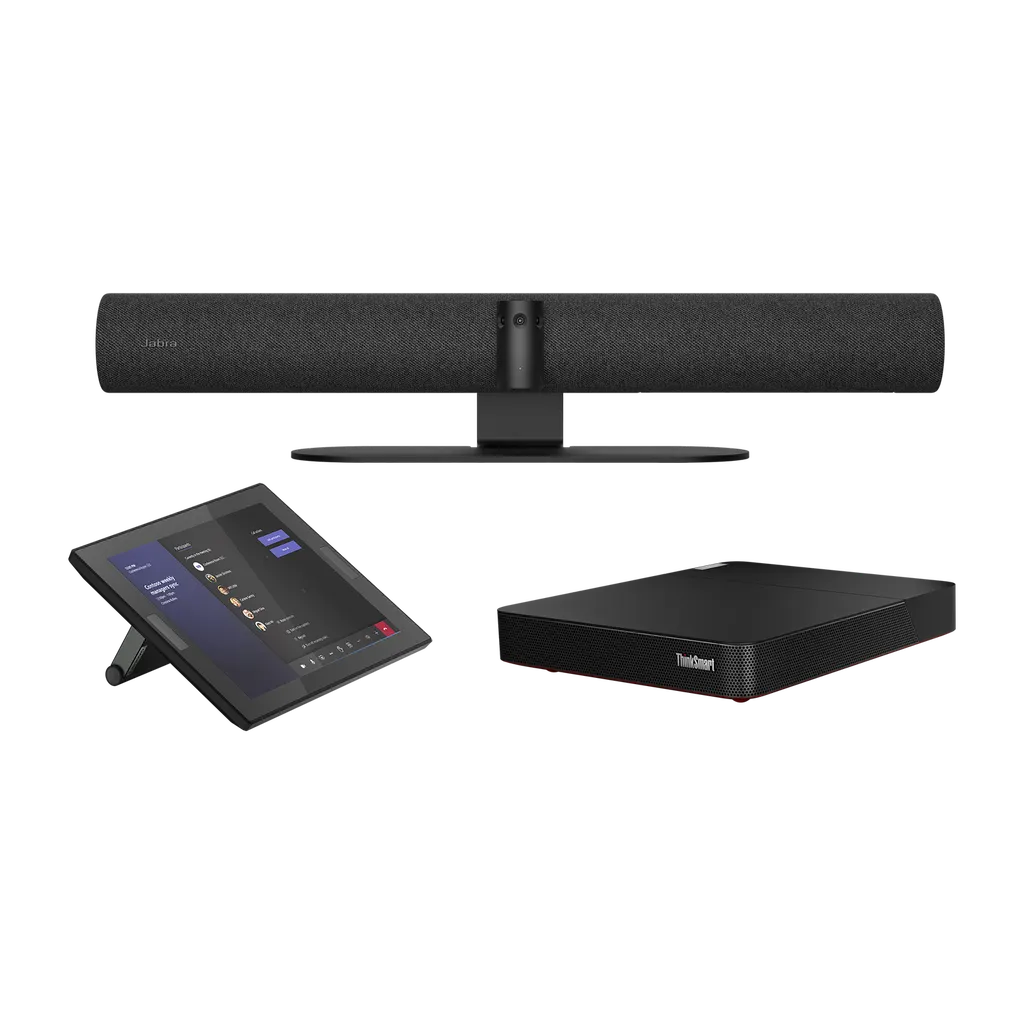
Jabra PanaCast 50 Room System Video Conferencing Kit

Video
13 megapixels
Field of view
Horizontal: 180°
Zoom
Up to 6x lossless digital zoom
Microphones
8 microphone beamforming array
WhatsApp
Priceon request
QuotationWithin 1 working day
DeliveryConfirmed with your quote, based on stock
PDFDownload datasheet (EN-Jabra-PanaCast-50-Room-System-Tech-Spec-180825-Web.pdf)
Overview

The Jabra PanaCast 50 Room System is a Windows-based video conferencing kit for small and medium meeting rooms. Three 13-megapixel cameras deliver a 180° Panoramic-4K view, eight beamforming microphones capture voices across the room, and a Lenovo ThinkSmart Core with a 10.1-inch touch controller runs the meeting. It ships preloaded with Microsoft Teams Rooms or Zoom Rooms, suiting boardrooms and training rooms in Doha, West Bay and Lusail where remote colleagues need to see and hear everyone clearly. Request a quote from SmartRooms Qatar.

What the PanaCast 50 Room System delivers in a meeting room

The Jabra PanaCast 50 Room System is a complete video conferencing kit built for small and medium rooms. It combines a three-camera panoramic array, an eight-microphone beamforming pickup, four speakers and a Lenovo ThinkSmart Core computer with a touch controller. Instead of sourcing cameras, audio devices and a PC separately, a buyer receives one matched system with either Microsoft Teams Rooms or Zoom Rooms preloaded.

The camera array records a 180° horizontal field of view at Panoramic-4K resolution, 3840 x 1080 at 30fps, with a 54° vertical field of view. Virtual Director and Intelligent Zoom adjust the picture toward the active speaker, Vivid HDR is included, and up to 6x lossless digital zoom is available. Manual pan-tilt-zoom control is there when a facilitator wants to choose the framing.

Audio and intelligence features that matter in hybrid meetings

Remote participants judge a meeting first by sound. The eight-microphone beamforming array concentrates on voices across the room, and full-duplex audio lets people speak over each other without the line cutting out. The Intelligent Speaker feature, certified for Microsoft Teams Rooms, identifies up to 10 individual voices so the live transcript shows who said what. An Aux-Out connection supports assistive listening devices, helping hearing aid users follow the discussion.

  • Whiteboard sharing: the built-in camera live-streams the whiteboard to people on the call.
  • Intelligent Meeting Space: define virtual room boundaries in Jabra Direct so only people inside the area are included.
  • Integrated PeopleCount: room occupancy data that works without a computer connection.

Where it fits in Qatar

A consultancy in Lusail running a weekly client review with colleagues in London needs a room where every participant appears in frame and the audio carries across a table. In Msheireb, a government department with a small boardroom can use the Teams variant for meetings with ministry staff who join from other sites. A training centre in Education City can use the controller to start sessions with one touch, while the whiteboard stream lets remote trainees follow sketches as they are drawn. In glass-walled offices in West Bay, the Intelligent Meeting Space setting keeps people at neighbouring desks out of the call.

What to plan before installation

The wall mount is included, while the table stand and screen mount are sold separately, so confirm the mounting method early. The setup guidance recommends two screens for larger conference rooms and advises that participants sit no closer than 90 cm (36 inches) to the screen. The operating temperature range is 5°C to 35°C, which matters in Qatar summers when outdoor temperatures can exceed 45°C. Make sure the room is air-conditioned and that the Core and cabling sit where they stay within the rated range. Connections include USB-A, USB-C and Ethernet (RJ45), and the manufacturer warranty is 3 years.

Request a quote from SmartRooms Qatar for the Jabra PanaCast 50 Room System. We usually return quotations within one working day, offer a free site survey before wall mounting, and can deliver across all eight municipalities of Qatar.

Highlights

  • Three 13-megapixel cameras with a 180° horizontal field of view
  • Panoramic-4K output at 3840 x 1080 and 30fps
  • Eight-microphone beamforming array with four speakers
  • Lenovo ThinkSmart Core and 10.1-inch touch controller
  • Preloaded with Microsoft Teams Rooms or Zoom Rooms
  • Operating range 5°C to 35°C with a 3-year warranty

Room fit

Tell us the room size and platform (Teams, Zoom or BYOD) and we confirm the right combination with your quotation.

Estimated timeline

Quotation within 1 working day · delivery timing depends on stock availability, and we confirm it with your quotation.

Specifications

38 specifications · Source: manufacturer · checked Oct 2026
Box contents3
Jabra PanaCast 50
PanaCast 50, power supply, wall mount, USB-C to USB-A cable 2m/6.6ft (USB 3.0)
Lenovo ThinkSmart Core and Controller
ThinkSmart Core computing device, ThinkSmart Controller display, power adapter, mount- ing bracket, 10m USB-C cable
Preloaded application
Microsoft Teams Rooms or Zoom Rooms
Video10
Number of cameras
3
Type of camera
Panoramic multi-camera array
Camera resolution
13 megapixels
Zoom
Up to 6x lossless digital zoom
Field of view
Horizontal: 180°, Vertical: 54°
Resolution
Panoramic-4K: 3840 x 1080 @ 30fps
Intelligent Zoom
Yes
Dynamic Composition
Yes. Requires USB 3.0 connection (USB 3.0 port + USB 3.0 cable) and UC clients that support NV12 format.
Virtual Director
Yes
Vivid HDR
Yes
Audio8
Speakers
2 x 2" (50mm) woofers, 2 x 3/4" (20mm) tweeters
Speaker frequency range
80Hz - 20kHz
Number of speakers
4
Automatic Speaker Detection
Yes
Microphone type
8 microphone beamforming array
Number of microphones
8
Microphone sensitivity
-37dBFS
Microphone frequency range
100Hz - 8kHz
Software and Apps6
System requirements
Compatible with Windows 10, macOS 10.15 and later, including macOS 11.x
Compatible software and apps
Jabra Direct, Jabra Sound+, Jabra Xpress
Proxy support
HTTP, SOCKS4, SOCKS4A, SOCKS5, SOCKS5H
Integrated PeopleCount
Yes
Software Development Kit (SDK)
Yes
Whiteboard Sharing / Content Camera
Yes
Ease of use1
Manual Pan-Tilt-Zoom (PTZ)
Yes
Connectivity4
Connectivity
USB-A, USB-C, Ethernet (RJ45) for connection to supported
Supported USB versions
USB 2.0, USB 3.0
USB cable length
2m | 6.5 ft
Bluetooth Low Energy Support
Yes for remote control and Sound+ access.
Extended info2
Operating temperature
5°C to 35°C | 41°F to 95°F
Storage temperature
-20°C to 60°C | -4°F to 140°F
General4
Packaging dimensions (WxHxD)
16.5cm x 69.8cm x 55cm | 6.5x2in x 7.48in x 21.65in
Weight range, specific to regional power plug
9914.6g/ 349.7oz/ 21.8lb to 10025.7g/ 353.6oz/ 22.1lb
Warranty
3 years
PanaCast 50 certifications and compliance
Microsoft Teams Rooms (with separate Microsoft Teams Rooms certification for integrated Content Camera), Microsoft Intelligent Camera Experience, Zoom Rooms


Downloads

20 files from the manufacturer
PDF Datasheets EN-Jabra-PanaCast-50-Room-System-Tech-Spec-180825-Web.pdf 93 KB Jabra PanaCast 50 Room System datasheets (PDF, 93 KB) PDF Datasheets EN-Jabra-Panacast-50-Room-System-060225_WEB.pdf 2.0 MB Jabra PanaCast 50 Room System datasheets (PDF, 2.0 MB) PDF Manuals & guides Jabra-PanaCast-50-Meeting-Room-Set-up-Guide-A4-190424.pdf 8.6 MB Jabra PanaCast 50 Room System manuals & guides (PDF, 8.6 MB) PDF Manuals & guides Jabra-PanaCast-50-Screen-Mount-assembly-instructions_AR_Arabic_RevB.pdf 2.3 MB Jabra PanaCast 50 Room System manuals & guides (PDF, 2.3 MB) PDF Manuals & guides Jabra-PanaCast-50-Screen-Mount-assembly-instructions_EN_English_RevB.pdf 2.3 MB Jabra PanaCast 50 Room System manuals & guides (PDF, 2.3 MB) PDF Manuals & guides Jabra-PanaCast-50-Table-Stand-assembly-instructions_AR_Arabic_RevA.pdf 644 KB Jabra PanaCast 50 Room System manuals & guides (PDF, 644 KB) PDF Manuals & guides Jabra-PanaCast-50-Table-Stand-assembly-instructions_EN_English_RevA.pdf 625 KB Jabra PanaCast 50 Room System manuals & guides (PDF, 625 KB) PDF Manuals & guides Jabra-PanaCast-50-Wall-Mount-assembly-instructions_AR_Arabic_RevA.pdf 1.9 MB Jabra PanaCast 50 Room System manuals & guides (PDF, 1.9 MB) PDF Manuals & guides Jabra-PanaCast-50-Wall-Mount-assembly-instructions_EN_English_RevA.pdf 1.9 MB Jabra PanaCast 50 Room System manuals & guides (PDF, 1.9 MB) PDF Manuals & guides Jabra-Panacast-50-User-Manual_AR_Arabic_RevI.pdf 2.8 MB Jabra PanaCast 50 Room System manuals & guides (PDF, 2.8 MB) PDF Manuals & guides Jabra-Panacast-50-User-Manual_EN_English_RevI.pdf 2.7 MB Jabra PanaCast 50 Room System manuals & guides (PDF, 2.7 MB) PDF Manuals & guides Jabra-Video-Solutions-Guide-Zoom-011125_WEB.pdf 18.0 MB Jabra PanaCast 50 Room System manuals & guides (PDF, 18.0 MB) PDF Manuals & guides Jabra-Video-Solutions-Guide_MS-Teams_011125.pdf 5.0 MB Jabra PanaCast 50 Room System manuals & guides (PDF, 5.0 MB) PDF Manuals & guides Jabra-ZDM-Plugin-Guide.pdf 63 KB Jabra PanaCast 50 Room System manuals & guides (PDF, 63 KB) PDF Manuals & guides QSG_P50-ADA-wall-mount_for-web.pdf 716 KB Jabra PanaCast 50 Room System manuals & guides (PDF, 716 KB) PDF Other documents EN-PanaCast-50-4K-Camera-190225.pdf 773 KB Jabra PanaCast 50 Room System other documents (PDF, 773 KB) PDF Other documents EN-PanaCast-VB-Series-Aux-Out.pdf 485 KB Jabra PanaCast 50 Room System other documents (PDF, 485 KB) PDF Other documents EN_Multistream-Dynamic-Composition-for-Teams_240524.pdf 955 KB Jabra PanaCast 50 Room System other documents (PDF, 955 KB) PDF Other documents Intelligent-Meeting-Space_160724.pdf 5.1 MB Jabra PanaCast 50 Room System other documents (PDF, 5.1 MB) PDF Other documents Network-interfaces-and-services-PanaCast-50-RevA.pdf 37 KB Jabra PanaCast 50 Room System other documents (PDF, 37 KB)

Questions about PanaCast 50 Room System

What is the Jabra PanaCast 50 Room System and who is it for?
It is a complete video conferencing kit for small and medium meeting rooms, built around three 13-megapixel cameras, eight microphones and a Lenovo ThinkSmart Core with a 10.1-inch touch controller. It suits consultancies, ministries, banks and schools in Doha, West Bay and Lusail that want one matched system rather than separate cameras, audio devices and a PC. Teams that hold regular calls with colleagues abroad benefit most.
What is the difference between SKU 8601-331 and 8601-431?
Both SKUs belong to the PanaCast 50 Room System range and differ in the application preloaded on the Lenovo ThinkSmart Core. SKU 8601-331 is the Microsoft Teams Rooms variant, while SKU 8601-431 is preloaded with Zoom Rooms. Choose the one that matches the meeting platform your organisation already uses in Qatar, and confirm the SKU in your quotation before issuing a purchase order.
How wide is the field of view, and will people at the edges of a table appear?
The panoramic array covers a 180° horizontal field of view, combining three cameras into a Panoramic-4K picture at 3840 x 1080 and 30fps. The stitching is designed so people seated near the sides are not squeezed or cut from the frame. The vertical field of view is 54°. The setup guidance advises seating participants no closer than 90 cm (36 inches) to the screen.
Does the system frame the active speaker automatically in a small meeting room?
Yes. Virtual Director and Intelligent Zoom adjust the picture to follow the active speaker, and Vivid HDR is included. Manual pan-tilt-zoom is available if you prefer control, and the system offers up to 6x lossless digital zoom. Automatic framing suits a boardroom in Msheireb where one person presents at a time, while manual control helps a training facilitator in Education City focus on a presenter.
Can the PanaCast 50 share a whiteboard with remote participants?
Yes. The whiteboard sharing function uses the built-in camera to live-stream the whiteboard content, so people on the call can see sketches even when they are not in the room. This suits a design workshop in Lusail or an engineering review at Mesaieed where remote specialists need to follow diagrams as they are drawn. Whiteboard Sharing is listed as supported in the product data.
Will the system cope with Qatar summer heat?
The operating temperature range is 5°C to 35°C, and storage is rated from -20°C to 60°C. Outdoor temperatures in Qatar often exceed 45°C in summer, so the meeting room must be air-conditioned and kept within the operating range. Before installation, the SmartRooms Qatar team can help you review room cooling and decide where the ThinkSmart Core and cabling will sit.
Do we need a laptop to start a meeting?
No. The ThinkSmart Core is a Windows-based computing device with 11th Gen Intel Core vPro processing, and the 10.1-inch controller starts a meeting with a single touch. Wireless content sharing lets a presenter show slides without cables. An optional remote control lets presenters manage the meeting from their seat, using Bluetooth Low Energy.
What is included in the box?
The Jabra PanaCast 50 comes with a power supply, a wall mount and a 2 m USB-C to USB-A cable. The Lenovo ThinkSmart Core and Controller package adds the ThinkSmart Core computing device, the ThinkSmart Controller display, a power adapter, a mounting bracket and a 10 m USB-C cable. The table stand and screen mount are sold separately, so confirm your mounting method before ordering.
How should we mount it in a boardroom with a wall-mounted screen?
The wall mount is included, and the screen mount (VESA) is sold separately. The product guidance describes three mounting options to suit different room layouts. Position the camera so it frames seated participants at the table, and keep the 90 cm minimum distance from the screen in mind. SmartRooms Qatar offers a free site survey before wall mounting and professional installation across Qatar.
Can PeopleCount and Intelligent Meeting Space work in a glass-walled or open-plan office?
Yes, with setup. Integrated PeopleCount provides room occupancy data without a computer connection, and Jabra Xpress shows visual data from previous meetings. Because the people detection can see faces outside the room, Intelligent Meeting Space in Jabra Direct lets you define virtual room boundaries. That matters for glass-walled offices in West Bay or open-plan areas in The Pearl, where a camera could otherwise include neighbouring desks.
Can an organisation buy several units on one purchase order?
Yes. Schools, universities and government offices often equip several rooms at once, and SmartRooms Qatar accepts purchase orders (LPOs) as well as government tenders, including Monaqasat. Send the room list and the number of units per room, and the quotation will show each SKU, whether Microsoft Teams Rooms or Zoom Rooms, and the accessories needed. Payment can be made by bank transfer, cheque or purchase order.
What warranty applies, and which connections are available?
The manufacturer warranty is 3 years. Connectivity includes USB-A, USB-C and Ethernet (RJ45), with USB 2.0 and USB 3.0 support. Dynamic Composition requires a USB 3.0 connection and UC clients that support the NV12 format. Bluetooth Low Energy supports the remote control and Sound+ access. Ask the SmartRooms Qatar team to check your UC client settings during the quotation.

Similar models

Yealink MVC S60 Yealink MVC S60 Microsoft Teams Rooms System with 360° Camera
360°
Biamp Evoko Liso Wall Mount Kit Biamp Evoko Liso Wall Mount Kit (910-01930) for Room Scheduling Displays
TAA Compliant
Email Call


