Thursday, 22 October 2026 · 11 Jumada I 1448 AH Sun – Thu · 9:00 – 18:00
+971 56 914 9477 العربية
WhatsApp

PanaCast 50

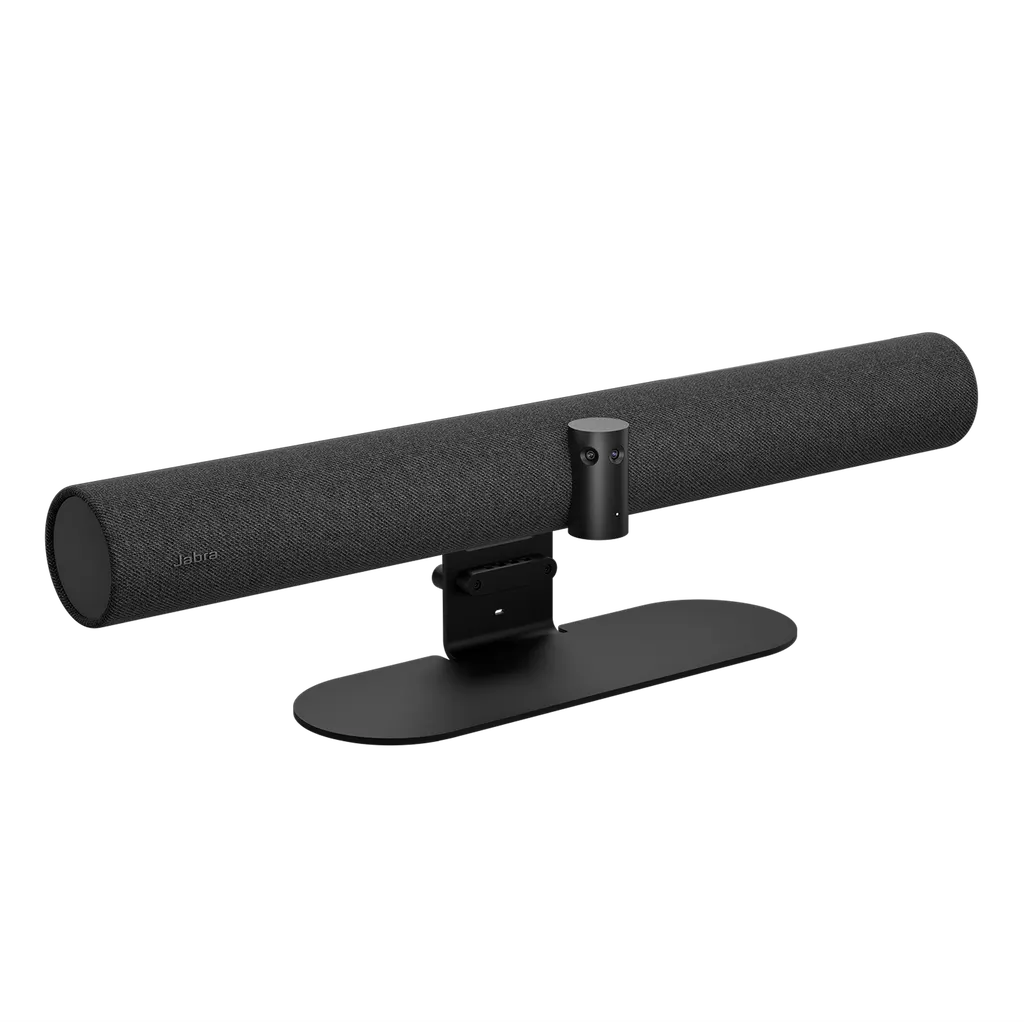
Jabra PanaCast 50 180° Video Bar for Meeting Rooms

Video
3 x >4K (3 x 13 megapixels)
Field of view
Horizontal: 180°
Zoom
Up to 6x lossless digital zoom
Microphones
8 microphone beamforming array
WhatsApp
Priceon request
QuotationWithin 1 working day
DeliveryConfirmed with your quote, based on stock
PDFDownload datasheet (EN-Jabra-Panacast-50-Datasheet-170325_WEB.pdf)
Overview

The Jabra PanaCast 50 is a video bar for meeting rooms. Three 13-megapixel cameras give a 180° horizontal view with panoramic 4K output at 3840 x 1080 and 30fps. An eight-microphone beamforming array, certified for rooms up to 4.5 x 6 metres, captures speech, and four speakers carry the audio. It is certified for Microsoft Teams and Zoom, and suits boardrooms and training rooms in Doha and Lusail.

What the PanaCast 50 does in a meeting room

The PanaCast 50 is a single video bar that replaces a separate camera, microphone and speaker set-up. Three 13-megapixel cameras sit in a fixed array, and their images are stitched together in real time to produce a 180° horizontal field of view and a 54° vertical view. The panoramic output runs at 3840 x 1080 and 30fps, so remote colleagues can see everyone seated along the table.

Because the view covers the full width of the room, a team can push the table against the wall and still keep every participant in frame. Intelligent Zoom limits the framing to people inside the meeting space, which matters in glass-walled rooms and open-plan areas where people outside should not appear on screen. Up to 6x lossless digital zoom is available for closer framing.

Audio, framing and room usage data

Sound is captured by an eight-microphone beamforming array with a sensitivity of -37dBFS and a pickup range of 100Hz to 8kHz. Four speakers, two 2-inch woofers and two 3/4-inch tweeters, cover 80Hz to 20kHz. Precision voice detection removes residual echo and static noise, and full duplex operation lets both ends of a call speak at the same time. Intelligent Speaker follows the active talker, while Virtual Director frames participants automatically.

The bar also includes integrated PeopleCount, which supports room usage insights, and an Aux-Out connection for assistive listening transmitters, so hearing aid users can stream meeting audio directly to their devices. The manufacturer notes that in-room audio is not streamed through this feature and that people outside the room may be able to connect and listen in, so review that before enabling it.

Connecting to Teams, Zoom and your room computer

The PanaCast 50 connects by USB-A, USB-C and Ethernet (RJ45), and supports USB 2.0 and USB 3.0. A 2 m USB-C to USB-A cable is included. It is certified for Microsoft Teams, Microsoft Teams Rooms, Zoom Rooms and Zoom, and is also listed for Tencent, Feishu and DingTalk. Compatible software includes Jabra Direct, Jabra Sound+ and Jabra Xpress, and Bluetooth Low Energy supports remote control and Sound+ access. Windows 10, Windows 11 and macOS 10.15 or later, including macOS 11.x, are supported.

Where it fits in Qatar

  • A boardroom in West Bay where executives join Teams calls with colleagues abroad, with the bar placed to frame the full table.
  • A training room in Education City running sessions with remote trainers, using whiteboard sharing with the integrated whiteboard camera where the platform supports it.
  • A glass-walled meeting room in Lusail where Intelligent Zoom keeps people passing in the corridor out of the remote view.

What to plan before you order

The main unit measures 650 mm wide, 80 mm high and 125 mm deep and weighs 2,200 g, and a wall mount is included. Confirm the wall position, the cable route to the room computer and the Ethernet point before installation. SmartRooms Qatar offers a free site survey to check the layout first, and the room should fall within the 4.5 x 6 metre range the microphone array is certified for.

Operating temperature is 5°C to 35°C, and storage temperature is -20°C to 60°C. Summer heat in Qatar can push unconditioned spaces well above 45°C, so install the bar in an air-conditioned room and confirm the environment with the SmartRooms Qatar team beforehand. The 8200-231 black model carries a 2-year warranty, while the 8202-231 black version is listed with 3 years.

Government ministries, schools and companies can order by LPO or through government tenders, including Monaqasat, and pay by bank transfer, cheque or purchase order. Send your room dimensions and the SKU you need, and request a quote from SmartRooms Qatar so we can confirm the setup for your room.

Highlights

  • 180° horizontal field of view from three 13-megapixel cameras
  • Panoramic 4K output at 3840 x 1080 and 30fps
  • Eight-microphone beamforming array certified for rooms up to 4.5 x 6 metres
  • Four speakers covering 80Hz to 20kHz
  • Certified for Microsoft Teams, Teams Rooms, Zoom and Zoom Rooms
  • Operating range 5°C to 35°C; 2-year warranty on 8200-231

Room fit

Tell us the room size and platform (Teams, Zoom or BYOD) and we confirm the right combination with your quotation.

Estimated timeline

Quotation within 1 working day · delivery timing depends on stock availability, and we confirm it with your quotation.

Specifications

33 specifications · Source: manufacturer · checked Oct 2026
Video8
Number of cameras
3
Camera resolution
3 x >4K (3 x 13 megapixels)
Zoom
Up to 6x lossless digital zoom
Field of view
Horizontal: 180°, Vertical: 54°
Resolution
Panoramic-4K: 3840 x 1080 @ 30fps
Intelligent Zoom
Yes
Virtual Director
Yes
Vivid HDR
Yes
Audio7
Speakers
2 x 2" (50mm) woofers, 2 x 3/4" (20mm) tweeters
Speaker frequency range
80Hz - 20kHz
Number of speakers
4
Automatic Speaker Detection
Yes
Microphone type
8 microphone beamforming array
Microphone sensitivity
-37dBFS
Microphone frequency range
100Hz - 8kHz
Software and Apps5
System requirements
Windows 10, compatible with macOS 10.15 and later, including macOS 11.x
Compatible software and apps
Jabra Direct, Jabra Sound+, Jabra Xpress
Integrated PeopleCount
Yes
Software Development Kit (SDK)
Yes
Whiteboard Sharing
Yes
Ease of use1
Manual Pan-Tilt-Zoom (PTZ)
Yes
Connectivity4
Connectivity
USB-A, USB-C, Ethernet (RJ45)
Supported USB versions
USB 2.0, USB 3.0
USB cable length
2m | 6.5 ft
Bluetooth Low Energy Support
Yes for remote control and Sound+ access
Extended info2
Operating temperature
5°C to 35°C | 41°F to 95°F
Storage temperature
-20°C to 60°C | -4°F to 140°F
General6
Box content
PanaCast 50, power supply, wall mount, USB-C to USB-A cable 2m/6.6ft (USB 3.0)
Packaging dimensions (WxHxD)
685mm x 167mm x 130mm | 27in x 6.6in x 5.1in
Main unit dimensions (WxHxD)
650mm x 80mm x 125mm | 25.6in x 3.1in x 4.9in
Weight
2200g | 77.6oz
Warranty
2 years
Certifications and compliance
Microsoft Teams, Microsoft Teams Rooms (MTR), Zoom Rooms, Zoom

Downloads

28 files from the manufacturer
PDF Datasheets EN-Jabra-Panacast-50-Datasheet-170325_WEB.pdf 1.1 MB Jabra PanaCast 50 datasheets (PDF, 1.1 MB) PDF Datasheets EN-PanaCast-50-TechSpec_ANZ-SKUs_28082025.pdf 620 KB Jabra PanaCast 50 datasheets (PDF, 620 KB) PDF Datasheets EN-PanaCast-50-TechSpec_EMEA-SKUs_28082025.pdf 621 KB Jabra PanaCast 50 datasheets (PDF, 621 KB) PDF Datasheets EN-PanaCast-50-TechSpec_India-SKUs_28082025.pdf 621 KB Jabra PanaCast 50 datasheets (PDF, 621 KB) PDF Datasheets EN-PanaCast-50-TechSpec_NA-SKUs_28082025.pdf 622 KB Jabra PanaCast 50 datasheets (PDF, 622 KB) PDF Datasheets EN-PanaCast-50-TechSpec_UK_HK-SKUs_28082025.pdf 622 KB Jabra PanaCast 50 datasheets (PDF, 622 KB) PDF Manuals & guides Jabra-PanaCast-50-Meeting-Room-Set-up-Guide-A4-190424.pdf 8.6 MB Jabra PanaCast 50 manuals & guides (PDF, 8.6 MB) PDF Manuals & guides Jabra-PanaCast-50-Screen-Mount-assembly-instructions_AR_Arabic_RevB.pdf 2.3 MB Jabra PanaCast 50 manuals & guides (PDF, 2.3 MB) PDF Manuals & guides Jabra-PanaCast-50-Screen-Mount-assembly-instructions_EN_English_RevB.pdf 2.3 MB Jabra PanaCast 50 manuals & guides (PDF, 2.3 MB) PDF Manuals & guides Jabra-PanaCast-50-Table-Stand-assembly-instructions_AR_Arabic_RevA.pdf 644 KB Jabra PanaCast 50 manuals & guides (PDF, 644 KB) PDF Manuals & guides Jabra-PanaCast-50-Table-Stand-assembly-instructions_EN_English_RevA.pdf 625 KB Jabra PanaCast 50 manuals & guides (PDF, 625 KB) PDF Manuals & guides Jabra-PanaCast-50-Wall-Mount-assembly-instructions_AR_Arabic_RevA.pdf 1.9 MB Jabra PanaCast 50 manuals & guides (PDF, 1.9 MB) PDF Manuals & guides Jabra-PanaCast-50-Wall-Mount-assembly-instructions_EN_English_RevA.pdf 1.9 MB Jabra PanaCast 50 manuals & guides (PDF, 1.9 MB) PDF Manuals & guides Jabra-Panacast-50-User-Manual_AR_Arabic_RevI.pdf 2.8 MB Jabra PanaCast 50 manuals & guides (PDF, 2.8 MB) PDF Manuals & guides Jabra-Panacast-50-User-Manual_EN_English_RevI.pdf 2.7 MB Jabra PanaCast 50 manuals & guides (PDF, 2.7 MB) PDF Manuals & guides Jabra-Video-Solutions-Guide-Zoom-011125_WEB.pdf 18.0 MB Jabra PanaCast 50 manuals & guides (PDF, 18.0 MB) PDF Manuals & guides Jabra-Video-Solutions-Guide_MS-Teams_011125.pdf 5.0 MB Jabra PanaCast 50 manuals & guides (PDF, 5.0 MB) PDF Manuals & guides Jabra-ZDM-Plugin-Guide.pdf 63 KB Jabra PanaCast 50 manuals & guides (PDF, 63 KB) PDF Manuals & guides QSG_P50-ADA-wall-mount_for-web.pdf 716 KB Jabra PanaCast 50 manuals & guides (PDF, 716 KB) PDF Other documents EN-PanaCast-50-4K-Camera-190225.pdf 773 KB Jabra PanaCast 50 other documents (PDF, 773 KB) PDF Other documents EN-PanaCast-VB-Series-Audio-Capabilities.pdf 508 KB Jabra PanaCast 50 other documents (PDF, 508 KB) PDF Other documents EN-PanaCast-VB-Series-Aux-Out.pdf 485 KB Jabra PanaCast 50 other documents (PDF, 485 KB) PDF Other documents EN_Multistream-Dynamic-Composition-for-Teams_240524.pdf 955 KB Jabra PanaCast 50 other documents (PDF, 955 KB) PDF Other documents Intelligent-Meeting-Space_160724.pdf 5.1 MB Jabra PanaCast 50 other documents (PDF, 5.1 MB) PDF Other documents Jabra-Infographic-Panacast-50.pdf 1.6 MB Jabra PanaCast 50 other documents (PDF, 1.6 MB) PDF Other documents Network-interfaces-and-services-PanaCast-50-RevA.pdf 37 KB Jabra PanaCast 50 other documents (PDF, 37 KB) PDF Other documents PanaCast-50-LCA.pdf 2.1 MB Jabra PanaCast 50 other documents (PDF, 2.1 MB) URL Other documents · Opens on manufacturer site PanaCast 50: 2D and 3D files (PDF and DXF). Jabra PanaCast 50 other documents (URL)

Questions about PanaCast 50

Who is the Jabra PanaCast 50 for?
It suits meeting rooms where in-room and remote participants need an equal view, such as a boardroom in West Bay or a management meeting room near the Industrial Area. Its 180° view and eight-microphone array are sized for rooms up to 4.5 x 6 metres, so it is best matched to small and medium rooms with people seated around a table rather than large lecture halls.
How wide is the field of view, and can it cover a long table?
The PanaCast 50 has a 180° horizontal field of view and a 54° vertical view, built from three 13-megapixel cameras. Because the view spans the room's width, you can place the table against the wall and still keep everyone seated on camera. Up to 6x lossless digital zoom is available for closer framing of a presenter or whiteboard.
What video resolution does it output?
The bar outputs panoramic 4K at 3840 x 1080 and 30fps, and each of its three cameras is rated above 4K at 13 megapixels. Vivid HDR is also included. Before ordering, confirm that your meeting platform and room computer can handle a panoramic stream at this resolution, so the setup works as planned on the day.
Which meeting platforms is it certified for?
It is certified for Microsoft Teams, Microsoft Teams Rooms, Zoom Rooms and Zoom, and the catalogue also lists Tencent, Feishu and DingTalk. Confirm which platform your team uses before ordering, so that the room computer and the software licences match it. This avoids delays when the bar is set up for the first live meeting.
Does the dual-stream whiteboard work with Teams Rooms?
The integrated whiteboard camera streams written content alongside in-room participants, and whiteboard sharing is supported. For dual-stream whiteboard functionality in Microsoft Teams Rooms, the source notes that a separate Teams Rooms certification applies to the integrated content camera. Confirm that certification status before relying on this feature in a Teams Rooms deployment.
Can it run in a hot room in Doha during summer?
The operating range is 5°C to 35°C, and storage range is -20°C to 60°C. In Doha, summer heat can push rooms beyond the operating range if air conditioning fails or a room is unshaded, so install the bar only in air-conditioned meeting rooms and keep it clear of direct sunlight from windows. Confirm the installation spot with the SmartRooms Qatar team.
What should I plan for during installation?
The main unit is 650 mm wide, 80 mm high and 125 mm deep, weighs 2,200 g, and a wall mount is in the box. Plan the wall position in line with the table's centre, a route for the 2 m USB-C to USB-A cable, and an Ethernet point if you use RJ45. SmartRooms Qatar offers a free site survey to check the layout before work begins.
Does it support assistive listening for hearing aid users?
Yes. An Aux-Out connection allows a hearing augmentation transmitter to be connected to the bar, so hearing aid users can stream meeting audio directly to their hearing aids. The manufacturer notes that in-room audio is not streamed through this feature and that people outside the room may be able to connect and listen in, so plan the room use accordingly.
What comes in the box?
The box contains the PanaCast 50 main unit, a power supply, a wall mount, a 2 m USB-C to USB-A cable (USB 3.0) and a privacy cover. Ethernet and other connection cables are not included, so check which ports your room computer and network point use before the bar arrives on site.
What is the difference between 8200-231, 8201-231 and 8202-231?
All three SKUs are the PanaCast 50 video bar. 8200-231 is the Black unit with a 2-year warranty, 8201-231 is the Grey unit, and 8202-231 is the Black unit listed with a 3-year warranty. Choose the colour to suit your room and the warranty period you need, then request a quote for the exact SKU.
Is it suitable for a glass-walled or open-plan room in Lusail?
Yes. Intelligent Zoom lets you define virtual meeting space boundaries so that only people inside the meeting space are included in the framing. This suits glass-walled rooms and open-plan spaces in Lusail's office developments, where people walking past or working nearby would otherwise appear on camera. Mark the boundary area during your site survey so the framing matches the room.
Can a government body or school buy it through an LPO or tender?
Yes. SmartRooms Qatar accepts purchase orders (LPOs) and government tenders, including Monaqasat, with payment by bank transfer, cheque or purchase order. A school fitting out several meeting rooms can order multiple PanaCast 50 units under one LPO. Send your room list and SKU mix with your request, and the quotation usually follows within one working day.

Similar models

Biamp Parlé ABC 2500a Biamp Parlé ABC 2500a All-in-One Conferencing Audio Bar
Zoom Certified Microsoft Teams Certified
Biamp Parlé CBC 2500 CM Biamp Parlé CBC 2500 CM Ceiling-Mounted Conferencing Bar
Zoom Certified Microsoft Teams Certified
Biamp Parlé CBC 2500 PM Biamp Parlé CBC 2500 PM Pole-Mounted Conferencing Bar
Zoom Certified Microsoft Teams Certified
Biamp Parlé N 100 Biamp Parlé N 100 Network and USB Expander for Parlé Conferencing Bars
TAA Compliant
Biamp Parlé PMA 2000-DM Biamp Parlé PMA 2000-DM Display Mount Kit for Parlé 2000 Video Bars
Video bars
Email Call