Thursday, 22 October 2026 · 11 Jumada I 1448 AH Sun – Thu · 9:00 – 18:00
+971 56 914 9477 العربية
WhatsApp

PanaCast 55 VBS

Jabra PanaCast 55 VBS 4K AI Video Bar

Video
Up to 3840 x 1080 px
Field of view
Horizontal: 180°
Zoom
Up to 6x lossless digital zoom
Microphones
8 microphone beamforming array…
WhatsApp
Priceon request
QuotationWithin 1 working day
DeliveryConfirmed with your quote, based on stock
PDFDownload datasheet (EN-Jabra-PanaCast-55-VBS-Datasheet-220126.pdf)
Overview

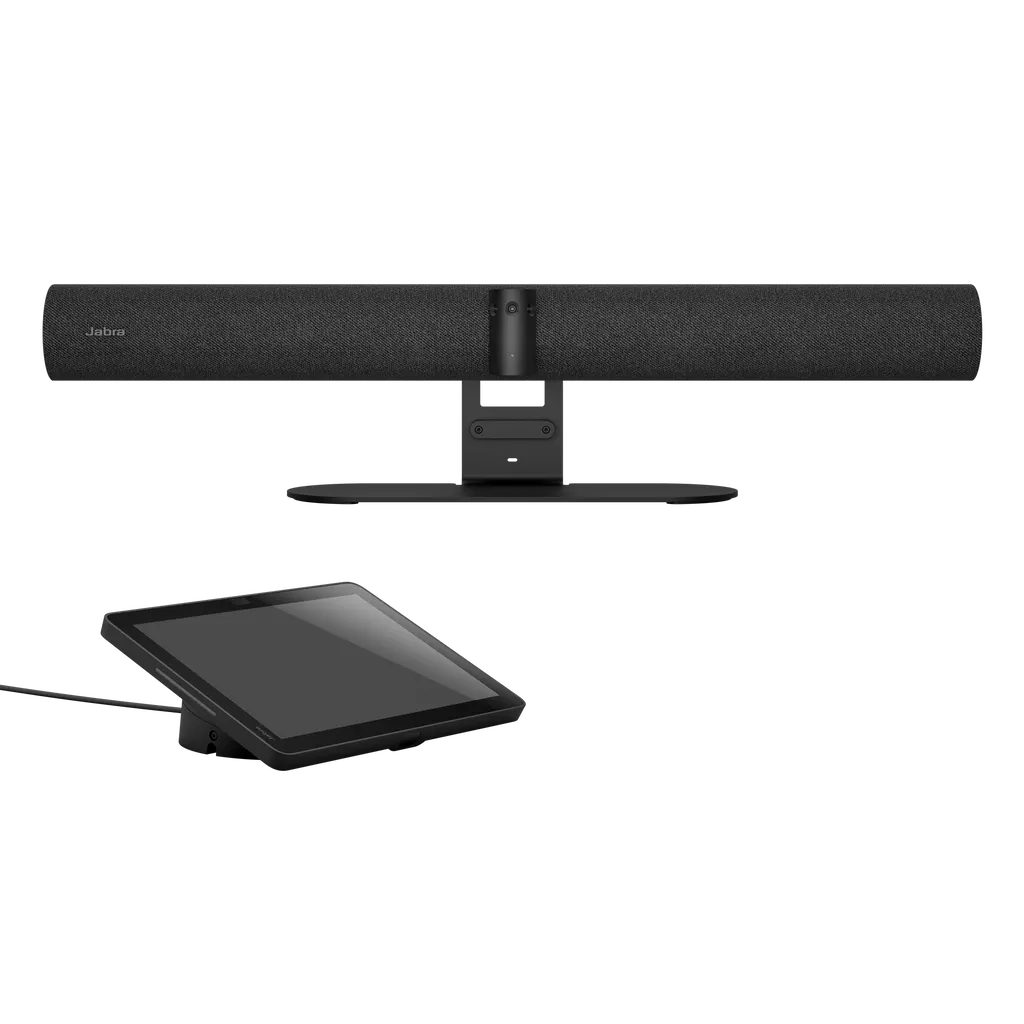
The Jabra PanaCast 55 VBS is an all-in-one AI-powered video bar for medium meeting rooms. Three cameras cover a 180-degree horizontal view with 4K output, an eight-microphone array is certified for rooms up to 4.5m x 6m, and four speakers handle the audio. It works with Microsoft Teams and Zoom and can grow with a SpeakerMic and up to five extra cameras. Suited to boardrooms and training rooms across Doha and Lusail.

A single video bar built for medium meeting rooms

The Jabra PanaCast 55 VBS brings camera, microphones and speakers into one AI-powered unit, so a meeting room does not need a separate camera or ceiling microphones. It is designed for medium rooms, and its eight-microphone beamforming array is certified for spaces up to 4.5m x 6m. The main unit measures 730 x 77 x 146 mm and weighs 2259 g, so it sits neatly above a display without dominating the wall.

Microsoft Teams and Zoom certification means the bar fits the meeting platforms most organisations in Qatar already run. The specification also lists native support for Microsoft Teams Room for Android and Zoom Rooms. Appliance mode lets the room run as a dedicated system, while BYOD mode lets a visitor connect their own laptop.

Video and audio figures that shape the purchase

  • Video: three cameras form a panoramic array with a 180° horizontal and 54° vertical field of view, capturing up to 3840 x 1080 px with 4K output support. Intelligent Zoom, Dynamic Composition and Virtual Director are among its listed framing features.
  • Audio: eight microphones and four speakers, with two woofers and two tweeters. Noise reduction, echo cancellation and non-speech noise suppression are built in. Audio coverage reaches 7 m, or 11 m with a PanaCast SpeakerMic added.
  • Zoom: up to 6x lossless digital zoom.
  • Ports: two HDMI outputs, one HDMI input, Ethernet RJ45, one USB-A, two USB-C, plus Wi-Fi 802.11a/b/g/n/ac and Bluetooth 5.1.

Where it fits in Qatar

In a boardroom in West Bay or Msheireb, the bar lets a hybrid meeting with a team abroad run from one display, with the Jabra Control IP touch panel handling call and room controls. In a training room at a university in Education City or a school in Al Wakrah, the wide view suits seminars where both the presenter and the participants need to be seen. Organisations working in Arabic and English side by side can standardise the same room setup across their sites.

What to plan before installation

  • Check your room dimensions against the 4.5m x 6m certification and the 7 m or 11 m audio coverage figures.
  • Plan the Ethernet run for the Jabra Control IP panel, which is powered over Ethernet using IEEE 802.3af; the source lists a PoE power injector.
  • Confirm the room is air-conditioned, since the operating range is 5°C to 35°C with 15% to 80% humidity.
  • Allow for the two HDMI outputs and the 1.83 m HDMI cable included in the box.

SmartRooms Qatar offers free site surveys, so wall height, display position and cable routing can be checked before the bar is mounted. Quotations usually follow within one working day. Request a quote for the Jabra PanaCast 55 VBS and our team will confirm the configuration, accessories and installation for your room.

Highlights

  • Three cameras with a 180° horizontal field of view and 4K output
  • Eight-microphone array certified for rooms up to 4.5m x 6m
  • Audio coverage up to 7 m, or 11 m with SpeakerMic
  • Microsoft Teams and Zoom certified
  • Remote management through Jabra Plus and admin portals
  • Operating range 5°C to 35°C, humidity 15% to 80%
  • 2-year manufacturer warranty

Room fit

Tell us the room size and platform (Teams, Zoom or BYOD) and we confirm the right combination with your quotation.

Estimated timeline

Quotation within 1 working day · delivery timing depends on stock availability, and we confirm it with your quotation.

Specifications

84 specifications · Source: manufacturer · checked Oct 2026
General info12
Box contents
PanaCast 55 VBS video bar • power supply • wall mount • Jabra Control IP • Privacy cover with sensor • Cable compartment cover and tool • 1 x HDMI cable 1.83m/6ft • 1 x regional power cable
Packaging dimensions (WxHxD)
1065 x 175 x 210 mm | 41.9 x 6.9 x 8.3 in
Main unit dimensions (WxHxD)
730 x 77 x 146 mm | 28.8 x 3.1 x 5.8 in
Main unit weight (base unit)
2259 g | 79.7 oz
Package weight
5760.5 g | 203.2 oz
Warranty
2 years
Onboard AI
Yes
Cable management
Yes
Kensington lock compatible
Yes
Operating voltage
100-240V, 12V, 5A
Power Adapter
AC 100-240V, Output DC 12V 5A
LED features and functions
Answer/end call, Firmware update status, Mute/unmute, Power indicator
Video15
Video output
2 x HDMI
Display resolution
Supports up to 4K, Touch Display Compatible
Content sharing
Apple Airplay (only supported by Zoom), HDMI input, Microsoft Teams-Cast (only supported by Teams)
Number of cameras
3
Type of camera
Panoramic multi-camera array
Camera resolution
Up to 3840 x 1080 px
Zoom
Up to 6x lossless digital zoom
Field of view
Horizontal: 180°, Vertical: 54°
Intelligent Zoom
Yes
Intelligent Meeting Space
Yes
Multi-stream Dynamic Composition
Yes
Dynamic Composition
Yes
Virtual Director
Yes
Vivid HDR
Yes
Support secondary external USB camera
Yes
Audio16
Supported number of SpeakerMics
1
Audio coverage
Up to 7 m
Audio coverage (PanaCast 55 VBS with PanaCast SpeakerMic)
Up to 11 m
Speakers
2 x 2" (50mm) woofers, 2 x 3/4" (20mm) tweeters
Speaker frequency range
80Hz - 20000Hz
Number of speakers
4
Automatic Speaker Detection
Yes
Noise Reduction Echo Cancellation
Yes
Non-Speech Noise Suppression
Yes
Woofer driver
2 inches, outer diameter 61mm; Sensitivity: 79dB ±2dB @ 1 Watt, 1 meter; Rated Power: 5 Watts; Impedance: 4 Ohms
Mid-Range driver
0.6 inches, outer diameter 33.2mm; Sensitivity: 80.5dB ±2dB @ 1 Watt, 1 meter; Rated Power: 5 Watts; Impedance: 4 Ohms
Microphone type
8 microphone beamforming array - certified for rooms up to 4.5m x 6m
Number of microphones
8
Microphone sensitivity
-37dBFS
Microphone frequency range
100Hz - 16000Hz
Aux-Out
Yes
Security7
Media encryption
Provided by VaaS Partner
Access management
Jabra Plus; Admin menus; Jabra Web Console; Local account; VaaS Admin Portals including MS Teams Admin Center and Zoom Device Management
Security management
Remote log in via Jabra Plus, Jabra Web Console and VaaS Admin Portal
Authenticated access to Admin settings, Jabra Web Console, Jabra Plus
Yes
Lockdown with secureboot, OS verified boot, Vendor lock
Yes
Log retrieval via Jabra Web Console
Yes
Microsoft and Zoom based VaaS account authentication
Yes
Connectivity3
Interfaces
Ethernet (RJ45), HDMI, Wi-Fi (802.11a/b/g/n/ac), 1 x USB-A, 2 x USB-C
Bluetooth® version
5.1
Supported USB versions
USB 2.0, USB 3.0
Network6
Internet Protocol (IP)
IPv4, IPv6
Ethernet
RJ45
Auto-MDIX
Yes
Proxy support
HTTPS
Support DHCP
Yes
Support Static IP Address
Yes
Software & Apps2
Compatible software and/or apps
Jabra Plus; Jabra Web Console for remote device management via HTTPS; Support for native 3rd party applications, including Microsoft Teams Room for Android and Zoom Rooms; Cloud service providers including Microsoft Teams Admin Center and Zoom Device Management
Integrated People Count
Yes
Ease of use6
Appliance mode
Yes
BYOD mode
Yes
Digital pan/tilt/zoom
Yes
Manual Pan-Tilt-Zoom (PTZ)
Yes
One touch meeting join
Yes
Camera privacy cover
Yes
Extended info8
Operating temperature
5°C to 35°C | 41°F to 95°F
Operating humidity
15% to 80%
Storage temperature
-20°C to 60°C | -4°F to 140°F
Maximum altitude
4876.8m | 16000ft
Temperature sensor
Yes
Humidity sensor
Yes
CO2 sensor
Yes
TVOCs sensor
Yes
Jabra Control IP9
Main unit dimensions (WxHxD)
248 x 85 x 156 mm | 9.8 x 3.4 x 6.2 in
Main unit weight
958g | 33.8oz
Display size
10.1″
Display orientation
Landscape
Display resolution
1920 x 1200
PoE power injector
Yes
Power over ethernet (PoE)
IEEE 802.3af
Proximity sensor
2
Kensington lock compatible
Yes

Downloads

31 files from the manufacturer
PDF Datasheets EN-Jabra-PanaCast-55-VBS-Datasheet-220126.pdf 232 KB Jabra PanaCast 55 VBS datasheets (PDF, 232 KB) PDF Datasheets EN-Jabra-PanaCast-55-VBS-Datasheet_APAC-SKUs-220126.pdf 229 KB Jabra PanaCast 55 VBS datasheets (PDF, 229 KB) PDF Datasheets EN-Jabra-PanaCast-55-VBS-Datasheet_EMEA-SKUs-220126.pdf 229 KB Jabra PanaCast 55 VBS datasheets (PDF, 229 KB) PDF Datasheets EN-PanaCast-SpeakerMic-250226.pdf 258 KB Jabra PanaCast 55 VBS datasheets (PDF, 258 KB) PDF Manuals & guides EN-PanaCast-VB-Series-BYOD-Mode.pdf 1002 KB Jabra PanaCast 55 VBS manuals & guides (PDF, 1002 KB) PDF Manuals & guides Jabra-PanaCast-55-VBS-Screen-Mount-assembly_AR_Arabic_RevA.pdf 3.1 MB Jabra PanaCast 55 VBS manuals & guides (PDF, 3.1 MB) PDF Manuals & guides Jabra-PanaCast-55-VBS-Screen-Mount-assembly_EN_English_RevA.pdf 3.1 MB Jabra PanaCast 55 VBS manuals & guides (PDF, 3.1 MB) PDF Manuals & guides Jabra-PanaCast-55-VBS-Wall-Mount-assembly_AR_Arabic_RevA.pdf 1.6 MB Jabra PanaCast 55 VBS manuals & guides (PDF, 1.6 MB) PDF Manuals & guides Jabra-PanaCast-55-VBS-Wall-Mount-assembly_EN_English_RevA.pdf 1.6 MB Jabra PanaCast 55 VBS manuals & guides (PDF, 1.6 MB) PDF Manuals & guides Jabra-Panacast-55-VBS-Installation_AR_Arabic_RevB.pdf 4.5 MB Jabra PanaCast 55 VBS manuals & guides (PDF, 4.5 MB) PDF Manuals & guides Jabra-Panacast-55-VBS-Installation_EN_English_RevB.pdf 4.4 MB Jabra PanaCast 55 VBS manuals & guides (PDF, 4.4 MB) PDF Manuals & guides Jabra-Panacast-55-VBS-User-manual_AR_Arabic_RevB.pdf 3.1 MB Jabra PanaCast 55 VBS manuals & guides (PDF, 3.1 MB) PDF Manuals & guides Jabra-Panacast-55-VBS-User-manual_EN_English_RevB.pdf 2.9 MB Jabra PanaCast 55 VBS manuals & guides (PDF, 2.9 MB) PDF Manuals & guides Jabra-Panacast-55-VBS_Administrator-Guide_RevA.pdf 639 KB Jabra PanaCast 55 VBS manuals & guides (PDF, 639 KB) PDF Manuals & guides Jabra-SpeakerMic_assembly_AR_Arabic_RevB.pdf 2.7 MB Jabra PanaCast 55 VBS manuals & guides (PDF, 2.7 MB) PDF Manuals & guides Jabra-SpeakerMic_assembly_EN_English_RevB.pdf 2.7 MB Jabra PanaCast 55 VBS manuals & guides (PDF, 2.7 MB) PDF Manuals & guides Jabra-Table-Stand-assembly_EN_English_RevB.pdf 3.0 MB Jabra PanaCast 55 VBS manuals & guides (PDF, 3.0 MB) PDF Other documents EN-PanaCast-VB-4K-Camera.pdf 1.0 MB Jabra PanaCast 55 VBS other documents (PDF, 1.0 MB) PDF Other documents EN-PanaCast-VB-Series-802,-d-,1X-Whitepaper.pdf 4.5 MB Jabra PanaCast 55 VBS other documents (PDF, 4.5 MB) PDF Other documents EN-PanaCast-VB-Series-Audio-Capabilities.pdf 508 KB Jabra PanaCast 55 VBS other documents (PDF, 508 KB) PDF Other documents EN-PanaCast-VB-Series-Aux-Out.pdf 485 KB Jabra PanaCast 55 VBS other documents (PDF, 485 KB) PDF Other documents EN-PanaCast-VB-Series-Intelligent-Meeting-Space.pdf 526 KB Jabra PanaCast 55 VBS other documents (PDF, 526 KB) PDF Other documents EN-PanaCast-VB-Series-Multi-stream-Dynamic-Composition-for-Zoom.pdf 725 KB Jabra PanaCast 55 VBS other documents (PDF, 725 KB) PDF Other documents EN-PanaCast-VB-Series-Network-Protocols.pdf 4.0 MB Jabra PanaCast 55 VBS other documents (PDF, 4.0 MB) PDF Other documents EN-PanaCast-VB-Series-Noise-Suppression.pdf 918 KB Jabra PanaCast 55 VBS other documents (PDF, 918 KB) PDF Other documents EN-PanaCast-VB-Series-Permanent-BYOD.pdf 390 KB Jabra PanaCast 55 VBS other documents (PDF, 390 KB) PDF Other documents EN-PanaCast-VB-Series-Single-stream-Dynamic-Composition.pdf 556 KB Jabra PanaCast 55 VBS other documents (PDF, 556 KB) PDF Other documents Network-interfaces-and-services-PanaCast-55-VBS-RevA.pdf 62 KB Jabra PanaCast 55 VBS other documents (PDF, 62 KB) URL Other documents · Opens on manufacturer site Control IP/Jabra Scheduler 2D/3D files (PDF and DXF). Jabra PanaCast 55 VBS other documents (URL) URL Other documents · Opens on manufacturer site PanaCast 55: VBS 2D/3D files (PDF and DXF). Jabra PanaCast 55 VBS other documents (URL) URL Other documents · Opens on manufacturer site SpeakerMic 2D/3D files (PDF and DXF formats). Jabra PanaCast 55 VBS other documents (URL)

Questions about PanaCast 55 VBS

What is the Jabra PanaCast 55 VBS designed for?
The Jabra PanaCast 55 VBS is an all-in-one AI-powered video bar for medium meeting rooms. It combines three cameras, four speakers and an eight-microphone array in one unit. The microphone array is certified for rooms up to 4.5m x 6m, which makes it a practical choice for a boardroom or standard training room in Doha, Lusail or Al Sadd where a separate camera and ceiling microphones would add cabling.
Which room sizes suit this model?
The microphone array is certified for rooms up to 4.5m x 6m. Audio coverage is up to 7 m with the bar alone and up to 11 m when the optional PanaCast SpeakerMic is added. A large lecture hall or long boardroom may need the SpeakerMic and additional cameras, so send your room dimensions with your quote request and we will confirm the right configuration.
Is it certified for Microsoft Teams and Zoom?
Yes, the product is listed as Microsoft Teams and Zoom certified. It also supports native third-party applications, including Microsoft Teams Room for Android and Zoom Rooms, with cloud management through Microsoft Teams Admin Center and Zoom Device Management. Content sharing differs by platform: Apple AirPlay works only with Zoom and Microsoft Teams-Cast only with Teams, so confirm your platform before ordering.
Can I extend the system later?
Yes. The source data lists support for one PanaCast SpeakerMic and for up to five additional cameras, so the system can grow when a room changes layout or a team expands. A secondary external USB camera is also supported. The add-ons are described as modular, with no refit needed, and we can quote the extensions that match your current room.
Can it be installed in a hot room in Qatar?
The operating temperature range is 5°C to 35°C, with humidity between 15% and 80%. Outdoor temperatures in Qatar can exceed 45°C in summer, so install the bar only in an air-conditioned room that stays within that range. Confirm the room's cooling and ventilation during the free site survey before the quotation is finalised.
What ports and connections does it have?
The unit has two HDMI outputs, one HDMI input for content sharing, an Ethernet RJ45 port, one USB-A, two USB-C, a 3.5 mm jack, and an Aux-Out. Wireless connectivity covers Wi-Fi 802.11a/b/g/n/ac and Bluetooth 5.1. The box includes a 1.83 m HDMI cable. Check that your display has an HDMI input before you request a quote.
Does the Jabra Control IP panel need a PoE network?
The Jabra Control IP touch panel is powered over Ethernet using IEEE 802.3af, and the source data lists a PoE power injector. The panel has a 10.1-inch landscape display at 1920 x 1200 resolution and two proximity sensors. If your comms cabinet has no PoE-enabled port, plan for the injector during the site survey so the panel sits within reach of the cable run.
How is it mounted and how much space does it need?
The main unit measures 730 x 77 x 146 mm and weighs 2259 g. The integrated hinge fixes to a wall using the wall mount included in the box. It can also be attached to a VESA mount, table stand or tripod. Cable routing supports a tidy finish, and a cable compartment cover is included. A site survey confirms display height and cable route before you buy.
What comes in the box?
The box includes the PanaCast 55 VBS video bar, power supply, wall mount, Jabra Control IP touch panel, privacy cover with sensor, cable compartment cover and tool, one 1.83 m HDMI cable and one regional power cable. The power supply is rated AC 100-240V with 12V 5A output. Check the room's power and network points against this list when you request a quote.
How do IT teams manage devices remotely?
Remote management runs through Jabra Plus, the Jabra Web Console and the VaaS admin portals for Microsoft Teams and Zoom. Administrators can monitor devices, push updates and troubleshoot issues without visiting the room. Access is protected by authenticated admin settings, local accounts, log retrieval and lockdown features such as secure boot and vendor lock, which suits organisations with strict IT policies.
Does it report room conditions and occupancy?
Yes. The product includes integrated people counting plus temperature, humidity, CO2 and TVOC sensors. For a facilities manager in a government office or a university seminar room, that means occupancy and air-quality data can be reviewed alongside meeting use. Confirm how this data is accessed through the manufacturer's admin tools before relying on it for building reports.
What warranty applies and how do we order for a public-sector project?
The product carries a 2-year manufacturer warranty. SmartRooms Qatar supplies it with delivery to all 8 municipalities of Qatar, accepts purchase orders (LPOs) and government tenders including Monaqasat, and accepts payment by bank transfer, cheque or purchase order. Quotations usually follow within one working day, and lead times are confirmed with the quotation based on stock.

Similar models

Biamp Parlé ABC 2500a Biamp Parlé ABC 2500a All-in-One Conferencing Audio Bar
Zoom Certified Microsoft Teams Certified
Biamp Parlé CBC 2500 CM Biamp Parlé CBC 2500 CM Ceiling-Mounted Conferencing Bar
Zoom Certified Microsoft Teams Certified
Biamp Parlé CBC 2500 PM Biamp Parlé CBC 2500 PM Pole-Mounted Conferencing Bar
Zoom Certified Microsoft Teams Certified
Biamp Parlé N 100 Biamp Parlé N 100 Network and USB Expander for Parlé Conferencing Bars
TAA Compliant
Biamp Parlé PMA 2000-DM Biamp Parlé PMA 2000-DM Display Mount Kit for Parlé 2000 Video Bars
Video bars
Email Call