





Thursday, 22 October 2026 · 11 Jumada I 1448 AH Sun – Thu · 9:00 – 18:00
+971 56 914 9477 العربية
WhatsApp

PanaCast Room Kit Multi

Jabra PanaCast Room Kit Multi 9010-231 Video Conferencing System

WhatsApp
Priceon request
QuotationWithin 1 working day
DeliveryConfirmed with your quote, based on stock
PDFDownload datasheet (EN-Jabra-PanaCast-Room-Kit-Multi-Datasheet-270726_Web.pdf)
Overview

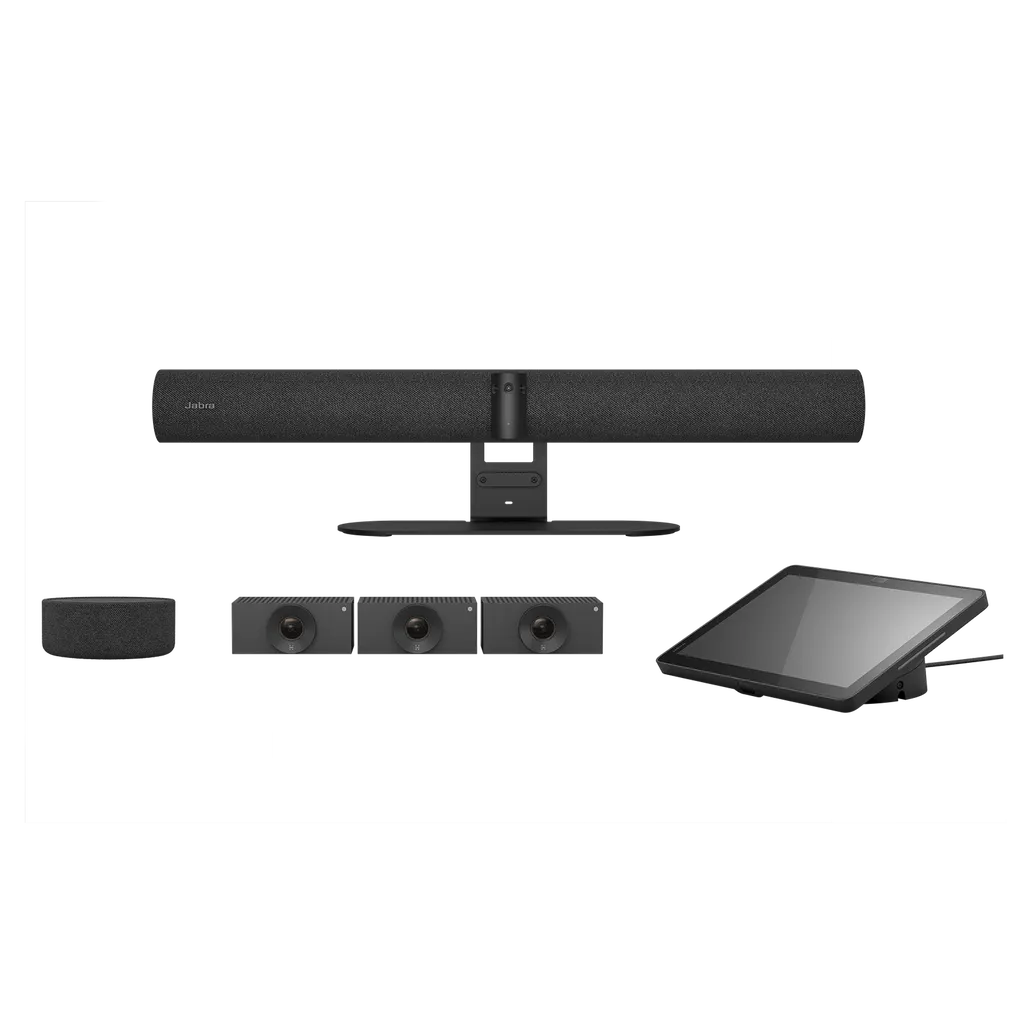
The Jabra PanaCast Room Kit Multi 9010-231 is a single-order video conferencing package for meeting rooms hosting up to 22 people. It includes the PanaCast 55 VBS video bar with a three-camera panoramic array, the PanaCast SpeakerMic and the Jabra Cam Crew, with plug-and-play setup and no programming needed. It suits boardrooms, staff rooms and training rooms across Doha and Al Rayyan.

What the Jabra PanaCast Room Kit Multi covers

The Jabra PanaCast Room Kit Multi 9010-231 is a complete video conferencing package for meeting rooms that seat up to 22 people. The master box holds the PanaCast 55 VBS video bar, the PanaCast SpeakerMic and the Jabra Cam Crew, so a room can be equipped from one purchase rather than assembled from separate components.

At the centre of the kit, the video bar uses a panoramic array of three cameras with a 180-degree horizontal field of view and a 54-degree vertical field of view. Capture resolution reaches 3840 x 1080 pixels, and digital zoom goes up to 6x without loss. Onboard AI features include Intelligent Zoom, Virtual Director and Picture-in-Picture, which gives remote participants fuller context of the room.

Audio sized for a room of up to 22 people

Audio is handled by an eight-microphone beamforming array certified for rooms up to 4.5 m x 6 m, with pickup up to 7 m. Adding the PanaCast SpeakerMic extends coverage to 11 m. The SpeakerMic has four omnidirectional microphones and a 60 mm speaker, and it connects over RJ45 with cable runs up to 30 metres, using a Cat6 cable that is not included in the box. The video bar also carries four speakers, two 2-inch woofers and two 3/4-inch tweeters, and provides an auxiliary output for external audio equipment.

Setup, management and security

There is no programming to do. The kit is plug-and-play, and the video bar, SpeakerMic and camera unit each come with the mounting hardware needed for a standard installation. The Jabra Control IP touch panel has a 10.1-inch display at 1920 x 1200 and is powered over Ethernet to IEEE 802.3af.

IT teams can manage the system remotely through Jabra Plus and the Jabra Web Console, which uses HTTPS. The platform is built on the Microsoft Device Ecosystem Platform and includes secure boot, verified boot and vendor lock. The video bar supports native third-party applications including Microsoft Teams Room for Android and Zoom Rooms.

Where it fits in Qatar

  • Boardrooms in West Bay or Msheireb: an executive meeting where directors in Doha join colleagues in Europe or Asia, with participants at the far end of the table kept in view.
  • Staff rooms in a private school in Al Rayyan: a 22-seat planning room where the SpeakerMic picks up voices from the far end of the table.
  • Training rooms at a hospital or clinic in Doha: teaching sessions where clinicians present cases to colleagues at other sites.

What to plan before ordering

Confirm the room environment before installation. The video bar is rated for operating temperatures from 5°C to 35°C and humidity from 15% to 80%, with storage from -20°C to 60°C. Summer temperatures in Doha can exceed 45°C, so the room must be air-conditioned and kept within the operating range. The power adapter accepts 100-240V input, and the box includes a regional power cable that the SmartRooms Qatar team will check against the sockets in your room.

The manufacturer lists a 3-year warranty for the video bar, the SpeakerMic and the camera unit. The video bar main unit is 730 mm wide and weighs 2259 g, so a free site survey before installation is the safest first step. It also confirms wall suitability, cable routes and the placement needed for the 30-metre SpeakerMic run.

To receive a quote for the Jabra PanaCast Room Kit Multi 9010-231, send SmartRooms Qatar your room dimensions, seating capacity and meeting platform, and the team will confirm the right configuration.

Highlights

  • Three-camera panoramic array with 180 degree horizontal field of view
  • Camera resolution up to 3840 x 1080 pixels
  • Eight-microphone array certified for rooms up to 4.5m x 6m
  • PanaCast SpeakerMic extends audio coverage up to 11 m
  • Plug-and-play setup with no programming required
  • Operating range 5°C to 35°C, 15% to 80% humidity

Room fit

Tell us the room size and platform (Teams, Zoom or BYOD) and we confirm the right combination with your quotation.

Estimated timeline

Quotation within 1 working day · delivery timing depends on stock availability, and we confirm it with your quotation.

Specifications

3 specifications · Source: manufacturer · checked Oct 2026
General info3
Master box contents
PanaCast 55 VBS, PanaCast SpeakerMic, Jabra Cam Crew
Master box dimensions (WxHxD)
XXX mm | xxx in
Master kit weight
XXXg | XXXoz

Downloads

13 files from the manufacturer
PDF Datasheets EN-Jabra-PanaCast-Room-Kit-Multi-Datasheet-270726_Web.pdf 568 KB Jabra PanaCast Room Kit Multi datasheets (PDF, 568 KB) PDF Manuals & guides Jabra-PanaCast-55-VBS-Screen-Mount-assembly_AR_Arabic_RevA.pdf 3.1 MB Jabra PanaCast Room Kit Multi manuals & guides (PDF, 3.1 MB) PDF Manuals & guides Jabra-PanaCast-55-VBS-Screen-Mount-assembly_EN_English_RevA.pdf 3.1 MB Jabra PanaCast Room Kit Multi manuals & guides (PDF, 3.1 MB) PDF Manuals & guides Jabra-PanaCast-55-VBS-Wall-Mount-assembly_AR_Arabic_RevA.pdf 1.6 MB Jabra PanaCast Room Kit Multi manuals & guides (PDF, 1.6 MB) PDF Manuals & guides Jabra-PanaCast-55-VBS-Wall-Mount-assembly_EN_English_RevA.pdf 1.6 MB Jabra PanaCast Room Kit Multi manuals & guides (PDF, 1.6 MB) PDF Manuals & guides Jabra-Panacast-55-VBS-Installation_AR_Arabic_RevB.pdf 4.5 MB Jabra PanaCast Room Kit Multi manuals & guides (PDF, 4.5 MB) PDF Manuals & guides Jabra-Panacast-55-VBS-Installation_EN_English_RevB.pdf 4.4 MB Jabra PanaCast Room Kit Multi manuals & guides (PDF, 4.4 MB) PDF Manuals & guides Jabra-Panacast-55-VBS-User-manual_AR_Arabic_RevB.pdf 3.1 MB Jabra PanaCast Room Kit Multi manuals & guides (PDF, 3.1 MB) PDF Manuals & guides Jabra-Panacast-55-VBS-User-manual_EN_English_RevB.pdf 2.9 MB Jabra PanaCast Room Kit Multi manuals & guides (PDF, 2.9 MB) PDF Manuals & guides Jabra-Panacast-55-VBS_Administrator-Guide_RevA.pdf 639 KB Jabra PanaCast Room Kit Multi manuals & guides (PDF, 639 KB) PDF Manuals & guides Jabra-SpeakerMic_assembly_AR_Arabic_RevB.pdf 2.7 MB Jabra PanaCast Room Kit Multi manuals & guides (PDF, 2.7 MB) PDF Manuals & guides Jabra-SpeakerMic_assembly_EN_English_RevB.pdf 2.7 MB Jabra PanaCast Room Kit Multi manuals & guides (PDF, 2.7 MB) PDF Manuals & guides Jabra-Table-Stand-assembly_EN_English_RevB.pdf 3.0 MB Jabra PanaCast Room Kit Multi manuals & guides (PDF, 3.0 MB)

Questions about PanaCast Room Kit Multi

Who is the Jabra PanaCast Room Kit Multi 9010-231 designed for?
It suits larger meeting rooms for up to 22 people, such as a boardroom in West Bay where directors join colleagues in Europe or Asia. The kit pairs a three-camera video bar with a SpeakerMic and the Jabra Cam Crew, so people at both ends of a long table stay in view and audible. It is a poor fit for small huddle rooms, where a smaller kit would be simpler to install.
What does the master box contain?
The master box holds the PanaCast 55 VBS video bar, the PanaCast SpeakerMic and the Jabra Cam Crew. The video bar package includes a wall mount, the Jabra Control IP touch panel, a privacy cover with sensor, a 1.83 m HDMI cable and a regional power cable. The SpeakerMic comes with a mounting plate, a SpeakerMic adapter and three table adhesives, but its Cat6 cable is not included.
How many cameras does the kit use and what do they cover?
The PanaCast 55 VBS has three panoramic cameras with a 180-degree horizontal and 54-degree vertical field of view, at up to 3840 x 1080 pixels. The Jabra Cam Crew adds three further cameras at 1920 x 1080 with a 92-degree horizontal field of view, and it comes with its own wall mounts. Together they let the room view follow the conversation, with AI-powered speaker tracking directing the framing.
Will the audio carry well in a 22-person staff room at a school in Al Rayyan?
For a staff room of up to 22 people, the video bar's eight-microphone array covers up to 7 m and is certified for rooms up to 4.5 m x 6 m. Adding the PanaCast SpeakerMic extends pickup to 11 m, which helps when the table is long or people sit at the far end. The SpeakerMic has four omnidirectional microphones and connects by RJ45 with runs up to 30 m, so placement can be planned around the table.
Which meeting platforms does the kit support?
The video bar supports native third-party applications including Microsoft Teams Room for Android and Zoom Rooms. Content sharing varies by platform: Apple AirPlay works only with Zoom, and Microsoft Teams-Cast works only with Teams. HDMI input is also available. For an energy site in Mesaieed where engineers join from abroad, confirm which platform your organisation uses before ordering so the right app is configured.
What connections does the video bar provide?
The video bar provides two HDMI outputs, one HDMI input, an Ethernet RJ45 port, Wi-Fi 802.11a/b/g/n/ac, one USB-A port and two USB-C ports, plus Bluetooth 5.1. It supports USB 2.0 and USB 3.0. The Jabra Control IP panel is powered over Ethernet to IEEE 802.3af, and the SpeakerMic connects through an RJ45 to USB-C adapter.
Does the kit need programming for a fast setup?
No. The kit is plug-and-play with no programming required, and the video bar offers appliance mode, BYOD mode and one-touch meeting join. IT teams can manage settings and updates remotely through Jabra Plus and the Jabra Web Console without visiting the room. SmartRooms Qatar offers professional installation, and a free site survey helps plan mounting and cable routes first.
Can the room stay cool enough for this kit during a Doha summer?
The video bar is rated for an operating temperature of 5°C to 35°C and humidity of 15% to 80%. Summer temperatures in Doha can exceed 45°C, so the meeting room must be air-conditioned and kept within that range, including around the equipment. Storage is rated from -20°C to 60°C. If a room has weak cooling or direct sun through a window, confirm the environment with the SmartRooms Qatar team before installation.
Does the power supply suit Qatar's electricity supply?
The power adapter accepts 100-240V input and outputs 12V at 5A, and the box includes a regional power cable. Qatar's mains supply is 240 V at 50 Hz with BS 1363 (Type G) sockets. Before ordering, confirm with the SmartRooms Qatar team that the regional cable matches the sockets in your room, and plan where the adapter sits so the cable reaches it.
How is the kit secured and managed by IT teams?
The system includes secure boot, verified boot and vendor lock, and admin settings require authenticated access. IT teams can log in remotely through Jabra Plus, the Jabra Web Console or the VaaS admin portal, and retrieve logs from the Jabra Web Console. The platform is built on the Microsoft Device Ecosystem Platform, and cloud management is available through Microsoft Teams Admin Center and Zoom Device Management.
Would the kit fit a 22-person training room at a hospital in Doha?
Yes, provided the room is air-conditioned and has a wall position for a 730 mm wide video bar weighing 2259 g. The video bar package includes a wall mount, and the Jabra Cam Crew arrives with three camera wall mounts. Hospital training rooms often host staff from several departments, so a site survey helps confirm sight lines, power points and cable runs before anything is fixed to the wall.
Can a government ministry buy this kit through an LPO or tender?
Yes. SmartRooms Qatar supplies this kit against purchase orders (LPOs) and government tenders, including Monaqasat. Payment can be made by bank transfer, cheque or purchase order, and quotations are usually issued within one working day. Because the kit has several components, request the full bundle as one quoted line so the procurement team can compare it against the specification.

Similar models

Yealink MVC S60 Yealink MVC S60 Microsoft Teams Rooms System with 360° Camera
360°
Biamp Evoko Liso Wall Mount Kit Biamp Evoko Liso Wall Mount Kit (910-01930) for Room Scheduling Displays
TAA Compliant
Email Call




