






Barco
ClickShare Power Supply 100W
Barco ClickShare Power Supply 100W, 100-Watt Video Conferencing Accessory
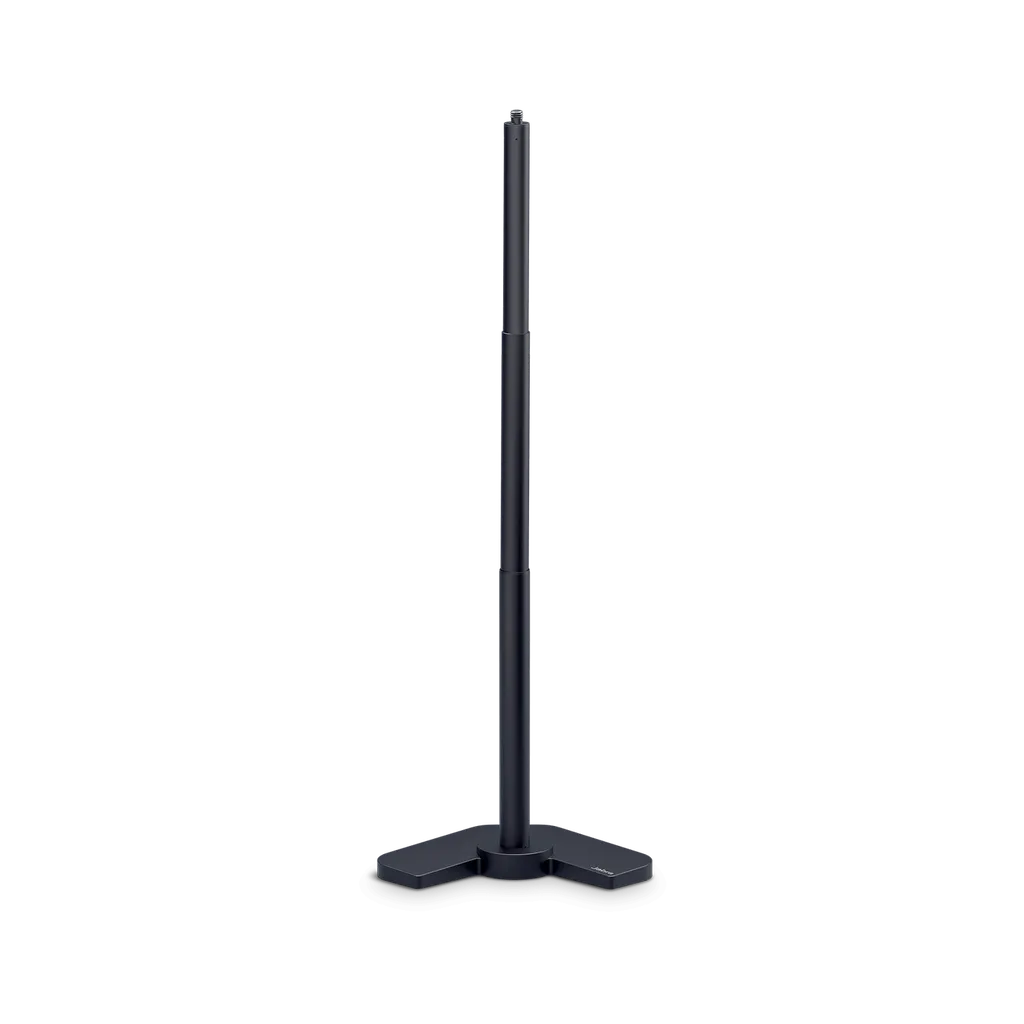
PanaCast Table Stand
Jabra PanaCast Table Stand 14207-56 Freestanding Mount
Priceon request
QuotationWithin 1 working day
DeliveryConfirmed with your quote, based on stock
Overview
The Jabra PanaCast Table Stand (14207-56) lets you place a PanaCast camera on a desk or table instead of a wall or fixed mount, so one camera can move between meeting rooms, training spaces and breakout areas. It includes three cable clips for tidy cable routing. Suited to Doha offices, schools and universities that share a camera across rooms. Request a quote today.
The Jabra PanaCast Table Stand, model 14207-56, is an accessory for the PanaCast video conferencing camera. It replaces the usual wall or fixed mounting with a base that stands on a desk or table, so the camera can be set up where a meeting is taking place and then moved to the next room. For organisations that hold meetings in several spaces, that flexibility is the main reason to buy it.
A freestanding base for a camera that changes rooms
Many conference camera installations are permanent: a bracket on a wall, a fixed position and a cable run that never moves. This stand suits the opposite case. A single PanaCast can serve a boardroom on Monday, a training room on Tuesday and a breakout space later in the week, without drilling into walls or buying a second camera.
The stand is designed specifically for PanaCast, so the camera sits on the stand as a freestanding unit on the table. Three cable clips are included to help you route the camera cable along the table edge or down the leg of the table, which keeps the work surface clear during a meeting.
Where it fits across Qatar
- Corporate boardrooms in West Bay or Lusail: a camera placed on the table for hybrid meetings, then moved to a smaller room when the leadership team meets with fewer people.
- Universities and training centres in Education City: one camera shared between seminar rooms, used for lectures and remote teaching sessions.
- Shared offices in Msheireb or The Pearl: a camera that follows the booking calendar rather than staying in one meeting room.
In offices where Arabic and English are used side by side, a meeting may open in Arabic and continue with teams in Europe or Asia. A movable camera lets the room be arranged around the participants rather than around a fixed bracket. Schools in Al Rayyan or Al Wakrah that fit out classrooms in phases can use the same logic: buy the stand alongside the camera and move the setup as classroom use changes.
What to plan before ordering
Check the table surface before placing the camera. The stand is designed for use on a table, so confirm that the surface is level and large enough for the stand, and that the camera has a clear view of the seating area. Plan the cable route in advance, because the three included clips work best when the route is set before the camera is positioned.
The operating conditions for this accessory are not listed in its specification. Ask the SmartRooms Qatar team to confirm suitability for rooms with windows or for areas exposed to Qatar's summer heat before buying several units. Confirm also that the PanaCast camera you own or plan to buy is the one you intend to pair with the stand.
Ordering is straightforward. Send your room list and camera details to SmartRooms Qatar and we will usually return a quotation within one working day. We deliver to all eight municipalities of Qatar, and ministries, schools and companies can issue a purchase order or LPO against the quotation. Request a quote for the Jabra PanaCast Table Stand 14207-56 today.
Highlights
- Freestanding base that lets PanaCast sit on a desk or table
- Built for a camera that moves between meeting rooms
- Three cable clips included for neat cable routing
- Current accessory, catalogue number 14207-56
- Launched April 2020
Room fit
Tell us the room size and platform (Teams, Zoom or BYOD) and we confirm the right combination with your quotation.
Estimated timeline
Quotation within 1 working day · delivery timing depends on stock availability, and we confirm it with your quotation.
Specifications
5 specifications · Source: manufacturer · checked Oct 2026
Catalogue attributes5
- Audiocodecssupported
- AAC; SBC
- Launchdate
- 2020-04-01
- Portfolio
- Jabra
- Producttype
- Accessory
- sku
- 14207-56
Downloads
0 files from the manufacturerNo downloadable files are listed for this model yet. Ask us and we will send the datasheet.
Questions about PanaCast Table Stand
What is the Jabra PanaCast Table Stand used for?
It is an accessory that lets a Jabra PanaCast camera stand freely on a desk or table instead of being fixed to a wall. It suits teams that need one camera in more than one room. This is a current model, catalogue number 14207-56, listed by the manufacturer under mounts and stands for video conferencing.
Is the stand designed for the Jabra PanaCast camera?
Yes. The stand is described as the accessory that enables a Jabra PanaCast to be used as a free-standing unit. Before you order, confirm which PanaCast camera you already own or plan to buy, so that the quotation matches your setup. SmartRooms Qatar can check this with you when you request a quote.
How many cable clips are included with the stand?
Three cable clips are included. Use them to route the camera cable along the edge of the table or down a table leg, which keeps the work surface clear during meetings. Plan the route before you place the camera, so the cable does not cross a walkway in a training room or lecture space where people move around.
Can one PanaCast camera be moved between meeting rooms with this stand?
Yes, that is the main purpose of the stand. An office in West Bay with a boardroom and two smaller meeting rooms can keep one camera on the stand, set it up in the room that is booked, then move it when the meeting changes. This avoids buying a second camera for each room, though you should confirm the cable length needed for each room.
Does the stand need to be fixed to a wall?
No. It is a freestanding unit, so it sits on a table rather than requiring a wall bracket or drilling into the room. That makes it useful in leased offices in Doha where wall work needs building management approval, and in shared spaces where the camera changes position often. Check that the table is stable and large enough for the stand before ordering.
What should I check on the table before placing the camera?
Check that the surface is level, sturdy and large enough for the stand, and that the camera will have a clear view of the seats in the room. Look for a spot away from direct sunlight if the table sits beside a window. Also plan where the cable will run, because the three included clips work best when the route is planned in advance.
Will the stand work in a room with a window during Qatar's summer heat?
The source data for this accessory does not state an operating temperature range, so SmartRooms Qatar cannot confirm suitability for hot rooms from the specification alone. Summer temperatures in Doha can exceed 45°C, so ask the team to review a room with a window or direct sun before you buy several units. Keep the camera out of direct sun where possible.
Is this stand useful for a university seminar room in Education City?
It can be, when one PanaCast camera needs to serve several seminar rooms or a lecture space used for both in-person and remote teaching. Staff can move the camera between rooms on different days, and the freestanding base means no wall work is needed in buildings where fixings are restricted. Request a quote to confirm the camera and stand combination for your rooms.
Should a private school in Al Rayyan buy one stand or one per classroom?
That depends on how often the camera needs to move. If the school has a few shared rooms and one staff member who runs remote sessions, one stand and one camera moved between classrooms may be enough. If each classroom needs a camera permanently, buy a stand for each. SmartRooms Qatar can quote for either option, and schools can issue an LPO.
How could a hotel in The Pearl use this stand?
A hotel or serviced apartment in The Pearl hosting client meetings and small conferences can use the stand to set up a camera in a function room for a presentation, then move it to a breakout room. Because the stand is freestanding, staff avoid drilling into finished walls. Ask for a quote early in your event planning.
Does the stand need its own power or a mains connection?
The source data for this stand does not list any electrical specifications. Its role is to hold the camera in a freestanding position, so check the power and cable requirements of the PanaCast camera itself. Ask SmartRooms Qatar to confirm the power arrangements for your room before ordering.
How do I order this stand for a government ministry or school in Qatar?
Send your room list and camera details to SmartRooms Qatar, and we will usually return a quotation within one working day. We deliver to all eight municipalities of Qatar. Ministries, government bodies and schools can issue a purchase order or an LPO against the quotation, and payment by bank transfer, cheque or purchase order is accepted. Request a quote for model 14207-56 today.



