Thursday, 22 October 2026 · 11 Jumada I 1448 AH Sun – Thu · 9:00 – 18:00
+971 56 914 9477 العربية
WhatsApp

PanaCast U30

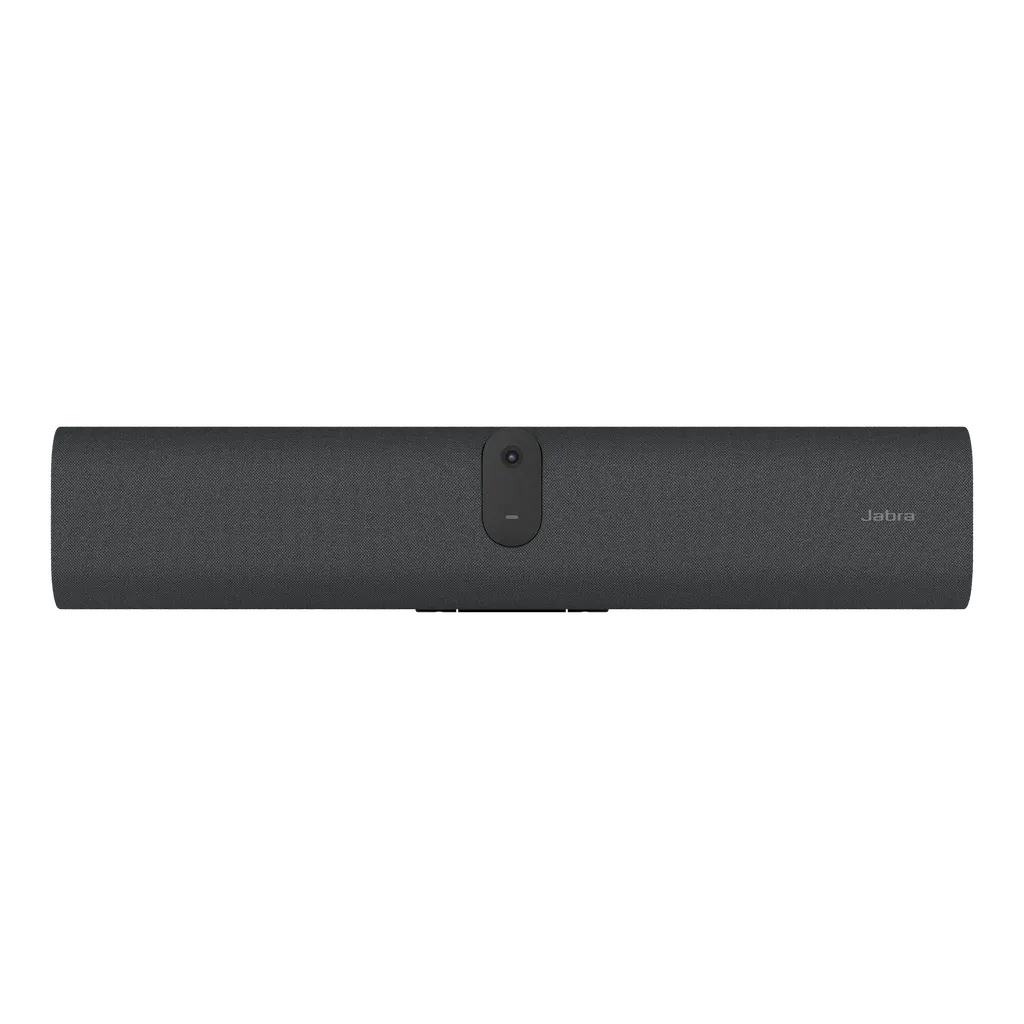
Jabra PanaCast U30 4K BYOD Video Bar for Huddle Rooms

Video
4K resolution
Field of view
Horizontal: 120°
Zoom
Up to 3x lossless digital zoom…
Speakers
Yes
WhatsApp
Priceon request
QuotationWithin 1 working day
DeliveryConfirmed with your quote, based on stock
PDFDownload datasheet (EN-US--PanaCast-U30-Datasheet-20260529.pdf)
Overview

The Jabra PanaCast U30 is a compact BYOD video bar for small and huddle rooms seating up to six people. It pairs a 4K camera with intelligent auto-framing, six microphones and a single USB-C connection to the participant's laptop. Its 120-degree horizontal field of view covers the whole table. Suited to offices in Doha, school staff rooms and clinic meeting spaces, it is supplied by quotation.

What the Jabra PanaCast U30 does in a huddle room

The Jabra PanaCast U30 (model VSM060, SKU 8800-231) is a video bar for BYOD meetings, where each participant joins from their own laptop and the room supplies the camera, microphones and speaker. It is built for small and huddle rooms that seat up to six people, such as team stand-ups, candidate interviews and short client calls.

Everything runs from one cable. A single USB-C 3.2 Gen 1 connection carries video and audio between the laptop and the bar, so staff do not have to assemble a set of separate leads each time they walk into the room.

Camera, audio and framing

  • 4K camera with a 120° horizontal field of view, 61° vertical and 132° diagonal.
  • Intelligent auto-framing with Intelligent Zoom, Virtual Director and Dynamic Composition.
  • Digital zoom of up to 3x lossless at 720p, and up to 6x at 720p.
  • Six microphones with noise reduction, echo cancellation and non-speech noise suppression.
  • One speaker covering 80 Hz to 20 kHz.

The wide horizontal angle matters in a room where the table runs across the width of the wall, because it keeps all six seats in frame without moving the bar. The microphone array helps remote participants hear people at the far end of the table.

Connections, management and planning

Beyond USB-C, the bar has one HDMI input, one HDMI output, USB-A, Ethernet (RJ45), Wi-Fi 802.11a/b/g/n/ac, Bluetooth 5.2 and a 3.5mm jack for assistive listening devices. It supports DisplayPort Alt Mode over USB-C, but USB 2.0 cables do not, so use the 1.8 m cable in the box or Jabra's 5 m active USB 3.2 Gen 1 cable for longer runs.

For multi-room estates, administrators can manage devices remotely through Jabra Plus, the Jabra Web Console over HTTPS, or Jabra Plus On-Prem. Account password strength checks, secure boot, device lockdown and log retrieval are included, along with DHCP and static IP support.

Where it fits in Qatar

  • A six-seat huddle room in an office in Msheireb or West Bay, where staff join calls with teams in Europe or Asia from their own laptops.
  • A staff room in a private school in Al Rayyan or Al Sadd, used for parent interviews and video calls with specialists.
  • A small consultation room in a clinic in Al Wakrah or Lusail, used for case reviews with colleagues in other locations.

Environment, mounting and what to plan

The operating temperature range is 5°C to 35°C (41°F to 95°F), and storage is rated from -20°C to 60°C. Outdoor temperatures in Doha can exceed 45°C in summer, so the bar belongs in an air-conditioned room, away from window glare and direct sun.

The box includes a wall mount, privacy cover, regional power cable and power supply. The main unit measures 529 x 108 x 65 mm and weighs 1.51 kg, with an operating voltage of 100-240V. Before fixing, arrange a free site survey to confirm the wall, display height and cable route from the laptop position. The manufacturer provides a two-year warranty.

Ready to equip a huddle room? Request a quote from SmartRooms Qatar for the Jabra PanaCast U30. We will confirm availability and expected lead time in our quotation, usually within one working day.

Highlights

  • Single USB-C 3.2 Gen 1 connection for BYOD laptops
  • 4K camera with 120° horizontal field of view
  • Six microphones with noise reduction and echo cancellation
  • Intelligent auto-framing and up to 6x digital zoom at 720p
  • Supports Microsoft Teams and Zoom; Teams certification pending
  • Two-year warranty; wall mount and privacy cover included

Room fit

Tell us the room size and platform (Teams, Zoom or BYOD) and we confirm the right combination with your quotation.

Estimated timeline

Quotation within 1 working day · delivery timing depends on stock availability, and we confirm it with your quotation.

Specifications

63 specifications · Source: manufacturer · checked Oct 2026
General info12
Box contents
PanaCast U30 • USB C to USB C 3.2 gen 1 Cable (1.8m / 5.9 ft) • 1 x regional power cable • Privacy cover • power supply • wall mount
Operating system
Android 13
Packaging dimensions (WxHxD)
589 x 110 x 210 mm | 23.21 x 4.34 x 8.28 in
Main unit dimensions (WxHxD)
529 x 108 x 65 mm | 20.83 x 4.25 x 2.56 in
Main unit weight (base unit)
1.51 kg | 3.32 lbs
Package weight
2.99 kg | 6.59 lbs
Warranty
2 years ¹
Onboard AI
Yes
Cable management
Yes
Operating voltage
100-240V
System requirements
Windows (latest two versions), macOS (latest two versions)
LED features and functions
Firmware update status, Mute/unmute, Power indicator, Streaming
Video12
Video input
1 x HDMI
Video output
1 x HDMI
Content sharing
HDMI input, USB-C (DP-alt mode) ³
Number of cameras
1
Camera resolution
4K resolution
Zoom
Up to 3x lossless digital zoom at 720p, Up to 6x digital zoom at 720p
Field of view
Horizontal: 120°, Vertical: 61°, Diagonal: 132°
Intelligent Zoom
Yes
Intelligent Meeting Space
Yes
Multi-stream Dynamic Composition
Yes ⁴
Dynamic Composition
Yes
Virtual Director
Yes
Audio9
Speaker frequency range
80Hz - 20000Hz
Number of speakers
1
Automatic Speaker Detection
Yes
Noise Reduction Echo Cancellation
Yes
Non-Speech Noise Suppression
Yes
Number of microphones
6
Microphone sensitivity
-37dBFS
Microphone frequency range
100Hz - 16000Hz
Aux-Out for assistive listening devices
3.5mm jack ⁵
Security7
Access management
Jabra Plus for admins; Jabra Plus; Jabra Web Console; Local account; Jabra Plus On-Prem
Security management
Remote log in via Jabra Plus, Jabra Web Console and VaaS Admin Portal
Authenticated access to Admin settings, Jabra Web Console, Jabra Plus
Yes
Account password strength check and enforcement
Yes
Device locked down for security
Yes
Lockdown with secureboot, OS verified boot, Vendor lock
Yes
Log retrieval via Jabra Web Console
Yes
Connectivity5
Interfaces
Wi-Fi (802.11a/b/g/n/ac), USB-A, Ethernet (RJ45), HDMI, 3.5mm jack port, USB-C 3.2 gen 1
Bluetooth® version
5.2
Supported USB versions
USB 2.0, USB 3.0
UVC versions
1.5
Recommended passive USB 3 cable length
1.8m | 5.9ft
Network7
Internet Protocol (IP)
IPv4, IPv6
Ethernet
RJ45
Auto-MDIX
Yes
Proxy support
HTTP; HTTPS
Support DHCP
Yes
Support Static IP Address
Yes
Simple Certificate Enrollment Protocol
Yes
Software & Apps3
Compatible software and/or apps
Jabra Plus; Jabra Direct Online; Jabra SDK; Jabra Web Console for remote device management via HTTPS
Integrated People Count
Yes
Software Development Kit (SDK)
Yes
Ease of use6
Digital pan/tilt/zoom
Yes
Manual Pan-Tilt-Zoom (PTZ)
Yes
Camera privacy cover
Yes
Single Cable BYOD
Yes ³
Digital Signage
BYOD Cable Guides
Proximity sensor
Yes
Extended info2
Operating temperature
5°C to 35°C | 41°F to 95°F
Storage temperature
-20°C to 60°C | -4°F to 140°F

Downloads

26 files from the manufacturer
PDF Datasheets EN-US--PanaCast-U30-Datasheet-20260529.pdf 75 KB Jabra PanaCast U30 datasheets (PDF, 75 KB) PDF Manuals & guides EN-PanaCast-VB-Series-BYOD-Mode.pdf 1002 KB Jabra PanaCast U30 manuals & guides (PDF, 1002 KB) PDF Manuals & guides Jabra-PanaCast-U30-Screen-Mount-assembly_AR_Arabic_RevA.pdf 3.0 MB Jabra PanaCast U30 manuals & guides (PDF, 3.0 MB) PDF Manuals & guides Jabra-PanaCast-U30-Screen-Mount-assembly_EN_English_RevA.pdf 2.8 MB Jabra PanaCast U30 manuals & guides (PDF, 2.8 MB) PDF Manuals & guides Jabra-PanaCast-U30-Wall-Mount-assembly_AR_Arabic_RevA.pdf 1.4 MB Jabra PanaCast U30 manuals & guides (PDF, 1.4 MB) PDF Manuals & guides Jabra-PanaCast-U30-Wall-Mount-assembly_EN_English_RevA.pdf 1.6 MB Jabra PanaCast U30 manuals & guides (PDF, 1.6 MB) PDF Manuals & guides Jabra-Panacast-U30-Installation-manual_AR_Arabic_RevA.pdf 1.9 MB Jabra PanaCast U30 manuals & guides (PDF, 1.9 MB) PDF Manuals & guides Jabra-Panacast-U30-Installation-manual_EN_English_RevA.pdf 1.8 MB Jabra PanaCast U30 manuals & guides (PDF, 1.8 MB) PDF Manuals & guides Jabra-Panacast-U30-User-manual_AR_Arabic_RevA.pdf 1.5 MB Jabra PanaCast U30 manuals & guides (PDF, 1.5 MB) PDF Manuals & guides Jabra-Panacast-U30-User-manual_EN_English_RevA.pdf 1.4 MB Jabra PanaCast U30 manuals & guides (PDF, 1.4 MB) PDF Manuals & guides Jabra-Panacast-U30_Administrator-Guide_RevB.pdf 579 KB Jabra PanaCast U30 manuals & guides (PDF, 579 KB) PDF Manuals & guides Jabra-Table-Stand-assembly_EN_English_RevB.pdf 3.0 MB Jabra PanaCast U30 manuals & guides (PDF, 3.0 MB) PDF Other documents EN-PanaCast-U30-Custom-Wallpapers-130726.pdf 863 KB Jabra PanaCast U30 other documents (PDF, 863 KB) PDF Other documents EN-PanaCast-U30-and-PanaCast-40-VBS-Screen-and-Reflection-Detection-120826.pdf 826 KB Jabra PanaCast U30 other documents (PDF, 826 KB) PDF Other documents EN-PanaCast-VB-Series-802,-d-,1X-Whitepaper.pdf 4.5 MB Jabra PanaCast U30 other documents (PDF, 4.5 MB) PDF Other documents EN-PanaCast-VB-Series-Audio-Capabilities.pdf 508 KB Jabra PanaCast U30 other documents (PDF, 508 KB) PDF Other documents EN-PanaCast-VB-Series-Aux-Out.pdf 485 KB Jabra PanaCast U30 other documents (PDF, 485 KB) PDF Other documents EN-PanaCast-VB-Series-Intelligent-Meeting-Space.pdf 526 KB Jabra PanaCast U30 other documents (PDF, 526 KB) PDF Other documents EN-PanaCast-VB-Series-Multi-stream-Dynamic-Composition-for-Zoom.pdf 725 KB Jabra PanaCast U30 other documents (PDF, 725 KB) PDF Other documents EN-PanaCast-VB-Series-Network-Protocols.pdf 4.0 MB Jabra PanaCast U30 other documents (PDF, 4.0 MB) PDF Other documents EN-PanaCast-VB-Series-Noise-Suppression.pdf 918 KB Jabra PanaCast U30 other documents (PDF, 918 KB) PDF Other documents EN-PanaCast-VB-Series-Permanent-BYOD.pdf 390 KB Jabra PanaCast U30 other documents (PDF, 390 KB) PDF Other documents EN-PanaCast-VB-Series-Single-stream-Dynamic-Composition.pdf 556 KB Jabra PanaCast U30 other documents (PDF, 556 KB) PDF Other documents Network-interfaces-and-services-PanaCast-U30-RevA.pdf 43 KB Jabra PanaCast U30 other documents (PDF, 43 KB) PDF Other documents WP_panacast_series_security_whitepaper_080825.pdf 14.2 MB Jabra PanaCast U30 other documents (PDF, 14.2 MB) URL Other documents · Opens on manufacturer site PanaCast U30: 2D and 3D files (PDF, DXF and STP). Jabra PanaCast U30 other documents (URL)

Questions about PanaCast U30

Who is the Jabra PanaCast U30 designed for?
It is designed for small and huddle rooms holding up to six people, where participants bring their own laptop. Typical users include a team meeting room in West Bay, a staff room in a school in Al Sadd, or a clinic consultation room. The camera, six microphones and speaker sit in one bar, so the room needs no separate conferencing hardware.
How does a participant start a meeting with it?
They start the meeting from their own laptop as usual, using the platform they already know, and connect to the bar with a single USB-C 3.2 Gen 1 cable. The bar then provides the camera, microphones and speaker. The 1.8 m cable in the box is the recommended length, so plan the laptop position around it.
What camera and framing features does it have?
The camera is 4K with a 120° horizontal, 61° vertical and 132° diagonal field of view. Intelligent auto-framing, Intelligent Zoom and Virtual Director keep speakers in view. Digital zoom reaches up to 3x lossless at 720p, or 6x at 720p. This suits a table seating six without manual adjustment.
How good is the audio?
Six microphones with a sensitivity of -37dBFS and a 100Hz to 16kHz range feed noise reduction, echo cancellation and non-speech noise suppression. The single speaker covers 80Hz to 20kHz. In a school or bank meeting room where corridor noise or air conditioning is audible, these features make remote calls easier to follow.
Which meeting platforms does it support?
The manufacturer states it works with Microsoft Teams and Zoom. Teams certification was pending as of May 2026, and the catalogue lists Zoom Rooms certification. Before ordering for a Teams-based organisation in Doha, ask the SmartRooms Qatar team to confirm the current certification status with Jabra, as it can change.
Can I share a laptop screen through it?
Yes. Content can be shared through the HDMI input or over USB-C using DisplayPort Alt Mode. USB 2.0 cables do not support DisplayPort Alt Mode, so use the supplied cable or the 5 m active USB 3.2 Gen 1 cable from Jabra's accessory list. The Ethernet port is separate and is used for network connection and management.
Can I connect a display to it directly?
Yes. The bar has one HDMI output alongside its HDMI input, so a display can be connected to that output. Wi-Fi, Ethernet and Bluetooth 5.2 are also available. For a boardroom-style huddle room in Lusail, this helps keep the display and network connections tidy during installation.
How does IT manage several units remotely?
Administrators can manage devices through Jabra Plus, the Jabra Web Console over HTTPS, or Jabra Plus On-Prem. Management includes remote login, log retrieval, password strength enforcement and device lockdown with secure boot. DHCP, static IP addressing, IPv4 and IPv6 are supported, helping ministry and hospital IT teams apply their network policies.
Will it cope with Qatar's summer heat?
The operating range is 5°C to 35°C, and storage is rated from -20°C to 60°C. Outdoor temperatures in Doha can exceed 45°C in summer, so install the bar in an air-conditioned room, away from window glare and direct sun. Confirm the room temperature with your facilities team before installation.
What is in the box, and how large is the unit?
The box includes the PanaCast U30, a 1.8 m USB-C to USB-C 3.2 Gen 1 cable, a regional power cable, power supply, privacy cover and wall mount. The main unit measures 529 x 108 x 65 mm and weighs 1.51 kg, with an operating voltage of 100-240V. Measure the wall space against the 529 mm width before ordering.
Can a government body or school buy it through an LPO or tender?
Yes. SmartRooms Qatar supplies government and school purchasing through LPOs and tenders, including Monaqasat, and accepts payment by bank transfer, cheque or purchase order. If a school is ordering several PanaCast U30 units for small rooms, send the room count and sizes with your request so the quotation reflects the full order.

Similar models

Biamp Parlé ABC 2500a Biamp Parlé ABC 2500a All-in-One Conferencing Audio Bar
Zoom Certified Microsoft Teams Certified
Biamp Parlé CBC 2500 CM Biamp Parlé CBC 2500 CM Ceiling-Mounted Conferencing Bar
Zoom Certified Microsoft Teams Certified
Biamp Parlé CBC 2500 PM Biamp Parlé CBC 2500 PM Pole-Mounted Conferencing Bar
Zoom Certified Microsoft Teams Certified
Biamp Parlé N 100 Biamp Parlé N 100 Network and USB Expander for Parlé Conferencing Bars
TAA Compliant
Biamp Parlé PMA 2000-DM Biamp Parlé PMA 2000-DM Display Mount Kit for Parlé 2000 Video Bars
Video bars
Email Call