






Barco
ClickShare Power Supply 100W
Barco ClickShare Power Supply 100W, 100-Watt Video Conferencing Accessory
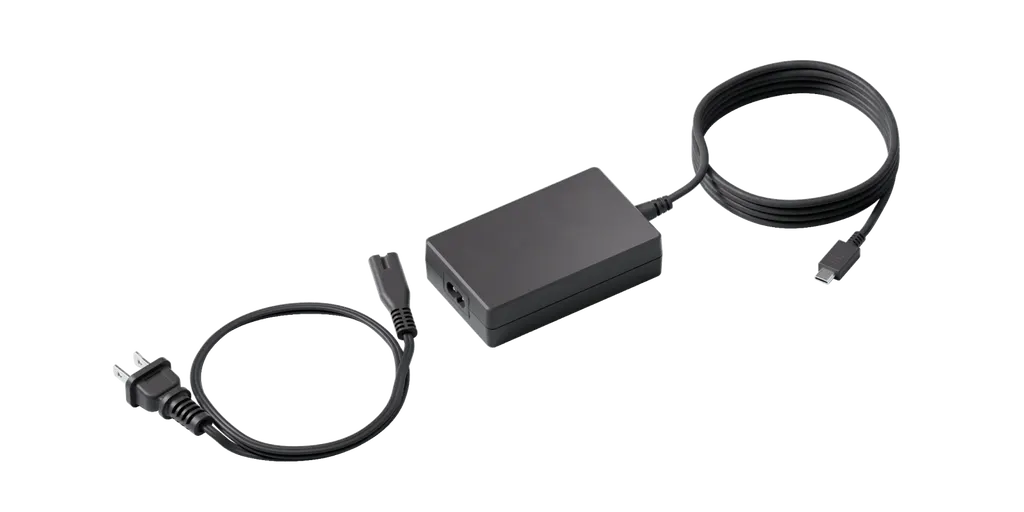
100W USB-C Charger
Logitech 100W USB-C Charger for Extend (952-000268)
- Platforms
- Logitech Extend
Priceon request
QuotationWithin 1 working day
DeliveryConfirmed with your quote, based on stock
Overview
The Logitech 100W USB-C Charger (part 952-000268, graphite) is the power unit for rooms equipped with Logitech Extend. It delivers up to 100W at 5.0A from a 100-240V, 50/60Hz input and includes a 0.89 m AC cable with regional plugs. It suits boardrooms, training rooms and meeting spaces in Doha and beyond where participants bring their own laptops and need to charge them at the table.
What this Logitech charger does in an Extend room
The Logitech 100W USB-C Charger (part number 952-000268, graphite) is a power unit for rooms equipped with Logitech Extend. It connects by USB-C to the Logitech Extend Table Side (TX) Box, which gives meeting participants a way to charge their devices from the table. Laptops and tablets can stay powered through long sessions without a separate extension lead running across the surface.
Specifications that matter when you plan
The figures below come from the manufacturer's data. Review them before sizing the power supply for one room or a group of rooms.
- Maximum output: 5.0A at 100W
- Power input: 100-240V, 50/60Hz, 1.5A
- AC cable length: 0.89 m
- Compatibility: Logitech Extend
- Connection type: USB-C to Logitech Extend Table Side (TX) Box
- Part number: 952-000268, graphite finish
Qatar's mains supply is 240 V at 50 Hz, which falls inside the stated input range of 100-240V at 50/60Hz. The 0.89 m AC cable is short, so the power outlet should sit close to where the charger will be placed. Measure that distance before ordering rather than assuming a cable run will reach.
Where it fits in Qatar
Three situations where buyers typically need this unit:
- A ministry or authority in West Bay refitting a boardroom, where senior staff bring their own laptops and expect to charge them at the table during long meetings.
- A private school in Al Wakrah setting up a staff meeting room or a teacher training room that uses Extend for hybrid sessions.
- A research team at Education City or a company in the Industrial Area of Mesaieed running training sessions with visiting participants who connect their own devices.
The source data does not list an operating temperature range. If the charger is to sit in a cabinet, a warm corner or any space that is not air-conditioned, confirm the environment with the SmartRooms Qatar team first, because summer temperatures in Qatar can exceed 45°C.
Planning the installation
- Confirm that the room has a Logitech Extend Table Side (TX) Box, since this charger is listed for Extend only.
- Check the regional plug supplied in the box against the outlets in the room before installation.
- Plan the charger's position around the 0.89 m AC cable and the location of the table box.
- Request a free site survey if several rooms are involved, so layout and power points are checked together.
SmartRooms Qatar provides professional installation for supplied equipment, and the product is covered by the manufacturer's warranty. Organisations buying several units can order against a purchase order (LPO), and payment can be made by bank transfer, cheque or purchase order.
Request a quote
Send SmartRooms Qatar the number of rooms, your Extend configuration and the outlet locations, and we will return a quotation, usually within one working day. Request a quote today for the Logitech 100W USB-C Charger, with delivery to all eight municipalities of Qatar.
Highlights
- Up to 100W output at 5.0A maximum
- Works with the Logitech Extend Table Side (TX) Box
- Input range 100-240V, 50/60Hz, 1.5A
- 0.89 m AC cable length
- Graphite finish, part number 952-000268
- Ships with regional plugs and user documentation
Room fit
Tell us the room size and platform (Teams, Zoom or BYOD) and we confirm the right combination with your quotation.
Estimated timeline
Quotation within 1 working day · delivery timing depends on stock availability, and we confirm it with your quotation.
Specifications
6 specifications · Source: manufacturer · checked Oct 2026
Part Number1
- Items
- 952-000268
Technical Specifications - System Requirements1
- Compatibility
- Logitech Extend
Technical Specifications - Electrical & Environmental3
- Power input
- 100-240V; 50/60Hz; 1.5A
- Max Output
- 5.0A 100W
- AC Cable
- 0.89 m
Technical Specifications - Connectivity1
- Connection type
- USB-C to Logitech Extend Table Side (TX) Box
Downloads
1 file from the manufacturerQuestions about 100W USB-C Charger
What is the Logitech 100W USB-C Charger used for?
It supplies power to devices connected through a Logitech Extend system, so participants can charge laptops and other devices from the table. It connects by USB-C to the Logitech Extend Table Side (TX) Box and provides a maximum output of 100W at 5.0A. It suits meeting rooms where people bring their own devices and expect to keep them charged during long sessions.
Which systems is this charger compatible with?
The manufacturer lists compatibility with Logitech Extend only. Its connection type is USB-C to the Logitech Extend Table Side (TX) Box. Before ordering, confirm that the room has an Extend table side unit, because this charger is not listed for use with other systems. SmartRooms Qatar can check your existing setup during a site survey.
How much power does the charger deliver?
The charger has a maximum output of 5.0A at 100W. This is the figure to check when you plan how many devices will charge from one table box at the same time. The manufacturer's data gives the output rating only, so confirm the expected device load with your supplier and the room's Extend configuration before finalising the order.
Will it work with Qatar's 240 V mains supply?
Yes, the stated power input is 100-240V at 50/60Hz with a current rating of 1.5A. Qatar's mains supply is 240 V at 50 Hz, which falls within that input range. Confirm that the regional plug supplied with the unit matches the outlets in your room before installation, as the box includes regional plugs.
How long is the AC cable, and does it affect placement?
The AC cable measures 0.89 m, which is a short run. Plan the charger's position so that the nearest power outlet and the Extend table side box are both within reach. Measure the distance on site before ordering, especially for tables where the outlet is under the desk or in a wall box at a distance from the table.
What is included in the box?
The box includes one USB-C charger with regional plugs and the user documentation. The AC cable length is 0.89 m. Any other accessories needed for your Extend room, such as the table side box itself, should be confirmed in your quotation, so that the order matches the room layout your installer will be working with.
Can a ministry office in West Bay use this charger in a boardroom?
Yes, a boardroom where senior staff bring their own laptops is a suitable use. The charger lets attendees charge devices from the table during long meetings without extension leads. Ask SmartRooms Qatar for a free site survey to check the table position, the outlet location and the cable run before the charger is ordered and installed.
Is this suitable for a private school training room in Al Wakrah?
It suits a teacher training or staff meeting room where Extend is used for hybrid sessions and participants connect their own devices. The 100W output and 5.0A maximum current support charging from the table. Confirm the room layout and the environment with the SmartRooms Qatar team, since the source data gives no operating temperature range.
Can a hospital conference room in Doha use it for clinician meetings?
A hospital conference room where clinicians bring laptops to shared sessions is a typical application. The charger supplies power through the Extend table side box so attendees can keep devices charged during presentations. Because the room may be used at all hours, confirm the location and power arrangement with SmartRooms Qatar before installation to ensure the outlet is suitable.
Can a university in Education City order several units for training rooms?
Yes. A university buying for several training rooms can order against a purchase order (LPO), and SmartRooms Qatar can quote for each room configuration. Each unit has an AC cable of 0.89 m, so the quotation should reflect the layout of every room. Request a free site survey to check outlet positions across the rooms before ordering.
Can an industrial company in Mesaieed use it for training with visiting participants?
A company in Mesaieed running training sessions with visiting participants can use the charger to keep attendees' own devices powered at the table. The unit's 100W maximum output and 100-240V input make it suitable for the mains supply in Qatar. Confirm the training room's environment with the SmartRooms Qatar team, particularly if the room is not air-conditioned.
Is the charger covered by warranty, and how do I request a quote?
The product is covered by the manufacturer's warranty. To request a quote, send SmartRooms Qatar the number of rooms, the Extend configuration and the outlet locations. A quotation is usually issued within one working day. Payment can be made by bank transfer, cheque or purchase order, and installation is available for supplied equipment.



