






Barco
ClickShare Power Supply 100W
Barco ClickShare Power Supply 100W, 100-Watt Video Conferencing Accessory
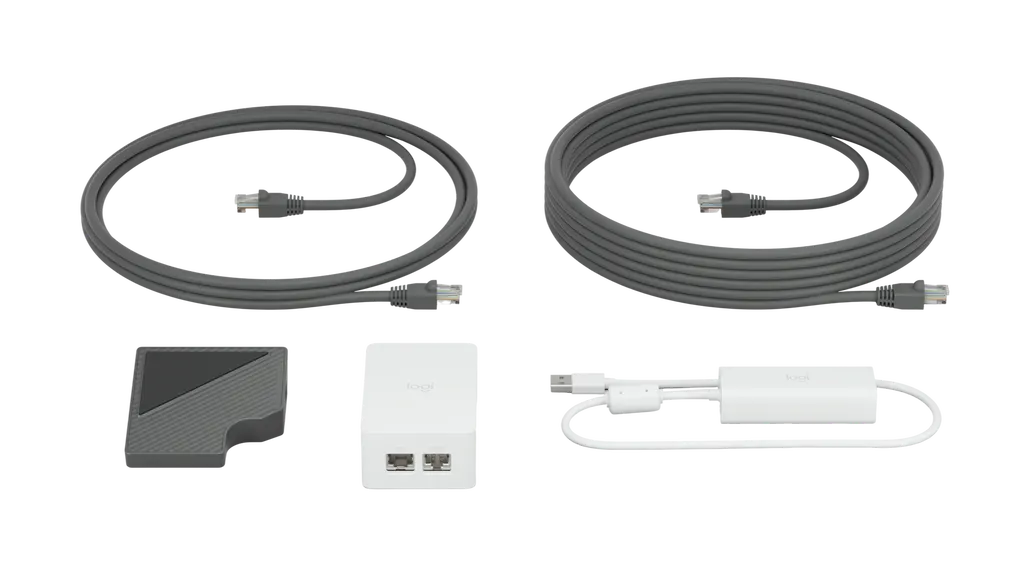
Cat5e Kit for Logitech Tap
Logitech Cat5e Kit for Logitech Tap, Part 952-000019
Priceon request
QuotationWithin 1 working day
DeliveryConfirmed with your quote, based on stock
Overview
The Logitech Cat5e Kit (part 952-000019) lets you place a Logitech Tap touch controller up to 40 metres from the meeting room computer, carrying USB data and power over one Cat5e run. The kit includes 10 metres of cable. It suits boardrooms and training rooms in Doha where the computer sits out of sight. Request a quote from our team.
What the Cat5e Kit does for Logitech Tap
The Logitech Cat5e Kit, part number 952-000019, is a cabling set for the Logitech Tap touch controller. It carries USB data and power between the meeting room computer and the Tap over a single category cable, so the touch controller does not need a separate power outlet beside the table. The kit comes in white.
The package combines a Logitech Tap Receiver, a Dongle Transceiver with a 500 mm cable for the computer's USB 2.0 port, a 100-240V power supply with an international adaptor set, and two Cat5e cables. Together these allow a maximum total cable run of 40 metres between the Tap and the computer.
Cabling details to check before ordering
- Maximum run: up to 40 metres of total cable length
- Included cable: 2.97 m and 7.0 m Cat5e, 10 metres combined
- Cable type: Cat5e SF/UTP AWG26 or higher
- Power: 100-240V auto-switching, with an international adaptor set
- Receiver size: 83 mm wide, 85 mm deep, 29 mm high
Where the kit fits in Qatar
In a West Bay or Lusail boardroom, the computer often lives in a credenza or AV cabinet at one end of the room, while the controller needs to sit mid-table. A run of up to 40 metres lets presenters reach the Tap without a power lead crossing the table.
A private school in Al Wakrah fitting out staff meeting rooms can apply the same routing plan in each room, checking each computer against the operating system requirement. A training centre in Education City can use one route plan across several teaching spaces, which simplifies quoting.
Hotel conference rooms in Doha often keep their AV equipment at the back of the hall, far from the presenter table. The same routing challenge applies there, and the Tap needs power and data at that table.
Planning the installation
Measure the distance from the computer position to the table, including any vertical drops and cable trays. The total length must stay within 40 metres, and the included 10 metres will not cover every room, so longer routes need additional Cat5e cabling. SmartRooms Qatar offers free site surveys, which help when cables pass through floor boxes or ceiling voids.
The power supply accepts 100-240V with auto-switching, which covers Qatar's 240 V mains, and an international adaptor set is included. Confirm the adaptor suits BS 1363 (Type G) sockets at your site and choose where the supply will plug in before fitting. Check that the meeting room computer runs Windows 10 64-bit or ChromeOS 80 or higher and has a USB 2.0 port or higher.
Send us your room layout, the distance between the computer and the table, and the number of rooms, then request a quote. Quotations are usually issued within one working day. We accept purchase orders (LPOs), government tenders through Monaqasat, and payment by bank transfer, cheque or purchase order.
Highlights
- Carries USB data and power over one Cat5e cable run
- Connects Logitech Tap up to 40 metres from the computer
- Includes 2.97 m and 7.0 m Cat5e cables, 10 m combined
- Works with Windows 10 64-bit or ChromeOS 80 or higher
- Power supply rated 100-240V, with international adaptor set
- Logitech part number 952-000019, white colour
Room fit
Tell us the room size and platform (Teams, Zoom or BYOD) and we confirm the right combination with your quotation.
Estimated timeline
Quotation within 1 working day · delivery timing depends on stock availability, and we confirm it with your quotation.
Specifications
16 specifications · Source: manufacturer · checked Oct 2026
Part Number1
- Items
- 952-000019
Dimensions - Logitech Tap Receiver3
- Height
- 29 mm
- Width
- 83 mm
- Depth
- 85 mm
Dimensions - Dongle Transceiver (Dongle)4
- Height
- 22.5 mm
- Width
- 31.0 mm
- Depth
- 83.7 mm
- Cable length
- 500 mm
Dimensions - Power supply3
- Height
- 91.0 mm
- Width
- 60.2 mm
- Depth
- 36.3 mm Without Plug
Dimensions - Included Cabling (Two Cables)1
- Length
- 2.97 m 7.0 m
Technical Specifications - General2
- Cable Type
- Cat5e SF/UTP AWG26 or higher
- Power supply
- 100-240V auto-switching power supply with international adaptor set
Technical Specifications - Compatibility2
- Touch Controller
- Logitech Tap
- Meeting Room Computer
- USB 2.0
Downloads
1 file from the manufacturerQuestions about Cat5e Kit for Logitech Tap
What is the Logitech Cat5e Kit used for with Logitech Tap?
It carries USB data and power between the meeting room computer and a Logitech Tap touch controller over a single category cable, so the Tap no longer needs its own outlet at the table. It suits rooms where the computer sits in a cabinet or a distant corner, letting the controller sit where presenters actually reach it without a cable crossing the table.
How far can Logitech Tap sit from the meeting room computer?
The total cable length between the Tap and the computer can be up to 40 metres, using Cat5e SF/UTP AWG26 or higher cable. The box includes a 2.97 m and a 7.0 m Cat5e cable, which give 10 metres in total, so longer routes need your own Cat5e cabling. Measure the full route, including vertical drops, before ordering.
Are the included cables enough for a classroom at a school in Al Wakrah?
The kit includes two Cat5e cables, 2.97 m and 7.0 m, giving 10 metres together. If the computer sits close to the wall and the Tap sits at the front bench, they may be enough. For longer routes, add Cat5e up to a 40-metre total. The SmartRooms Qatar team can confirm the route during a free site survey before fitting.
Will it work with a meeting room PC in a Lusail office?
The meeting room computer needs Windows 10 64-bit or ChromeOS 80 or higher, plus a USB 2.0 port or higher. The kit is built for the Logitech Tap touch controller specifically. Check the operating system on each room's PC before ordering, since older machines fitted in Lusail office meeting rooms may not meet the requirement.
Does the power supply work on Qatar's 240 V mains?
The power supply is 100-240V auto-switching, so its input range covers Qatar's 240 V mains, and an international adaptor set is included. Confirm that the adaptor suits BS 1363 (Type G) sockets at your site before installation, and decide where the supply will plug in, because the kit still needs a nearby socket for its power supply.
Can I use it in a West Bay boardroom with the computer in a credenza?
This is the layout the kit is built to support, as long as the total cable length stays within 40 metres. The computer can remain in a credenza or AV cabinet while the Tap sits mid-table. Route the cable under the table or through floor boxes to keep the boardroom tidy, and confirm the route during a site survey.
How does it compare with plugging Tap into USB and a separate power supply?
With a standard USB cable, the Tap needs its own power supply, which means finding an outlet close to the table. The Cat5e Kit carries power and data together over one category cable, so the Tap can sit farther from the computer. It is most useful when table positions are far from the computer or when outlets are limited.
What dimensions should I plan for?
The Tap receiver measures 83 mm wide, 85 mm deep and 29 mm high. The Dongle Transceiver is 31.0 mm wide, 83.7 mm deep and 22.5 mm high, with a 500 mm cable. The power supply measures 60.2 mm wide, 91.0 mm high and 36.3 mm deep without plug. Reserve space for the receiver on the table and find a discreet spot for the power supply and dongle.
Is it suitable for a teaching room at Education City?
It suits teaching rooms and labs where the instructor needs the touch controller within easy reach of the front bench, rather than beside a wall socket. A university in Education City could use the same route plan across several rooms, provided each computer meets the Windows 10 or ChromeOS 80 requirement. Send the room count and a purchase order (LPO) for a consolidated quote.
Does SmartRooms Qatar install it, and what do multiple rooms need?
SmartRooms Qatar offers professional installation and free site surveys. For several rooms, send each room's computer operating system, the cable distance and the planned Tap position, and we will quote per room. Products are covered by the manufacturer's warranty. We accept bank transfer, cheque or purchase orders, and government tenders through Monaqasat.
What is in the box?
The box contains the Logitech Tap Receiver, the Dongle Transceiver, a 100-240V power supply, an international adaptor set, a 2.97 m Cat5e cable, a 7.0 m Cat5e cable and documentation. Check the contents on delivery against your quotation before fitting the kit in the room.
Is it suitable for a conference room in a Doha hotel?
It suits hotel conference rooms where the PC is kept in an AV cabinet at the back and the presenter table sits in the middle of the room. The kit carries data and power over up to 40 metres of Cat5e, so the Tap can sit at the table without a dedicated outlet. Confirm the computer meets the Windows 10 64-bit or ChromeOS 80 requirement and has a USB 2.0 port.



