






Barco
ClickShare Power Supply 100W
Barco ClickShare Power Supply 100W, 100-Watt Video Conferencing Accessory
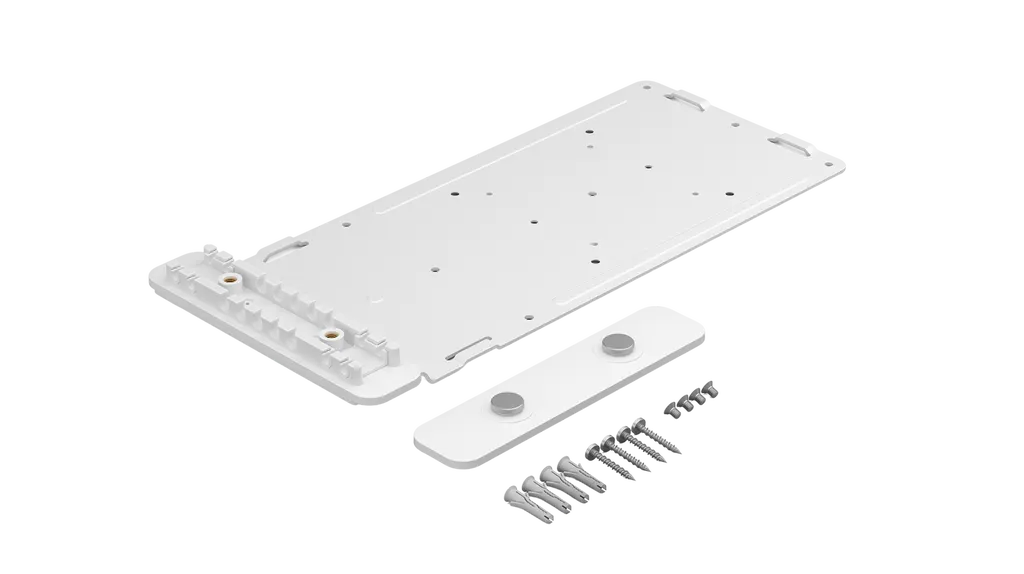
Compute Mount
Logitech Compute Mount 952-000097 Steel Bracket for Compute Devices
Priceon request
QuotationWithin 1 working day
DeliveryConfirmed with your quote, based on stock
Overview
The Logitech Compute Mount 952-000097 is a white steel bracket that holds a small form factor compute device out of sight, behind a display, inside a cabinet or on a cart. It works with standard 75 mm or 100 mm VESA patterns and includes a two-piece cable retention clamp for USB, HDMI, power and network cables. It suits Doha meeting rooms and lecture spaces that need a tidy installation.
What the Logitech Compute Mount is for
The Logitech Compute Mount 952-000097 is a white steel bracket that holds a small form factor compute device in a fixed position, away from the main room. It keeps the processing unit tucked away from foot traffic, whether it sits behind a display, inside a cabinet or on a cart. The manufacturer designs it for Logitech RoomMate, and it also suits other compatible compute devices, including Google Meet compute systems and Intel NUC units.
Mounting patterns and fit
The steel bracket works with the standard 75 mm and 100 mm VESA patterns, so it accepts devices with either a 75x75 or a 100x100 mounting layout. Check the rear of your compute unit before ordering, because a device without one of these patterns will not attach to the bracket. Measure the hole spacing and confirm it with the SmartRooms Qatar team as part of the quotation process.
Cable retention that reduces strain
A two-piece cable retention clamp holds USB, HDMI, power and network cables in place, so connectors are not pulled when a room is reconfigured. The clamp is raised, which gives cables more flexibility and eases strain on the ports. In a meeting room that is rearranged often, or a classroom where equipment is moved between lessons, that small detail helps keep connections secure.
Where it fits in Qatar
Three situations are common for this bracket:
- A boardroom in West Bay or Lusail, where the compute unit sits behind a wall-mounted display and the table and wall stay clean.
- A training room in Education City, where the unit rides on a mobile cart that moves between teaching spaces.
- A meeting room in a government office or hospital in Doha, where IT staff prefer compute hardware kept inside a cabinet, away from public areas.
What to plan before you order
Start with the device itself. Confirm its mounting pattern and list every cable that runs to it, because the clamp has to cover all of them. Plan airflow too. The source data for this mount does not give an operating temperature range, so if you plan to fit it inside an enclosed cabinet during a Qatari summer, ask the SmartRooms Qatar team to confirm the environment and ventilation first. A free site survey can also check the mounting surface and cable route before any drilling or cabinet work.
The box contains the mount with its cable retention clamp, mounting hardware and documentation. The compute device is not included, so order it separately. Schools and government bodies equipping several rooms can issue one purchase order (LPO) covering all units, and we can quote them together. We deliver to all eight municipalities of Qatar.
Send the make and model of your compute device and a short description of the room. The SmartRooms Qatar team will return a quotation, usually within one working day.
Highlights
- White steel bracket for Logitech RoomMate and compatible compute devices
- Supports standard 75 mm or 100 mm VESA mounting patterns
- Two-piece clamp secures USB, HDMI, power and network cables
- Hardware included for discreet mounting behind displays or in cabinets
- Box contains mount, clamp, mounting hardware and documentation
Room fit
Tell us the room size and platform (Teams, Zoom or BYOD) and we confirm the right combination with your quotation.
Estimated timeline
Quotation within 1 working day · delivery timing depends on stock availability, and we confirm it with your quotation.
Specifications
1 specifications · Source: manufacturer · checked Oct 2026
Part Number1
- Items
- 952-000097
Downloads
1 file from the manufacturerQuestions about Compute Mount
What is the Logitech Compute Mount 952-000097 used for?
It is a white steel bracket that holds a small form factor compute device out of sight, behind a display, inside a cabinet or on a cart. It is designed for Logitech RoomMate and other compatible compute devices, which makes it useful in meeting rooms where the processing unit should not sit on the table or in the open.
Which compute devices does it fit?
The manufacturer designs the mount for Logitech RoomMate and names the Google Meet compute system and Intel NUC among the devices it suits. Other compatible small form factor compute devices can also use it, provided they have a 75 mm or 100 mm VESA pattern. Confirm your unit's model and mounting holes with the SmartRooms Qatar team before ordering.
Does the bracket work with 75 mm and 100 mm VESA patterns?
Yes. The steel mount uses the standard 75 mm or 100 mm VESA mounting patterns, meaning it fits devices with a 75x75 or 100x100 layout. Measure the hole spacing on the back of your compute unit first. A device without either pattern will not attach to this bracket, so check before purchase.
What cables does the cable retention clamp secure?
The two-piece clamp holds USB, HDMI, power and network cables in place. Keeping them fixed reduces strain on the connectors and keeps connections tight when a room is rearranged. The clamp is raised, which gives the cables more flexibility, so they can bend without pulling on the compute unit's ports.
What is in the box?
The package includes the Compute Mount with its cable retention clamp, mounting hardware and documentation. The compute device itself is not included, so order it separately and confirm its mounting pattern before fitting. The SmartRooms Qatar team can help you confirm what each room needs before you request a quote.
Can it be fitted behind a wall-mounted display in a boardroom in West Bay?
Yes. The mount is designed for discreet installation behind displays, which suits a West Bay boardroom where the table and wall should look clean. Before drilling, arrange a free site survey with SmartRooms Qatar so the team can check the wall, the clearance behind the display and the cable route to the compute unit.
Will it work on a mobile cart in a training room in Education City?
The manufacturer lists carts as a suitable location, so the mount can sit on a cart that moves between training rooms in Education City. Choose a cart with a stable base and use the clamp to secure cables so they do not catch when the cart is wheeled. Confirm the cart dimensions and the device's VESA pattern before ordering.
Can I install it inside a cabinet in a hot Doha room?
The source data does not give an operating temperature range for this mount, so heat tolerance cannot be confirmed from the specification. Summer temperatures in Doha regularly exceed 45°C. For an enclosed cabinet, ask the SmartRooms Qatar team to confirm the environment and ventilation before fitting, and avoid sealing the unit into an unventilated space.
Do I need a site survey before installing?
It is advisable for any wall or cabinet installation. SmartRooms Qatar offers free site surveys, and for this bracket a survey can confirm the mounting surface, your compute device's VESA pattern and the route for USB, HDMI, power and network cables. Doing this first prevents drilling in the wrong position or rerouting cables after the unit is fixed.
Can a school or ministry order several units under one LPO?
Yes. SmartRooms Qatar accepts purchase orders (LPOs) and government tenders, so a school in Al Wakrah or a ministry department equipping several meeting rooms can issue one LPO covering multiple mounts. Send the quantity, the compute model for each room and the delivery location with your request. Payment can be by bank transfer, cheque or purchase order.



